# Eli, the assistant
Canonical page: https://zoomies.sh/eli/
Eli is the assistant built into Zoomies. The name stands for **Extremely Lively
Intelligence**, which is what a dog is for a few minutes after a bath, and what a
fleet is meant to be. Eli is one button away in the top bar of the console, and
in the command centre's own chrome. You ask in plain words, and Eli answers
about Zoomies, about GitHub Actions and, if you allow it, about your own fleet.
Eli talks to a model **you** choose and pay for: one on your own machine such as
Ollama, or a hosted one such as Ollama Cloud, OpenCode Zen, OpenCode Go, Anthropic or OpenAI, or your own
Claude, ChatGPT or GitHub Copilot plan.
Chat sends nothing until somebody asks Eli something. Enabled automatic repair policies also send PR source and failed-job evidence when a job fails.
## What you can do with Eli
Eli helps with the fleet **and the workflows running on it**. With fleet
access enabled for your provider, start from **Ask Eli** on the relevant page:
| You want to… | Try asking |
| --- | --- |
| Explain a failed build | “Was this a workflow failure or a runner fault? Show the evidence and the next step.” |
| Unblock a queued job | “Why is this job waiting, and which pool or host constraint matters?” |
| Choose a runner size | “Does the measured CPU and memory use support a different size for this workflow?” |
| Investigate a slow build | “Separate queue wait, startup and execution time before suggesting an optimisation.” |
| Understand a fleet problem | “Explain this problem code, the affected resources and the proposed remedy.” |
| Find out whether a busy controller machine is Zoomies | “The machine the controller runs on is busy: how much of that is the controller, and which of its loops takes the time?” |
| Follow a PR repair, in the same account | “Why is my latest repair on this pull request stuck?” or “Did Eli start a repair on the PR I asked about?” |
The answer shows which tools Eli used. It can advise from job history, failure
explanations and available runner logs, but chat does not apply changes or read
repository source. [Troubleshooting](https://zoomies.sh/troubleshooting/#investigate-jobs-with-eli-and-mcp)
takes a diagnosis into a fix or measured optimisation.
Use **Compare runs** from Job history to capture and inspect a historical
comparison. Capture requires an operator and saves shared repository evidence;
it does not dispatch jobs or change runners. Select exact GitHub run attempts,
including failures, describe the intended change and choose the observation
window. Existing reports open through a scoped shareable link and need only
reader access. Missing history stays unavailable rather than triggering a new
capture. The page keeps unknown timings distinct from measured zero and shows
separate latency, consumption and reliability, sample coverage and inconclusive
reasons. Inspect each arm's identities and attempt rows before drawing conclusions.
For a retained historical comparison, give Eli the `cmp_` ID, installation ID and
repository. Its read-only tool explains separate measurements and missing evidence
without collecting GitHub data or capturing a replacement. Operator text remains
untrusted evidence. It reports shortened text or omitted rows explicitly, with
aggregates still based on the full selection. Actor identity is excluded from this
tool's model output. Retained workflow facts include trigger events, path
fingerprints and nullable root-file digests, without raw filenames or source text.
Root-file coverage does not attest execution or establish equivalence of
dependencies, inputs, test scope or workloads. Full counts include omitted rows; missing facts
remain unknown. See [the MCP contract](https://zoomies.sh/mcp/#what-you-can-ask) for limits.
For an existing PR with failed checks, [PR repairs](#set-up-pr-repairs) are a
separate opt-in: Eli can read bounded source, publish a change to the PR branch
and watch GitHub's checks. It never merges the PR. Prefer your own assistant?
[MCP](https://zoomies.sh/mcp/) exposes fleet diagnostics, permitted actions and separately
authorised AI Context source reads to a connected client.
**Try it without credentials:** [start the local demo](https://zoomies.sh/quickstart/#just-looking),
open **Settings → Eli assistant**, edit the demo provider and enable
**Let Eli read this fleet through this provider**. Then open Eli and ask about
“the fleet”: the built-in fixture provider reads the demo data and presents a
formatted fleet summary with a next step. With the switch off it echoes your question without reading the
fleet. Use a model you configure for normal conversations and repairs on your
own instance.
## Setting it up
Under **Settings, Eli assistant**, add a provider, choose its model from the list the
provider gives, test it, and make it the default. Eli then appears in the top
bar, or in the command centre's own bar, for signed-in users with a personal
provider. Press E from anywhere that is not a box to type in, or press
**Ask Eli**. Esc puts the panel away.
The Ask Eli button opens setup guidance until you have an enabled personal provider; your default answers, or, with none ticked, the first usable one you own. Installation providers remain separate and do not pay for personal chat.
A provider that speaks the OpenAI chat protocol (the OpenAI-compatible and OpenAI
kinds) can be told how hard its model should think: **Reasoning effort** on the
provider's form is sent as `reasoning_effort` on every request, the test included,
so a model that does not take it says so under **Test**. The provider reads the word:
DeepSeek takes `none`, `low` and `high`, OpenAI `low`, `medium` and `high`. Leave it
empty for the provider's own default. A thinking model at its default effort can
spend an answer's whole room on reasoning, which Eli then reports as having run out
of room, so `low` is the setting for chat.
### Using your own subscription
An administrator can also add their own plan, used through the vendor's own program on the
controller's machine: **Claude** through Claude Code, **ChatGPT** through Codex, or
**GitHub Copilot** through its command line tool. Zoomies runs the program and asks
it the question. You sign in to it once, as the user the controller runs as
(`claude auth login`, `codex login` or `copilot login`); Zoomies never sees the login,
holds no key and has no address to call.
| | Claude Code | Codex | GitHub Copilot |
| --- | --- | --- | --- |
| Sends the question to | Anthropic | OpenAI | GitHub |
| Tools of its own | Every one off | Read-only sandbox | None pre-approved |
| Model | `sonnet`, `opus`, `haiku`, chosen from a list | Left empty, Codex chooses, or named | Left empty, Copilot chooses, or named |
| **Test** spends | Nothing | Nothing | One request of the plan |
| Refuses an API key | Yes | Yes | Not detectable |
Things to know before you add one:
* **It is yours alone.** A plan is one person's, and the vendors' terms do not allow
it to serve other people, so only the person who added the provider can use it,
test it, change it or make it the default. Another administrator sees it on the
list, marked with your name, and can remove it, but cannot use it. For them Eli
answers through a provider they are allowed to use, if there is one.
* **Read the vendor's terms yourself.** Whether your plan allows this use is your
decision, and Zoomies cannot check it for you.
* **Eli cannot read the fleet through it.** Eli's own fleet tools are never offered
to these programs, and the fleet switch is not shown for them. They are run from
an empty temporary directory with an environment that carries no `ZOOMIES_*`
setting and no key or token. What you type to Eli does leave this machine, for the
vendor.
* **Codex and Copilot have tools of their own, and cannot be run without them.**
Claude Code is run with every one of its tools off, in its safe mode. Codex has no
such mode: it is run in its read-only sandbox, so it can read files the controller's
user can read, and it is asked in the prompt not to. Copilot is run with nobody to
ask and none of its approval options passed, so a tool that needs permission does
not run. For both, whatever their tools did is ignored: it is not shown and Eli
does nothing on the strength of it, but ignoring what a tool did is not the same as
the tool not having done it. Only the person who added the provider can ask it
anything, and in a chat nothing about your fleet is put in the question, so what
could lead one to read a file is the person's own words.
* **Codex and Copilot do not answer repairs.** A repair's question is not only your
words: it holds the pull request's text, its diff and its failing job's log, which
whoever opened the pull request wrote, and what the model answers is committed to
that pull request. A line in a log could ask one of these tools to read a file on
the controller's machine and put it in the fix. So a repair through either is
refused, in the answer to the request or in a comment on the pull request, and
says what to use: an API provider (Anthropic, OpenAI or OpenAI-compatible) or
Claude Code, which has no tool to read with.
* **Copilot's question is a command line argument.** Anyone who can list processes on
the controller's machine can read it while the answer is being made.
* **They follow the programs' releases.** The options Zoomies uses are the
programs' own. If a release stops accepting one, **Test** says to update the
program.
* **A plan, not an API key.** For Claude Code and Codex, **Test** refuses a program
signed in with an API key and says so; use the Anthropic or OpenAI provider for
that. Copilot cannot be told apart, but its token variables are never passed on.
* **Not while Local models only is on.** The question goes to the vendor.
* **Host installs only.** They need the program installed on the machine the
controller runs on. The controller image is distroless and has none, so a compose
or image deployment cannot use them.
* **Two at a time.** At most two of these programs run at once, so a busy
conversation cannot start a crowd of them.
## What Eli can see
By default, **nothing about your fleet**. Eli is told it cannot see it, and answers
what it knows about Zoomies and GitHub Actions, and asks you to paste anything
else. That is the right setting for a hosted model you have not decided to trust
with job and repository names.
To let Eli look, turn on **Let Eli read this fleet through this provider** in that
provider's settings. It is a switch **per provider**, off for every provider
including those you already have, because what is read is sent to that provider.
For a model on this machine or a private network it stays there; for a hosted one
it leaves your network. Changing the switch is recorded in the audit log.
With it on, Eli can look at what an agent of yours could read through the
[MCP server](https://zoomies.sh/ai-context/): the fleet at a glance, problems, jobs and their
history, runners, pools, hosts and their health, label advice, a runner's log while
the runner exists, [Kennel Club](https://zoomies.sh/kennel-club/) findings, and the machines the
fleet [rents from a provider](https://zoomies.sh/proxmox/): which providers exist, which pools each
will buy for and why one will not, and where each machine got to. That last part is
what lets Eli answer "why is this pool full and not renting?" from the fleet and not
from a guess. A setting only an administrator can read, such as `provider.enabled`,
is not something Eli can see, but `list_providers` carries `renting`, which says
whether renting is switched on and what to change, so Eli can still name it.
It can read the fleet's recent past as well: what changed lately, the scheduler's
decisions and the reason for each, the minute-by-minute samples of the fleet and
of each host, a runner's timeline and the workflow runs, and it can wait for the
next change. Four questions it answers from one look, each the same answer an agent
sees, [`zoomies analyse`](https://zoomies.sh/cli/#zoomies-analyse) prints and the UI shows as a card
where the question is asked (the Jobs page's Queued view, Usage beside its releases,
a host's page, and the Runners page narrowed to failed ones). The Usage card compares
two releases, never two periods, and is not **Compare runs** above, which compares
run attempts you choose. The four are: why a period's jobs
waited (every second put down to one cause, for the fleet and each pool, with each
pool's longest waits by job), whether a release or a period was worse (the two
sides' durations, queue waits, startups, failure rates and OOM kill rates, measure
by measure), whether a host fails when it is busy (its failures, OOM kills and slow
startups placed against that minute's load and memory), and which host or pool keeps
failing to start runners (how many of its starts failed, since when, at which stage
and with which fault, and its last failed runner's message). Its own
[PR repairs](#set-up-pr-repairs) it reads through the same toolbox: the page
first, each row's repository, pull request, state and reason, then one pull
request's newest repair by name, with the one thing that can change from where
the row stands.
The job names and failure messages these quote are written by workflows and hosts,
and reach Eli set apart as untrusted, never as instructions. Host pressure names the
jobs only when the person asking can read jobs; otherwise it says the names were
left out. The audit log, the webhook deliveries and the support bundle are not
offered to it, whoever is asking: they are who did what by name, GitHub's whole
payloads and the whole instance at once, which is more than a question about the
fleet should send to a model. The same goes for their events: what changed lately,
as Eli reads it, never includes an audit row or a webhook delivery, and asking for
those kinds is refused. Eli's wait for the next change is held to 10 seconds, not
an agent's 25, so that a question which keeps waiting still ends inside the
answer's own time limit.
When it looks, the panel says what it looked at, under the answer, and a look
that failed says why beside its name (a code that is not in the catalog, a route
that refused), which is the part worth reading. A call Eli makes twice with the
same arguments is answered from the first without being run or shown again,
except a read of what changed lately or a wait for the next change, which is a
new question each time it is asked.
The questions an empty conversation offers come from the fleet when Eli can
read it: the open one first, then, while a problem is open, what changed in the
last ten minutes, then the worst open problem by name, the jobs waiting, the jobs
that failed and the host that is unwell, filled out from a fixed few on a quiet
fleet. Without fleet access they are about Zoomies in
general, so the first press is never a refusal.
Every question also carries the situation: the time, your role (so "ask an
administrator" is advice Eli knows whether you can act on), and the page you
asked from. Through a provider that may read the fleet that is the page's path,
and one line more: how many hosts, pools, runners and jobs there are, and how
many problems of each severity with their codes. Through a provider that may not,
it is only the section of the UI ("the hosts page"), and nothing of the fleet.
How much Eli says, and for whom, is your choice, under *How Eli answers* in
Settings, Eli assistant, My providers. The default is short: the answer
first, at most one short list, under about two hundred words, no headings and
no recap of what it was told. Medium adds the reasons and the evidence; long is
the full picture, including what Eli ruled out. The voice is plain (terms
explained, no commands unless asked), balanced (plain words with the exact names
of what to act on, the default) or technical (exact names and figures, common
terms not explained). The choice is kept with your account, so it holds on the
phone as at the desk, and Eli gives more when a question asks for it, whatever
it says.
Eli does not get the tools that change the fleet, and it does not get the ones that
read a repository's source. It reads as the person asking, through the same routes
and the same permissions, so it can see nothing that person could not.
Those two repair reads are the feature's whole presence in the toolbox. Asking
again pushes to
the pull request with your provider behind it, so starting a repair, accepting
an offer, clearing the history and setting a repository's policy are not tools:
they are the presses a person makes at the repairs page, and a model asked for
one says so rather than doing it.
## What is sent
When Eli looks at the fleet, what the tools return is sent to the provider with
your question: runner, host, pool, job, workflow, repository and branch names,
statuses, counts, a provider's address and the addresses of the machines it rented,
and the end of a runner's log if Eli asks for it. A provider's credential is never
part of it: the API reports only that one is configured. A tool's answer
is cut at 16 KiB. The fleet's recent past is held to 12 KiB a block before
that, on whole rows: events, samples, decisions and runs keep the first or
newest rows that fit. Samples, decisions and runs say how many there were, and
the cursor Eli is given names the last event it was shown, so reading on misses
nothing. The switch is still the main control: turn it on for a provider
only if that provider may be shown this.
### What is hidden first
Before anything goes to a model, Zoomies looks in it for credentials and for email
addresses and replaces what it finds with `[redacted credential]` and
`[redacted email]`. It looks in what a tool returns, in what you type or paste, and
in the facts a page shares when you ask Eli about it, and it does so for every
provider, a model on your own machine included, so that the behaviour does not
depend on which one answers.
What it recognises:
* GitHub tokens (`ghp_`, `gho_`, `ghu_`, `ghs_`, `ghr_` and `github_pat_`), OpenAI and
Anthropic keys (`sk-`), AWS access key ids, Google API keys, Slack tokens, npm
tokens and JSON Web Tokens;
* private key blocks, a password in the address of a repository
(`https://user:password@host/...`), and the value of an Authorization or Bearer header;
* the value of a setting whose name says it is a secret (`password`, `secret`,
`token`, `api_key`, `private_key`, `credential`, in any case and with any prefix or
suffix), such as `DB_PASSWORD=...` or `"access_token": "..."`. A number, a flag, a
value GitHub has already masked and a reference such as `${{ secrets.NAME }}` are
left as they are;
* email addresses, such as the author of a commit. Names, hostnames and IP addresses
are not hidden, because working out why a runner failed often needs them.
The answer says how many were hidden ("1 credential and 1 email address were hidden
before this went to the model."), and the `assistant.chat` audit row records the
counts, never what was hidden. Only what is new in your latest question is counted:
the earlier turns of the conversation are sent again and are hidden again, but were
counted when you asked them.
This is a set of known shapes and not a guarantee. It cannot recognise a secret that
has no shape, such as a password written in a sentence, a customer's name, or a
secret that a log has split across two lines. Do not paste what you would not send to
the provider, and keep the fleet switch off for a provider that must not see job and
repository names.
Job and branch names, commit messages and log lines are written by whoever can open
a pull request against your repositories. Eli is told that such text is data and
never instructions, and every tool result is marked as the fleet's data. Eli has
no chat tool that changes anything, and chat answers are drawn as text, so the most
a hostile name can do is mislead an answer: check what you act on.
## Limits
* One question may take at most six rounds of looking and twelve tool calls.
* Each round may write at most the provider's **output limit**, thinking
included: a number from 1,024 to 65,536 tokens, or automatic when its form
leaves it empty. A number is kept exactly, so it also caps what an answer can
cost. Automatic is 8,192 tokens in chat, and in a repair 12,000 that Eli
raises itself (see What a repair does). A chat answer that reaches the limit
is stopped by its provider, and Eli says so under the answer, naming the
provider and the limit, with a button that raises the limit on your own
provider and asks again: a thinking model at high effort can spend the ceiling
on reasoning and send no words at all. Lowering the provider's reasoning
effort is the cheaper cure. The button writes the new number to the provider,
so a repair on that provider keeps it exactly from then on and no longer
raises it itself, until the field on the provider's form is emptied again.
* A conversation is at most 40 messages and 32 KiB in all, and a message you
write is at most 8 KiB. Eli's own answers have no limit of their own, only the
32 KiB, so a long answer never stops you asking the next question; a
conversation that has grown past 32 KiB takes **Start a new conversation**.
The box shows the size of what you are typing from 6 KiB, and a message over
8 KiB cannot be sent until you cut it. **Keep the end** (the usual choice for
a log, whose failure is at the end) or **Keep the start** trims it at a line
break and says how much it took off, and **Undo** puts it back. Nothing is cut
until you choose. If the controller refuses a message anyway, or a conversation has
outgrown what one request carries, your words come back in the box with the
reason, and **Start a new conversation** takes them into a fresh thread.
* Signed-in conversations are saved to your account, with the retention and
limits described under [Past conversations](#past-conversations). A demo
with authentication off has no account and keeps no conversation history.
* Every signed-in user can ask through their own API provider; controller subscription tools require an administrator. Every chat is written to the audit log as
`assistant.chat` with the provider, the model, whether the fleet could be read
and the tools used, and never with what was said.
## PR check delay
Read **PR check delay** from a job drawer before asking Eli to explain the
snapshot. Supply a PR number in the selected job's repository. The selected
job fixes the installation and head; a changed head needs a job from the
current revision. The card shows protection/observation coverage and unknown
phases explicitly. Ask Eli shares those labelled facts without requesting a
fresh diagnostic. A fresh `get_pr_delay` tool read requires fleet access and
uses the same shared admission allowance as the UI and CLI.
The scripted evaluation harness includes unknown queue/startup timing, a missing
required check and a head change during collection, with instruction text
planted in the target branch. These scenarios prove the tool/transport path and
evidence fences; they do not measure an unscripted model's reasoning. Live model
evaluation remains a separate recorded check.
## Previewing a checkout change
A workflow that fetches full history it does not use spends time on every run.
Under **Checkout preview** (`/optimisations/checkout`) an operator can see exactly
which line would change and keep that preview for review. It publishes nothing: no
pull request, no approval and no job. Eli is not involved and no model reads the
file.
Both are off until someone asks for them, and nobody has to find Settings to do it.
The Checkout preview page opens with a short card saying what turning them on
allows. An administrator presses **Turn on workflow previews** and carries straight
on; anyone else is told whom to ask and can copy the request. The repair page's setup offers the
same choice as an unticked box, **Also let Zoomies preview workflow speed-ups**,
because repairing a pull request does not need it. Nothing turns it on silently, and
you can turn it off in Settings, under Optimisation.
Underneath are two settings, `optimisation.source_reads` (read one workflow file) and
`optimisation.workflow_edits` (compute and keep a proposed edit). They are separate
grants that the button sets together, and they are read again at every step, so
turning one off stops the next request at once. If the environment sets one, the page
says so rather than pretending the press worked.
1. **Choose a run.** Open **Preview a checkout change** on a successful job that a
push started (in the job's drawer), or pick the repository on the Checkout preview
page and choose from its recent successful runs. Nobody types GitHub IDs or counts
positions in a file: Zoomies reads the workflow at that push's commit and finds the
job's one full-history checkout itself. If the job has none, or two, it says so and
does not guess. The file is shown once, as untrusted text, with the time that
checkout took in that run. Reading source spends the installation's own GitHub
requests, so it only happens when you press **Review** or **Read this workflow**.
2. **Review it.** Confirm that neither the repository's tooling nor its downstream
consumers need full history: tags, `git describe`, diffs against older commits
and other repositories that build from this one are the usual reasons. The
confirmation is recorded against your name. It is a declaration, not proof.
3. **Keep the preview.** It stays for 14 days and shows the one changed line,
`fetch-depth: 0` to `fetch-depth: 1`.
4. **Approve it,** if you want to say this exact preview is the change to take
forward. Approval names the preview, the commit and the source digest, and
records who approved beside who reviewed. It expires with the preview and
publishes nothing: no pull request, no job, and the commit is not re-read, so
currentness stays `not_checked`. The same operator may approve their own
preview, with both people recorded.
5. **Publish a draft pull request.** This re-reads the run, its branch, the live
settings, the source and the approval, and refuses any change. It commits the
one reviewed line on a new branch and opens a draft against the branch the
push ran on. It never force-pushes and never merges. A retry after a lost
response reconciles the same branch and pull request; anything that differs is
preserved and refused rather than overwritten. The App needs Contents, Pull
requests and Workflows write for this step, and the third setting,
`optimisation.publish`, is off until an administrator turns it on from the
approved preview's page.
6. **Compare the result, after the draft merges.** The published preview offers
**Compare runs for this preview**, which opens E2's Comparisons page with the
repository, workflow kind and preview reference filled in. Choose the runs
before and after and state the hypothesis; the comparison is captured
explicitly, and it stays inconclusive without a usable control and candidate.
After the capture, **Link this comparison to the preview** puts the report on
the published preview, so the draft and the evidence point at each other.
Opening the draft is not evidence of a saving, and the linked report is not a
saving claim either.
The same retained view is available to an operator from
`zoomies optimisations get --installation ID --repo OWNER/REPO`, and
to Eli as `get_checkout_preview`. Both show metadata, the digests and the one
changed line, never the full file, and neither approves nor publishes. Actor
identities are left out of what a model is shown. The path and line are untrusted
repository text.
### Previewing a setup cache
**Cache preview** (`/optimisations/cache`) applies the same review to a Node
build's setup cache. Choose a successful push job; Zoomies reads the workflow and
the one root lockfile at that commit, finds the pinned `actions/setup-node` step
and the package manager the lockfile names, and shows the exact `with:` block it
would add `cache: npm`, `cache: yarn` or `cache: pnpm` to. The setup step's mean
time over the fleet's recent successful runs is descriptive, not a saving.
Confirm that you reviewed the block, then **Keep a preview for 14 days**. The
kept card shows the insertion, the commit and digests, the lockfile path and
digest, the setup summary and who kept it. An operator can then approve that
exact preview: approval names its commit and source digest, records who approved,
expires with the preview and publishes nothing. After approval, **Open a draft
pull request** commits the reviewed file on a new branch and opens one draft
against the branch the run came from. It never merges, never force-pushes and
runs no job. Verification is always
`inconclusive` and currentness `not_checked`; the cache is the setup action's own,
and nothing is published. The full workflow and lockfile are never returned after
the inspection.
**Readiness preview** (`/optimisations/readiness`) applies the same review to a
fixed sleep. Pick a successful push job, then type the readiness command Zoomies
should poll. The server finds the one literal `sleep` step on an Ubuntu runner and
shows the exact before and after block: the old duration becomes the bound, and a
timeout fails the step. Zoomies never infers the command. Confirm the block and
**Keep a preview for 14 days**; the kept card shows the exact source, command,
bound and evidence. Keeping approves and publishes nothing and opens no pull
request. An operator can then approve that exact preview: approval names its
commit and source digest, records who approved, expires with the preview and
publishes nothing. After approval, **Open a draft pull request** commits the
reviewed file on a new branch and opens one draft against the branch the run came
from. It re-reads the job, branch and workflow first and refuses if any moved, it
never merges, never force-pushes and runs no job, and a preview kept before the
branch was recorded must be made again. The same retained view is available from `zoomies optimisations
readiness --installation ID --repo OWNER/REPO`, and to Eli as
`get_readiness_preview`; both show the command, evidence and one changed block,
never the full workflow, and neither approves nor publishes.
**Kennel timeout fix** (`/kennel/fixes/timeout`) is the same review for a Kennel Club
`ci.no_timeout` finding rather than a measurement. On a repository's page, each job the
finding names has a **Preview a fix** button. Type how many minutes the job may run:
Zoomies never chooses the number, because nothing in the file says how long a healthy
run takes. It reads the one workflow file the finding names and shows the exact lines
with `timeout-minutes` added; keep, approve and **Open a draft pull request** work as
for the previews above, and a waived finding offers no fix. Opening the pull request
does not close the finding: Kennel Club closes it when it reads the merged file. The
kept fix is available from `zoomies kennel fix --installation ID --repo
OWNER/REPO` and to Eli as `get_kennel_fix`; neither approves nor publishes.
**Sharding preview** (`/optimisations/sharding`) splits a Playwright test job into
shards that together run the whole suite. Pick a successful push job. Zoomies reads
the workflow at that commit, finds its one `npx playwright test` step on an Ubuntu
runner, and chooses the number of shards from the fleet's own history of that job
(at least ten runs, medians) and from how many runners the pool could start at
once; you do not choose it. The review shows the exact before and after job block,
the runner time before and after (every shard repeats the setup, so it rises), the
runners needed at once, and an estimated wall-clock time that is labelled an
estimate, not a saving. A job with the original name stays behind to fail unless
every shard passed, so a required check that names the job still resolves. A command
that already shards or filters, a job with a matrix, services or outputs, and any
artifact or coverage upload are refused with the reason. **Keep a preview for 14
days** retains the exact source, history and shard count privately; it approves and
publishes nothing. An operator can then approve that exact preview: approval names
its commit and source digest, records who approved, expires with the preview and
publishes nothing. After approval, **Open a draft pull request** commits the
reviewed file on a new branch and opens one draft against the branch the run came
from. It re-reads the job, branch, workflow and history first and refuses if the
head, workflow, branch or test step moved, or if the pool or the history no longer
supports the approved shard count; the count is never taken from the request. It
never merges, never force-pushes and runs no job, and the draft's description says
plainly that runner time rises and no saving was measured. The same retained view
is available from `zoomies optimisations sharding --installation ID --repo OWNER/REPO`, and to Eli as
`get_sharding_preview`; both show the shard count, the evidence, the extra runner
time and one changed block, never the full workflow, and neither approves nor
publishes.
The step must use a commit-pinned `actions/checkout` with a literal
`fetch-depth: 0`, in a root workflow with literal job and step names. Matrix,
generated or reusable names are refused rather than guessed. If the file changed
between your review and the keep, the preview is refused and you read it again.
A preview says nothing about savings. Its verification is always `inconclusive` and
its currentness `not_checked`: nothing re-reads the commit or your settings after it
is kept. The time shown is one run's checkout, not a promise. Publishing opens a
draft and nothing more: measuring the result is a separate step that is not built
yet. Reading source, keeping previews and publishing spend GitHub requests from the
installation's own quota, share the PR check delay allowance, and wait for a manual
retry when it is exhausted.
An agent connected to the controller can do the reading half of this without Eli.
The `zoomies-optimise` skill (see
[the CLI reference](https://zoomies.sh/cli/#the-zoomies-optimise-skill)) reads the same evidence in a
fixed order, says which of the four changes fits a slow job, or that none does, and
hands you to the page. It starts, approves and publishes nothing.
## Measuring Eli
A prompt change is measured before it is trusted. `internal/api/eli_eval_test.go`
holds recorded scenarios against the fake fleet: a job the kernel killed for
memory, a pool with jobs waiting and no host to run them, and a job whose name
carries an instruction planted where a pull request could put one. Each names
the question, the tools a good answer rests on, the tools it must not touch, how
many looks it should take, and the claims it must not repeat.
Every test run plays them with a scripted model, which proves the loop, the
tools and the fences do what the scenarios expect. To play them against a real
model, set `ELI_EVAL_URL`, `ELI_EVAL_KEY` and `ELI_EVAL_MODEL` to an
OpenAI-compatible provider and run `make test-eli-eval`: the report says, per
scenario, what the model looked at and what it answered, and the run fails only
on the hard rules, a forbidden tool or a followed instruction. Which tool a model
reaches for first is a score to read and compare between prompt changes, not a
verdict to break the build on.
## If it is not there
* **No answer.** Add an enabled personal provider in **Settings, Eli assistant**, and tick the one you want as your default when you have several.
* **"Eli cannot see this fleet through ..."** The provider's fleet switch is off.
* **"already linked to" on Verify and link.** The same GitHub account is linked
to another Zoomies user, the usual state after an instance move or a
re-created account. The page names the holder; **Move the link** transfers it
and resets the confirmation, so whoever the link moved to allows provider use
again. The holding account can also be unlinked from the list under the form.
* **A provider error.** The text says what the provider answered; **Test** on its
card sends one short prompt and says which part failed. A model that does not
support tools answers without them, and says it could not look.
* **A private address is refused.** `assistant.allow_private_provider` lets a
provider live on this machine or your network, and `assistant.local_only` refuses
any that does not.
The demo model that ships with the demo fleet can be asked about "the fleet"
after you enable its fleet-read switch in Settings, Eli assistant. It then
reads the demo data and presents a readable summary, so the lookup loop can be seen
with no account and no key. With the switch off it only echoes the question.
## Personal conversations and PR repairs
Eli uses your configured model provider. In Settings, Eli assistant, add a personal
provider, test it and make it your default. Its key is encrypted at rest and
never returned to the browser. Each account has its own providers and default.
Administrators manage installation providers separately. Existing API providers remain installation-owned after an upgrade; existing subscription providers retain their owner.
## Past conversations
Once Eli has answered, the conversation is kept under your account, so a
reload or another device finds it: the clock icon in the panel's header lists
your past conversations, newest first, to pick one up where it was left or to
delete it. What is kept is the transcript the page would send back, bounded the
same way as a chat and with credentials and email addresses hidden the same way,
so nothing is in the database that was not already in front of a model; the
looks, the provider and the follow-ups an answer came with are not kept, so a
resumed answer is the words alone. Nobody else can read yours. Each person keeps
at most fifty, and `retention.assistant_conversations` (thirty days by default)
removes those untouched for longer. A session with authentication off has no
account to keep them under, and keeps none.
## A chat that fits your work
Open Ask Eli from any fleet page. Choose Compact, Default, Expanded or Full
screen with one click, move the panel to either side, or drag its resize handle.
The panel remembers its size preset and side in this browser. Minimise it while
working and reopen the same conversation. Conversation text stays in memory and
is cleared on sign-out; it is not saved to browser storage.
Ask Eli actions on host, runner, pool and problem views, on a job's Why panel in the
drawer, on a Kennel Club finding and on the Usage report send the displayed context
and a relevant question. Eli sees this snapshot, and can use read-only fleet tools when enabled for its provider. After an
answer, follow-on prompts use the conversation's topic and skip questions
already asked. Extend `web/src/lib/assistant/prompts.ts` with a narrative topic;
new page integrations pass an `EliContext` to `AskEli.svelte`.
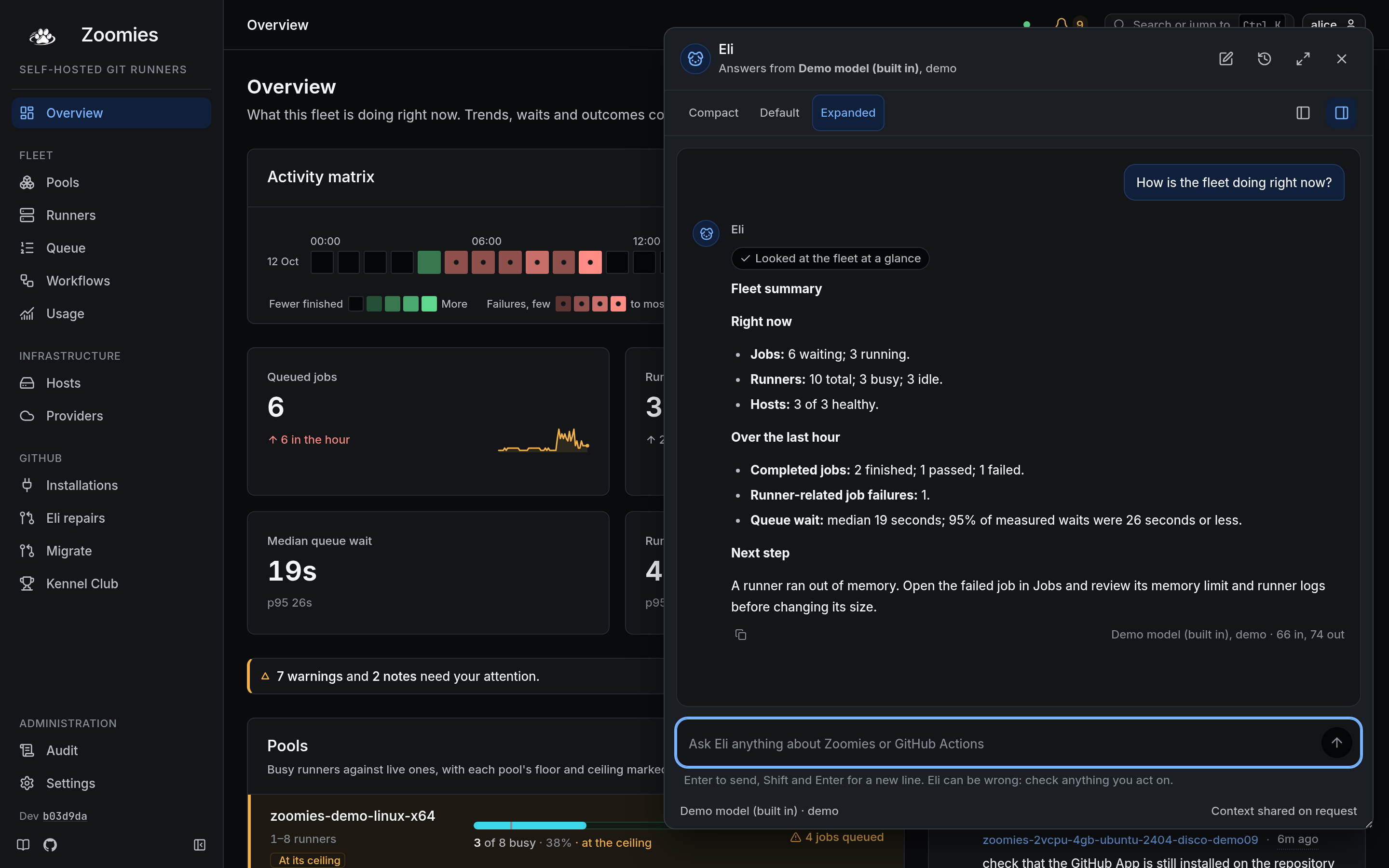
The [UI tour](https://zoomies.sh/ui/#ask-eli) shows the current panel beside the fleet. This
capture uses the built-in demo model and a real fleet lookup. It presents the
result with clear headings, labelled metrics and a next step, without credentials.
{ .zoomies-shot }
## Hybrid provider ownership
| Request | Provider |
| --- | --- |
| Chat and contextual Ask Eli | Signed-in user's personal provider |
| PR repair requested in Zoomies or a GitHub comment | Requester's personal provider: their default, or the first usable one they own |
| Unattended repair of a failed PR job | Installation provider selected by the repository policy |
There is no fallback from a missing personal provider to an installation key
when authentication is enabled. The authentication-disabled development demo
uses its built-in installation provider because it has no personal accounts.
Provider address restrictions and the Local models only setting apply to both
scopes. Removing a user removes their personal providers. Deleting an
installation provider leaves repository policies in place; automatic repairs stop until an administrator chooses another installation provider.
## Set up PR repairs
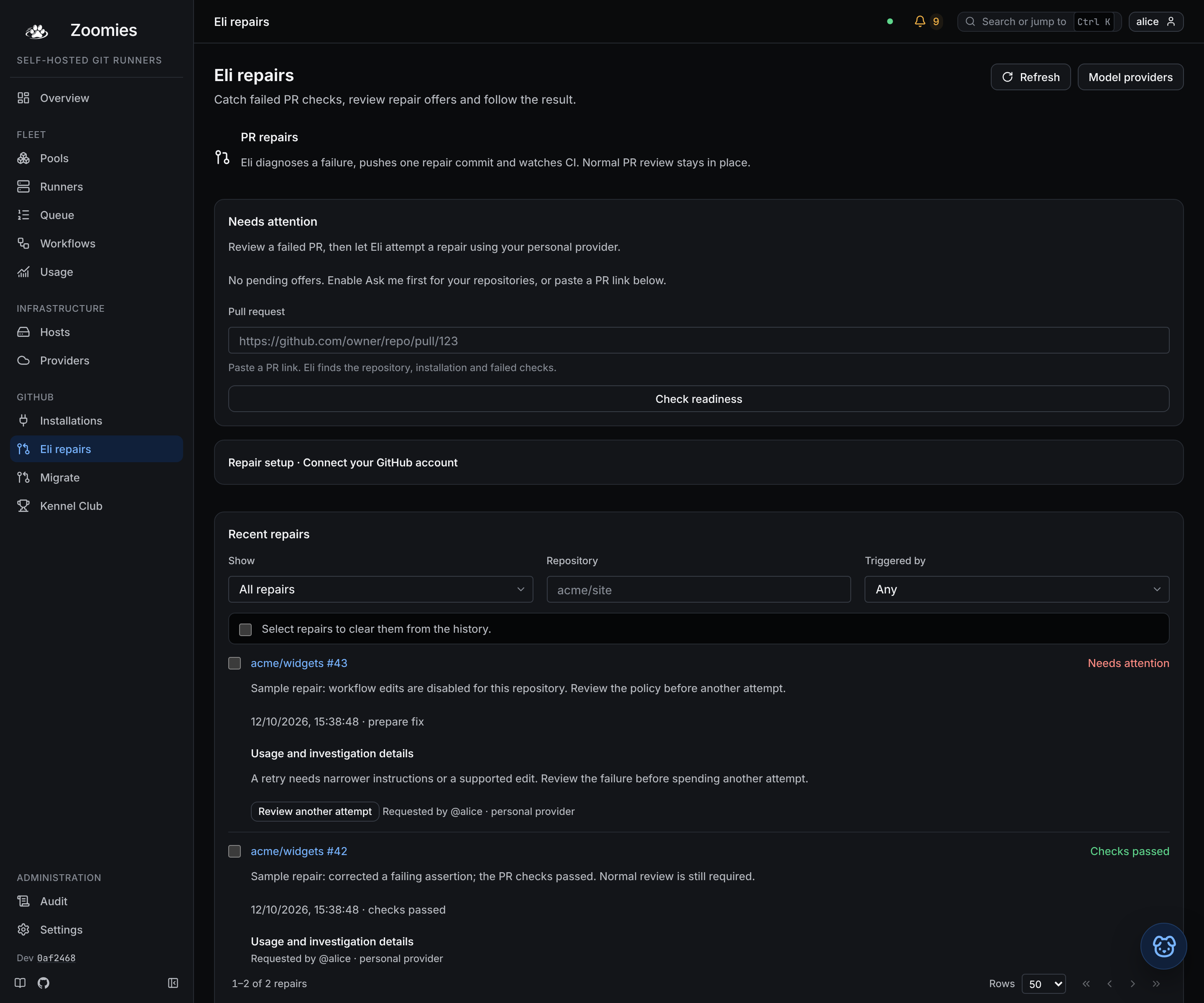
The [repair UI tour](https://zoomies.sh/ui/#eli-repairs) shows the four pages repairs live on:
the hub, the repair page for one failure, a page for each repair, and repair
settings. The history below uses labelled sample outcomes; no real PR was changed
to produce these images. A stopped attempt explains what needs attention before
you spend another attempt, while a passed repair still needs normal PR review.
{ .zoomies-shot }
The hub opens on **Needs you**, with a sticky **On this page** navigation counting
the failed pull requests that need a person, the running repairs and the
history. **Needs you** and **In progress** open when they hold work; **History**
and the administrator's **Automatic repairs** section are closed summaries, one
press away. History's filter fields sit behind **Filters**. A setup line appears
only when the person cannot repair yet.
From **Recent failures**, click the failure summary to inspect its failed step,
explanation and timeline, or choose **Fix with Eli**. Eli repairs a pull
request's branch and never raises a pull request, so **Fix with Eli** is not
offered for a failure of a run that no pull request started (a push to the
default branch, a merge, a schedule or a manual run). The controller reads what
started each failed run from GitHub, so a failure it has not read yet is still
offered, and the repair page says why if it turns out not to be a pull request's.
The repair page opens with the decision card beside the failure and an **On this
page** navigation for the next step, the setup when it is needed and the failure.
It names the pull request, its branch, the commit and the run, each linked to
GitHub, lists every failed job with the step it stopped at, and checks readiness
without invoking a model. A run this fleet did not run, so it has nothing
recorded of, is named as GitHub reports it: `Fix with Eli` works for a job that
never touched this fleet's runners, and the error output is read from GitHub when
the job is opened. **Can Eli act on this?** appears only when something is
blocked, showing the blocked rows first with **Show all 8 checks** for the rest.
A person decides to spend an attempt once they can see what it would be spent
on, so **Fix with Eli** is on that page, immediately under the case.
Missing account or repository setup opens the missing setup inline, under the
decision that needs it. It reuses existing settings; an administrator can link
their own GitHub account and enable manual repairs in one save, with workflow
edits disabled for a new policy. A personal
provider is still required. Setup checks the same run again before offering the
repair. Runs without an eligible open PR explain why they cannot be repaired.
Recent failures is an inbox of unresolved work, rather than a history of red
runs. Newer attempts and runs replace older failures of the same job and
workflow on the same known branch. Cancelled or skipped checks do not count as
a fix. Background checks remove failures when GitHub confirms a passing result,
a newer PR head, or a closed or merged PR, without requiring personal Eli setup.
GitHub errors leave the last known state intact; they never count as success.
The Failed view keeps the original history and acknowledgements remain separate.
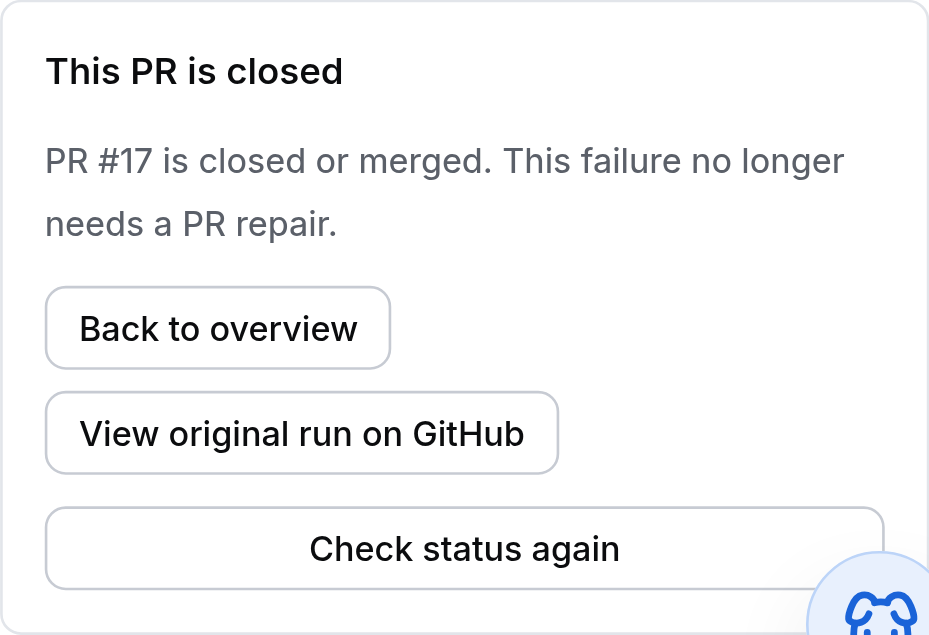
A failure can change while somebody is looking at it. Readiness explains
**Already fixed**, **This PR is closed**, or **A newer commit replaced this
failure**, with a link to the original run and a way to check the current PR.
Pending checks ask the reader to wait; unavailable GitHub checks offer a retry.
Starting a repair checks again before using an attempt. If the target changed
since review, the page replaces the stale offer with the current explanation.
{ .zoomies-shot }
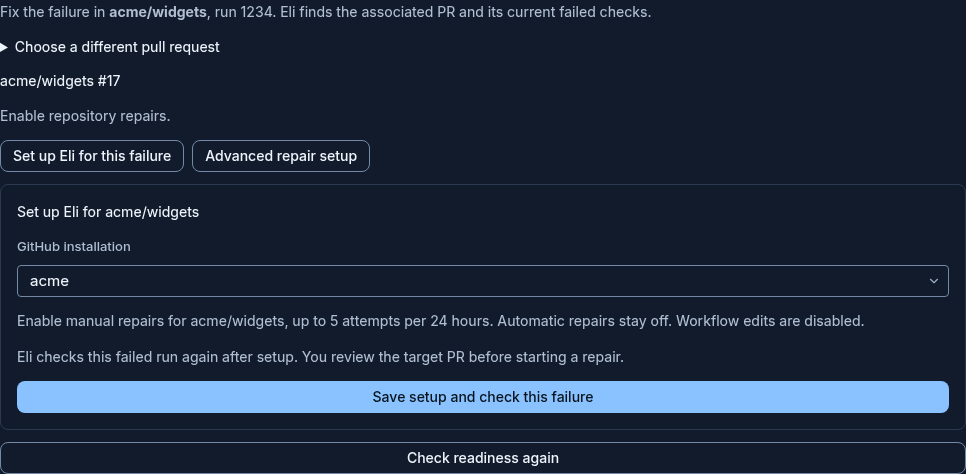
The wizard below uses a sample failure; no real PR was changed.
{ .zoomies-shot }
For repository automation:
1. Open **Eli repairs** from the navigation and choose **Repair settings**, or
use **Fix with Eli** beside a failed job. **Fix a failed check** lists recent
failures and checks readiness without invoking a model; **Paste a pull request
link** is the fallback.
2. Under **Choose repositories**, search and select a few repositories or use
**Select all matching repositories** across discovery pages. With one GitHub
connection it is already selected; with several, choose the connection first.
Discovery is bounded to 500 repositories and says when it is capped. Selection
alone enables nothing, and a failed discovery page leaves the selection intact.
3. Choose **Fix failed checks automatically**, **Offer a fix for failed checks**
or **Manual requests only**. Automatic repairs use an enabled installation
provider, with the saved default or sole provider preselected. The page explains
a missing provider. Personal GitHub linking is not needed for automation.
Save reports each repository's result; partial or failed saves offer a retry
for only the failed repositories, using the settings from that save.
**Configured repositories** shows the saved behaviour and **Pause** or
**Resume**. Pausing does not need a working model provider. Existing policies
keep their settings, and workflow edits remain under **Advanced**.
Filter configured repositories by name to find their controls. The list shows
enabled and paused totals. **Edit** moves focus to that repository's settings;
**Add repositories instead** starts a fresh selection with workflow edits off.
For individual requests using a personal provider, open **Personal repair
requests**. These are separate from repository automation:
1. An administrator verifies account ownership, selects the Zoomies user and a
discovered repository where their GitHub account has write permission, then
links the account once. Each requester confirms **Allow this GitHub account to
request repairs using my provider** and adds an enabled personal provider.
Administrators cannot give that consent on their behalf. Changing the link
clears consent; repository selection does not create another identity link.
One GitHub account may serve only one Zoomies user. After an instance move
or when the account was re-created, the same GitHub account can still be
linked to the old user, and the refused verification says so by name. The
**Move the link** press answers it: the holding account loses the link, the
moved link lands unconfirmed so the person it was moved to allows provider
use again, and the move is written to the audit log with the account it was
taken from. History the old account asked for stays with that account; a
move is a link, not a takeover of its record.
2. Return to the original PR and check readiness again. Review the payer, model
and workflow permission before choosing **Fix with Eli**.
Offer a fix for failed checks (the Ask me first policy) groups failed jobs into one persistent offer per PR head. The
Overview shows available offers; **Needs you** on the Eli repairs page lets you
review or dismiss them, and says for each which pull request it is about, its
branch, when it failed and which jobs stopped at which step. Offers do not invoke
a model or spend attempts. Dismissal is personal and applies
only to that commit. A bounded reconciliation every five minutes looks back at
recent failed jobs, including failures that predate setup. Access and the pinned
head are checked again before acceptance. Existing closed, superseded or now-green
PR offers are retired during reconciliation. External notifications are not sent.
**Needs you** also shows the latest failed, blocked, interrupted or unverified
attempt for each PR. A newer attempt, including one cleared from history,
supersedes an older failure. The same five-minute reconciliation asks GitHub
about each of them, and an attempt whose PR was closed or merged, has a newer
commit than the one the attempt was about, or now passes its checks leaves
**Needs you** and reads **No longer needed** in the history, with the reason
ahead of what Eli said when it stopped. Between those reads the inbox is a
record of repairs needing review, not a fresh claim about GitHub's current PR
head. An unavailable read never produces an all-clear. The attempt page keeps **What Eli changed**, its changed
paths and its commit separately from the subsequent check outcome. **Review fix**
opens the published commit's diff, so it can be reviewed even if checks later fail.
The GitHub App needs **Contents: write**, **Pull requests: write**,
**Issues: write**, **Actions: read**, **Checks: read** and **Commit statuses: read**
for the relevant repositories. Subscribe to **Issue comment** alongside
**Workflow job**. Existing installations may need to approve new App
permissions. Editing `.github/workflows` also requires the appropriate GitHub
App workflow permission, and a separate opt-in on the Zoomies policy.
An App created before Zoomies asked for Issues access cannot subscribe to **Issue comment**:
GitHub delivers that event only to an App with Issues access. In the App's settings, add
**Issues** (read is enough for the webhook; Eli's 👀 acknowledgement needs write), have the
installation's owner approve the permission change, then tick **Issue comment** under
**Subscribe to events**.
On a pull request, a linked maintainer can comment:
```text
/eli fix the failing test
/zoomies fix this PR issue
```
Prefer the slash form. `@eli` and `@zoomies` still work, but an at sign notifies
whichever GitHub user happens to own that name, who is not part of your
repository, and a slash command notifies nobody.
Commands must begin a line outside a quote or code block. Only new comments by
human users trigger a repair. Edited comments, ordinary issues and bots do not.
Both triggers use the existing signed webhook endpoint.
A newly queued command gets an eyes reaction straight away, even while Eli is
busy with another repair. Redelivering the same comment does not queue another
attempt.
A command from someone with write access that Eli cannot act on is answered, not
dropped: Eli puts a confused face on the comment and replies on the PR with the
reason. The reason is one of these: repairs are not enabled for this repository
and installation; the GitHub account is not linked to a Zoomies user, or its
owner has not allowed it; or the Zoomies account is disabled. A command from
anyone without write access is ignored without a word, so a stranger's comment
never makes the App post.
The App's own GitHub handle (for example `@zoomies-eyupio2`, the name GitHub
autocompletes) works too, once Zoomies has learned the App's slug. Recognition
uses the comment text and does not require GitHub mention notification routing.
### Watching and stopping automatic repairs
A repository set to **Automatic** has Eli repair its failed pull request checks
with nobody asking: when a job fails on the head of an open pull request that Eli
may repair, a repair is queued, paid for by the repository's installation
provider, and Eli pushes one commit. Because nobody is there when that happens,
the Eli repairs page shows it, to an administrator and to nobody else: automatic
repairs have no owner, so no one else can read them. A repository that is not
automatic adds nothing to any page.
The hub's **Automatic repairs** summary appears when at least one enabled policy
is Automatic. Open it for each repository's row, and the ones that cannot run
come first:
* **Who pays, and whether they can.** A provider that was deleted (which leaves
the policy with none), is disabled or belongs to a person cannot pay for an
unattended repair, and the row says so in a sentence with a link to the policy
in setup. A failed check there is not queued at all, so it spends nothing
and leaves no comment on the pull request.
* **The latest automatic repair** still in the history, which opens, and how many
are running now.
**Stop automatic repairs** (and **Stop all**, with two or more repositories) asks
what should happen instead. **Ask me first** hands the decision back: when checks
fail Eli offers a repair under *Needs you* and waits, and the repository keeps its
provider and workflow setting. **Turn repairs off** clears the policy's
enable switch and nothing else, so Eli neither offers nor starts a repair there
and nobody can request one until the switch is turned back on in repair settings,
which resumes Automatic as it was. Either way, a repair already queued is blocked
when the worker reaches it, and one that has not pushed yet stops before it
changes the branch; one that has pushed carries on watching its checks. The stop
needs no working provider, which is the day it is wanted, writes an
`assistant.repair_automatic_stop` audit row for each repository it changed, and
never turns anything on: starting Automatic is a decision made in setup.
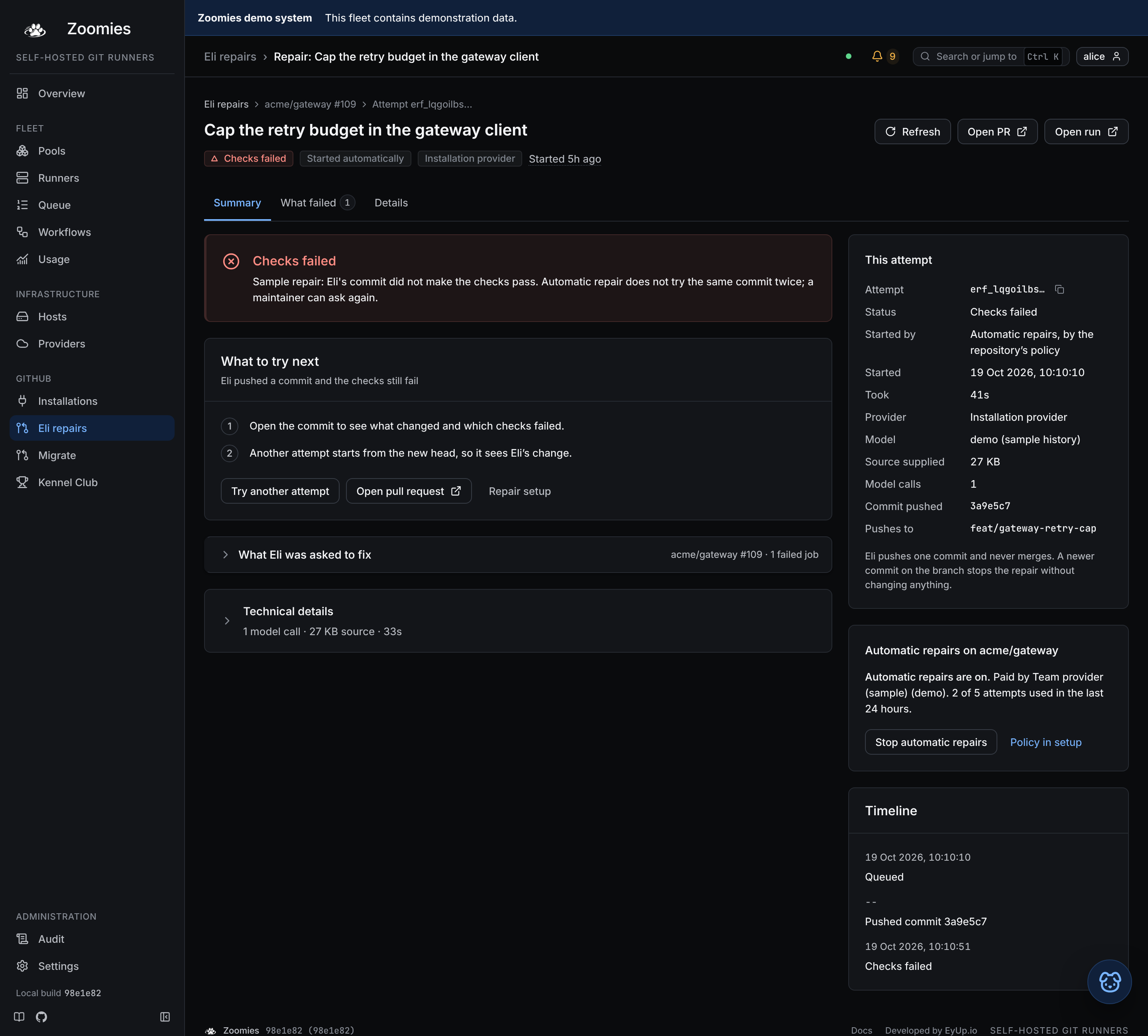
A repair the policy started says so on its own page (**Started by** Automatic
repairs, by the repository's policy), and an administrator gets a card for the
repository's policy with the same stop. On the repair page of a failure on an
automatic repository a note says whether Eli already tried this failure on its
own (it does not try the same commit twice by itself, so starting another attempt
is the retry) or why nothing has started. Eli starts an automatic repair from
GitHub's report that a job failed, so a failure reported before Automatic was
switched on, or whose report never arrived, is not picked up on its own. Anyone
else who opens that page sees one sentence saying the repository repairs itself.
{ .zoomies-shot }
The panel reads `GET /api/v1/assistant/repairs/automatic` and the stop is
`POST /api/v1/assistant/repairs/automatic/stop`, both for administrators; the
[API surface](https://zoomies.sh/api-surface/) describes them.
## What a repair does
The durable queue deduplicates webhook retries and records each attempt at
admission. Repair generation runs one attempt at a time. Published repair commits
have their checks observed separately, so a slow model does not delay their
outcomes. Pausing repository automation still allows published commits to finish
being checked. This does not enable continuous PR watching or additional fixes.
The worker reads the PR's pinned commit, changed text files, repository
inventory and bounded failed-job evidence. It asks the selected model for a
strict JSON plan, with at most twelve model turns and eight changed files. Each
turn tells the model how many replies remain and asks it to batch related reads,
with at most eight file or window requests per turn. A turn requests source,
proposes a fix, or explains why it cannot fix the failure; it cannot mix these
actions. A fix uses targeted edits or complete file replacements, never both.
The final turn must propose a fix from the supplied source or explain why it
cannot fix the failure; a further read request ends the attempt without fetching
source that no later turn could use. Text blobs
up to 512 KiB stay on the controller; the model receives windows of at most
32 KiB, prioritising files and line locations named by failure evidence. Unique
source supplied is capped at 128 KiB and the full transcript is checked against a
192 KiB byte allowance before every model call. The PR's changed files take at
most half of the source allowance before the model asks for anything, and the
rest are named as not loaded, so the other half is there for the files and
windows the model requests. A request that does not fit is answered with how
much remains, so the model can ask for a smaller window, and does not end the
repair. These are conservative application bounds, not a measurement of the
model's token capacity, and the provider's **Output limit** does not change
them: it caps what the model may write in one round, not how much source Eli
shows it. Repeated and overlapping reads return only new source. The PR's
bounded diff is included.
Each model turn may write at most the provider's output limit. When the
provider's form leaves it empty, which is automatic, a repair starts at 12,000
tokens. Each time the provider reports that the model ran out of room, Eli asks
again with twice as much, up to 65,536, and keeps that amount for the rest of the
repair, so only one step pays to find it. If the provider later refuses the kept
amount because the longer prompt no longer fits beside it, Eli goes back to
12,000 from that step. A thinking model's reasoning counts against the limit, so
such a model may need the most. Every attempt is a step in
the repair history with the usage the provider reported, so the tokens spent
finding the room stay visible; a cut attempt is billed by the provider, and its
input is sent again. A provider that refuses a larger request (its model's own
ceiling is lower, or too little context is left beside the prompt) ends the
repair at the last amount it accepted, and the comment says to set the
provider's Output limit to that model's maximum: an automatic limit asks for
twice as much, so a model whose ceiling lies between the two is refused every
time. A number set on the provider is never raised: it is the cap, and a cut at
it ends the repair. The whole repair has ten minutes, so a slow model can run out
of time before it has found its room. Where the provider takes a reasoning effort
(the OpenAI-compatible and OpenAI kinds), lowering it is the cheaper cure for a
model that keeps running out; the comment suggests it only for those kinds.
For large files, Eli returns exact before/after edits instead of rewriting the
whole file. The controller requires unique, non-overlapping preimages in source
already supplied to the model, which includes the head side of the bounded diff,
and preserves every untouched byte. Complete replacement of a partially read
file is refused. Targeted edit text is capped at
64 KiB; there are at most 32 targeted edits. Unsupported blobs are named and
skipped. A bounded log tail and unannotated test-error context help retain the
failure evidence. Very large inventories, PRs or logs can still exceed limits.
Repair history records the stage, model, source bytes and per-call input/output
usage when the provider reports it, including usage received before a failure.
Missing usage is shown as unknown. Request bytes and elapsed time are recorded
separately from token counts. Output truncation and provider rate limits receive
specific advice. Failed attempts offer readiness review and copyable investigation
details; deterministic source limits should be addressed before retrying.
Recognisable provider/GitHub tokens and private-key headers are redacted before
model use. These filters cannot identify every possible secret, so use a
provider permitted to process your repository and job logs.
Eli does not execute repository code or run local tests. It cannot edit symlinks,
submodules, credential paths or binary files. Workflow files are protected unless
explicitly enabled. The model is told this policy before its first turn. A
protected-path read is refused without fetching the file, and the model is told
which path was refused so it can continue from allowed source or explain why it
cannot fix the failure. Allowed reads in the same request still arrive. These
refusals count towards the twelve-turn limit, and do not permit protected edits.
Fork PRs, closed PRs and default-branch PRs are refused.
An infrastructure failure may produce a diagnosis rather than a code change.
Before publication, Eli rechecks repository policy, provider availability and
requester access. The commit has the original PR head as its parent, preserves
file modes and uses a non-force branch update. A concurrent push stops publication.
Eli never merges the PR or bypasses branch protection.
When a repair starts, Eli reacts to the comment that asked with 👀, then posts progress as a single comment that it edits in place, with a
heading for each stage (sniffing around, fetched a fix, checks passed, got
stuck), and watches check runs and commit statuses on its commit.
It reports checks passed, checks failed, a newer PR head, or unverified after an
hour without complete results. Reported checks are not a guarantee that every
branch-protection requirement is satisfied. Automatic repair will not start
another attempt on an Eli commit. A maintainer can request another attempt.
Check reads include up to ten pages of 100 check runs. Incomplete coverage stays
pending and cannot certify success; a confirmed failure remains a failure even
if a later page cannot be read. Closing or merging the PR stops verification
promptly and preserves the published fix on record.
Queued work survives restart. A repair interrupted during publication has an
uncertain outcome, so it is marked interrupted and never replayed automatically.
Inspect the PR before asking again. The Eli repairs page shows repair history,
and each repair opens a page of its own; ordinary users see their own requests
and administrators see the whole history.
The history is paged and filtered by the controller, so a repair from last month
is as easy to reach as one from this morning. Filter it by state (all, needs
attention, in progress or checks passed), by repository name, and by whether Eli
was triggered automatically or by a request; any change of filter starts again
from the first page and drops whatever was chosen. Press **Select** to show a
box on each row, so the list reads as a record until you mean to edit it, then
choose repairs one at a time, or with the box above the list for every repair
shown. Once every repair on the
page is chosen and more match, **Select all** takes everything the filters match,
up to 500 at a time, and says so when there are more than that. **Clear from
history** asks first, saying how many repairs it will clear, and then hides them
from this list and does nothing else. A cleared repair is kept: it still stops Eli
repairing its own commit, and it still stops Eli answering the same webhook
delivery twice. It cannot be restored from the page, but asking again for it,
from the page or by accepting an offer, brings it back into the history; a
repair that a webhook delivers again does not come back, because nobody asked.
A repair that is queued, running or waiting on checks cannot be cleared until it
finishes. Ordinary users clear only their own requests, and each clear that
hides a repair is written to the audit log as `assistant.repair_clear`.
Model-generated fixes still need review. The limits constrain cost and the
editing surface; they do not prove a patch correct. Provider errors, quota
exhaustion or unsupported model output stop a repair without trying another
user's credentials.
A repair offers the model no tools; every step is a JSON object. Some models
take the names of those replies (`read`, `windows`, `edits`, `files`,
`cannot_fix`) for functions and call them. A call named after a reply says what
that reply would have, so Eli reads it as the reply and the repair goes on; the
same checks apply to it as to JSON the model typed. Any other tool call is
answered, as the result of that call, with the fact that it has no tools and which
JSON replies it may send, and the model is asked once more. Most models comply.
One that calls a tool again stops the repair, and Eli's comment names the tool it
asked for and the names of its arguments, so you can tell a model that ignores its instructions, which a
different model or provider fixes, from a prompt that was wrong. Every model turn
appears in the repair history.
A reply that is not one JSON object is not the end of the repair either. Models
wrap the object in a sentence or a code fence, add a key the repair has no use
for, or write the file they want to read and the window they want as two objects
in one answer. Eli reads the JSON objects it knows, merges two that only ask for
source, and asks the model to correct a reply it still cannot read with the
model's own words in view. Valid JSON that mixes actions or requests more than
eight files and windows receives the same correction, with the specific reason,
before any of that step's source is read or changes are applied. Eli allows two
consecutive correction attempts, shared with malformed replies, within the
twelve-turn limit. A model that cannot answer after those attempts stops the
repair, and the comment names the reply problem.
### What a repair remembers
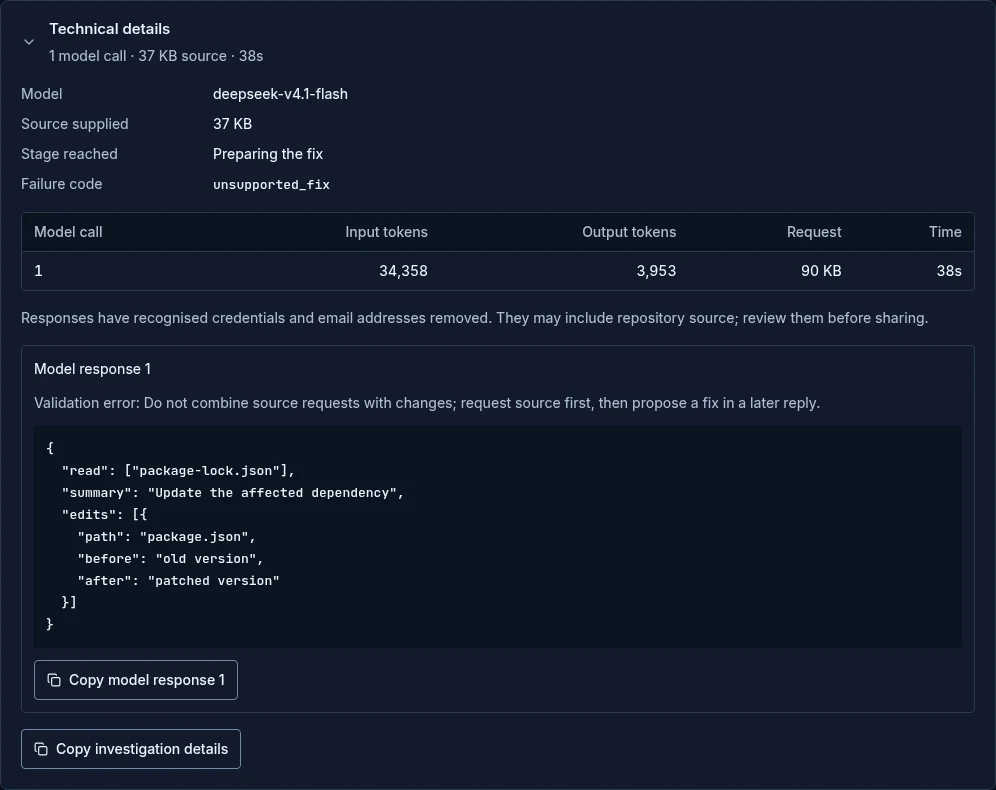
A repair retains each model call's response, tool call names and arguments,
provider error and any reply-format validation error. Open **Technical details**
on the attempt page to read or copy one response, or use **Copy investigation
details** to copy the responses with the attempt's exact usage figures and errors.
Partial output is kept when a provider cuts off or fails. A response with no text
is distinguished from an older attempt whose response was never retained.
Responses are plain text, not rendered HTML or executed tool calls. Recognised
credentials and email addresses are removed before storage, then each response
is capped at 96 KiB with an explicit truncation notice. Redaction cannot recognise
every secret, and a response may quote private source, so review the text before
sharing it. Responses follow the repair's existing owner and administrator access
rules; the input prompt and hidden model reasoning are not retained.
An example of a rejected reply, with its validation reason and copy controls:
{ .zoomies-shot }
A repair keeps what it was about. When it starts it records the run whose failure
you were looking at, and a short summary of the failure: the pull request's
title, author and branch, the run's workflow and number, and up to ten of the
failed jobs with the step each stopped at. The jobs come from Zoomies's own
record of the run where it has one, and straight from GitHub's report of the run
where it does not, so a failure the fleet never ran, on GitHub's own runners or
in records since pruned, is named for the repair too. Zoomies prunes its own job records
and a pull request's title changes, so the repair page and the history can still
say what a repair was for long after the original has gone. The summary holds no
log text. Every title and name in it is cut to 200 characters, and an address is
kept only if it is a plain web link of a sensible length, because the people who
can open a pull request choose all of them. A repair
asked for in a comment on the pull request reaches the worker with no summary,
and the worker reads one when it picks the repair up. A repair made before
summaries were kept shows what its own row holds and says it has no record of the
jobs.
### Error output
Open a failed job on the repair page, or on the page of a repair, and Zoomies
reads the end of its log from GitHub for you: at most twelve lines, the last
ones, which are those that ended the job. It reads only when asked, and only for
a person whose linked and confirmed GitHub account can write to the repository,
because a job's log can hold anything a workflow printed. Anything that looks
like a credential is taken out first, by the same redaction the model's evidence
goes through. The lines are never stored and never logged. The controller keeps a
minute's copy in memory, so opening the same job twice is one download, and a
restart forgets it. The access check runs on every request, before that copy is
looked at, so one person's read is never how another person reads. If GitHub no
longer has the log, or the job printed no error lines, the page says so.