# Zoomies: the documentation in one file
These are the pages of https://zoomies.sh/ as Markdown, in the order of its navigation.
The index is https://zoomies.sh/llms.txt. A page too long to include here is listed at the end,
with a link to its own Markdown copy.
---
# Zoomies
Canonical page: https://zoomies.sh/
Free · open source · AGPL-3.0
# GitHub Actions runners
on machines you own.
Zoomies is a self-hosted GitHub Actions runner controller: one binary, SQLite,
no Kubernetes. Put your cloud VMs, office servers or home lab to work. It starts
a fresh runner for each job, scales across your hosts and shows you what is
happening in one live web UI. Ask Eli about your builds, or connect your own AI
assistant through MCP.
[Run your first job :material-arrow-right:](https://zoomies.sh/quickstart/){ .md-button .md-button--primary }
[Try the live demo](https://demo.zoomies.sh/){ .md-button target=_blank rel="noopener" }
```sh
curl -fsSL https://zoomies.sh/install.sh | sh
```
Start on Linux with Docker or Podman and a GitHub organisation or repository you administer. Explore the live demo without signing in, or [run the local demo](https://zoomies.sh/quickstart/#just-looking) without GitHub credentials. [Read the installer first](https://zoomies.sh/quickstart/#1-install).
[Meet Eli and MCP](#ask-your-fleet-understand-your-builds) [Documentation](https://zoomies.sh/start-here/) [What it costs](https://zoomies.sh/costs/)
## Choose your next step
### New to self-hosted runners?
Learn what a host and pool do, connect GitHub, then run one trusted workflow.
[Learn the basics :material-arrow-right:](https://zoomies.sh/fundamentals/)
### Moving an existing workflow?
Preview `runs-on` changes and try one repository before expanding the fleet.
[Plan your migration :material-arrow-right:](https://zoomies.sh/migration/)
### Already operating a fleet?
Size capacity, measure queue waits, tune resources and automate operations.
[Advanced operations :material-arrow-right:](https://zoomies.sh/advanced/)
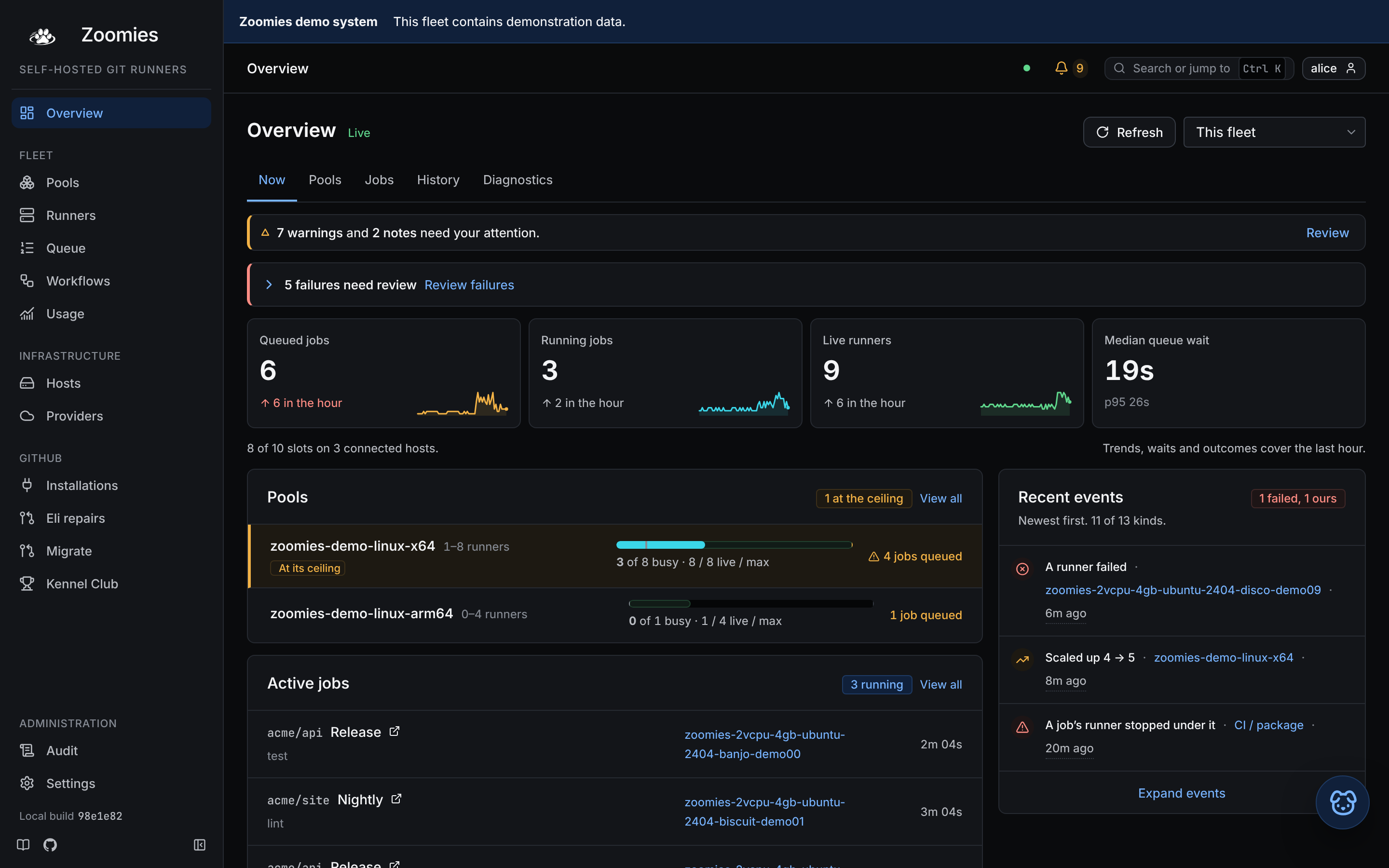{ .zoomies-shot }
Watch jobs, capacity and scheduler decisions update in place, shown here in the Classic style. [Explore the web UI](https://zoomies.sh/ui/).
{ .zoomies-shot-caption }
## Ask your fleet. Understand your builds.
Investigate a failed test, find why a job is waiting, or work out whether a
build needs more memory or a smaller runner. Zoomies gives assistants access
to the job evidence and fleet measurements behind those questions.
### Eli, right where you work
Press **Ask Eli** on a job, host, pool or problem. With fleet access enabled
for your chosen model, Eli can read job history, failure explanations,
available runner logs and measured sizing advice, then explain what to try
next. Its answer shows what it looked at.
> “Why did this job fail, and what should I try next?”
Use a local or hosted model you choose. Explore the built-in fixture provider
in the [local demo](https://zoomies.sh/quickstart/#just-looking), without an account or API key.
[Meet Eli :material-arrow-right:](https://zoomies.sh/eli/)
### Your assistant, connected over MCP
Bring the same live diagnostics into Claude or another Model Context Protocol
client. Compare queue waits, runner sizes and usage; with separately granted
AI Context access, read the verified workflow source behind a job.
> “Compare this workflow's runner sizes and show the evidence for a better fit.”
Start with read access. Operator connections can also re-run jobs, drain
runners and adjust capacity, within the role you grant.
[Connect your assistant :material-arrow-right:](https://zoomies.sh/mcp/)
**From a failed check to a fix:** opt-in [Eli PR repairs](https://zoomies.sh/eli/#set-up-pr-repairs)
can investigate failed jobs, publish changes to the existing PR branch and
watch GitHub's checks. Choose when repairs run and which provider pays; Eli
never merges the PR. Chat itself diagnoses and advises without changing the
fleet or repository.
[Try Eli in the local demo](https://zoomies.sh/quickstart/#just-looking){ .md-button }
[Troubleshoot jobs and improve builds](https://zoomies.sh/troubleshooting/#investigate-jobs-with-eli-and-mcp){ .md-button }
## What you get
:material-monitor-dashboard:{ .icon }
### See why a job is waiting
Fourteen pages, one job each: live jobs, runner logs, host health, queue waits
and scheduler reasons. [Tour the UI](https://zoomies.sh/ui/) or [diagnose a queued job](https://zoomies.sh/queued-job/).
:material-recycle-variant:{ .icon }
### A fresh runner per job
Ephemeral container runners take one job, then their containers and workspaces
are removed. GitHub App authentication supplies single-use registrations.
[Understand the boundaries](https://zoomies.sh/security/).
:material-server-network-outline:{ .icon }
### Scale across your machines
Pools define labels, runner sizes and limits. Agents contribute capacity from
eligible hosts and connect outbound to the controller. [Hosts and pools](https://zoomies.sh/hosts-and-pools/).
:material-rabbit:{ .icon }
### Use spare resources
Optional [elastic CPU](https://zoomies.sh/elastic-cpu/) lends spare CPU to busy runners.
[Elastic memory](https://zoomies.sh/elastic-memory/) can raise a memory limit when there is
headroom. Observe first, then tune from measurements.
:material-database-clock-outline:{ .icon }
### Keep useful build caches
Optional host-local caches preserve selected downloads and build data outside
the disposable workspace. [Add a cache](https://zoomies.sh/persistent-caches/) with a workflow
recipe that also works on a cache miss.
:material-backup-restore:{ .icon }
### Operate through open interfaces
Use the [CLI](https://zoomies.sh/cli/), [API](https://zoomies.sh/api-surface/), [Prometheus metrics](https://zoomies.sh/metrics/)
and [backup tools](https://zoomies.sh/backup-and-restore/) alongside the UI. Keep the database
and its matching encryption key recoverable.
## How it works
Connect a GitHub App to your organisation or to a repository on your personal
account. A pool advertises the runner label your workflow requests. Zoomies
sees queued work through webhooks, with polling as a fallback, and provisions
capacity on a host that can run it. GitHub assigns the job to the runner.
```mermaid
flowchart LR
q["GitHub job queued
webhook or fallback poll"]
p["Controller matches a pool
and chooses an eligible host"]
r["Agent starts a fresh runner
GitHub assigns the job"]
e["Job finishes
ephemeral runner is removed"]
q --> p --> r --> e
```
[The fundamentals](https://zoomies.sh/fundamentals/) explain labels and capacity.
[Architecture](https://zoomies.sh/architecture/) follows the complete lifecycle.
## Your home lab belongs in the pack.
Built-in **Tailcat** connections bring private home and office hosts into the
same fleet as your cloud machines, without a public host IP, router port
forwarding, Tailscale account or separate tunnel installation. Choose
**Private connection · Tailcat** in **Hosts → Add a host**, then run the
command on that machine.
[Connect a private host :material-arrow-right:](https://zoomies.sh/private-hosts/){ .md-button }
[Plan a home-lab fleet](https://zoomies.sh/home-lab/){ .md-button }
## From a fresh host to a running fleet
The [quick start](https://zoomies.sh/quickstart/) takes you through five steps: install, choose
native or container deployment, connect GitHub, create a pool and run a test
workflow. Native setup completes in the terminal; container deployments finish
account, App and pool setup in the browser. Use the label printed by your pool,
then watch the job complete and its ephemeral runner be removed.
Keep the first setup small: one host, one pool and a workflow you trust.
Caches, resource elasticity and automatic pools can follow once that works.
[Run your first job :material-arrow-right:](https://zoomies.sh/quickstart/){ .md-button .md-button--primary }
## Run it from the browser. Reach it from anywhere.
| Your task | Documentation |
| --- | --- |
| Learn and install | [Start here](https://zoomies.sh/start-here/), [fundamentals](https://zoomies.sh/fundamentals/), [quick start](https://zoomies.sh/quickstart/) |
| Run the fleet day to day | [Web UI](https://zoomies.sh/ui/), [hosts and pools](https://zoomies.sh/hosts-and-pools/), [troubleshooting](https://zoomies.sh/troubleshooting/) |
| Deploy from files or a platform | [Docker Compose](https://zoomies.sh/compose/), [PaaS](https://zoomies.sh/paas/), [marketplace deployment](https://zoomies.sh/marketplace/) |
| Scale, tune and recover | [Advanced operations](https://zoomies.sh/advanced/), [metrics](https://zoomies.sh/metrics/), [backup and restore](https://zoomies.sh/backup-and-restore/) |
| Script or integrate | [CLI](https://zoomies.sh/cli/), [API](https://zoomies.sh/api-surface/), [configuration](https://zoomies.sh/configuration/) |
| Investigate jobs or use an assistant | [Eli](https://zoomies.sh/eli/), [MCP guide](https://zoomies.sh/mcp/), [AI Context](https://zoomies.sh/ai-context/), [job troubleshooting](https://zoomies.sh/troubleshooting/#investigate-jobs-with-eli-and-mcp) |
## Moving what you have now
**From hosted runners:** the migration wizard maps supported hosted labels to
your pools, shows the diff and can open one pull request per repository. It
needs optional repository write permissions. It never merges the pull
requests; test one workflow before moving more.
**From static self-hosted runners:** a pool can advertise the labels your jobs
already request, so workflows may need no edits. Check the installation,
runner group, platform and toolchain before retiring the old runners. The
migration wizard deliberately leaves existing self-hosted jobs alone.
[Preview a migration :material-arrow-right:](https://zoomies.sh/migration/){ .md-button }
## What runs where
| Component | Platforms and boundaries |
| --- | --- |
| **Controller and agents** | Linux x86-64 and arm64. The agent also builds for Windows x86-64; macOS builds are useful for controller development. Qualification is described below. |
| **Container runners** | Ubuntu 24.04, Ubuntu 26.04, Ubuntu 22.04, Debian 12, Debian 13, Fedora 42 and Rocky Linux 9, each for x86-64 and arm64. See [the image catalogue](https://zoomies.sh/naming/#the-runner-image). There is no macOS runner image. |
| **Backends** | Docker, Podman (including rootless), or `process`. Windows uses `process`, which runs directly on the host with a fresh work directory and no container isolation. See [worked shapes](https://zoomies.sh/hosts-and-pools/#worked-shapes). |
## What is qualified
The [support matrix](https://github.com/eyupio/zoomies/blob/main/roadmap/support-and-measurement.md)
separates automated evidence, manual trials and builds. It is the place to
check before choosing a platform for important workloads.
Controller, agent, join and real-workload paths are exercised on pull requests
with the process backend and a fake GitHub, on amd64 and arm64. Docker is
unit-tested against a fake Engine API; this repository also runs its own CI on
Zoomies container runners, apart from the arm64 and Windows legs. That is useful
operating evidence, with different coverage from a dedicated end-to-end test.
The Windows agent builds and is vetted and unit-tested on a hosted Windows
runner. The maintainer reports a real Windows host join and job on 11 October
2026; the written qualification evidence is still pending. Treat that manual
trial separately from a qualified support claim.
## Why not something else
Zoomies suits teams that own runner hardware or VMs and want ephemeral runners,
autoscaling and a web UI without operating Kubernetes. You still own host
capacity, patching, network access and recovery.
| Your situation | Read before choosing |
| --- | --- |
| You already operate Kubernetes and want runners in that cluster | [Compared with ARC](https://zoomies.sh/actions-runner-controller/) |
| You want CI capacity without maintaining machines | [Compared with runner services](https://zoomies.sh/hosted-runner-services/) |
| You are choosing among VM-based controllers | [Alternatives](https://zoomies.sh/alternatives/) |
| You are unsure the savings justify the work | [Should you self-host?](https://zoomies.sh/should-i-self-host/) and [costs](https://zoomies.sh/costs/) |
Zoomies charges no platform fee. Machines, storage, electricity and operator
time still count; [costs](https://zoomies.sh/costs/) records the pricing assumptions and links
to GitHub's current billing guidance.
## A word about self-hosted runners
Start with workflows you trust. Ephemeral containers reduce leftover job state,
but share the host kernel; they are not a VM per job. The process backend runs
on the host itself. Optional Docker access and shared caches change the
boundaries further. Read [security](https://zoomies.sh/security/) before running untrusted
pull requests or changing isolation settings.
Give your CI the Zoomies.
Explore the demo, run your first trusted job, then grow at your own pace.
The documentation takes you from the basics to operating a fleet.
[Run your first job :material-arrow-right:](https://zoomies.sh/quickstart/){ .md-button .md-button--primary }
[Browse the docs](https://zoomies.sh/start-here/){ .md-button }
---
# Zoomies documentation: choose your starting point
Canonical page: https://zoomies.sh/start-here/
Zoomies runs GitHub Actions jobs on machines you own or rent. It watches the
queue, starts runners when they are needed, and removes each ephemeral runner
after its job. You manage the fleet through a web UI, CLI or API.
**New to self-hosted runners?** Start with [the fundamentals](https://zoomies.sh/fundamentals/),
then [run your first job](https://zoomies.sh/quickstart/). **Already running Zoomies?** Use the
task table below or go straight to [advanced operations](https://zoomies.sh/advanced/).
## Choose a path
### Evaluate Zoomies
Decide whether running your own fleet suits your workloads and your team.
1. [Should you self-host?](https://zoomies.sh/should-i-self-host/): responsibilities and trade-offs.
2. [Explore the live demo](https://demo.zoomies.sh/){ target=_blank rel="noopener" } without signing in, or [run the local demo](https://zoomies.sh/quickstart/#just-looking) to explore a fixture fleet without GitHub credentials.
3. [Costs](https://zoomies.sh/costs/) and [alternatives](https://zoomies.sh/alternatives/): compare the whole cost of ownership.
### Run your first job
Learn the few concepts needed to connect GitHub and run one trusted workflow.
1. [Fundamentals](https://zoomies.sh/fundamentals/): controller, host, pool, runner and labels.
2. [Quick start](https://zoomies.sh/quickstart/): install, connect GitHub and verify a job.
3. [The web UI](https://zoomies.sh/ui/): find the job, its runner and the fleet's problems.
### Grow and tune a fleet
Work from measured demand, add capacity and automate repeatable operations.
1. [Hosts and pools](https://zoomies.sh/hosts-and-pools/): placement and capacity.
2. [Advanced operations](https://zoomies.sh/advanced/): sizing, performance, recovery and automation.
3. [Configuration](https://zoomies.sh/configuration/), [CLI](https://zoomies.sh/cli/) and [API](https://zoomies.sh/api-surface/): exact settings and interfaces.
## Get help with jobs and workflows
[Eli](https://zoomies.sh/eli/) brings job context into a conversation from **Ask Eli** in the
web UI. [MCP](https://zoomies.sh/mcp/) connects your own assistant to diagnostics, measured
runner sizing and, with separate consent, verified repository source. Use
either to investigate failed or slow builds as well as fleet problems.
Start with [assistant-led job troubleshooting](https://zoomies.sh/troubleshooting/#investigate-jobs-with-eli-and-mcp).
For a failed check on an existing PR, [Eli repairs](https://zoomies.sh/eli/#set-up-pr-repairs)
can publish a fix and watch CI after you configure and authorise repairs.
## Find a task
| I want to… | Start with | Check that it worked |
| --- | --- | --- |
| Install on one Linux machine | [Quick start](https://zoomies.sh/quickstart/) | A manually triggered job completes and its runner is removed. |
| Deploy the controller with a file | [Docker Compose](https://zoomies.sh/compose/) or [PaaS](https://zoomies.sh/paas/) | Claim the instance, connect GitHub and create a pool. |
| Add a machine | [Hosts and pools](https://zoomies.sh/hosts-and-pools/#adding-a-host) | The host checks in and an eligible pool can place a runner there. |
| Use a private home or office host | [Private hosts with Tailcat](https://zoomies.sh/private-hosts/) | The agent joins through the private connection and reports capacity. |
| Move existing workflows | [Migration](https://zoomies.sh/migration/) | Review a diff, run one migrated workflow, then expand. |
| Diagnose a queued job | [A job stuck in the queue](https://zoomies.sh/queued-job/) | Follow labels, installation access, host capacity and registration in order. |
| Speed up repeated builds | [Persistent caches](https://zoomies.sh/persistent-caches/) | Compare repeated runs on the same host; keep a cache-miss path working. |
| Allocate spare CPU or memory | [Elastic CPU](https://zoomies.sh/elastic-cpu/) and [elastic memory](https://zoomies.sh/elastic-memory/) | Observe first, then compare run time and host pressure under representative load. |
| Route different job sizes | [Size classes and automatic pools](https://zoomies.sh/auto-pools/) | Read shadow-mode decisions before enabling routing. |
| Create VMs when capacity is needed | [Proxmox VE](https://zoomies.sh/proxmox/) | Verify the template, join and workload before increasing limits. |
| Monitor the fleet | [Metrics](https://zoomies.sh/metrics/) and [problem codes](https://zoomies.sh/problem-codes/) | An authenticated scrape works and alerts reach the person who operates it. |
| Back up, restore or upgrade | [Backup and restore](https://zoomies.sh/backup-and-restore/), then [upgrading](https://zoomies.sh/upgrading/) | Verify the backup and rehearse recovery before relying on it. |
| Script fleet operations | [CLI](https://zoomies.sh/cli/), [API](https://zoomies.sh/api-surface/) and [automation contract](https://zoomies.sh/automation/) | Use a scoped token and inspect errors; the automation contract is still proposed. |
| Diagnose a failed or slow build | [Eli and MCP troubleshooting](https://zoomies.sh/troubleshooting/#investigate-jobs-with-eli-and-mcp) | Read the evidence, then compare a fix or optimisation against a baseline. |
| Repair a failed PR check | [Eli PR repairs](https://zoomies.sh/eli/#set-up-pr-repairs) | Review readiness, the published diff and GitHub's resulting checks. |
| Connect my own assistant | [MCP](https://zoomies.sh/mcp/), [Connect Claude](https://zoomies.sh/connect-claude/) or [AI Context](https://zoomies.sh/ai-context/) | Choose fleet access and repository source access deliberately. |
## How to use these docs
The **Quick start** is a tutorial: follow it in order to reach a first successful
job. **Run your fleet** contains task guides, usually starting in the UI and
linking to CLI and API equivalents. **Scale and tune** covers optional features
to adopt after the basic fleet works. **Reference** contains exact contracts,
settings and architecture details to look up while working.
Use search for a setting such as `scheduler.scale_up_delay`, a problem code or
a command name. The long reference pages also have a table of contents for
jumping to one setting or route.
## Before you commit workloads
Start with workflows you trust and a finite pool maximum. Container runners
share a host kernel; a fresh runner is not a separate VM. The process backend
runs directly on the host. Read [security](https://zoomies.sh/security/) for the boundaries and
[platform qualification](https://zoomies.sh/#what-is-qualified) for the evidence behind
support claims.
You own the host capacity, patching and recovery plan. [Advanced
operations](https://zoomies.sh/advanced/) gives you an order in which to put those in place.
---
# Zoomies fundamentals: hosts, pools and workflow labels
Canonical page: https://zoomies.sh/fundamentals/
You keep your workflows in GitHub Actions. Zoomies supplies the machines that
execute their jobs. The first change a workflow usually needs is its
`runs-on` label; the steps still run through GitHub's runner application.
## Five things to know
| Term | What it means | Where you use it |
| --- | --- | --- |
| **Controller** | The Zoomies process that watches jobs, schedules runners and stores fleet state in SQLite. It serves the UI and API. | Install one to manage the fleet. |
| **Agent** | The Zoomies process that starts and removes runners on a machine, and reports its health. | Join another machine to the controller. On a single-machine install the controller has an embedded agent. |
| **Host** | A machine running an agent. It contributes runner slots, CPU, memory and supported backends. | **Hosts** shows where work can run and how much room remains. |
| **Pool** | A recipe for interchangeable runners: workflow labels, GitHub installation, backend, image, size and runner limits. | **Pools** defines what a job can ask for. A pool can use several suitable hosts. |
| **Runner** | The GitHub runner application that executes the job. With the default ephemeral setting, it takes one job and is then removed. | **Runners** shows its lifecycle and logs; **Jobs** keeps the job record. |
A **backend** is how an agent runs a runner: Docker or Podman uses a container;
`process` runs it directly on the host. A **GitHub installation** is the App's
permission to manage runners for an organisation or a repository. It also
determines which repositories Zoomies can see.
## Follow one job
```mermaid
flowchart LR
job["GitHub job
requests a pool label"] --> controller["Controller
matches an enabled pool"]
controller --> host["Eligible host
has room and the right backend"]
host --> runner["Agent starts runner
GitHub assigns the job"]
runner --> finish["Job finishes
ephemeral runner is removed"]
```
GitHub normally announces a queued job with a `workflow_job` webhook. When
webhooks are unavailable, the controller can discover work through fallback
polling, which is slower. Agents open their connections to the controller;
the controller does not need to open a connection into a runner host.
Zoomies provisions capacity. **GitHub assigns the job to a registered runner**,
using the runner's labels, runner group and repository access. That distinction
matters when diagnosing a runner that is idle while a job waits.
## Choose the right label
The quick start uses `zoomies-linux-x64` as an example pool label. Copy the
label from **your pool's page**, which supplies a complete test workflow.
Its name depends on the machine and the way you created the pool.
```yaml
name: Test my Zoomies pool
on: workflow_dispatch
jobs:
hello:
runs-on: zoomies-linux-x64 # Replace with your pool's label.
steps:
- run: echo "Hello from a Zoomies runner"
```
Save this as `.github/workflows/zoomies-test.yml` on the repository's default
branch. In GitHub, choose **Actions → Test my Zoomies pool → Run workflow**.
The repository must be accessible to the App installation and runner group.
| Label or selector | What it selects | Example |
| --- | --- | --- |
| Workflow `runs-on` | A runner whose advertised labels satisfy the job. With a list, every requested label must match. | `runs-on: zoomies-linux-x64` |
| Pool runner labels | What workflows can ask for. Every pool also answers to the shared `zoomies` label. | A pool advertising `zoomies-linux-x64` can answer the workflow above. |
| Host labels and pool `host_selector` | Which machines the scheduler may place that pool's runners on. | Host label `gpu=true` and pool selector `gpu=true`. |
Host labels do not automatically become workflow labels. Asking for
`runs-on: [zoomies-linux-x64, gpu]` requires a pool that advertises **both**
labels; labelling a host `gpu=true` alone does not provide that match.
Use a specific pool label for your first job. The shared `zoomies` label is
useful when any matching pool is suitable, but it does not express the
operating system or hardware your job needs. See [naming and
platforms](https://zoomies.sh/naming/) before mixing architectures or operating systems.
## Understand capacity
There are two different limits:
- **Host capacity** limits how many runner slots the machine can provide. CPU,
memory, backend support, health and placement rules can further restrict it.
- **Pool minimum and maximum** control how many runners that recipe keeps
ready and may create. A minimum of zero leaves no warm idle runners; it does
not switch the pool off. A maximum of zero prevents new capacity.
A pool maximum does not create hardware. If a pool allows eight runners but
its eligible hosts only have room for four, additional jobs wait. Pools also
share the room on a host: each pool's maximum is not a separate reservation.
Start with one pool, a finite maximum and one trusted workflow. Add pools when
jobs need different images, resources, backends or placement rules. [Hosts and
pools](https://zoomies.sh/hosts-and-pools/) explains sizing and placement in detail.
## What a fresh runner gives you
With a container backend and the default ephemeral setting, each job gets a
fresh runner and workspace. Completed workloads are cleaned up after their
reports have been accepted and the configured retention window has passed.
An optional [persistent cache](https://zoomies.sh/persistent-caches/) lives outside that
workspace, so selected build data can survive between jobs.
Containers share the host kernel. A fresh workspace cannot make arbitrary code
safe to run on your own infrastructure. The process backend has no container
boundary and preserves host state outside the job's work directory. Choose
trusted workloads first and read [security](https://zoomies.sh/security/) before changing
isolation settings or sharing caches.
## Ready for your first job?
[Follow the quick start](https://zoomies.sh/quickstart/) to install, connect GitHub and run the
workflow. If you already have a fleet and a job is waiting, use [the queued-job
guide](https://zoomies.sh/queued-job/) to check routing, capacity and registration in order.
---
# GitHub Actions runners with Docker Compose
Canonical page: https://zoomies.sh/compose/
The web UI is how a Zoomies fleet is run day to day, and it does not care how
the controller under it was started. This page is for the people who would
rather start it with `docker compose up -d` than with the installer, because
that is how everything else on the host runs, because the deployment lives in a
repository, or because the installer's questions have already been answered
once and a file remembers them better than a person does.
There are two ways to get a compose deployment, and they meet at the same
place.
## From the installer
`zoomies init` offers **Docker Compose** whenever the host has a `compose`
command, and makes it the default. It writes a `docker-compose.yml` and a
**fully populated `.env`** (a freshly generated encryption key, the paths of the
state directory and the database, the image tag, the published address and port,
and the host's real docker group id), stores the rest of its answers as the
controller's settings in its database (the external URL, bind address, TLS mode,
trusted proxies, backend and capacity), then brings the stack up. The settings
are kept out of the file on purpose: a variable there would override the
database, and the Settings page would show it as locked. Every variable in the
file carries a one-line comment saying what it is for; the file is `0600`
because it holds your encryption key; and it is written atomically, so an
interrupted install never leaves a half-written file that compose would then
read.
```sh
curl -fsSL https://zoomies.sh/install.sh | sh -s -- --deployment compose
```
Re-running it over an existing deployment is an upgrade, not a reinstall. It
**keeps the existing encryption key**, because minting a new one would make
every stored secret undecryptable, and backs the old file up beside it.
## From the repository's file
The `docker-compose.yml` at the repository root is the same deployment without
the installer, set up for a controller behind Cloudflare or another reverse
proxy that terminates TLS:
```sh
git clone https://github.com/eyupio/zoomies && cd zoomies
cp .env.example .env
$EDITOR .env # ZOOMIES_EXTERNAL_URL, ZOOMIES_ENCRYPTION_KEY, DOCKER_GID
mkdir -p data && sudo chown 65532:65532 data # the container runs as 65532
sudo mkdir -p /var/lib/zoomies/shared && sudo chown 65532:65532 /var/lib/zoomies/shared
docker compose up -d
docker compose logs zoomies | grep 'setup token'
```
The second `mkdir` is the [shared folder](https://zoomies.sh/configuration/#the-shared-folder),
the one place the embedded agent and the host's Docker daemon both see at the
same path. The Compose file declares it with `create_host_path: false`, so
Compose will not create it for you and `up` stops on the missing mount.
Three values are required, and compose refuses to start with any of them
missing, because each one left to a default produces a container that is
healthy and useless:
| Variable | What it is | Why it cannot default |
| --- | --- | --- |
| `ZOOMIES_EXTERNAL_URL` | The https address you and GitHub reach the controller at. | Webhooks are delivered there, the GitHub App's creation flow sends your browser back there, and the `https` is what makes the session cookie Secure. |
| `ZOOMIES_ENCRYPTION_KEY` | `openssl rand -base64 32`. | Everything secret in the database is sealed with it. Back it up separately from the database; without it the stored App key cannot be read. |
| `DOCKER_GID` | The gid that owns `/var/run/docker.sock`: `stat -c '%g' /var/run/docker.sock`. | It is not always the group called `docker`. With the wrong number the container comes up healthy and can start nothing. The Hosts page then says which group it holds and which line to change, and `docker compose up -d` recreates it. |
If `stat` prints `0`, the socket belongs to root's group, and the answer is
not to put the container in it: give the socket a group of its own
(`sudo groupadd docker`, then restart the daemon) or use a rootless daemon.
The database lives in `./data` beside the compose file, bind mounted, so a
backup is a copy of a directory and inspecting it needs no `docker volume
inspect`. It has to be owned by uid 65532: a bind mount keeps the host
directory's ownership, the container is not root, and Docker would create a
missing `./data` as root, so the file refuses to create it and fails with
"bind source path does not exist", which is easier to act on than SQLite's
error 14.
Every other `ZOOMIES_*` setting in [Configuration](https://zoomies.sh/configuration/) can be
put in `.env` too, with no matching line in the compose file: it is passed
into the container whole. The explicit `environment:` entries in the file
still win.
## What moves to the browser
A container keeps its database in a volume nothing outside it can open, so the
three things the native installer does on the console happen in the web UI
instead, in this order:
1. **The first account.** Open the external URL and paste the setup
token from the container's log. The token is what proves the instance is
yours: the origin is reachable the moment the container starts, and an
empty database is a thing a stranger can find too. It changes on every
restart and stops being printed once an account exists.
2. **GitHub.** **Installations → Connect GitHub** creates the App through the
manifest flow, with exactly the permissions Zoomies needs, and takes the
private key and webhook secret directly.
3. **The first pool.** Nothing creates one for you on this path, and nothing
runs until one exists. **Pools → Create a pool** opens the pool editor with a name
and a label already filled in; [the quick start](https://zoomies.sh/quickstart/#4-your-first-pool)
walks the rest.
The Overview repeats these as a checklist that ticks itself off as you go,
ending with a test workflow to run once a pool exists.
Open the **https** address, not `http://`. The session cookie is marked
Secure because the external URL is https, a browser on a plain-http page
throws it away, and Zoomies refuses to sign you in from one and says why
rather than signing you in and out in the same second. To test over plain
http for a moment, set `ZOOMIES_COOKIE_SECURE=false` for the duration.
## The proxy in front
The file publishes port 80 and serves plain HTTP on it, with
`ZOOMIES_TRUSTED_PROXIES=cloudflare` so the audit log and the login rate
limiter see real client addresses rather than the proxy's. Zoomies warns at
startup that it is listening without TLS; in this deployment that is expected,
and the warning says so. Only the proxy should be able to reach the origin:
firewall it to Cloudflare's ranges, or use a Cloudflare Tunnel and publish no
port at all. [Behind Cloudflare (or any reverse
proxy)](https://zoomies.sh/configuration/#behind-cloudflare-or-any-reverse-proxy) has the
three things that go quietly wrong here.
## The controller is also a host
The compose file runs the controller with an **embedded agent**, so this is one
container plus the runners it creates: the container holds the Docker socket,
and every pool on the `docker` backend can place runners on it. That socket is
Zoomies' own access to Docker, for creating runner containers; it is not
reachable from a job unless a pool's `docker_mode` says so.
`ZOOMIES_AGENT_CAPACITY` is the host's slot count, and `.env.example` leaves it
**empty** on purpose: the agent works its capacity out from the machine it
measures, which also sets the share a pool sized by its host gives each runner.
A constant pins every deployment of the file to the same slot count however
large the host is, so set a number only to hold this host below what it would
take on its own. The installer does not leave it empty: `zoomies init` measures
the host and stores a number as the controller's `agent.capacity` setting before
the container first starts, one runner per two of the cores it found (at least
one) unless you gave it another.
Every further host joins the same way it would on any other deployment:
**Hosts → Add a host** hands you one line to paste on the new machine. [Adding
a host](https://zoomies.sh/hosts-and-pools/#adding-a-host).
## Operating it from a terminal
The CLI talks to the controller over the API, so it does not care that the
controller is in a container:
```sh
export ZOOMIES_URL=https://zoomies.example.com
export ZOOMIES_TOKEN=zoo_... # Settings → API tokens, or zoomies tokens create
zoomies status
zoomies pools list
```
The deployment itself is driven with compose, and `zoomies deployment` wraps
the same commands using the file and container name recorded at install:
| Task | With compose | With the installer's record |
| --- | --- | --- |
| Logs | `docker compose logs -f zoomies` | `zoomies logs` |
| Restart | `docker compose restart zoomies` | `zoomies deployment restart` |
| Upgrade | `docker compose pull && docker compose up -d` | `zoomies deployment update`, which also pulls the cached runner images and rolls back on failure |
| Stop, keeping the database | `docker compose down` | `zoomies deployment down` |
`docker compose down -v` deletes the volume with the database in it, and is
the one command here that cannot be undone. [Upgrading a container
deployment](https://zoomies.sh/upgrading/#upgrading-a-container-deployment) says what an
upgrade does to work in flight.
`zoomies config set` and `config unset` need the controller stopped, on every
deployment: they write the same settings table the **Settings** page does, and
writing under a process that has already read it would leave the two
disagreeing. On compose that is `docker compose stop zoomies` first, or, more
simply, use the Settings page, which is what it is for.
## What this is not
A compose deployment is a controller on a host you own, with that host's
Docker daemon running jobs. For a host you do not install on at all (a
platform that builds from source and gives a container no Docker socket) see
[Deploying on a PaaS](https://zoomies.sh/paas/); for an instance booted from a provider's
marketplace image, see [One-click deployment](https://zoomies.sh/marketplace/). Both deploy a
controller; the runner capacity is still yours.
---
# Deploying on a PaaS
Canonical page: https://zoomies.sh/paas/
There is a `nixpacks.toml` in the repository root, so any platform that builds
with [Nixpacks](https://nixpacks.com) -- Coolify, Dokploy, Railway, Zeabur,
Easypanel -- can deploy Zoomies straight from the source. Point it at
`github.com/eyupio/zoomies`, set the handful of variables below, give it a
volume, and it builds the UI, builds the binary and starts the controller.
InstaPods deploys with commands you give it rather than Nixpacks, and offers
no Docker, so it has a guide of its own: [Deploying on InstaPods](https://zoomies.sh/instapods/).
Nothing about the build is special to any one platform: it is the same two
steps as `deploy/Dockerfile`, in the order that matters. `internal/api` embeds
`internal/api/webdist`, so the Svelte UI is built first and the Go build embeds
what it produced. Nixpacks' own Node and Go providers would each find half of
that and neither would wait for the other, which is why every phase is written
out in the file rather than detected.
## What you get, and what you do not
**A controller.** The API, the web UI, the webhook endpoint, the scheduler and
the database.
**No runners on that host.** A PaaS does not give a container a Docker socket,
and Zoomies will not pretend otherwise: `nixpacks.toml` sets
`ZOOMIES_AGENT_EMBEDDED=false`, so the controller comes up knowing it runs
nothing itself. Jobs would otherwise queue against a host that can never start
a container -- which the Overview would tell you, eventually, in the problems
panel. Runners come from agents you join on machines that do have a container
runtime; see [Adding a host](#adding-a-host-that-can-run-jobs) below.
That split is a reasonable shape, not a consolation prize: the controller is
the part you want always-on, backed up and reachable from GitHub, and the
runner hosts are the part you want close to your own network and cheap to
replace.
## Set these
| Variable | Why |
| --- | --- |
| `ZOOMIES_EXTERNAL_URL` | The https address the platform gives you. Webhooks are delivered to `$ZOOMIES_EXTERNAL_URL/webhooks/github`, the session cookie's `Secure` flag is derived from it, and every link in the UI is built from it. |
| `ZOOMIES_ENCRYPTION_KEY` | 32 random bytes, base64: `openssl rand -base64 32`. Everything secret in the database is sealed with it. Set it explicitly and store it in the platform's secret manager -- see [the volume](#the-volume) for what happens if you leave it to be generated. |
| `ZOOMIES_TRUSTED_PROXIES` | The address range of the platform's ingress proxy. Without it every audit row records the proxy rather than the person, and the login rate limiter throttles every caller as one client. |
`nixpacks.toml` sets the rest: `ZOOMIES_TLS_MODE=off` because the platform
holds the certificate, `ZOOMIES_STATE_DIR` and `ZOOMIES_CONFIG_DIR` at `/data`,
JSON logs, and a bind address taken from `$PORT` when the platform sets one.
Every one of them is an ordinary `ZOOMIES_*` variable from
[Configuration](https://zoomies.sh/configuration/), so anything you set in the platform's own
environment wins over the file's default.
Zoomies will warn at startup that it is listening without TLS. In this
deployment that warning is expected, for the same reason it is expected behind
Cloudflare: the controller cannot see the proxy from behind it, so it has no
way to tell a terminated connection from an origin genuinely exposed in the
clear. [Behind Cloudflare (or any reverse
proxy)](https://zoomies.sh/configuration/#behind-cloudflare-or-any-reverse-proxy) is the longer
version of this paragraph, and applies here unchanged.
## The volume
Mount the platform's persistent volume at **`/data`**, or set
`ZOOMIES_STATE_DIR` and `ZOOMIES_CONFIG_DIR` to wherever it did mount one.
`/data` holds the SQLite database, the runners' work area, and -- if you did
not supply `ZOOMIES_ENCRYPTION_KEY` -- the encryption key Zoomies generated on
first start. Without a volume, a redeploy gives you an empty database and a new
key, and the new key cannot decrypt the GitHub App private key the old one
sealed. That failure is silent until the next time Zoomies needs to
authenticate, which is why it is worth getting right before you connect GitHub
rather than after.
A backup is a copy of that directory, plus the encryption key if you kept it
somewhere else -- [Backup and restore](https://zoomies.sh/backup-and-restore/) is the whole
procedure, and it is the same one here.
## Adding a host that can run jobs
Once the controller is up, create the first account in the UI, connect
GitHub, then generate a join token (**Hosts → Add a host**, or
`zoomies hosts join-token create --ttl 15m`) and run the line it gives you on a
machine with Docker or Podman:
```sh
curl -fsSL https://zoomies.sh/install.sh | sh -s -- \
--mode agent \
--controller https://zoomies.example.com \
--join-token zoojoin_...
```
Agents connect outbound only, so that machine can sit behind NAT with no
inbound rule -- including on a laptop, a home server, or a box in the office
the PaaS could never reach.
Then make a pool. This path has no `zoomies init`, so nothing creates one for
you, and nothing runs until one exists: the **Pools** page, or
[Hosts and pools](https://zoomies.sh/hosts-and-pools/) for what the settings mean.
## Upgrading
Redeploy. The platform rebuilds from the current `main`, the new binary starts,
and the first start applies any schema migrations -- there is nothing else to
run. [Upgrading](https://zoomies.sh/upgrading/) is what that does to work in flight, and how far
a controller and its agents may drift apart, which matters more here than on a
single VM because the agents are upgraded separately from the controller.
## Building the same image yourself
```sh
make image-nixpacks # needs the nixpacks CLI
```
It builds exactly what the platform builds, which is the way to check a change
to `nixpacks.toml` before pushing it.
## When not to use this
The published image is smaller and starts faster. A Nixpacks image carries the
Go and Node it built with, where `ghcr.io/eyupio/zoomies` is a static binary on
distroless and nothing else. If your platform can run a prebuilt image, run
that one and skip the build:
```
ghcr.io/eyupio/zoomies:latest
```
That tag is the newest full release. Pin `ghcr.io/eyupio/zoomies:vX.Y.Z` if you
would rather decide when your platform moves, or run `:dev` to track `main`.
[Which image tag to run](https://zoomies.sh/upgrading/#which-image-tag-to-run) has the rest.
The variables above are the same either way. Nixpacks earns its place when the
platform builds from a repository and you would rather not maintain a second
answer to "how is this built".
---
# Two-step verification
Canonical page: https://zoomies.sh/two-step/
Two-step verification adds a second step to signing in to Zoomies: after your
password, a six-digit code from an authenticator app on your phone. Somebody
who has learned your password (from another site that leaked it, or from a
phishing page) still cannot sign in as you without the phone.
It is for accounts that sign in with a **password**. It is off until you turn
it on, and an administrator can make it compulsory for every password account
on the instance.
Any app that implements the standard (TOTP, RFC 6238) works: 1Password,
Bitwarden, Google Authenticator, Microsoft Authenticator, Aegis, Ente Auth,
and most password managers.
## Turn it on
1. Open **Settings → Account** and choose **Turn on two-step verification**.
2. Scan the QR code with your authenticator app. If you cannot scan (on the
phone you are reading this on, say) choose **Enter the key instead** and
type the key into the app. The entry is named *Zoomies* and shows your
username and this instance's address, so a staging and a production
instance do not end up as two identical entries.
3. Type the six-digit code the app shows, and choose **Turn on**.
4. Zoomies shows ten **recovery codes**. This is the only time they are shown.
Copy or download them and keep them somewhere that is not your phone; a
password manager, or printed and put away.
Turning it on signs you out everywhere else: those sessions were signed in with
the password alone.
## Sign in
Sign in with your username and password as usual. Zoomies then asks for the
code from your app. Type the six digits shown now; spaces are fine. You have
five minutes and five tries before you are sent back to the password.
Each code works **once**. If a code is refused straight after you used it,
wait for the app to show the next one.
## Recovery codes
Each recovery code works once, in place of a code from the app, at sign-in,
or when turning two-step off. Type it in the same box; the hyphen and capitals
do not matter.
**Settings → Account** says how many you have left. When you are running low,
or think somebody else has seen them, choose **New recovery codes**: you give
your password and a current code, and every old code stops working.
## Turn it off, or move to a new phone
Choose **Turn off** on **Settings → Account** and give your password and a
current code (a recovery code works too). To move to a new phone, turn it off
and on again from the new one; the old phone's entry stops working the moment
you do.
## Lost your phone
Sign in with a recovery code, then turn two-step off and on again with the new
phone.
If you have no recovery codes left either, ask an administrator. They can reset
it for you:
* from **Settings → Users**, the account's **Reset two-step** action, or
* from a terminal, `zoomies users reset-two-step `.
A reset removes your authenticator and recovery codes and signs you out
everywhere. You then sign in with your password alone and can set it up again,
or, where the instance requires two-step, you are asked to at that sign-in.
Every reset is recorded in the audit log as `user.two_step_reset`, with the
name of the administrator who made it.
!!! warning "Administrators: check who is asking"
A reset is exactly what somebody holding a stolen password would ask for.
Confirm the request through a channel other than the one it arrived on.
## Require it for everybody
Set `security.require_two_step: true` (or `ZOOMIES_REQUIRE_TWO_STEP=true`) and
restart. From then on, every password account that has no authenticator sets
one up at its next sign-in before it gets any further; accounts that already
have one simply keep using it. The problems panel shows `two_step.required` as
a reminder of what the setting does not cover.
## What it does not cover
* **Single sign-on accounts.** An account that signs in through your identity
provider is never asked for a Zoomies code, even with two-step required. Its
second factor belongs to the identity provider, require multi-factor
authentication there, where your organisation's policy already lives.
* **API tokens.** A token is never asked for a code. It is already a long
random secret, and the scripts and pipelines it is made for have nobody to
type one. Keep tokens scoped to what they need, give them an expiry, and
revoke one the moment it may have leaked.
* **Sessions already signed in** when an administrator turns the requirement
on. They carry on until they expire; the requirement applies at the next
sign-in.
[Security](https://zoomies.sh/security/#two-step-verification) explains how the key and the
recovery codes are stored, and the limits a code attempt counts against.
---
# Public view
Canonical page: https://zoomies.sh/public-view/
Some fleets are meant to be looked at. A project's demo, an open-source
organisation that wants contributors to see why their job is queued, a lab
that puts its runners on a screen in the corridor. `security.public_view` lets
anyone who can reach the controller read its fleet without an account, and
keeps everything else exactly where it was.
It is off by default, and a controller with it on says so in its problems list
as `auth.public_view`, as every setting that widens who may look does.
## Turn it on
In **Settings → Security**, turn on **Public read-only view**, then restart the
controller. Or set it in `zoomies.yaml`:
```yaml
security:
public_view: true
```
`ZOOMIES_PUBLIC_VIEW=true` overrides both, as every `ZOOMIES_*` variable does.
Make sure an administrator account exists first: the first-run form is what a
controller with no account shows, public or not.
## What a visitor sees
A request with no credential at all is a **visitor**. In the browser that is
the whole product, read-only, with a line under the top bar saying so and a
**Sign in** link beside it:
| A visitor reads | A visitor is not shown |
| --- | --- |
| The Overview, pools, runners, the queue, workflows and jobs | The audit log, which names people and the addresses they came from |
| Runner logs, live and finished | Accounts, API tokens, sessions and MCP connections |
| Usage and what it cost | Settings, and every page under them |
| Hosts, providers and the machines rented from them | AI context and the source files it reads |
| Installations, webhook deliveries and the update status | Eli, its conversations and its repairs |
| Kennel Club's findings and the problems list | Migrations |
The live event stream follows the same rule: a frame is sent only to somebody
who could fetch what it carries, so a visitor never receives an audit row.
Every change answers **403** with *this is a read-only public view; sign in to
do this*, whether it is asked for from the UI, the API or MCP. The UI does not
offer the pages a visitor cannot open, so they are rarely told.
## Signing in
Whoever runs the fleet signs in as usual, from the link under the top bar or
the **Visitor** menu, and has their own role back. Signing out returns them to
the sign-in page, where **Continue without signing in** makes the browser a
visitor again. A session that runs out does the same on its own: on a public
view a browser whose session has ended is a visitor, and its cookie is cleared.
An API token is never softened into a visitor. A token that is wrong, revoked
or expired is refused with 401, so automation holding a dead token hears about
it rather than carrying on as a stranger.
## Assistants
`/mcp` answers a client with no credential as a visitor, so anybody can point
their own assistant at a public fleet:
```sh
claude mcp add --transport http zoomies https://zoomies.example.org/mcp
```
The read-only tools work on the fleet. The tools that change it are not
offered, and the AI context tools answer that the public view does not show
them. Somebody who needs more connects with an API token in the
`Authorization` header instead. [MCP](https://zoomies.sh/mcp/) has the rest.
## What it costs to be public
Every open tab holds a live event stream. Visitors' streams have a ceiling of
their own, `limits.visitor_event_subscribers` (200 unless you change it), and
are not counted against `limits.event_subscribers`, so however many people are
looking, whoever runs the fleet still gets theirs. A visitor past the ceiling
still reads every page, without live updates, and is told to reload in a
minute.
Watching a running job's log asks that job's agent for a stream as well. Put a
reverse proxy in front that limits requests and open connections per address,
and keep secrets out of the workflows the fleet runs: anyone can read their
logs.
---
# GitHub Actions job stuck queued: self-hosted fix
Canonical page: https://zoomies.sh/queued-job/
A queued job needs a runner that matches its routing and is available to take
it. In Zoomies, check the job's matched pool, that pool's eligible hosts, then
the runner's startup and registration. Increasing a pool's maximum only helps
when its ceiling is the thing holding the job back.
Start in **Jobs** and open the job, then read the Overview's problems drawer.
For a runner managed by another tool, start with GitHub's runner status and
routing checks below; the pool and host steps are specific to Zoomies.
**Want help following the evidence?** Use **Ask Eli** on the job, or connect
your own assistant through [MCP](https://zoomies.sh/mcp/). [Assistant-led
troubleshooting](https://zoomies.sh/troubleshooting/#investigate-jobs-with-eli-and-mcp) explains
the required access and how to distinguish a routing or capacity problem from
a workflow failure.
## 1. Check what GitHub is waiting for
Open the workflow run and read the job's status and requested runner labels.
An unmet `needs` dependency, an environment approval or a
[workflow concurrency limit](https://docs.github.com/en/actions/how-tos/write-workflows/choose-when-workflows-run/control-workflow-concurrency)
can hold work before runner capacity is the issue. Adding machines does not
resolve those waits.
If the job is waiting for a runner, compare its `runs-on` with the labels and
group available to that repository. A label list requires a runner matching
**every** label, and a group adds its own eligibility constraint. GitHub's
[routing documentation](https://docs.github.com/en/actions/how-tos/manage-runners/self-hosted-runners/use-in-a-workflow)
shows both forms.
For example, a workflow using the pool label from the Zoomies quick start has:
```yaml
runs-on: zoomies-linux-x64
```
Use your actual pool label. Adding `self-hosted`, another operating system or
an extra custom label changes the match; it is not an instruction to create a
runner with those labels.
## 2. Confirm that Zoomies sees and claims the job
Use the configured CLI connection, or read the same information in the UI:
```sh
zoomies status
zoomies jobs list --state queued --since 24h
zoomies jobs list --unmatched --since 24h
zoomies pools list
```
Use a longer `--since` window for an older job. If Zoomies sees the job but no
enabled pool claims it, compare the workflow labels with the pool's labels,
installation target and enabled state. A pool deliberately limited to zero
runners cannot create capacity; check why that limit was set before changing it.
[Hosts and pools](https://zoomies.sh/hosts-and-pools/) explains those settings.
For organisation runners, also check that the runner group permits this
repository. A personal-account repository needs a repository-target
installation. [Many repositories](https://zoomies.sh/many-repositories/) explains that boundary.
If the job is absent, open **Installations** and check that the App can see the
repository. Review its `workflow_job` webhook deliveries and the controller's
external URL. The fallback poller can discover queued work when webhooks fail;
if both routes are unavailable, no scheduler change can create the missing job.
The [problem codes](https://zoomies.sh/problem-codes/) name external URL and polling faults.
## 3. Read the reason capacity was not created
Open the matched pool and its eligible hosts, or run:
```sh
zoomies hosts list
zoomies runners list
```
| What you find | What to check next |
| --- | --- |
| The pool is at `max_runners` | Whether existing jobs will finish soon, or the pool needs a higher ceiling |
| No host matches the selector | The host's labels, operating system, architecture and the pool's selector |
| A host is disconnected or cordoned | Its last heartbeat and the reason it is unavailable |
| No matching host offers the backend | The agent's backend probe and socket permissions on that host |
| The host has no usable capacity | CPU and memory reservations, disk space, live pressure and any hold |
| A runner already exists | Its startup facts and logs, in the next step |
Read the host's own reason before reducing reserves or raising limits. A busy
host can have nominal slots left and still lack the resources to start a job.
The [host-pressure troubleshooting section](https://zoomies.sh/troubleshooting/#the-agent-is-connected-but-new-runners-are-held)
explains reservations and measured load.
For a socket-permission fault, use the remedy the agent reports for **its own
account**. Adding your interactive user to a group may change nothing for a
service account, and a containerised agent has different group settings. The
[backend troubleshooting section](https://zoomies.sh/troubleshooting/#a-job-that-sits-in-the-queue)
explains both installations.
## 4. Separate workload startup from GitHub registration
Open the runner's detail page and inspect **Container started**,
**Registered with GitHub** and **Host last seen**:
| Startup evidence | Where to look |
| --- | --- |
| No workload start reported | Agent connectivity, backend creation and image pull errors on that host |
| Workload started, no registration | Runner logs, outbound GitHub access and registration errors |
| Runner registered | GitHub eligibility, runner availability and the job's current routing |
With the runner ID copied from Zoomies:
```sh
zoomies runners get
zoomies runners logs --tail 100
```
On a native systemd controller installation, read recent decisions with
`journalctl -u zoomies -n 50`. Read a remote agent's logs on its host instead;
the controller log is not a substitute for a failed image pull there.
A first pull may take longer than a warm start. Change
`scheduler.provision_timeout` only after checking whether the runner is making
progress. [Runner startup under host load](https://zoomies.sh/runner-startup-stability/) and
[runtime compatibility](https://zoomies.sh/runtime-compatibility/) cover admission and resource
limits. For a published Zoomies image failing with `manifest unknown`, see
[image recovery](https://zoomies.sh/development/image-recovery/).
In GitHub's **Settings → Actions → Runners**, check whether a registered runner
is available, executing another job or offline. GitHub's
[runner troubleshooting guide](https://docs.github.com/en/actions/how-tos/manage-runners/self-hosted-runners/monitor-and-troubleshoot)
explains the states, runner diagnostics and connectivity checks.
## 5. Verify one change against one job
Watch the same job move from queued to running and confirm that its runner
belongs to the expected pool and host. The quick start shows this example
scaling decision:
```text
scaled zoomies-linux-x64 0 -> 1: 1 job queued
```
That line means Zoomies decided to create capacity; it does not prove that the
runner registered or took the job. Check those stages separately. With
ephemeral runners, removal after the job is expected behaviour.
If a job remains queued despite an eligible, available runner, retain its
workflow URL, routing, pool and runner IDs, timestamps and relevant logs for
an [issue](https://github.com/eyupio/zoomies/issues). Remove credentials and
private payloads before sharing. Avoid deleting a busy runner or resetting the
fleet while diagnosing a single waiting job.
## 6. Ask the fleet why
When a job ran and failed, stalled, or is still waiting after the checks
above, ask the fleet for its verdict before you open a log. Three places give
the same answer, from the controller's own explanation:
* [`zoomies why `](https://zoomies.sh/cli/#zoomies-why) in a terminal, with a job ID, a
GitHub run or job URL, or `--latest-failed` when the job is not to hand.
* The **Why** section of the job's drawer in the UI.
* `get_job` over MCP, for a coding agent ([Connect Claude](https://zoomies.sh/connect-claude/)).
The answer is a **class** from a closed set (`oom`, `timeout`, `cancelled`,
`queued-unmatched`, `queued-blocked`, `queued-capacity`, `queued`,
`runner-startup-failure`, `host-lost`, `disk`, `scratch-full`, `workflow-failure`,
`held-by-github`, `running`, `succeeded` or `unknown`), how sure the fleet is
and, when it is not sure, what was missing; the **evidence** the class rests
on, each a fact you can check; the runner's last lines up to the one that
decided it; the catalogue code to read on, whose entry says what to change and
how to see that the change worked; and the next steps in order. A fleet that
caused the failure says so (`host-lost`, `runner-startup-failure`, `oom`,
`scratch-full`), and
one that did not says that too (`workflow-failure`), so a person reads a
verdict before it reads a log, and the log only to confirm it. `unknown` is a
verdict as well: the explanation is still printed, with what the fleet would
have needed to decide.
---
# Advanced Zoomies operations: capacity, tuning and automation
Canonical page: https://zoomies.sh/advanced/
Use this path once a trusted workflow has completed on your fleet. It connects
the detailed guides in the order you need them: establish a baseline, size
capacity, change one thing, then check the result.
**Looking up one field?** Go directly to [configuration](https://zoomies.sh/configuration/),
[CLI commands](https://zoomies.sh/cli/), [API routes](https://zoomies.sh/api-surface/) or [metrics](https://zoomies.sh/metrics/).
**Handling an incident?** Start with [a queued job](https://zoomies.sh/queued-job/) or
[troubleshooting](https://zoomies.sh/troubleshooting/).
## 1. Establish a baseline
Watch a representative mix of jobs, including a burst. In **Jobs**, compare
queue wait with execution time; in **Runners**, inspect startup and registration;
in **Hosts**, inspect CPU, available memory, capacity and pressure holds.
**Usage** records runner-hours and configured cost assumptions.
| Symptom | Evidence to inspect | First guide |
| --- | --- | --- |
| Jobs wait while eligible hosts are full | Pool maximum, occupied slots, CPU and memory reservations | [Hosts and pools](https://zoomies.sh/hosts-and-pools/) |
| Jobs wait while hosts appear idle | Requested labels, installation and group access, backend, selectors and health | [Queued jobs](https://zoomies.sh/queued-job/) |
| Runners take a long time to become ready | Image pull, create, DinD readiness and registration timings | [Startup stability](https://zoomies.sh/runner-startup-stability/) and [startup metrics](https://zoomies.sh/metrics/#where-a-slow-start-actually-goes) |
| A job runs slowly after it starts | Its resource usage, quota throttling, downloads and build steps | [Elastic CPU](https://zoomies.sh/elastic-cpu/) and [caches](https://zoomies.sh/persistent-caches/) |
| A job exits with 137 | Runner logs, memory usage and host pressure; 137 alone is not proof of an out-of-memory kill | [Elastic memory](https://zoomies.sh/elastic-memory/) and [troubleshooting](https://zoomies.sh/troubleshooting/) |
Keep the measurements from before a change. Compare like workloads, tool
versions and cache conditions afterwards; a warm cache or quieter host can
otherwise look like a successful tuning change.
## 2. Set capacity and placement deliberately
A runner needs a free slot **and** enough CPU and memory on an eligible host.
The host must offer the backend, satisfy the pool's platform and selector, be
healthy and accept new work. Pool limits operate within those constraints.
For example, two eligible hosts with four slots each provide an upper bound of
eight concurrent runners. A pool maximum of six caps that pool at six; other
pools sharing those hosts and resource constraints can reduce it further. A
GPU selector that matches only one of the hosts changes the upper bound to
that host's four slots before resource checks.
In **Pools → Edit**, choose host-derived sizing for a share of each host, or
fixed sizing when a job needs the same resources everywhere. Keep a finite
maximum. Increase the minimum only when measured cold-start waits justify
keeping idle runners. Runner autoscaling uses available hosts; provisioning
new VMs is a separate [provider](https://zoomies.sh/proxmox/) feature.
Read [placement and capacity](https://zoomies.sh/hosts-and-pools/), [pool
settings](https://zoomies.sh/configuration/#pool-settings) and [naming and
platforms](https://zoomies.sh/naming/). For Docker-building jobs, choose `dind` deliberately and
budget for the runner and daemon together; see [jobs that build container
images](https://zoomies.sh/configuration/#jobs-that-build-container-images).
## 3. Tune from observation
| Feature | Start with | Enable when | Limits to keep in mind |
| --- | --- | --- | --- |
| [Persistent caches](https://zoomies.sh/persistent-caches/) | One trusted pool and the recipe for its package manager | Repeat downloads or builds dominate run time | Caches are host-local and disposable. A cache namespace does not restrict which repository GitHub assigns to an organisation runner. |
| [Elastic CPU](https://zoomies.sh/elastic-cpu/) | **Observe only** in the pool editor | Busy runners demand CPU and the host has spare capacity | Boosts use spare CPU and can be withdrawn. Host pressure can throttle below a runner's guarantee. |
| [Elastic memory](https://zoomies.sh/elastic-memory/) | The observing mode in the pool editor | Memory peaks exceed a runner's guarantee while the host has headroom | A loan only raises a limit and remains until the runner is removed. It cannot guarantee avoiding an out-of-memory kill. |
| [Size classes and automatic pools](https://zoomies.sh/auto-pools/) | `shadow` for both switches | Recorded classifications and proposed pools fit your workloads | Defaults are off. Enable automatic pools before size routing; changing routing also affects queued jobs. |
| [Proxmox capacity](https://zoomies.sh/proxmox/) | A qualified template and conservative machine limits | Existing host capacity is insufficient for measured demand | VM creation takes time; runner autoscaling and machine provisioning have different limits. |
Change one feature or one pool at a time. Repeat the baseline workloads, check
host pressure and failure rates as well as speed, and keep the observation
window long enough to include bursts. Each feature's guide describes its
settings, diagnostics and way to turn it off.
## 4. Monitor with authenticated access
The controller exposes `/metrics`, authenticated by default. Agents report to
the controller and do not expose their own metrics endpoint. Use a token
restricted to `metrics:read` for your scraper; [metrics](https://zoomies.sh/metrics/#reaching-the-endpoint)
shows how to create it and [starting alerts](https://zoomies.sh/metrics/#a-starting-point-for-alerts)
provides examples.
Keep liveness and readiness separate: `/healthz` tells you the process is
serving; `/readyz` checks whether it is ready to operate. A serving controller
does not prove that a pool can run a job. Monitor queued work, host health,
pressure holds and runner startup failures as well. [Problem
codes](https://zoomies.sh/problem-codes/) give stable identifiers and concrete remedies.
## 5. Rehearse recovery and maintenance
The database holds fleet state and encrypted secrets. The encryption key is
separate. A database backup alone cannot decrypt those secrets on a replacement
controller: keep the matching key in a separate, protected recovery location.
Use [backup and restore](https://zoomies.sh/backup-and-restore/) to verify a backup and practise
restoring onto another machine, including the recovery fence and invalidated
credentials.
Before upgrading, read the release notes and [upgrading](https://zoomies.sh/upgrading/). Plan
for work in flight, agent version skew and the deployment method. Schema
migrations have no downgrade path; [manual rollback](https://zoomies.sh/upgrading/#rolling-back-by-hand)
uses a matching pre-upgrade database and binary, with the consequences that
guide describes. Updating a remote host from the UI requires the host owner
to install the privileged update helper.
For host maintenance, cordon the host to stop new placements and let running
jobs finish before stopping its service or container runtime. [Host
health](https://zoomies.sh/host-health/) explains diagnosis and tuning consent; upgrades
observe health rather than automatically changing the host.
## 6. Automate through the same interfaces
The UI and CLI use the REST API. Use a token with only the role and scopes your
script needs. Configure `ZOOMIES_URL` and `ZOOMIES_TOKEN`, or a private CLI
configuration file, as described in [CLI connections](https://zoomies.sh/cli/#talking-to-a-controller).
Supply credentials through your secret manager, rather than committing them
with deployment files.
Once the connection is configured, these commands read the fleet without
changing it:
```sh
zoomies status
zoomies hosts list
zoomies pools list
zoomies jobs list --state queued --since 24h
```
For changes, check the command's `--help`, required role and available preview.
For example, `zoomies pools create --dry-run` validates a proposed pool without
creating it; the [worked CLI example](https://zoomies.sh/hosts-and-pools/#adding-a-pool) includes
the required fields. This preview is specific to that command, not a global
CLI mode.
Use the [API reference](https://zoomies.sh/api-surface/) for error shapes, pagination and SSE
events, and the [automation contract](https://zoomies.sh/automation/) for intended stability
boundaries. That contract is still **proposed**; its open questions are relevant
when building unattended deployment or recovery tooling.
## Keep going
- [Eli and MCP troubleshooting](https://zoomies.sh/troubleshooting/#investigate-jobs-with-eli-and-mcp): investigate jobs, prepare fixes and compare optimisation evidence.
- [Migrating repositories](https://zoomies.sh/migration/): preview workflow changes before expanding adoption.
- [Private hosts and providers](https://zoomies.sh/private-hosts/): connect capacity behind NAT.
- [Architecture](https://zoomies.sh/architecture/): scheduling, outbound agents and lifecycle behaviour.
- [Security](https://zoomies.sh/security/) and [two-step verification](https://zoomies.sh/two-step/): identity and isolation boundaries.
- [Eli](https://zoomies.sh/eli/), [MCP](https://zoomies.sh/mcp/) and [AI Context](https://zoomies.sh/ai-context/): assistant access to fleet operations and repository source.
---
# Private hosts with Tailcat
Canonical page: https://zoomies.sh/private-hosts/
**Put the machines you already own to work.** The mini PC under your desk,
your ARM lab and the build server behind your office firewall can all join the
same Zoomies fleet as your cloud hosts. Private connections powered by
[Tailcat](https://tailscale.com/tailcat) are built into Zoomies: one guided
setup, one command on the host, and a live **Tailcat host** badge when it joins.
No public host IP. No router port forwarding. No Tailscale account or separate
Tailcat installation. Free, open source, and managed from the same web UI as
the rest of your pack.
Still deciding which machines to use, or where the controller should run?
[Runners in your home lab](https://zoomies.sh/home-lab/) covers the planning.
## Add a private host
1. Open **Hosts → Add a host** and choose **Private connection · Tailcat**.
2. Leave capacity on **Automatic**, or choose a limit. Add any labels your pools
select, such as `location=home` or `arch=arm64`.
3. Select **Get the command**, choose the machine's operating system, then copy
and run it on the intended machine. On Linux and macOS the installer detects
the machine and runtime and installs the Zoomies agent service; on Windows
the command is for PowerShell opened as administrator, and works the same
way with a private connection. The existing supported native agent platforms
and backends apply.
4. Leave the page open. It recognises the enrolment and shows the host and
matching pools. On the Hosts page, **Tailcat host** identifies its private
connection; the separate health badge tells you whether the agent is live.
There is no controller address to type in this mode. Advanced users with the
matching Zoomies binary already installed can use the shorter command under
the existing-binary instructions The install command selects the controller's published
channel; unpublished builds must be distributed to agents manually.
Before you run it, read
[what the agent owns on a host](https://zoomies.sh/security/#what-the-agent-owns-on-a-host):
its service and user, its work directory, the containers carrying its labels,
its per-pool cache, and the one daemon-wide thing it does, pruning unused
Docker builder cache, with the setting that turns that off on a shared
daemon.
The runtime must permit network-interface discovery (including netlink on
Linux); sandboxes that block it cannot initialise Tailcat. No root privilege
or TUN device is needed for the tunnel itself.
Both machines still need outbound internet access. Tailcat connects them to
one another; it does not supply their internet connection. Runner jobs still
contact GitHub, image registries and dependency sources using the host's normal
network. A tunnel does not make an offline or air-gapped host internet-enabled.
## Choose the connection that fits
| Connection | When to use it | What you configure |
| --- | --- | --- |
| Direct | Your host can reach the controller over your LAN or HTTPS | The controller's reachable address |
| Tailcat | Your host cannot reach that address, or you want the agent connection independent of public ingress | Choose Private connection; Zoomies supplies the tunnel credentials |
Direct agents already connect outbound and work behind NAT. Tailcat extends
that model to controllers without an agent-facing public endpoint, and adds
WireGuard encryption, NAT traversal and relay fallback without making you
build and manage an overlay network first.
A controller with a public agent endpoint needs a private connection only for
the hosts that cannot reach that endpoint; every host that can should join
directly.
## How it works
The controller listens inside a userspace Tailcat network. Each private agent
opens outbound HTTP requests over a WireGuard-encrypted tunnel for enrolment,
heartbeats, task polling, results and live logs. The HTTP connection exists
inside the encrypted transport; it never falls back to ordinary HTTP on the
network. Environment HTTP proxies and redirects cannot reroute these requests.
The tunnel admits the agent API and single-use Proxmox setup uploads. It does
not expose the web UI, administrator API, SSH, Docker sockets, arbitrary ports
or your LAN.
Zoomies still requires a single-use join token to enrol and a host-specific
agent token for ongoing operations. The controller marks the connection from
its own observation, not an agent-supplied label.
Tailcat tries to establish a direct peer connection and uses a relay where
that is not possible. The badge identifies the transport, not a claim that
traffic is peer-to-peer at that instant. The current UI does not report the
underlying path or round-trip time.
## Restarts and credential protection
The controller stores its Tailcat identity encrypted with its existing
instance encryption key in SQLite. Existing tunnels resume with the same
address after a restart. Back up the database **and its matching encryption
key**, as described in [Backup and restore](https://zoomies.sh/backup-and-restore/).
An agent keeps the private address beside its agent token in `agent.json`,
with mode `0600`. Its normal configuration contains only
`agent.controller_url: tailcat://controller`. Keep each host's state directory
private and do not mount it into runner containers. Do not clone an enrolled
agent's credentials into a second machine.
**The enrolment command contains credentials.** Keep it out of screenshots,
public issues, logs and source control. Clear it from clipboard and shell
history on shared machines. The join token expires and is single use, but the
Tailcat address is a persistent connection capability shared by private hosts
in this controller. Revoking an unused join token prevents that enrolment; it
does not rotate the controller's tunnel address. The address alone cannot
register a host or retrieve work without a valid Zoomies credential.
Drain and delete a host through the existing host controls to revoke its agent
access. To stop all private connections, set `ZOOMIES_TAILCAT_ENABLED=false`
and restart the controller. This preserves the identity for later re-enabling;
it is not a key rotation operation. Removing private connection credentials
from a compromised machine remains necessary.
## Configuration and troubleshooting
Private enrolment is enabled by default but makes no Tailcat network connection
until the first private host is requested. Once an identity exists, the
controller resumes its listener on startup; if no relay answers then, the
controller starts anyway, raises
[`tailcat.unavailable`](https://zoomies.sh/problem-codes/#runtime-hosts-and-installations) and
keeps retrying, its sealed relay first, so the listener comes back without a
restart once a relay does. It requires normal Zoomies
authentication and a usable controller encryption key; it is unavailable in
auth-disabled demo mode.
| Symptom | What to check |
| --- | --- |
| `zoomies agent` fails to start naming a missing private connection address | `agent.json` in the agent's work directory has a host ID and agent token but no `tailcat_address` -- it was edited, truncated, or restored from a backup taken before this host enrolled. The address cannot be recovered locally; mint a fresh enrolment command from **Hosts → Add a host → Private connection** and run it on the host. |
| Private connection is unavailable | Enable authentication, check the controller encryption key, and ensure `server.tailcat_enabled` is true; restart after changing these settings. |
| Cannot reach a Tailcat relay | Both sides need outbound access to Tailcat's relay infrastructure; retry after correcting firewall or internet connectivity. No token is minted if setup fails. For a listener that already exists this shows as `tailcat.unavailable` in the problems list, which clears by itself once a relay answers. |
| Command expired before the host joined | Use **Mint another token** on the waiting page. Capacity and labels are retained. |
| A Tailcat host is offline | Check the Zoomies agent service and outbound internet access. The agent retries transient connection failures; existing jobs are not deliberately killed by a tunnel interruption. Prolonged loss follows the normal host-health and recovery rules. |
| Host has no matching pool | Set host labels and pool selectors to match, and check runtime/platform compatibility and capacity. The tunnel does not change scheduling rules. |
| Restored controller cannot decrypt its identity | Restore the encryption key from the same backup as the database. |
| A private provider is unreachable | Both ends keep dialling, so this clears on its own once the connection is back; there is nothing to reconnect and no Zoomies restart helps. On the machine beside the provider, `systemctl status 'zoomies-proxmox-*'` shows whether the gateway service is running and `journalctl -u 'zoomies-proxmox-*'` what happened to it; the machine needs outbound HTTPS to the relays, and the API the gateway forwards to must answer there too. The gateway logs a warning each time it cannot reach its `--target`. If the gateway was started from a new state directory, its address changed and the provider has to be given the new one; if the machine was reinstalled, run a fresh setup command on it, which reuses the stored credential and the template answers. |
Tailscale describes its hosted Tailcat relays as rate-limited and not intended
for high-throughput use. They retain metadata logs. A relayed live-log stream
can therefore be slower than a direct connection. This integration currently
uses Tailcat's default relay discovery; custom relay configuration is not
exposed in Zoomies. See [Tailcat's operational details](https://tailscale.com/tailcat)
and [upstream source](https://github.com/tailscale/tailcat).
The tunnel serves the agent connection only. GitHub webhook ingress and access
to the Zoomies UI are configured separately. A fully private controller can
use the existing GitHub polling fallback when webhooks cannot reach it.
## Private providers
For Proxmox, **Providers → Add provider → Proxmox VE → Generate setup command**
automates the steps below. Run the command as root on the Proxmox host and return
to Zoomies. The wizard detects the host name, creates the API credential, trusts
the local certificate and installs a persistent gateway. An existing runner
agent keeps its registration and service; the provider uses separate state and
a separate binary. See [Proxmox setup](https://zoomies.sh/proxmox/#the-provider).
The following commands are for a gateway you want to configure yourself.
The hypervisor a home lab rents machines from is behind the same router the
hosts are. A Proxmox cluster on `192.168.1.10` has no address a controller in
the cloud can dial, and the same private connection that brings a host in
brings the cluster's API in too, with the direction reversed: a host connects
out to the controller, so the controller listens inside the tunnel; a provider
is something the controller connects to, so a **gateway** listens instead.
`zoomies gateway` runs on the hypervisor node or on any machine beside it that
can reach the API. It forwards every connection that arrives through the tunnel
to that one address and nothing else (no port on the machine, no route into
the LAN, no second destination) and TLS is not terminated there: the
controller still verifies the cluster's certificate end to end, so the gateway
reads none of the API token that passes through it.
1. On a machine beside the hypervisor, run
`zoomies gateway --target 192.168.1.10:8006`. It prints a Tailcat address
beginning with `tc`.
2. Open **Providers → Add provider**, keep the endpoint as
`https://192.168.1.10:8006` (the name the certificate is checked against)
choose **Private connection · Tailcat**, and paste the address.
3. Press **Check**. The preflight now reaches the cluster through the gateway,
and the provider card shows **Tailcat** beside the endpoint.
Leave the gateway running: as a systemd unit, a compose service or however you
keep the agent alive on that machine. It keeps its identity in `--state-dir`
(the same directory as the agent's credentials by default, mode 0600), so a
restart keeps the same address and the provider row keeps working. Moving that
file aside starts the gateway with a new address, which the provider then has
to be given.
**The address is a credential.** Whoever holds it can open connections to the
hypervisor's API, so it is handled exactly as the API token is: sealed on the
provider row with the instance key, never returned by the API, never in an
audit row. A form that cannot read it back cannot erase it by accident either,
switching the provider back to **Direct** is what clears it. Run the gateway
with `--quiet` where its output goes to a log, and read the address from the
state file instead.
The same setting that stops private hosts stops private providers:
`ZOOMIES_TAILCAT_ENABLED=false` makes the controller refuse to build a client
for a provider with a private connection, naming the setting, rather than
dialling an address it cannot reach.
## Why this is different
Hosted runner services sell managed execution capacity. Zoomies lets you turn
your own private hardware into that capacity, mix it with cloud machines,
and operate the whole fleet yourself, without a Zoomies licence or per-minute
platform fee. You still pay for your hardware, power, connectivity and any
cloud resources you choose.
**Your hardware. Your network. One pack.** This is the feature to showcase:
private home-lab runners with a guided web UI and built-in encrypted connectivity.
Compare deployment models as well as connectivity: some providers also offer
private networking or bring-your-own-compute options. Zoomies puts both the
controller and your runner hardware under your control.
---
# Runner startup under host load
Canonical page: https://zoomies.sh/runner-startup-stability/
Disabling `scheduler.default_runner_limits` improved startup in the reported
fleet. This points to constrained startup, but no production trace or
before/after load benchmark was available to establish a single root cause.
Two concrete problems compound host pressure: the startup queue released new
creates while a quota-limited DinD daemon was still initialising, and newly
created DinD pairs used the whole host share as their throttle base instead of
the per-container half recorded in labels. Restoring their quotas could double
the CPU reservation. Adoption after restart already used the correct half.
The backend now holds the DinD startup admission until a bounded `docker info` health
probe succeeds, tolerating transient failed probes and reporting early
OOM/exit. Failure uses the existing cleanup path. The runner image retains
its readiness check for older agents, host sockets and intervening failures.
No consumed JIT configuration is retried. A runner that starts no daemon is
admitted on a lane of its own, beside the DinD one, so a host still starts at
most one daemon at a time without making those runners wait for it. The two
lanes can prepare images at the same time, so a cold pull on one can run beside
a pull on the other or beside a daemon still booting; with `if-not-present`
that is the first pull of an image and the timed refresh, not every create.
The per-container throttle base now matches creation and adoption. A bounded
CPU grace protects registration from an additional pressure reduction. A job
accepted during that grace also retains the normal quota. Neither CPU nor
memory limits are removed or raised.
## Defaults and controls
| Setting | Default | Control |
| --- | --- | --- |
| `scheduler.default_runner_limits` | `true`, unchanged | Keep host-share limits for automatic pools. |
| `agent.bootstrap_cpu_grace` | `2m`, new | 0s disables; maximum 10m. Restart each agent after configuring it. |
| `runners.docker_wait` | `3m`, previously 2m | Live for new tasks. 0s selects the 2m compatibility fallback; pool environment overrides accept 1–3600 whole seconds. |
| `scheduler.provision_timeout` | `20m`, unchanged | Includes queue time; increase for large bursts and cold pulls. |
The agent's outer 10m create budget still caps image preparation plus daemon
readiness. Existing stored values and environment overrides remain authoritative.
The controller's startup grace configures its embedded agent; standalone agents
need the setting on their own hosts. See [Configuration](https://zoomies.sh/configuration/).
Automatic pool creation and editing reuse Settings findings. The one-time
button lists fleet-wide changes, requires an administrator, respects environment
pins and read-only settings, and identifies pending restarts. Settings renders
the same warning beside each affected item. Existing host-fit and capacity
warnings still diagnose undersized slots; grace cannot fix insufficient memory.
## Open-source comparison
Reviewed source snapshots:
| Project | Observed behaviour | Application here |
| --- | --- | --- |
| [ARC DinD configuration](https://github.com/actions/actions-runner-controller/blob/e8753bcf57db67d03293e52a6f6bbed167818226/charts/gha-runner-scale-set/values.yaml) | `docker info` startup probe; 24 attempts at five-second intervals. | Gate startup on daemon readiness. Zoomies uses Docker health state instead of Kubernetes startup probes. |
| [ARC ephemeral controller](https://github.com/actions/actions-runner-controller/blob/e8753bcf57db67d03293e52a6f6bbed167818226/controllers/actions.github.com/ephemeralrunner_controller.go) | Bounded 5/10/20/40/80-second failure backoff; quota refusal requeues. | Retain bounded recovery, without adding unsafe listener/JIT retries. |
| [GARM bootstrap supervision](https://github.com/cloudbase/garm/blob/0d35fe0db03b0fcc093976bc231d74e1ee9e57c6/workers/scaleset/scaleset.go) | Separates provider creation deadlines from reaping offline bootstrap instances. | Keep readiness in the owning create operation and GitHub authoritative for idle/busy state. |
| [GARM backoff](https://github.com/cloudbase/garm/blob/0d35fe0db03b0fcc093976bc231d74e1ee9e57c6/workers/common/backoff.go) | Per-key exponential delay, capped at five minutes, with jitter. | Supports bounded recovery; cross-host jitter is a possible follow-up, not implemented here. |
These sources do not establish that removing CPU limits is a universal fix.
Rollout still needs representative concurrent jobs, cold pulls and registration
timings on the affected hosts.
## Registration and background work
Credential minting now has a per-installation admission bound, controlled by
`scheduler.registration_concurrency` (default 1). API rate limits establish the
existing shared installation hold, without adding pool startup-failure backoff.
Excess demand remains with the scheduler rather than accumulating waiter goroutines.
Bootstrap retries revoke the unused previous credential before issuing another;
revocation and redemption are serialised in the store, and a failed revocation
aborts replacement.
Agent runtime recovery adds up to 25% positive jitter to its 5-second exponential
cooldown (maximum 75 seconds). Background prewarming has an independent budget and
stagger, configured by `agent.prewarm_timeout` and `agent.prewarm_jitter`. Neither
changes foreground pull policy. See [runtime compatibility and diagnostics](https://zoomies.sh/runtime-compatibility/)
for the capability matrix, measurement fields and real-host validation procedure.
---
# Runtime compatibility: Docker, Podman and cgroups
Canonical page: https://zoomies.sh/runtime-compatibility/
Zoomies uses Docker API **v1.41** for Docker and Podman's compatibility service.
A successful connection is not proof that a daemon can enforce quotas or provide
Docker-in-Docker. The agent reports the daemon's CPU, memory and PID limit
capabilities; admission must use those reported capabilities.
| Runtime | Resource limits | Docker-in-Docker | Readiness and measurements |
| --- | --- | --- | --- |
| Rootful Docker, cgroup v1 or v2 | As reported by `/info` | Supported, privileged sidecar | Container health must report `healthy`; CFS counters are optional |
| Rootless Docker, cgroup v2 | Requires delegated controllers; inspect the reported capabilities | Subject to host and runtime support | A running sidecar alone is insufficient; validate the actual deployment |
| Rootless Docker, cgroup v1 | Do not assume CPU quotas work | Subject to host and runtime support | Unsupported quotas remain explicit in the capability report |
| Rootful or rootless Podman | As reported by its compatibility service and delegated controllers | Refused; use a supported alternative | Absent CFS data means unmeasured, not zero throttling |
| Custom DinD image | Uses the same limits and readiness budget as the standard sidecar | Docker backend only | Must provide `docker` and a daemon answering `docker --host=tcp://127.0.0.1:2375 info` |
| Process backend | Host/process capabilities apply | No sidecar | Container-specific timings and CFS counters remain absent |
`TestRuntimeCapabilityMatrix` checks Docker/Podman, rootful/rootless and cgroup
v1/v2 protocol fixtures. Existing backend tests cover quota updates, Podman's
DinD refusal, custom sidecar configuration, healthy/unhealthy startup, cancellation,
OOM and unavailable daemons. These are contract tests against a fake engine;
they do **not** certify a real engine/kernel combination. Missing health reporting
is identified in the bounded readiness failure instead of being accepted as ready.
## Interpreting measurements
Runner API responses include `resource_sample.sampled_at` for the last successful
sample. The agent samples approximately every 30 seconds, with a bounded 20-second
sampling pass. If sampling fails, values and their original timestamp are retained.
An absent timestamp means freshness is unknown, including older agents. The runner
details page shows the timestamp and cumulative CPU quota counters when supported.
`cpu_throttling` contains periods, throttled periods and throttled nanoseconds.
Compare **deltas for the same workload**; counters reset when the container is
recreated. Absence means unsupported or unmeasured. A newly created DinD runner
reports the runner and sidecar as one logical sample, because the nested daemon
does the build's work; older containers without the mode label report the runner
container only. These are never whole-host measurements. OOM outcomes continue
through existing lifecycle faults and sidecar failure messages.
Live elastic CPU needs Docker or Podman's resource-update endpoint and an agent
advertising `elastic-cpu`. Unsupported and older agents remain at their creation
quota. The controller records what each agent advertises (`features` on the
host), so a host's card and the pool editor say which hosts would honour an
elastic pool before a runner lands there. Host-pressure reductions take
precedence over boosts, and neither of those paths moves memory on a live
workload.
[Elastic memory](https://zoomies.sh/elastic-memory/) raises a live container's memory limit
through the same endpoint, sending the limit and the swap limit together, and
needs an agent advertising `elastic-memory`: one on Linux, where the host's free
memory can be read the way a loan has to be checked, and new enough to carry the
valve's rules out. A runtime that refuses to change a limit that is already set
is detected once and not asked again (`unsupported`), and that runner keeps what
it was created with. The valve never lowers a limit, so the lowering paths above
are unchanged.
The Prometheus histograms `zoomies_runner_startup_queue_seconds` and
`zoomies_runner_dind_ready_seconds` separate admission delay from sidecar creation
and readiness. They are recorded on successful creates and retain the existing
bounded pool/backend label scheme. Structured `startup admitted` and
`Docker sidecar readiness completed` logs also show these stages; readiness logs
include success/failure. No runner ID is added as a metric label.
Background preparation logs distinguish `cache_hit` and `refresh`, with
duration, resolved digest and success. The Prometheus counter
`zoomies_image_prewarms_total` and histogram
`zoomies_image_prewarm_duration_seconds` carry the same bounded outcome signal
back through the controller for cache-efficiency and latency comparisons. The
bounded 128-entry cache keys include
backend, native platform, requested image reference, pull policy and DinD dependency.
Digest-pinned references retain their immutable identity. Tag entries expire after
45–60 seconds; failure never populates the cache. Foreground `always` pulls retain
their existing semantics. This is metadata coalescing, not a second image store;
existing runtime image/build-cache retention remains responsible for disk usage.
## Representative host validation
Before raising concurrency or shortening startup budgets, test cold and warm
bursts on each deployed runtime/kernel combination. Repeat with normal load, CPU
saturation and memory pressure, using limits on and off only in an isolated test
fleet. Record registration failure rate, p50/p95 time to registration, startup queue
and DinD readiness histograms, sample age, CFS deltas and OOM outcomes. Include the
five-second sidecar health-probe overhead in that comparison. Recovery tests should
also interrupt the runtime and registry, then verify cancellation, staggered retry
and foreground priority. Production performance improvements require those real-host
measurements; unit tests do not establish them.
---
# The infrastructure provider contract
Canonical page: https://zoomies.sh/providers/
An **infrastructure provider** rents machines. Zoomies asks one for a machine
when a pool has queued work and no host can run it, installs an agent inside
what comes back, and asks for the machine to be destroyed when it is no longer
needed.
This page is for whoever writes one. It is the other side of
[Proxmox VE](https://zoomies.sh/proxmox/), which is for whoever operates the one that exists.
The contract is deliberately small. A provider performs **infrastructure
operations** and nothing else: it does not decide how many machines should
exist, when to give up, how long to wait, or what to delete. One reconciler in
the controller owns all of that, for every provider, so that a second provider
is a new package rather than a new branch in the controller.
## What a provider implements
```go
type Provider interface {
Kind() store.ProviderKind
Capabilities() Capabilities
Preflight(ctx context.Context) Report
Allocate(ctx context.Context, spec MachineSpec) (MachineRef, error)
Create(ctx context.Context, ref MachineRef, spec MachineSpec) (OperationRef, error)
Inspect(ctx context.Context, ref MachineRef) (Machine, error)
List(ctx context.Context, owner Owner) ([]Machine, error)
Delete(ctx context.Context, ref MachineRef) (OperationRef, error)
Operation(ctx context.Context, op OperationRef) (OperationStatus, error)
}
```
Three capabilities are optional, and each is a separate one-method interface
found by type assertion rather than a flag: `PowerController` (start and stop
without destroying), `Bootstrapper` (push the enrolment payload into the guest),
and `Discoverer` (list the nodes, storages and networks the credential can
actually see, so the configuration form offers them instead of asking for a
string). A provider that cannot do one of these does not implement it. It never
implements it and returns "unsupported": a method that is always going to refuse
is a method the reconciler will keep calling.
### Allocate is separate from Create on purpose
`Allocate` picks the identity a machine will have (which zone, which native
identifier, which name) and **creates nothing**. Zoomies writes that identity
into its own database before it calls `Create`.
That ordering is the single most important thing in this design, and the whole
reason the two are separate calls. When `Create` times out, or the connection
drops after the request went out, the machine may or may not exist. Zoomies then
has a name and an identifier it chose in advance, so the answer is to go and
look (`Inspect`, then `List`) rather than to ask for a second machine.
**A timeout is not evidence that creation failed.** A provider that makes this
untrue (by allocating identity only after creation, with no way to find the
result again) cannot be made safe by the reconciler. If your identity is only
knowable after the fact, return a ref carrying `Name` alone from `Allocate` and
make that name findable through `List`.
`Create` must also be idempotent for one ref: calling it twice for the same
`MachineRef` must not build two machines.
## Failure categories
Every error a provider returns carries a category, because the reconciler's next
move is different for each one. Returning a bare error means `internal`, which
retries nothing.
| Kind | What it means | What the reconciler does |
| --- | --- | --- |
| `config` | A setting is wrong. | Fails the machine. Nothing but an edit fixes it. |
| `auth` | The credential was rejected. | Fails, and stands the provider down for creates. |
| `permission` | The credential is valid and not allowed to do this. | Fails, naming the privilege and the path. |
| `unreachable` | We could not talk to the provider. | Backs off. **Never** evidence about a resource. |
| `quota` | Refused for want of resources or a limit. | Retries slowly; never by asking for more. |
| `conflict` | Something else holds the resource; a lock, an identifier taken. | Waits and observes. |
| `not_found` | The resource is not there. | For a delete, that is success. |
| `refused` | A definite refusal, in the provider's own words. | Retries with backoff, then fails. |
| `ambiguous` | **We do not know whether it happened.** | Resolves it by looking. Never retries the operation. |
| `internal` | Anything unclassified, including a category from a newer contract. | Retries nothing, and asks for a person. |
`permission` is kept apart from `auth` because the advice differs: one is "this
token is wrong", the other is "this token is right and lacks
`VM.Clone` on `/vms/9000`", and an operator sent to the wrong one of those
loses an afternoon.
### The classification that decides everything
Only the transport knows whether a deadline or a reset happened **before or
after the request body went out**. Before it, nothing can have happened:
`unreachable`. After it, the provider may have done the work and lost the
answer: `ambiguous`.
Get this wrong in the safe direction and a machine waits. Get it wrong in the
unsafe direction and you rent two machines and pay for the one nobody is
tracking. Classify at the point where the answer is known, inside the HTTP
client, and never above it.
An `ambiguous` failure is **never retryable**. Its only legal next move is
observation.
## Operations are durable handles
`Create`, `Delete` and the optional power operations return an `OperationRef`:
an opaque handle the provider can be asked about later, through `Operation`.
It has to survive a controller restart, because that is what it is for. Zoomies
stores the handle on the machine row before it considers the call done, and a
controller that comes back holding nothing but that handle asks about it rather
than acting again. Proxmox's UPID is a good shape: it encodes its own node, so
the handle alone is enough to follow the task.
A provider whose operations are synchronous returns a zero `OperationRef` and
sets `AsyncOperations: false` in its capabilities.
## Ownership
Zoomies marks the resources it creates, and verifies those marks before it
deletes anything. `Owner` carries the controller's identity, the provider's, the
machine's, a per-machine fingerprint minted with the row, and a creation time.
None of it is authenticated. Anyone with write access to your infrastructure can
forge the lot, and the contract says so out loud: **the marks are
tamper-evidence, not authorisation.** The database is the authority. What the
marks catch is the realistic accident (a recycled identifier, another
controller's resource, one somebody made by hand) rather than an attacker.
A delete therefore needs four facts to agree: the row, a **fresh** inspection
(a cached sweep result is not evidence), this controller holding the fleet's
lease, and a state that permits it. Any disagreement quarantines the machine for
a person to look at. Nothing is deleted on a guess, and an untracked resource
wearing our marks is reported and never removed; it might be another live
fleet's.
`List` must return both the machines carrying this owner's controller mark and
any carrying our naming grammar with somebody else's mark. The caller needs both
to tell an orphan from a foreign resource, and it must be cheap: one API call
where the API allows one.
## Deadlines
Every method takes a context and must honour its deadline. A provider declares
its own honest budgets in `Capabilities().Deadlines`, and the reconciler applies
the larger of those and the operator's configuration, so a provider may ask for
longer, and never for less supervision than the operator asked for.
A provider does not retry, back off, or read a clock for its own decisions.
Those belong to the caller, as they do for the GitHub client.
## Versioning
`ContractVersion` is one number. Adding a field, a failure category or a method
to an optional interface never raises it; a change that would make a provider
written for the previous version behave *wrongly* does.
A provider declares the range it speaks. The controller refuses to build one
whose range does not contain this build's version, names both numbers, and says
which side to upgrade, and the machines that provider already owns stay
visible, drainable and deletable, because a version mismatch must never strand a
running VM.
Two forward-compatibility rules follow from the same instinct, and both fail
safe: an unknown failure category reads as `internal`, which retries nothing;
and an unknown machine phase reads as `unknown`, which never authorises a
delete.
Exactly one version is supported, and every provider is in the Zoomies tree.
Accepting a range of versions is a decision for the day an out-of-tree provider
exists; it was considered and deliberately deferred, because a plugin ABI is a
compatibility promise that is much harder to withdraw than to make.
## Writing one
`RunContractTests(t, name, open)` is exported from the provider package and
exercises every rule on this page against any implementation. A new provider's
test file starts with one line calling it, and the suite is the definition of
done:
```go
func TestTheProviderObeysTheContract(t *testing.T) {
provider.RunContractTests(t, "example", func(t *testing.T) provider.Provider {
return newExampleProvider(t)
})
}
```
`provider.NewFake()` is an in-memory provider that obeys the same rules, with
knobs for the cases that are hard to reach against real infrastructure: an
operation that does the work and then reports an unknown outcome, one that
reports an unknown outcome having done nothing, a quota that runs out, a
resource that vanishes underneath you, and a foreign resource wearing your
naming grammar. The whole reconciler is tested against it, with no network.
Two tests keep the contract honest in the other direction: one asserts the
package imports nothing beyond the domain types, and one fails on any identifier
or comment in it that names a specific provider. A contract that has learned the
word `vmid` has stopped being one.
A provider that opens its own connections has one more rule to keep. `Config`
carries a `DialContext`, set when the operator reached the provider through a
[private connection](https://zoomies.sh/private-hosts/#private-providers), and every socket the
provider opens has to go through it, with no proxy in between: the endpoint's
host is then only the name TLS verifies the certificate against, and a provider
that dialled it directly would report a hypervisor down that is merely at home.
The Proxmox client does this in one place, in its `http.Transport`, which is
where a new provider should do it too.
---
# Automating a self-hosted Zoomies runner fleet
Canonical page: https://zoomies.sh/automation/
Zoomies can be installed, claimed, watched, backed up and retired with no
person at the UI. This page lists what a tool doing that (a
configuration-management module, an installer, an operator running many
installations from one script) may rely on. It is **proposed** in
[decision 0005](https://github.com/eyupio/zoomies/blob/main/roadmap/decisions/0005-a-stable-automation-contract.md)
and not yet a promise; until it is accepted, treat it as the list the promise
will cover.
## Stability
Within a major version, everything listed here keeps its path, method,
required role and every documented field and meaning. New optional fields
and new routes may appear; ignore fields you do not know. A listed item is
changed incompatibly or removed only after it has been marked deprecated
(in the release notes, on this page and, for a route, in `api/openapi.yaml`)
for at least one minor release and ninety days, whichever is longer, with its
replacement already shipped. Anything not on this page carries no such
promise. Every route is described in full in the [API reference](https://zoomies.sh/api-surface/).
## What you can rely on
| Need | Surface |
| --- | --- |
| Know the process is serving | `GET /healthz`: 200 once serving. The container health check. |
| Know it is ready: migrated, database answering, not held for recovery | `GET /readyz`: 503 when not; `schema.applied` and `schema.latest` are the schema version. |
| Know whether anyone has claimed it | `bootstrap_required` on `/readyz`, and on `GET /api/v1/meta` with the version. |
| Create the first account with no human step | `ZOOMIES_BOOTSTRAP_ADMIN` with `ZOOMIES_BOOTSTRAP_TOKEN_FILE`; see [configuration](https://zoomies.sh/configuration/). Remove both once the instance is claimed. |
| Mint and revoke API tokens | `GET`, `POST /api/v1/tokens`, `DELETE /api/v1/tokens/{id}`. Rotate by minting the new token, switching, then revoking the old. |
| Read and change settings | `GET`, `PATCH /api/v1/settings`; `GET /api/v1/settings/export` and `POST /api/v1/settings/import` with `dry_run`. |
| Know what is wrong | `GET /api/v1/problems`; every code is in [problem codes](https://zoomies.sh/problem-codes/). |
| Collect a support bundle | `GET /api/v1/diagnostics/bundle`. |
| Read usage for a window | `GET /api/v1/usage` and `/usage.csv`; `history_from` says where the figures begin. |
| Back up, and check a remote holds the copy | `GET /api/v1/backups` (the list, the schedule and the remotes), `GET /api/v1/backups/remotes/{name}/copies`; see [backup and restore](https://zoomies.sh/backup-and-restore/). |
| Move or retire an installation | `POST /api/v1/installations/{id}/export`, `POST /api/v1/installations/import`, `DELETE /api/v1/installations/{id}?purge=true`. |
| Move pools between instances | `GET /api/v1/pools/export`, `POST /api/v1/pools/import` with `dry_run`. |
| Know whether it is held for recovery, and lift it | `GET /api/v1/recovery`, `POST /api/v1/recovery/unfence`. |
| Stop it for an upgrade | `SIGTERM`; see [upgrading](https://zoomies.sh/upgrading/). |
## Open questions
These are gaps an unattended caller meets today. The contract is not
accepted until each is closed or written here as a known limit.
- There is no `GET /api/v1/backups/remotes`. The remotes are read from
`GET /api/v1/backups`; a request for the missing route is matched as a
backup id and answered with a 400 rather than a 404.
- `/readyz` gives no machine-readable reason for a 503. A held instance
carries `fenced: true`; a database that is not answering carries only a
prose `message`. A stable `reason` field would let a caller act on each
without reading English.
- Rotating an API token is three calls, not one audited action, so there is
a window with two valid tokens and no record tying them together.
- On a new instance `history_from.runners` starts at the runner retention
window, so a usage window longer than `retention.runners` is incomplete
from the first day.
- What a `SIGTERM` waits for, and for how long, is not stated as a number an
orchestrator can set its stop timeout from.
---
# Capacity-demand receiver
Canonical page: https://zoomies.sh/capacity-demand-receiver/
Zoomies can ask an external autoscaling system for host capacity without owning
or deleting infrastructure itself. Configure `capacity_demand.destination_url`
and a high-entropy `signing_secret`; `pools` optionally limits publication to
pool IDs or names.
The controller posts JSON for `capacity_demand` when queued work has nowhere to
run (either because every host that could run the pool is full, however many
other hosts the fleet has, or because no host in the fleet could run that pool
at all) and `scale_down_opportunity` only after
excess idle host capacity remains continuously visible for the cooldown.
Delivery state is stored in SQLite, so it survives a restart. A scale-down event
is advisory: the receiver must apply its own safety policy before removing a VM.
The second case is the one worth knowing about, because it is the one a receiver
is usually written for and the one Zoomies used to keep to itself. A pool with
queued jobs and an empty fleet (or a fleet whose every host runs the wrong
backend, the wrong platform, or does not match the pool's host selector) is
asking to be scaled from zero, and no job finishing anywhere will clear it. The
event says what is missing; whether your infrastructure can supply it is still
yours to decide, and a pool blocked on something a new machine would not fix
(an architecture you do not have) is a signal to refuse, not to buy.
Three behaviours matter to whoever writes the receiver, and none of them is
what you would guess:
* **The cooldown keys on the attempt, not the outcome.** Once Zoomies has tried
to deliver an event for a pool and event type, it will not try again until the
cooldown has passed, whether the first attempt was accepted, refused or
never answered. This is deliberate: it is the circuit breaker that stops an
unavailable receiver turning every reconcile pass into a request storm. It
also means a receiver that returns 500 does not get an immediate retry from
the next pass.
* **Each delivery retries up to three times on its own**, with backoff, inside
that one attempt, and every try carries the same `event_id`. Deduplicate on
it: the second arrival of one event is not a new demand. When all three
fail, the failure is recorded, raised as the
`capacity_demand.delivery_failed` problem, and left until the cooldown
expires.
* **The event is a reading, not an increment.** After the cooldown, a shortfall
that is still unmet (because the hosts you asked for have not joined yet)
is delivered again under a **new** `event_id`. A receiver that adds
`required_runner_slots` to whatever it already asked for, once per event ID,
therefore adds the same shortfall again every cooldown until the first hosts
arrive. Read the pair instead: `current_capacity` is the eligible runner
capacity Zoomies counted when it looked, `required_runner_slots` is what was
missing, and `current_capacity + required_runner_slots` is the capacity the
pool should have. Set your target to that. It is safe to apply once per event
ID and safe to apply again when the next event names the same shortfall,
because the same reading sets the same target. Both numbers are runner slots,
not machines; how many slots a host of yours provides is for the receiver to
know.
`schema_version` is the first thing to check. It is `1`; adding a field never
raises it, and a change that a receiver written for `1` would misread does.
Refuse a version you do not know rather than guess at the fields.
```json
{
"schema_version": 1,
"event_id": "random-id",
"type": "capacity_demand",
"timestamp": "2026-09-05T12:00:00Z",
"pool_id": "pool_123",
"host_selector": {"zone": "eu-west-1"},
"backend": "docker",
"required_runner_slots": 3,
"current_capacity": 8,
"queued_job_count": 3,
"oldest_queue_age_seconds": 74
}
```
`required_runner_slots` is positive for scale-up demand and negative for a
scale-down opportunity, and the target reading holds for both: eight slots
minus two removable ones is a target of six. The request also carries
`X-Zoomies-Event-ID`, `X-Zoomies-Timestamp`, and `X-Zoomies-Signature-256`.
The last header is
`sha256=`.
## Minimal receiver mapped to an autoscaler
This Go handler verifies the body before converting the signal into a desired
capacity update. In production, put the event ID in a database with a unique
constraint before calling the provider, clamp changes to fleet limits, and
return a 2xx response only after that durable operation succeeds.
```go
func capacityDemand(secret []byte, autoscaler Autoscaler) http.HandlerFunc {
return func(w http.ResponseWriter, r *http.Request) {
body, err := io.ReadAll(http.MaxBytesReader(w, r.Body, 64<<10))
if err != nil { http.Error(w, "bad body", 400); return }
mac := hmac.New(sha256.New, secret)
mac.Write(body)
want := "sha256=" + hex.EncodeToString(mac.Sum(nil))
if !hmac.Equal([]byte(want), []byte(r.Header.Get("X-Zoomies-Signature-256"))) {
http.Error(w, "bad signature", 401); return
}
var event struct {
SchemaVersion int `json:"schema_version"`
EventID string `json:"event_id"`
PoolID string `json:"pool_id"`
RequiredRunnerSlots int `json:"required_runner_slots"`
CurrentCapacity int `json:"current_capacity"`
}
if json.Unmarshal(body, &event) != nil || event.EventID == "" {
http.Error(w, "bad event", 400); return
}
if event.SchemaVersion != 1 {
http.Error(w, "unknown schema version", 400); return
}
// Autoscaler.SetTarget is idempotent by event ID and, because the
// event is a reading, harmless to repeat under the next one: the pool
// should have current_capacity + required_runner_slots slots. It can
// map PoolID to an AWS ASG, GCP MIG, Kubernetes node pool, or another
// system, and the slots to however many machines that takes.
if err := autoscaler.SetTarget(r.Context(), event.EventID, event.PoolID,
event.CurrentCapacity+event.RequiredRunnerSlots); err != nil {
http.Error(w, "autoscaler unavailable", 503); return
}
w.WriteHeader(http.StatusNoContent)
}
}
```
Reject timestamps outside a small clock-skew window to prevent replay, while
retaining event IDs for at least the sender cooldown. Scale-down handlers should
also verify that instances are still idle and respect the provider's own
minimum capacity; Zoomies deliberately never performs infrastructure deletion.
---
# Dependencies
Canonical page: https://zoomies.sh/dependencies/
Every dependency needs a reason. If one below stops earning its line, it should
go. The bar is: *would writing this ourselves be worse than carrying it?*
Two things are deliberately **not** here, and both were close calls, see
[Deliberate omissions](#deliberate-omissions).
## Go
| Module | Why |
| --- | --- |
| `github.com/tailscale/tailcat` | Built-in encrypted private transport for agents and, through `zoomies gateway`, for providers on a home network; NAT traversal and relay fallback without installing and supervising a separate tunnel process. Pinned in `go.mod`, which is the one place its version is written; requires Go 1.27.1. |
| `tailscale.com` | Tailcat’s network and key types, plus a local DERP test relay that verifies real tunnel behaviour without hosted infrastructure. Non-test code imports only `tailscale.com/tailcfg` (`internal/api/tailcat.go`, `internal/gateway/gateway.go`), yet the pin carries about a hundred and thirty indirect modules with it, so it is the one dependency whose bumps are reviewed as a graph, not a module: a bump that changes what it pulls in says so in its commit. The pin rides the pre-release channel `tailcat` tracks, at or above the version `tailcat` itself requires, so the types cannot drift from the transport that uses them; govulncheck and osv-scanner catch vulnerabilities, not a channel that quietly moved. |
| `modernc.org/sqlite` | Pure-Go SQLite. No cgo means the binary is static, cross-compiles to five platforms from one machine, and runs on distroless. |
| `github.com/go-chi/chi/v5` | Router. `net/http`'s 1.22 mux nearly suffices, but chi's middleware chaining and sub-router mounting keep the API's role and audit middleware readable. Small, stable, no reflection. |
| `github.com/google/go-github/v88` | The GitHub REST client. Hand-rolling the Actions endpoints, their pagination and their error shapes would be a permanent maintenance tax for no gain. |
| `github.com/bradleyfalzon/ghinstallation/v2` | GitHub App installation tokens: JWT signing, token caching, refresh. It is 400 lines we would otherwise get subtly wrong. |
| `golang.org/x/crypto` | `argon2` for password hashing. The algorithm is not something to implement. |
| `golang.org/x/oauth2` | OIDC's authorisation-code flow. |
| `github.com/coreos/go-oidc/v3` | OIDC discovery and ID-token verification, including JWKS rotation: single sign-on, and the GitHub Actions tokens Zoomies-only AI Context uploads carry. Optional features, well-maintained library. |
| `github.com/prometheus/client_golang` | The metrics endpoint. The exposition format has enough edge cases that hand-writing it is a false economy. |
| `github.com/prometheus/client_model` | The metric type a test reads a value back out of (`dto.Metric`), so a timing can be asserted on without parsing the text format. Only a test imports it, and `client_golang` already requires it, so it adds nothing to the build. |
| `gopkg.in/yaml.v3` | `zoomies.yaml`. Strict decoding turns a misspelled key into an error naming the line. |
| `github.com/charmbracelet/huh` | The installer's prompts, select, input, confirm, with validation. It is what makes `zoomies init` feel like a product rather than a script. It brings `bubbletea` with it as its runtime, which is why that appears in `go.mod` as indirect and has no row of its own. |
| `github.com/charmbracelet/lipgloss` | Styling for the installer and the CLI's table output. |
| `golang.org/x/term` | Terminal detection, so the CLI and installer degrade to plain output when piped. |
| `golang.org/x/sys` | The Windows half of the agent: the service control dispatcher a process started by the service manager must answer, the job object that lets killing a runner kill what it started, and the process and disk queries POSIX answers with a signal and a `statfs`. It was already in the tree as a transitive dependency; making it direct added no module. |
Standard library for everything else: `net/http`, `log/slog`, `database/sql`,
`crypto/*`, `embed`, `os/exec`, `context`, `testing`.
## npm
Runtime (shipped to the browser):
| Package | Why |
| --- | --- |
| `svelte` | The framework. Runes, no virtual DOM, and a compiled output small enough to hit the 200 KB shell budget. |
| `@tanstack/svelte-table` | Headless data-grid logic (sorting, filtering, column visibility, row selection) with our own markup. Reimplementing this correctly, including keyboard navigation over a virtualised body, is weeks. |
| `@xterm/xterm` + `addon-fit`, `addon-search`, `addon-webgl` | The log viewer. 100k lines without jank is a hard requirement, and xterm's WebGL renderer is the reason it is achievable. |
| `@lucide/svelte` | Icons. Imported individually so tree-shaking keeps only what is used. |
| `@fontsource-variable/inter`, `@fontsource/jetbrains-mono` | Self-hosted fonts. An air-gapped install must not make a third-party font request, and neither should anyone else's browser. |
Build and test only:
| Package | Why |
| --- | --- |
| `vite`, `@sveltejs/vite-plugin-svelte` | Build and dev server. |
| `tailwindcss`, `@tailwindcss/vite` | Utility CSS. v4's CSS-first `@theme` reads our design tokens directly, so there is exactly one source of truth for a colour. |
| `typescript`, `svelte-check` | Types, and type checking inside `.svelte` files. |
| `@types/node` | Node's own types, for the handful of files that run under Node rather than in the browser: `vite.config.ts`, the Playwright specs and the test harness. Without it those files typecheck against a DOM that has no `process`. |
| `openapi-typescript` | Generates the API client's types from `api/openapi.yaml`. The UI cannot drift from the API without the build failing. |
| `@playwright/test` | UI tests against the real binary. |
| `eslint`, `typescript-eslint`, `eslint-plugin-svelte`, `@eslint/js`, `globals` | Linting. |
| `prettier`, `prettier-plugin-svelte` | Formatting. |
## Managed AI Context workflows
| Package | Why |
| --- | --- |
| `repomix` 1.18.1 | Scans and packs repository source for AI context. The setup template embeds its integrity-locked npm dependency tree; Actions installs it in a temporary tool directory with lifecycle scripts disabled. It is not a controller or browser dependency. Source bytes come from the pinned Git commit so Repomix boundary trimming cannot change line numbers. |
## Runner images
Runner images also carry `gawk` to extract the runner's masked build console
lines and discard verbose worker noise before it reaches the live relay, without
adding a second runtime or buffering a build's output. It is `gawk` on the apt
images too, in place of the `mawk` they ship as `awk`: mawk reads a pipe in large
blocks, so a quiet build's lines would not reach the relay until it ended.
## The docs site
`docs/requirements.txt`, pinned. These never reach a user's machine; they
build [zoomies.sh](https://zoomies.sh) and nothing else.
| Package | Why |
| --- | --- |
| `mkdocs` | Turns `docs/` into the site, so the website is the repository's own documentation rather than a second copy of it. Pinned below 2.0 deliberately; the reason is in `docs/requirements.txt`. |
| `mkdocs-material` | The theme. It carries the search, the light/dark palettes, the tabbed blocks the quick start uses, and the Mermaid integration below. |
| `pymdown-extensions` | The fenced-block, tabbed and admonition syntax the pages are written in, including the custom `mermaid` fence. |
| Mermaid | Diagrams. Material fetches it from a CDN in the reader's browser, only on a page that has one, and colours it from the palette above, so a diagram lives in the Markdown beside what it explains, renders on GitHub as well, and there is no exported image to go stale. |
| `pillow` | Encodes the screenshots in `docs/screenshots/` as lossless WebP, at under half the size of the PNGs Playwright takes. Only `make screenshots` needs it, so it is not in `docs/requirements.txt` and the site builds without it; the browser can write lossless WebP itself but compresses it six times worse. |
## Coverage reporting
| Action | Why |
| --- | --- |
| `codecov/codecov-action` | Publishes the Go coverage report so coverage is visible in Codecov and pull requests. Pinned to a release commit; GitHub OIDC authenticates uploads without a stored secret. |
The Codecov GitHub App must have access to `eyupio/zoomies`. CI uploads
`coverage.out` after successful Go tests and fails visibly if the upload fails.
Fork and Dependabot pull requests keep the tests and coverage summary but skip
the upload because their restricted permissions do not provide the OIDC token.
`make cover` measures with `-coverpkg=./...`, and that flag is load-bearing
rather than a detail. Without it Go credits a package only for the lines its
own `_test.go` files run, and this repository deliberately tests several things
through the layer above them; the controller's migration service is driven
entirely by `internal/api`'s handler tests. Those files reported 0%, which is
worse than a low number: it is a dashboard pointing the next contributor at the
best-covered file in the tree.
## Deliberate omissions
**`github.com/docker/docker`.** The official client drags in a very large
dependency tree (containerd, gRPC, OpenTelemetry, swarm types) for what
amounts to a dozen JSON endpoints over a unix socket. `internal/backend/dockerapi.go`
is a few hundred lines of `net/http` against the documented Engine API, and it
buys Podman support almost free, because `podman.sock` speaks the same protocol.
The one genuinely fiddly part, demultiplexing the log stream's 8-byte frame
headers, is unit-tested.
**A Proxmox VE client.** The Go clients for it (`luthermonson/go-proxmox`,
`Telmate/proxmox-api-go`) model most of a hypervisor for what Zoomies asks of
one: clone a template, start it, write a file into the guest, destroy it, and
poll a task. That is a dozen endpoints, and `internal/provider/proxmox` reaches
them with the same hand-rolled `net/http` approach as the Engine API client
above. The deciding argument is not the dependency tree, though: it is that the
one classification the whole design rests on (whether a deadline or a reset
happened *before or after* the request body went out, which is the difference
between "nothing happened" and "we do not know") can only be made inside the
transport, and no third-party client exposes it. A client that reports both as
one error would have Zoomies retry a create that already worked, and rent a
second machine nobody is tracking.
**An S3 SDK.** The backup remotes need four verbs (put an object, get it,
list a prefix, delete a key) and signature version 4, which is forty lines of
HMAC with a published definition. `internal/backup/s3.go` is that, against the
same hand-rolled `net/http` approach as the two clients above, and it speaks to
every implementation for the same reason a hand-rolled client speaks to Podman:
ListObjectsV2 and SigV4 are what they all agree on. `aws-sdk-go-v2` would bring
its own configuration, credential-provider and middleware stacks (and its own
release cadence and vulnerability surface) so that a controller can write one
file a night; `minio-go` is smaller and still an order of magnitude more client
than four requests deserve. The one part with an external definition, the
canonical request's encoding, is unit-tested against that definition rather
than against itself.
**A charting library.** The Overview needs sparklines and utilisation bars.
Those are inline SVG paths of a few dozen lines each. The smallest credible
charting library is larger than the entire rest of the app shell.
**A client-side router.** Seventeen routes, two of them with a parameter
segment, do not need a routing library. `web/src/lib/router.ts` is small enough
to read in one sitting and does exactly what the History API already offers.
**A state-management library.** Svelte 5 runes are the state management library.
## Reviewing a new dependency
1. Could the standard library, or fifty lines of our own, do it?
2. Is it maintained, and does it have a release in the last year?
3. What does it pull in transitively? (`go mod graph`, `npm ls --all`.)
4. If it ships to the browser, what does it cost against the shell budget?
5. Add a line to the right table above, in the same voice: *why*, not *what*.
A pull request that adds a dependency without a line here should be asked for
one.
---
# What are self-hosted GitHub Actions runners?
Canonical page: https://zoomies.sh/what-are-self-hosted-runners/
A runner is the machine, and the small program on it, that executes a GitHub
Actions job. **GitHub-hosted** runners are virtual machines GitHub provides and
bills by the minute. **Self-hosted** runners are machines you provide: a cloud
VM, a server in an office, a spare box at home. The workflow file is the same
either way. Only the line that says where the job runs changes.
```yaml
jobs:
build:
runs-on: [self-hosted, linux]
```
That `runs-on` list is a set of **labels**. GitHub gives a job to an idle runner
that carries every label the job asks for, and every self-hosted runner has the
`self-hosted` label by default. You add others, such as the operating system or
the size, to tell your runners apart. GitHub's
[documentation on self-hosted runners](https://docs.github.com/en/actions/concepts/runners/self-hosted-runners)
is the reference for the details.
## How a job reaches a runner
```mermaid
flowchart LR
W["Workflow run
runs-on: self-hosted"] --> Q["GitHub
job queue"]
R["Runner on your machine"] -- "long poll, outbound HTTPS" --> Q
Q -- "job assigned" --> R
R -- "logs and result" --> Q
```
The runner always dials out. It holds a connection to GitHub open and asks for
work, so a machine behind a home router or a corporate firewall needs no inbound
port. That is why self-hosting works almost anywhere there is an internet
connection.
## GitHub-hosted or self-hosted
| | GitHub-hosted | Self-hosted |
| --- | --- | --- |
| Who provides the machine | GitHub | You |
| Who patches and secures it | GitHub | You |
| A fresh machine for every job | Yes | Only if you arrange it |
| Hardware | The sizes GitHub offers | Whatever you own: more memory, a GPU, an arm64 board, a machine with private network access |
| Cost | Per minute beyond your plan's allowance | Your own hardware or cloud bill, plus the time to run it |
| Jobs that need your private network | Awkward | Natural |
Neither is better in general. See [should you self-host?](https://zoomies.sh/should-i-self-host/)
for how to decide, and [what it costs](https://zoomies.sh/costs/) for the arithmetic, which
changes whenever GitHub changes its pricing.
## Persistent or ephemeral
A **persistent** runner stays registered and takes job after job on the same
machine. It is the simplest thing to set up and the one most people start with.
It has two problems. Work from one job is still on the disk for the next, so a
leftover file, a poisoned cache or a stray process can change the next result.
And a job from a pull request can leave something behind for the one after it.
An **ephemeral** runner takes exactly one job and is then removed. The next job
gets a fresh one. The state of one job cannot leak into another, which is the
property GitHub-hosted runners have by default and a hand-built self-hosted
runner usually lacks. It is also what makes autoscaling possible, because
nothing needs to be cleaned up. [Ephemeral runners](https://zoomies.sh/ephemeral-runners/) and
[autoscaling](https://zoomies.sh/runner-autoscaling/) explain how Zoomies does each.
Ephemeral runners are registered with a short-lived, single-use credential
rather than a long-lived one sitting on the machine, which also shrinks what an
attacker gets from a compromised job.
## Autoscaling
A fixed set of runners is either idle and costing money or busy while jobs queue.
Autoscaling watches the queue, starts an ephemeral runner when a job is waiting
and removes it when the job ends, so capacity follows demand and can be zero
overnight. Something has to do the watching and the starting. GitHub's own
answer is
[actions-runner-controller (ARC)](https://docs.github.com/en/actions/concepts/runners/actions-runner-controller),
which runs on Kubernetes. The alternatives for people without a cluster are
compared on [this page](https://zoomies.sh/alternatives/).
## Security
GitHub's guidance is that a self-hosted runner should not serve a public
repository, because anyone who can open a pull request can run code on it. Even
on a private repository, assume a workflow can read whatever the runner can
reach. The rules that follow:
- Run each job in a fresh, disposable environment, not on a machine you care
about.
- Keep the runner on a network that cannot reach what it does not need.
- Give it the narrowest credentials that work, and never a long-lived token that
outlives the job.
- Keep the runner application and the operating system up to date. GitHub
expects it, and an old runner version eventually stops being accepted.
GitHub's [secure use reference](https://docs.github.com/en/actions/reference/security/secure-use)
covers workflows in detail, and [Zoomies' security page](https://zoomies.sh/security/) says what
this project does about each of the above.
## What you take on
Installing the runner application takes a few minutes. Running a fleet of them
is a standing job: registering and removing runners, keeping them updated,
cleaning disks, noticing when a host has stopped taking jobs, scaling with
demand and not letting one repository's work starve another's. A
[controller](https://zoomies.sh/fundamentals/) exists to do that for you.
## Where Zoomies fits
Zoomies is that controller for people who have machines rather than a
Kubernetes cluster. It is one binary with a web UI, it runs one ephemeral runner
per job on hosts you own, and it scales them with the queue. The
[quick start](https://zoomies.sh/quickstart/) takes a fresh Linux host to a completed job in
about five minutes, and the [FAQ](https://zoomies.sh/faq/) answers what people ask before they
try it.
---
# Should you self-host GitHub Actions runners?
Canonical page: https://zoomies.sh/should-i-self-host/
Sometimes. Installing the GitHub runner application takes minutes. Running a
fleet of them, safely, for months, is a different job. This page lists what
that job involves, says plainly which parts Zoomies handles and which it leaves
to you, and is honest about when renting runners is the better choice.
New to the idea? [What self-hosted runners are](https://zoomies.sh/what-are-self-hosted-runners/)
explains the terms first.
*Last checked: 9 October 2026. The pricing facts below need refreshing if
GitHub's pricing changes.*
## The short answer
Self-hosting tends to make sense when:
- you already own hardware (a home lab, an office server, spare cloud credit)
and want to use it for CI;
- you need to reach private networks, special hardware or a specific operating
system that a managed runner cannot give you;
- your build volume is high enough that per-minute billing outweighs the cost
of running machines and the time you spend on them.
It tends not to make sense when your CI volume is low, when you have no one who
wants to own the fleet, or when you need macOS runners (Zoomies has no macOS
runner image). In those cases a managed service may be simpler. See
[Compared with runner services](https://zoomies.sh/hosted-runner-services/) for the trade-offs.
## What a runner fleet has to do
Whatever tool you use, a production fleet needs to cover the same ground. Here
is each item, who owns it with Zoomies, and where the limits are.
### 1. Start capacity quickly and scale for bursts
Zoomies is event-driven: a `workflow_job` webhook queues work, the scheduler
decides, and an agent starts a fresh runner. Pools set how many runners may
exist and how many stay idle. Scaling happens across the hosts you give it.
**You own the capacity.** If your hosts are full, jobs wait. The Overview says
which machine to add.
### 2. Keep runner images current
Zoomies publishes runner images for Ubuntu 22.04, 24.04 and 26.04, Debian 12
and 13, Fedora 42 and Rocky Linux 9, each for amd64 and arm64, from
`ghcr.io/eyupio/zoomies-runner` (the [catalogue](https://zoomies.sh/naming/#the-runner-image)
is the full list). Upgrades refresh locally cached stock images, but not a
pool's pinned or custom image. **You own host patching**, and any image you
pin or build yourself. See [Upgrading](https://zoomies.sh/upgrading/).
### 3. Isolate one job from the next
Each runner handles one job, then its container and workspace are destroyed.
By default jobs get no Docker daemon, run as a non-root user, and have all
Linux capabilities dropped. This is container-level isolation, not a virtual
machine per job: containers share the host kernel. The `process` backend runs
the job straight on the host with no container boundary at all; it is the only
backend on Windows, and an option on Linux. Read
[Security](https://zoomies.sh/security/) for what this protects and what it does not.
### 4. Clean up after jobs and failures
By default registrations are single-use, minted by Zoomies as a GitHub App, so
there is no long-lived registration token left on a host. Runner containers are
destroyed when the job ends, and a completed job triggers removal of its
runner whether it passed, failed or was cancelled.
Two things clean up after the rest. A runner that never finishes registering is
marked failed after `scheduler.provision_timeout` (20 minutes by default). And
every ten minutes the controller compares its runners with GitHub's and deletes
registrations that are orphaned: ones named with Zoomies' `zoomies-` prefix
whose runner it knows is gone, or which GitHub reports offline and Zoomies has
no record of. It leaves other tools' runners alone, and any registration that is
online and unknown or still running a job. A delete that fails is recorded on
the runner and retried. It cannot clean up what it cannot reach: if GitHub is
rate limiting the installation, cleanup waits.
### 5. Keep logs and metrics after the runner is gone
The controller keeps state in SQLite, exposes Prometheus metrics, records job
history with queue waits, and writes an audit row for every mutating action.
Job history is kept for 30 days by default and finished runner rows for 7;
audit rows are never pruned. Both windows are settings under `retention`. See
[Metrics](https://zoomies.sh/metrics/).
Zoomies does not store job or runner log text. A runner's log is streamed live
from its host while the runner exists. By default the container is removed as
soon as the controller has acknowledged its final report, so its log goes with
it; `agent.finished_retention` keeps a finished container (and so its log) on the
host for a window you choose, at the cost of host disk. For a failed step, the
Jobs page links to that step's log on GitHub, which is where the workflow's
logs live. If you need logs kept for a set period, ship them out of your
workflows or hosts yourself.
### 6. Control credentials and access
Zoomies authenticates as a GitHub App with only the permissions it needs. There
are no pasted personal access tokens. Authentication is on by default, the
controller binds to loopback by default, and every setting that weakens the
defaults is named at startup and in the problems drawer (with one exception,
`server.bind` without TLS, which is printed at startup but kept off the drawer).
Zoomies does not filter outbound network traffic from jobs. The nearest settings
do something else: `security.allow_private_egress` limits which addresses the
controller itself will dial, and `agent.network` attaches runners to a Docker
network you have already set up. If you need egress rules for jobs, enforce them
at the host or network level.
### 7. Plan capacity across platforms and sizes
The controller and agents run on Linux (amd64 and arm64). A Windows x86-64 agent
exists and runs jobs as a process with no container, but the project says it
has not yet run a job on a Windows host anyone keeps. macOS is fine for running
a controller while you develop, but there is no macOS runner image. Size classes, automatic pools and elastic CPU and
memory help you fit jobs to hosts. See [What is qualified](https://zoomies.sh/#what-is-qualified)
for exactly what has and has not been run.
### 8. Be the on-call
With a self-hosted fleet, you are. Zoomies tries to make that easier: a
problems drawer that says what is true, why it matters and what to change, and
[problem codes](https://zoomies.sh/problem-codes/) you can look up. It cannot take the pager
from you.
## What about GitHub's pricing?
In December 2025 GitHub announced a $0.002 per minute platform charge for
self-hosted runner usage, due from March 2026, alongside cuts of up to 39% to
GitHub-hosted runner prices. GitHub then postponed the self-hosted charge to
re-evaluate its approach, and its own announcement carries that notice:
[Pricing changes for GitHub Actions](https://github.com/resources/insights/2026-pricing-changes-for-github-actions).
As of the date above, [our cost page](https://zoomies.sh/costs/) records it as postponed rather
than cancelled, and some older articles still describe it as active. Check GitHub's current
pricing page before you decide, because this can change.
For our own numbers, see [What it costs](https://zoomies.sh/costs/).
## A 30-day trial worth running
Before committing, run a real month, not one warm machine:
- include your busiest week of pull requests;
- note queue waits, failed jobs and how long you spent fixing the fleet
(the Usage page and job history give you the first two);
- count idle capacity, since machines you own cost money even when nothing is
queued;
- include the time of whoever will be on call.
If the month looks good, you have your answer. If it looks like a second job,
a managed service may suit you better.
## Where to go next
- [Quick start](https://zoomies.sh/quickstart/): from a fresh host to a running job.
- [Compared with ARC](https://zoomies.sh/actions-runner-controller/): if you already run
Kubernetes.
- [Runners without Kubernetes](https://zoomies.sh/runners-without-kubernetes/): the simpler
options first.
- [Compared with runner services](https://zoomies.sh/hosted-runner-services/): when renting is
the better choice.
- [FAQ](https://zoomies.sh/faq/).
---
# GitHub Actions cost: hosted vs self-hosted
Canonical page: https://zoomies.sh/costs/
**Does GitHub Actions cost money?** It depends on the repository and the runner.
Public repositories on standard GitHub-hosted runners are free. Private
repositories get a monthly allowance of minutes with the plan, then pay per
minute (Linux 2-core is $0.006). Self-hosted runners cost nothing in GitHub
minutes today, so you pay only for your own machines.
GitHub does not charge for minutes on self-hosted runners. You pay for the
machines, and for the time it takes to look after them; Zoomies itself is free
under the [AGPL-3.0](https://github.com/eyupio/zoomies/blob/main/LICENSE).
Whether that works out cheaper than GitHub's own runners depends on how many
minutes you use, on which operating system, and whether your repositories are
public.
The figures on this page are GitHub's published prices as of September 2026.
They change; [GitHub's pricing reference](https://docs.github.com/en/billing/reference/actions-runner-pricing)
is the one to trust over this page.
## What GitHub charges for its own runners
Public repositories on standard GitHub-hosted runners are free. Private
repositories get a monthly allowance of minutes with the plan, and pay per
minute after that
([GitHub Actions billing](https://docs.github.com/en/billing/concepts/product-billing/github-actions)).
| Plan | Minutes included each month |
| --- | --- |
| GitHub Free, and Free for organisations | 2,000 |
| GitHub Pro | 3,000 |
| GitHub Team | 3,000 |
| GitHub Enterprise Cloud | 50,000 |
| Standard GitHub-hosted runner | Price per minute |
| --- | --- |
| Linux, 2 cores (x64) | $0.006 |
| Windows, 2 cores (x64) | $0.010 |
| macOS, 3 or 4 cores | $0.062 |
Larger runners cost more, and are not free even on public repositories.
## What GitHub charges for self-hosted runners
Nothing, today. GitHub's billing documentation lists self-hosted runners
alongside public repositories as free.
In December 2025 GitHub announced a "GitHub Actions cloud platform charge" of
$0.002 a minute for self-hosted runners, starting on 1 March 2026, and
later postponed it "to take time to re-evaluate our approach"
([the announcement and its update](https://github.blog/changelog/2025-12-16-coming-soon-simpler-pricing-and-a-better-experience-for-github-actions/),
[GitHub's summary of the 2026 changes](https://github.com/resources/insights/2026-pricing-changes-for-github-actions)).
Postponed is not cancelled. If it comes back at the announced rate, 20,000
minutes a month would cost $40; a third of the Linux hosted rate, and paid on
top of your own machines.
Zoomies adds no charge of its own either way: it is software you run, not a
service you rent.
## Working out whether it pays
The comparison that matters is what GitHub would charge you for the minutes
beyond your allowance, against what your own machines cost you each month.
GitHub's side of it is the minutes you use, less the minutes your plan
includes, times the price per minute.
Two examples on the GitHub Team plan, all on Linux 2-core runners:
| Minutes a month | Beyond the 3,000 included | Hosted cost at $0.006 |
| --- | --- | --- |
| 20,000 | 17,000 | $102 |
| 100,000 | 97,000 | $582 |
Turned round, a machine costs its monthly price divided by $0.006 in Linux
minutes before it pays for itself: one you rent for $30 a month breaks even at
5,000 minutes past the allowance. A machine you already own (a home-lab box,
a spare server, an idle VM) starts ahead, which is what
[private hosts with Tailcat](https://zoomies.sh/private-hosts/) is for.
Windows minutes cost two-thirds more than Linux ones on GitHub's runners, so
the sums tip sooner there. macOS minutes cost ten times as much, but Zoomies
has no macOS runner image, so it does not help with those.
## What running your own costs that a price list does not show
- **Your time.** Someone keeps the hosts patched, the runner images current and
the controller upgraded. Zoomies keeps that small, one binary to
[upgrade](https://zoomies.sh/upgrading/), and a web UI that names what is wrong and what to
change, but it is not zero.
- **Idle machines.** A pool scales to zero runners by default, so nothing
starts until a job is queued, but the hosts themselves are still yours to
pay for while they wait.
- **Security.** A self-hosted runner runs your repositories' code on your
machine. On a public repository that is anyone who can open a pull request,
and GitHub's advice is not to do it. For public repositories GitHub's own
runners are free and the safer choice. [Security](https://zoomies.sh/security/) has the rest.
- **Shared hosts.** GitHub gives each hosted job its own virtual machine.
Zoomies gives each job a fresh container with a guaranteed share of its host,
and can lend a busy one the CPU nobody else is using, see
[hosts and pools](https://zoomies.sh/hosts-and-pools/) and
[elastic CPU zoomies](https://zoomies.sh/elastic-cpu/).
- **What is qualified.** Linux runners are what Zoomies is built and tested
for. The Windows agent builds and is unit-tested, with a reported manual
host-and-job trial; [written qualification is still pending](https://zoomies.sh/#what-is-qualified).
## Where to go next
- [Quick start](https://zoomies.sh/quickstart/): a fresh host to a running job in five steps.
- [Migrating repositories](https://zoomies.sh/migration/): moving `runs-on` off GitHub's runners,
one pull request per repository.
- [Zoomies and the runner services](https://zoomies.sh/hosted-runner-services/): Blacksmith,
WarpBuild and RunsOn, side by side.
- [FAQ](https://zoomies.sh/faq/): what Zoomies needs, and what it will not protect you from.
---
# Zoomies FAQ: cost, requirements and supported platforms
Canonical page: https://zoomies.sh/faq/
## What is Zoomies?
Zoomies is a self-hosted GitHub Actions runner fleet controller. You point it at
a GitHub organisation, or at a repository on a personal account; it watches for
queued jobs, starts a fresh runner container for each one, and destroys the
runner when the job finishes. It is a single Go binary with SQLite for state and
a web UI built in.
## Do I need Kubernetes?
No. Zoomies is a process on a machine. There is no cluster, no operator, no
custom resources and no database server. A VM with a container runtime is the
whole requirement. See the [architecture](https://zoomies.sh/architecture/).
## How is this different from actions-runner-controller?
[ARC](https://github.com/actions/actions-runner-controller) is excellent if you
already run Kubernetes. Zoomies is for the case where you do not: a VM or three,
where a Helm chart and a set of CRDs are more machinery than the problem needs,
but hand-registering a few long-lived runners is not enough. The
[comparison table](https://zoomies.sh/#why-not-something-else) on the home page is the
short version, and [Zoomies and actions-runner-controller](https://zoomies.sh/actions-runner-controller/)
the long one.
## What does "ephemeral by default" actually buy me?
Each runner takes exactly one job and is then destroyed. Nothing survives from
one workflow run to the next: not a clone, not a cache, not a credential a
previous job left on disk. It is the single most useful property a self-hosted
runner can have, and it is why it is the default rather than an option.
A finished runner's container and Zoomies-created scratch directory are removed
once the controller has recorded its end. The default
[`agent.finished_retention`](https://zoomies.sh/configuration/#agentfinished_retention) is `0s`;
operators can retain stopped containers briefly for local log inspection.
Completed, failed and cancelled GitHub jobs also trigger ephemeral runner
removal, with retries until the host confirms cleanup. Shared host-socket
images and job-created volumes are separate; unused Docker builder cache has
its own [size target](https://zoomies.sh/configuration/#agentdocker_build_cache_mb).
## Do I have to paste a runner registration token anywhere?
No. Zoomies authenticates as a GitHub App and mints a single-use JIT
registration for each runner itself. A JIT configuration registers exactly one
runner and cannot be replayed, so there is no long-lived credential sitting in a
dotfile next to a runner. The App's private key is encrypted at rest with
AES-256-GCM.
## Does it scale to zero?
Yes, and that is the default: a pool with `min_runners: 0` runs nothing at all
while its queue is empty. Set `min_runners` above zero only when you want warm
capacity waiting, and always set `max_runners`, which is the backstop against a
runaway workflow. See [configuration](https://zoomies.sh/configuration/).
## Is it safe to run self-hosted runners on public repositories?
No, and Zoomies does not change that. A self-hosted runner executes code from
your repositories, which on a public repository means code from anyone who can
open a pull request; GitHub's own guidance says not to do it. What Zoomies does
is make each execution's blast radius as small as it reasonably can: one job per
runner, no reusable registration credential on the host, no Docker daemon inside
the job unless you ask for one, a non-root user with dropped capabilities.
[Security](https://zoomies.sh/security/) says what every setting that trades this away costs.
## What happens if the webhook is misconfigured?
The fleet gets slower, not stuck. `workflow_job` webhooks are how Zoomies finds
out about a queued job, and a fallback poller runs behind them, so a delivery
that never arrives means a job picked up on the next poll rather than a job that
sits there forever. Webhook deliveries are at-least-once and can arrive out of
order, and the jobs upsert refuses to move a job backwards through its
lifecycle.
## Can runners run on more than one machine?
Yes. One controller and any number of agents, on any number of hosts. Agents
only ever connect outbound (they long-poll the controller for tasks and post
results and logs back on connections they opened), so a runner host behind NAT
needs no inbound firewall rule at all.
## Which container runtimes work?
Docker and Podman, including rootless, and a `process` backend that runs the
runner directly on the host without a container. Zoomies talks to the Engine API
over a socket and Podman's socket speaks the same protocol, so both are the same
code path.
## Can jobs build container images?
Yes, with one setting on the pool: `docker_mode: dind` gives each of its runners
a private Docker daemon. The stock runner image has no Docker CLI on purpose
(most pools never build an image, and the client is cold-start time they would
pay for nothing) so a pool that asks for a daemon is switched to
`ghcr.io/eyupio/zoomies-runner-docker`, the same image plus a client, as it is
saved, under whichever tag it was on. An image of your own is left alone and has
to carry `docker` itself, as is a digest or a tag from a build that may never
have published the variant, and a pool left on one of those says so, with
`pool.docker_client_missing`, rather than failing its jobs one at a time. See
[Jobs that build container
images](https://zoomies.sh/configuration/#jobs-that-build-container-images), and
[self-hosted runners in Docker](https://zoomies.sh/docker/) for how the three ways of giving a
job Docker compare.
## Which platforms does it run on?
Linux on x86-64 and arm64 is what the controller, the agents and the runner
images are built for, and the reference configuration is Linux amd64. macOS
works for running a controller in development. A Windows host can join as an
agent, with one PowerShell command from **Hosts → Add a host**, and run jobs
with the `process` backend (actions/runner's own Windows build, as a process
on the machine, with no container). It builds and is unit-tested, and a real
host join and job were reported in a manual trial. [Written qualification is
still pending](https://zoomies.sh/#what-is-qualified). The [runner image catalogue](https://zoomies.sh/naming/#the-runner-image) is the list of
Linux distributions, and it is generated from the code that publishes them.
## Does it work with GitHub Enterprise Server?
It is designed for it, and has not yet been verified against one. Point
`github.api_base_url` at your Enterprise Server instance and the App
authentication, the JIT configurations and the webhooks are all the same code
paths; the setting is validated, and nothing about the design assumes
github.com. What is missing is evidence: no test, fake or real run in this
project has ever spoken to an Enterprise Server. If you try it, please say how
it went.
## Do I need a GitHub organisation?
No. When you connect GitHub, the target is either an organisation or a single
repository written as `owner/name`. A repository target is how a personal
account is used: the App is created on your own account and installed there,
scoped to that repository, and its runners register at the repository level --
GitHub offers no account-wide runners for personal accounts. Each repository you
want to run jobs for is one installation and one pool, and the installer and
the Connect GitHub dialog both offer the choice.
[One fleet for many repositories](https://zoomies.sh/many-repositories/) covers both cases.
## How do I move my existing workflows onto it?
The migration wizard rewrites `runs-on` across your repositories and opens one
pull request per repository, showing you the exact diff before it opens
anything, and only touching the jobs it is sure about. See
[migrating repositories](https://zoomies.sh/migration/).
## Does a runner get the whole machine, or a fixed slice of it?
Neither, by default: it gets a guaranteed share (the host's allocatable CPU
and memory divided by its slot count, applied as a real cgroup limit) and, on
a pool with [elastic CPU zoomies](https://zoomies.sh/elastic-cpu/) switched on, a busy runner is
lent the CPU the rest of the host is not using on top of that. The guarantee is
never reduced by another runner, one queued job's worth of CPU is held back
before anything is lent. Memory is lent on different terms: a pool with
[elastic memory](https://zoomies.sh/elastic-memory/) on raises the limit of a job that is about
to be killed for it, out of memory the host has not promised to anyone, and
never lowers one. A pool made in the UI starts by measuring what it would lend
and publishing that to Prometheus; switch it to *Automatic boost* in the pool's
**Size** section once the numbers say the host has room. A pool whose jobs need
the same size everywhere can type a fixed one instead.
## Can I see what the scheduler is doing, and why?
Yes: every scaling decision carries a reason string written for a person
("1 job queued", or "3 jobs queued > 30s" once a scale-up delay is set), and it is shown in the UI next to the pool it applies
to. Scheduling is a pure function of a snapshot, which is what makes those
reasons reliable enough to print.
## Why did my job fail, and how do I find out?
Ask the fleet before you read a log. `zoomies why ` in a terminal, the
**Why** section of the job's drawer, and `get_job` over MCP give one answer
from the controller's own explanation: a **class** from a closed set (out of
memory, a timeout, a runner that never started, a host that was lost, a
workflow that failed on its own, and the rest), how sure the fleet is, the
evidence that decides it, the catalogue code whose entry says what to change
and how to see that it worked, and the next steps in order. A class that the
fleet caused is named as such, so "the fleet broke it" and "the fleet could
not say" are told apart by the exit code of `zoomies why` as much as by the
words. See [A job stuck in the queue](https://zoomies.sh/queued-job/#6-ask-the-fleet-why) and
[`zoomies why`](https://zoomies.sh/cli/#zoomies-why).
## Can a coding agent check my workflow files without sending them anywhere?
Yes. `zoomies kennel check` runs [Kennel Club](https://zoomies.sh/kennel-club/)'s workflow
checks over `.github/workflows` of a checkout on the machine it runs on, with
the same parser and the same checks the controller runs, and sends nothing
anywhere: timeouts, pins, token permissions, a `pull_request_target` workflow
that checks out a stranger's code, a secret on a command line. What a laptop
cannot know, which is what the fleet observed, the run history and the
repository's tree as GitHub lists it, is listed as *not checked here* rather
than left silently absent, so "nothing found" means what it says. The
[`zoomies-kennel` skill](https://zoomies.sh/cli/#the-zoomies-kennel-skill) wraps it for an
agent: it summarises the findings with security first, asks which to act on,
and edits nothing without a selection. A controller joins in only when
`--controller owner/name` names a repository to read from it.
## What does it cost?
Nothing. Zoomies is free and open source under the GNU Affero General Public
License (AGPL-3.0). You pay for the machines you run it on.
[What self-hosted runners cost](https://zoomies.sh/costs/) works through the sums against
GitHub's hosted runner prices.
## Should I self-host runners at all?
Sometimes. [Should you self-host GitHub Actions runners?](https://zoomies.sh/should-i-self-host/)
lists what a runner fleet has to do, which parts Zoomies handles and which it
leaves to you, and when renting runners is the better choice.
## Are GitHub self-hosted runners still free?
Yes. GitHub charges nothing for minutes on self-hosted runners. In December 2025 it
announced a $0.002-a-minute platform charge for them from 1 March 2026, then
postponed it to re-evaluate; it has been postponed, not cancelled.
[What self-hosted runners cost](https://zoomies.sh/costs/) has the details and the links.
## Will GitHub's minimum runner version stop my runners?
Not on the stock images. From 25 September 2026 GitHub stops sending jobs to
self-hosted runners older than 2.329.0, and to any runner that has not updated
within 30 days of a new `actions/runner` release. That applies to github.com and
GitHub Enterprise Cloud, not to Enterprise Server.
Zoomies starts every runner with `--disableupdate`, so it does not wait for the
runner to update itself. Instead, the runner images carry the current
`actions/runner` release, and a weekly job in this repository opens a pull
request to bump it when a new one ships. Each ephemeral runner is created fresh
from the image, and
[`images.refresh_interval`](https://zoomies.sh/configuration/#imagesrefresh_interval-keeping-a-moving-tag-current)
pulls a newer image in the background every hour. So a fleet on the stock images
keeps up without anyone touching it.
Three setups do need you:
- A pool that pins `runner_version` or an image digest. Zoomies never replaces
a pin, so move the pin forward yourself.
- The `process` backend, including Windows hosts. It downloads the release that
the Zoomies binary pins, so upgrade the controller and the agents.
- `images.refresh_interval` set to `0`. Hosts then keep the image they pulled
first until you pull a newer one.
A runner that is too old exits with code 7. Zoomies reports that as a
configuration failure and backs off rather than retrying in a loop;
[troubleshooting](https://zoomies.sh/troubleshooting/#runner-exits-with-code-7) has the fix.
## Why does a runner controller give AI assistants repository context?
Because AI Context needs what Zoomies already has: a GitHub App installation,
sign-in and roles, an audit log and an MCP server that Claude connects to by
address. It prepares a repository with a reviewed pull request, and lets an
assistant read the verified source through Zoomies, only for the people and
connections you choose. It is the first feature that is not about runners, and
it leaves the fleet alone: it starts no runners and uses no pool. See
[AI Context](https://zoomies.sh/ai-context/).
## Can I run Zoomies as a service for other people?
Yes. The licence has one thing to say about it: if you change Zoomies and let
other people use your changed version over a network, you have to offer those
people the source of what you are running. That is the clause the AGPL adds to
the GPL, and it is why Zoomies uses it. Running it for your own organisation,
modified or not, asks nothing of you. The full text is in
[LICENSE](https://github.com/eyupio/zoomies/blob/main/LICENSE).
---
# One self-hosted runner fleet for many repositories
Canonical page: https://zoomies.sh/many-repositories/
A self-hosted runner serves whatever GitHub registered it to. Registered to an
organisation, it can take jobs from every repository there; registered to one
repository, it takes that repository's jobs and no others. So the question of
sharing runners across repositories is mostly a question of where they are
registered, and Zoomies registers them wherever the GitHub App you connect is
installed.
## Where GitHub lets a runner be registered
| Level | Who it serves | Zoomies |
| --- | --- | --- |
| A repository | That repository only | Yes: a repository target, written `owner/name` |
| An organisation | Any repository in the organisation that its runner group allows | Yes: an organisation target |
| An enterprise | Several organisations in a GitHub Enterprise Cloud enterprise | No |
[GitHub's documentation](https://docs.github.com/en/actions/how-tos/manage-runners/self-hosted-runners/add-runners)
covers all three. A personal account has no level of its own: its runners are
registered repository by repository.
## One organisation, every repository
Install the GitHub App on the organisation (the installer and the Connect
GitHub dialog both offer it) and one pool can serve every repository there. A
workflow reaches it by the pool's label:
```yaml
runs-on: zoomies-linux-x64
```
Give each pool one branded label and add pools as the work needs different
shapes (a bigger machine, a GPU host, arm64) rather than one pool per
repository. Every pool also answers to `zoomies`, so `runs-on: zoomies` means
"anywhere in this fleet", which suits a repository nobody has assigned a pool to
yet. [The labels to give a pool](https://zoomies.sh/configuration/#the-labels-to-give-a-pool) has
the rest.
On an organisation, GitHub puts runners in a
[runner group](https://docs.github.com/en/actions/concepts/runners/runner-groups),
and a group decides which repositories may use them. When it connects, Zoomies
creates an organisation-wide `zoomies` group, enables it for public
repositories, and registers new pools' runners there; a pool can name another
group instead, and a group an administrator chose is never rewritten.
[A pool belongs to one installation](https://zoomies.sh/hosts-and-pools/#a-pool-belongs-to-one-installation)
explains how that works, and what happens when a group cannot be found.
GitHub's own default keeps public repositories out of runner groups, and for a
good reason: a self-hosted runner on a public repository runs code from anyone
who can open a pull request. Enabling the group for them makes the runners
reachable, not safe. Read [Security](https://zoomies.sh/security/) before a public repository
uses this fleet.
## A personal account
GitHub offers no account-wide runners for a personal account, so there is no
single registration that covers all its repositories. Connect each repository
you want to run jobs for as its own target, `owner/name`, with a pool of its
own. It is one installation and one pool per repository, all in the same fleet
and on the same hosts.
## Keeping repositories apart
Within an organisation, **GitHub decides which runner gets a queued job**: it
offers the job to any runner in scope whose labels match. A runner Zoomies
started for one repository's job may be handed another repository's job from
the same organisation instead, and nothing on Zoomies' side can prevent it.
Ephemeral runners make that harmless for most fleets (each job still gets a
fresh runner, destroyed afterwards) but it matters where repositories must not
share machines or caches.
| To keep apart | Use | How strong |
| --- | --- | --- |
| Which repositories may use a set of runners | A runner group limited to those repositories, named on the pool | Enforced by GitHub |
| One repository from all others | A repository-target installation with its own pool | Enforced by GitHub |
| Workloads by label | Separate pools with separate labels | A convention kept in workflow files |
| One busy repository from starving the rest | A pool's `repository_scale_up_limit` | A throttle on new runners, not isolation |
A pool's cache follows the same rule: a repository cache under an organisation
installation is only as private as the pool's labels. See
[The pool cache](https://zoomies.sh/configuration/#the-pool-cache) before sharing one.
## Moving many repositories at once
The [migration wizard](https://zoomies.sh/migration/) reads the workflows in every repository
the App can see, maps GitHub's hosted runner labels to your pools, and opens one
pull request per repository after showing you each diff, never more than
twenty-five at a time, and never onto a default branch directly. Jobs already
on self-hosted runners are left alone; for those,
[give a pool the label they already use](https://zoomies.sh/migration/#coming-from-your-own-static-runners).
## Where to go next
- [Quick start](https://zoomies.sh/quickstart/): connect GitHub and create the first pool.
- [Hosts and pools](https://zoomies.sh/hosts-and-pools/): how a pool decides where its runners go.
- [Self-hosted runners in Docker](https://zoomies.sh/docker/): what a job can reach, depending on
how it gets Docker.
---
# GitHub Actions runners in your home lab
Canonical page: https://zoomies.sh/home-lab/
A mini PC, an old desktop, a Raspberry Pi or a Proxmox server you already run
can take real CI work: builds that are too slow on GitHub's two-core runners,
arm64 builds done natively instead of under emulation, or simply minutes you no
longer pay for. This page is about planning that fleet.
[Private hosts with Tailcat](https://zoomies.sh/private-hosts/) is the step-by-step for joining a
machine once you know where it fits.
## What a home machine is good for
| Machine | Good for | Worth knowing |
| --- | --- | --- |
| A mini PC or an old desktop, x86-64 Linux | Most Linux jobs, on every [runner image](https://zoomies.sh/naming/#the-runner-image) | Its cores and memory are shared between its runners, each with a guaranteed slice, see [how big a runner is](https://zoomies.sh/hosts-and-pools/#how-big-a-runner-is-and-how-many-there-are) |
| An arm64 board or server running 64-bit Linux | Native arm64 builds and tests | Every runner image is published for arm64; a pool can select arm64 hosts without any labelling |
| A Proxmox VE server | Runner hosts made and removed as pools need them | Zoomies can [rent virtual machines from Proxmox](https://zoomies.sh/proxmox/) through its provider contract |
| A spare Windows PC | Windows jobs, as processes on the machine | One PowerShell command from **Hosts → Add a host** joins it. A manual trial is reported; [written qualification is still pending](https://zoomies.sh/#what-is-qualified) |
macOS is not on the list: there is no macOS runner image.
## Where the controller goes
The controller is what GitHub talks to, so where it runs decides how quickly
jobs start.
- **On a small cloud VM, with the home machines joined to it.** GitHub delivers
its `workflow_job` webhooks to the VM's public address and runners start at
once. Home machines connect out to it through [Tailcat](https://zoomies.sh/private-hosts/), so
nothing at home is opened to the internet; no public address, no port
forwarding.
- **At home, on one of the machines.** Everything stays in the house. Without an
address GitHub can reach, webhooks cannot arrive and Zoomies falls back to
polling, which starts runners in tens of seconds rather than at once, see
[`server.external_url`](https://zoomies.sh/configuration/#serverexternal_url). A tunnel that
gives the controller a public HTTPS address, such as the Cloudflare Tunnel the
[compose file](https://zoomies.sh/compose/#the-proxy-in-front) is set up for, restores
webhooks without opening a port.
## Keeping jobs on the right machines
A pool chooses its hosts with a host selector, and a host carries labels you
give it when it joins, such as `location=home`. Architecture and operating
system need no labels at all: a pool that selects `arch=arm64` only ever lands
on arm64 machines. Give each pool a branded label for workflows to ask for
(`zoomies-home-arm64`, say) and a reviewer can see where a job will run.
[Hosts and pools](https://zoomies.sh/hosts-and-pools/) has the details.
## When a machine is switched off
Home machines sleep, reboot and get unplugged. Zoomies expects it:
- A host that stops sending heartbeats takes no new runners after 90 seconds.
After five minutes it is presumed gone, and any job it was running is marked
as lost.
- Before switching a machine off on purpose, **cordon** it: it finishes what it
is running and accepts nothing new. Uncordon it when it is back.
- If every host a pool can use is away, its jobs wait in GitHub's queue, and the
scheduler says why (`unhealthy`, `cordoned`) in Scaling events, the
problems drawer and the CLI. A pool whose selector also admits a cloud host
keeps jobs moving while the home machines are off.
[When nothing can be placed](https://zoomies.sh/hosts-and-pools/#when-nothing-can-be-placed)
lists every reason and its fix.
## Your home network
A runner runs your repositories' code on your machine, and by default a job's
container can open connections to anything that machine can reach, which, at
home, can include your NAS, your router's admin page and every other device on
the network.
- **Run trusted code only.** Keep home runners for private repositories you
control. On a public repository anyone who can open a pull request is running
code in your house; GitHub's advice is not to do it, and [Security](https://zoomies.sh/security/)
explains why Zoomies does not change that.
- **Put runner hosts on their own network** where you can; a separate VLAN or a
guest network, with a firewall rule that keeps them away from the rest of the
house.
- **Know what the tunnel does and does not carry.** Tailcat carries only the
agent's connection to the controller; it does not expose the web UI, SSH,
Docker sockets or your LAN. It also gives the host no internet of its own:
jobs still reach GitHub and package registries over your normal connection.
## What it costs
Nothing for Zoomies, and nothing from GitHub for self-hosted runner minutes
today; you pay for the electricity and your time. A machine you already own
starts ahead of anything you would rent, [what self-hosted runners
cost](https://zoomies.sh/costs/) works through the sums against GitHub's hosted runner prices.
## Getting started
1. Run the controller: [quick start](https://zoomies.sh/quickstart/) on a small VM or a home
machine.
2. Connect GitHub, and create a pool with a host selector for the machines it
should use.
3. Join each home machine through **Hosts → Add a host → Private connection ·
Tailcat**, adding a `location=home` label as you go.
4. Point a workflow's `runs-on` at the pool's label and push.
## Where to go next
- [Private hosts with Tailcat](https://zoomies.sh/private-hosts/): joining a machine, step by
step.
- [Self-hosted runners in Docker](https://zoomies.sh/docker/): what a job can reach, depending on
how it gets Docker.
- [Elastic CPU zoomies](https://zoomies.sh/elastic-cpu/): letting a busy runner borrow the cores
nobody else is using, useful on a machine with more cores than jobs.
---
# Self-hosted GitHub Actions runners in Docker
Canonical page: https://zoomies.sh/docker/
Putting a GitHub Actions runner in a container is the easy first step. The hard
parts come after: a fresh runner for every job, more runners when jobs queue,
none when they do not, and jobs that need Docker themselves without being handed
the host. This page walks through those, and where Zoomies fits.
## One runner in one container
A runner image, [myoung34/docker-github-actions-runner](https://github.com/myoung34/docker-github-actions-runner)
is the best-known, starts GitHub's runner inside a container and registers it
with your repository or organisation. It is a good way to try self-hosting, and
for one repository with a steady trickle of jobs it may be all you need.
What it leaves to you:
- **Registering.** The container needs a credential to register with. A
personal access token or a GitHub App key in its environment is available to
every job that runs there, and the myoung34 README says as much: environment
variables "are not safe from exfiltration", so workflow changes should be
gated. A short-lived registration token avoids that, but has to be renewed by
hand.
- **Starting fresh.** A runner registered as ephemeral takes one job and exits,
so something has to start the next one. A runner that is not ephemeral keeps
whatever the last job left behind (files, caches, credentials) for the next.
- **Scaling.** The container does not know how many jobs are queued. You run as
many as you guess you need, and they sit idle or leave jobs waiting.
- **More than one machine.** Each host is its own set of containers, started
and watched separately.
## Three ways to give a job Docker
A job that runs `docker build`, uses `docker/build-push-action`, or has a
`container:` or `services:` block needs a Docker daemon. A runner in a container
has three ways to get one, and they are not equally safe.
| Approach | What the job can reach | The cost |
| --- | --- | --- |
| No daemon | Nothing | Docker steps fail. Right for most jobs, which never build an image |
| Docker-in-Docker | A private daemon in a privileged sidecar | A container escape from the privileged sidecar reaches the host |
| The host's `docker.sock` mounted in | The host's own daemon | **Any job can become root on the host**, and see and stop every other container on it |
Zoomies calls these `docker_mode: none`, `dind` and `host-socket`, set per pool.
`none` is the default and `dind` is the one to prefer when a pool builds
images; a pool on `dind` or `host-socket` raises a `pool.dangerous` warning in
the UI's problems drawer, and `zoomies pools create` and `pools edit` print it too.
[Security](https://zoomies.sh/security/#6-the-dangerous-toggles) says what each costs in full,
and [Jobs that build container images](https://zoomies.sh/configuration/#jobs-that-build-container-images)
covers the runner image a pool is switched to when it asks for a daemon.
## From containers to a fleet
Zoomies is the part that sits above the containers: a controller that watches
GitHub for queued jobs and an agent on each Docker host that starts and removes
runner containers.
| | A runner container on its own | Zoomies |
| --- | --- | --- |
| A fresh runner per job | Only if registered as ephemeral, and something restarts it | Every job, by default; the container is destroyed afterwards |
| Credential in the container | A token or App key in its environment | A single-use just-in-time registration, unset before the job starts |
| Scaling with the queue | By hand | From `workflow_job` webhooks, down to zero |
| Several hosts | Each managed on its own | One controller, any number of agents, which dial out |
| Docker for jobs | However you mount it | `none`, `dind` or `host-socket`, per pool, with the risky two raised as problems |
| Seeing what is happening | `docker logs` | A live [web UI](https://zoomies.sh/ui/), [metrics](https://zoomies.sh/metrics/) and an audit log |
It runs on the same Docker you already have, and on
[rootless Docker or Podman](https://zoomies.sh/runtime-compatibility/) too. Runners use
[published images](https://zoomies.sh/naming/#the-runner-image) for Ubuntu, Debian, Fedora and
Rocky Linux, or an image of your own.
## Getting started
The installer detects Docker and, when a `compose` command is available,
defaults to a Docker Compose deployment:
```sh
curl -fsSL https://zoomies.sh/install.sh | sh
```
Or start from the [compose file](https://zoomies.sh/compose/) in the repository. A compose
deployment runs the controller with an embedded agent, so the machine it is on
is already a runner host; **Hosts → Add a host** gives you one line to paste on each further
machine. The [quick start](https://zoomies.sh/quickstart/) goes from a fresh host to a running
job in five steps.
## Coming from runner containers you run yourself
You do not have to change any workflows. Give a Zoomies pool the label your
containers already register with, and the same `runs-on` lines reach the new
fleet; then stop the old containers as the work moves across.
[Coming from your own static runners](https://zoomies.sh/migration/#coming-from-your-own-static-runners)
has the details, and the [migration wizard](https://zoomies.sh/migration/) handles repositories
still on GitHub's own runners.
## Where to go next
- [What self-hosted runners cost](https://zoomies.sh/costs/): whether running your own pays.
- [Zoomies and actions-runner-controller](https://zoomies.sh/actions-runner-controller/): if you
are weighing a Kubernetes-based setup instead.
- [Security](https://zoomies.sh/security/): what a self-hosted runner exposes, and what each
setting that weakens the defaults costs.
## Persistent caches
Runner ephemerality does not require cold caches. See [Persistent caches](https://zoomies.sh/persistent-caches/) for scoped dependency/tool caches and registry-backed BuildKit reuse with isolated DinD sidecars.
---
# GitHub Actions runners without Kubernetes
Canonical page: https://zoomies.sh/runners-without-kubernetes/
You do not need Kubernetes to run GitHub Actions on machines you own. A single
runner can be enough for a small, trusted workload. A fleet controller becomes
useful when jobs need fresh environments, more capacity as they queue, or
several hosts you can manage from one place.
Zoomies is a free, open-source controller for that second case: one Go binary,
SQLite, ephemeral runners by default and a live web UI. You still provide and
maintain the hosts. It is Linux that the project runs and tests; check the
[qualification limits](https://zoomies.sh/#what-is-qualified) before choosing a platform.
## Choose the amount of machinery you need
| Your situation | Start with | What you still operate |
| --- | --- | --- |
| One repository, trusted jobs and steady demand | GitHub's runner application on a dedicated machine | Registration, updates, capacity and cleanup |
| The same workload, with the runner packaged in a container | A runner image and your container runtime | Starting the next runner, credentials and scaling |
| Fresh runners per job, bursty demand or several machines | Zoomies | Hosts, controller, runner images and capacity limits |
| You would rather buy capacity than maintain machines | A hosted runner service | Workflows and the service's configuration and bill |
| You already operate Kubernetes and want CI inside it | Actions Runner Controller (ARC) | Cluster operations and the runner scale sets |
These choices can coexist. A workflow chooses its runner per job, so a Linux
build on your own host does not require moving a macOS job off a hosted service.
## One runner can be the right answer
[GitHub's self-hosted runner](https://docs.github.com/en/actions/concepts/runners/self-hosted-runners)
connects a machine to your repository or organisation. If the jobs are trusted,
the machine is dedicated and its capacity is enough, a controller may add
little value.
Decide what survives between jobs. A long-lived runner keeps machine state;
an ephemeral runner handles one job and exits, so something must start its
replacement. Packaging the runner in Docker does not supply that lifecycle
management on its own. [Runners in Docker](https://zoomies.sh/docker/) explains containers,
registration and the choices for jobs that need Docker themselves.
## When Zoomies earns its place
Use Zoomies when you want to:
- Start fresh runners as jobs queue, then remove them after each job.
- Set limits per pool and see why a job has no runner yet.
- Join several hosts to one fleet, including
[private machines behind NAT](https://zoomies.sh/private-hosts/).
- Serve [many repositories](https://zoomies.sh/many-repositories/), with explicit installation
targets and trust boundaries.
- See pools, hosts, jobs and logs in the [web UI](https://zoomies.sh/ui/), or use the
[CLI](https://zoomies.sh/cli/) and [API](https://zoomies.sh/api-surface/).
The usual installation is a Linux machine with Docker or Podman. The
controller can run an embedded agent on that machine, or agents on other hosts
can connect outbound. The [quick start](https://zoomies.sh/quickstart/) covers the first job;
[Docker Compose](https://zoomies.sh/compose/) is another way to deploy the controller.
There is also a process backend, which executes jobs on the host. Its work
directory is disposable, but it does not give a job a container's isolation.
Choose it only for trusted workflows on a suitable machine; read the
[backend's security limits](https://zoomies.sh/security/#agentbackend-process).
## When buying runners is simpler
[Should you self-host GitHub Actions runners?](https://zoomies.sh/should-i-self-host/) is the
longer version of this question: what a fleet has to do, and what Zoomies does
and does not do for you.
Maintaining hosts has a cost even when the software is free. A service can be
the better choice when you need capacity you do not own, an operating system
Zoomies does not qualify, or a support arrangement this project does not offer.
[Zoomies vs Blacksmith, WarpBuild and RunsOn](https://zoomies.sh/hosted-runner-services/)
distinguishes capacity on a vendor's machines from software in your own cloud
account. [What runners cost](https://zoomies.sh/costs/) works through machine costs, included
minutes and the time spent maintaining a fleet. Compare the whole workload,
including storage and idle hosts, rather than only a per-minute rate.
## When Kubernetes is already there
ARC is worth considering when your team already operates a cluster. Avoiding
Kubernetes is useful when it removes work; it is less useful if it creates a
second infrastructure stack beside one you already know.
The [ARC comparison](https://zoomies.sh/actions-runner-controller/) covers installation,
scaling, isolation and support, including cases where ARC is the better fit.
## Before moving a real workload
Check four things: the runner operating system and architecture, the tools the
workflow needs, the trust of code it executes, and enough capacity for the
jobs that must run together. Ephemeral runners reduce retained job state;
they do not make arbitrary code safe on your infrastructure.
Try one trusted repository first. Then use the
[migration wizard](https://zoomies.sh/migration/) to review `runs-on` changes across repositories.
If the first job waits, the [queued-job checklist](https://zoomies.sh/queued-job/) identifies
whether routing, capacity or registration is holding it up.
---
# Zoomies ephemeral GitHub Actions runners, one job each
Canonical page: https://zoomies.sh/ephemeral-runners/
An **ephemeral runner** takes exactly one job and then goes away. The next job
gets a new runner, started from the same image, with a clean workspace. Nothing
the last job left behind is there to find: no stray files, no changed
environment variables, no credentials written to disk, no half-installed
toolchain.
GitHub supports this directly. A runner registered as ephemeral is removed from
GitHub after it has run one job, and GitHub will not hand it a second. The
harder part is everything around it: something has to notice a job is waiting,
register a new runner, start it on a machine with room, and clean up
afterwards, every time. That is the work a controller does, and it is what
Zoomies does by default.
## Why one job per runner
A long-lived runner is cheap to set up and slowly gets worse:
- **State leaks between jobs.** A build that leaves a file, a cached credential
or a modified `PATH` changes the next job's result, sometimes in a way that
is hard to reproduce.
- **Secrets stay around.** Anything one workflow wrote to the workspace or the
home directory is readable by the next workflow that lands on the same
runner.
- **Drift builds up.** Packages, toolchains and disk usage change a little
with every job until the runner no longer matches the image it started from.
- **Registration lasts too long.** A runner that stays registered for weeks is
a standing credential on your network.
An ephemeral runner removes the first three by construction, and the fourth
because its registration is single-use.
## What Zoomies does for each job
```mermaid
flowchart LR
Q["Job queued
on GitHub"] --> C["Controller
sees the webhook"]
C --> J["Single-use JIT
configuration"]
J --> A["Agent starts a
fresh container"]
A --> R["Runner takes
one job"]
R --> X["Runner exits,
workload cleaned up"]
```
1. GitHub tells the controller a job is queued, by `workflow_job` webhook.
2. The controller asks GitHub for a **just-in-time (JIT) configuration**. A JIT
configuration registers exactly one runner and cannot be replayed, which is
what makes it safe to hand to a container in its environment.
3. The agent on the chosen host starts a fresh container from the pool's runner
image, with that configuration.
4. The runner registers, takes the job GitHub assigns, and exits when it is
done.
5. The agent reports the exit to the controller. Once the report has been
accepted and the retention window (`agent.finished_retention`) has passed,
the agent deletes the finished container and anything it made for it.
The retention window is the only reason a finished runner lingers: it is how
long you can still read that runner's log from the Runners page. It is `0s` by
default, so the workload goes as soon as the controller has the report; set it
to a few minutes if you want to look at a finished runner's output. The full
sequence is in [the architecture notes](https://zoomies.sh/architecture/#a-job-arrives).
## Ephemeral is a pool setting, and it is on
Each pool has an `ephemeral` setting, and the default is to leave it on. A pool
with it off keeps its runners between jobs, and has to register them with a
registration token and a runner configuration step instead of a JIT
configuration. That is the model of a traditional self-hosted runner, and it has
the drawbacks above. Leave it on unless you have a specific reason, and see
[the pool settings](https://zoomies.sh/configuration/) for the rest.
## What a fresh runner costs you
Starting from nothing every time has a price, and these are the ways to pay less
of it:
- **Cold starts.** A runner whose image is not on the host has to pull it
first. Prewarm a pool's image after you create it or change it
(`zoomies pools prewarm `), as described in [hosts and
pools](https://zoomies.sh/hosts-and-pools/).
- **Warm capacity.** A pool with a minimum above zero keeps registered runners
idle and waiting, so the first job does not wait for a container to start.
Each warm runner is still ephemeral and takes exactly one job. A minimum of
zero leaves no warm runners and costs nothing while the queue is empty.
- **Rebuilt caches.** A fresh workspace has no dependency cache. Use GitHub's
own cache action, or an optional [persistent cache](https://zoomies.sh/persistent-caches/)
that lives outside the workspace so selected build data survives between
jobs.
## What ephemeral does not do
A fresh workspace is not a security boundary. Containers share the host
kernel, and the process backend has no container boundary at all, so arbitrary
code can still affect the machine it runs on. Treat ephemeral runners as the
right default for workloads you trust, and read [security](https://zoomies.sh/security/) before
you run code from forks or other strangers on your own hardware.
## Questions
**Does an ephemeral runner need Kubernetes?** No. Zoomies starts ordinary
containers (Docker, Podman) or a bare process on machines you own. See
[runners without Kubernetes](https://zoomies.sh/runners-without-kubernetes/).
**Is the runner removed from GitHub afterwards?** Yes. A runner registered with
a JIT configuration is single-use, and GitHub drops it after its job.
**Can two jobs share an ephemeral runner?** No. One job, then the runner exits.
Jobs that need to share data should use caches or artifacts.
## Where to go next
[Understand the basics](https://zoomies.sh/fundamentals/) explains pools, hosts and labels.
[Autoscaling](https://zoomies.sh/runner-autoscaling/) explains how runners are created in
response to a queue. [What are self-hosted
runners?](https://zoomies.sh/what-are-self-hosted-runners/) covers persistent and ephemeral
runners from the start.
---
# Zoomies: autoscale GitHub Actions runners, no Kubernetes
Canonical page: https://zoomies.sh/runner-autoscaling/
Autoscaling means the number of runners follows the number of jobs waiting:
runners appear when work is queued and go away when it is done. GitHub's own
answer to this is a Kubernetes operator. Zoomies does it with one Go binary and
the machines you already have, and nothing in it needs a cluster.
## How the decision is made
```mermaid
flowchart LR
W["workflow_job
queued webhook"] --> L["Reconcile loop
wakes at once"]
P["Fallback poller
(if webhooks fail)"] --> L
L --> D["Scheduler decides:
how many, where, why"]
D --> A["Agents start
fresh runners"]
```
1. GitHub sends a `workflow_job` webhook when a job is queued. The controller
checks its signature and records the job.
2. The reconcile loop wakes immediately. It also runs on a timer, so a missed
event is corrected on the next pass.
3. The scheduler is handed a snapshot of the pools, runners, queued jobs and
hosts, and returns a plan. It reads no clock, database or network, which is
why its behaviour can be tested, and every decision it makes comes with a
plain-language reason.
4. For each runner in the plan, the controller asks GitHub for a single-use
registration and queues a task for the chosen host's agent. The agent starts
a fresh container, and the runner takes one job. See [ephemeral
runners](https://zoomies.sh/ephemeral-runners/).
Agents only ever connect outwards, so a host behind a home router or a firewall
needs no inbound port. If webhooks cannot reach the controller at all, a
fallback poller lists queued jobs on a timer (`github.poll_fallback`, on by
default), so a controller whose webhook was misconfigured keeps scaling instead
of silently stopping.
## The settings that bound it
Autoscaling that has no ceiling is a runaway bill waiting to happen, so the
limits matter more than the trigger.
| Setting | What it does |
| --- | --- |
| `min_runners` | Runners kept warm and idle even with nothing queued. `0` is usually right, and it does not switch the pool off. |
| `max_runners` | The hard ceiling for the pool. Always set it: it is the backstop against a runaway workflow. |
| `idle_timeout` | How long an idle runner waits before it is drained. |
| `scale_up_delay` (fleet setting `scheduler.scale_up_delay`) | How long a job must have been queued before it counts as demand. `0` reacts at once; a small delay damps churn when jobs arrive in bursts. |
| `repository_scale_up_limit` | A best-effort limit on new capacity attributed to one repository. It throttles creation and is not an isolation boundary. |
These are pool settings; [the configuration reference](https://zoomies.sh/configuration/) lists
every one with its default, and the [hosts and pools](https://zoomies.sh/hosts-and-pools/)
guide explains how to size them.
## Why a queued job can still wait
A pool's maximum does not create hardware. If a pool allows eight runners but
the hosts it can use only have room for four, the other jobs wait. Pools also
share the room on a host rather than each reserving a separate slice.
The scheduler places each new runner only on a host that is healthy, not
cordoned, offers the pool's backend, matches the pool's platform and host
selector, and has room left. A host that is under sustained load is stepped
down automatically so a runaway job cannot starve the rest.
When a job waits, the [queued-job guide](https://zoomies.sh/queued-job/) checks routing,
capacity and registration in order and names the one that applies.
## Scaling the machines themselves
Runners are scaled within the capacity of your hosts. If you also want the
machines to come and go, an optional infrastructure provider (Proxmox VE is the
first) can rent a machine when a pool has queued work and no host can run it,
install an agent on it, and destroy it when it has been idle long enough. Its
own delay and cooldown settings keep a quiet minute between two bursts from
deleting machines the next burst needs. See [the provider
contract](https://zoomies.sh/providers/) and [Proxmox VE](https://zoomies.sh/proxmox/).
## How this compares
Actions Runner Controller scales runners as pods in a cluster you operate, which
is a good fit when you already run Kubernetes. Zoomies is for the case where you
do not, or do not want to. [Compared with ARC](https://zoomies.sh/actions-runner-controller/)
goes through the differences, and [runners without
Kubernetes](https://zoomies.sh/runners-without-kubernetes/) helps you choose between a single
runner, a container, Zoomies and a runner service.
## Questions
**Can runners scale to zero?** Yes. A pool with `min_runners` of `0` keeps no
warm runners, and creates one when a job is queued. The first job pays the start
time, which [prewarming the image](https://zoomies.sh/hosts-and-pools/) reduces.
**Does it need a public webhook URL?** A webhook is the fast path, but the
fallback poller means a controller with no reachable address still scales,
at the cost of a short delay and more GitHub API calls.
**What stops it creating too many runners?** `max_runners` on the pool, the
capacity of the hosts, and the pool-sharing rules above. Set a finite maximum
before you rely on it.
## Where to go next
[Understand the basics](https://zoomies.sh/fundamentals/) explains hosts, pools and labels, and
[the quick start](https://zoomies.sh/quickstart/) runs a first job end to end.
---
# ARC alternatives: runner controllers compared
Canonical page: https://zoomies.sh/alternatives/
This page compares ways to run GitHub Actions jobs on runners other than GitHub's
own. If you are looking for an alternative to GitHub Actions itself, such as
GitLab CI or Buildkite, this is not that comparison: here your workflows stay as
they are and only the machines that run them change.
There are several good ways to run GitHub Actions jobs somewhere other than
GitHub's own runners, and most people arrive here looking for an alternative to
[actions-runner-controller (ARC)](https://zoomies.sh/actions-runner-controller/), usually
because they do not want to run Kubernetes. Zoomies is one of the answers, and
for many setups it is not the right one. These pages say where each tool is
stronger, where Zoomies is, and how to move between them.
Each page is written from the project's public documentation, dated, and linked
so you can check it. They are comparisons of documentation, not benchmarks, and
a feature one page does not mention is not a claim that it is missing.
## Which of them need Kubernetes
| | Needs Kubernetes | Web UI | Licence | Runners run on |
| --- | --- | --- | --- | --- |
| **Zoomies** | No | Yes | AGPL-3.0 | Linux hosts you own or rent |
| [ARC](https://zoomies.sh/actions-runner-controller/) | Yes | No, metrics only | Apache-2.0 | A Kubernetes or OpenShift cluster |
| [GARM](https://zoomies.sh/alternatives/garm/) | No | Yes | Apache-2.0 | Providers you configure |
| [runscaler](https://zoomies.sh/alternatives/runscaler/) | No | None documented | MIT | Docker, or macOS VMs through Tart |
| [gharp](https://zoomies.sh/alternatives/gharp/) | No | A dashboard | Apache-2.0 | Docker on one host |
| [AWS Terraform module](https://zoomies.sh/alternatives/terraform-aws-github-runner/) | No | Your AWS tooling | MIT | EC2 in your account |
| [TestFlows Hetzner runners](https://zoomies.sh/alternatives/testflows-hetzner-runners/) | No | An embedded dashboard | Apache-2.0 | Hetzner Cloud servers |
| [Cirun](https://zoomies.sh/alternatives/cirun/) | No | A managed service | Not applicable | Your cloud, or on-premises agents |
Each cell comes from the project's own documentation, as the linked page says.
Where a project's documentation is silent the cell says so, and does not guess.
## At a glance
| | Model and licence | Runs on | Pick it when |
| --- | --- | --- | --- |
| **Zoomies** | Self-hosted; [AGPL-3.0](https://github.com/eyupio/zoomies/blob/main/LICENSE) | Linux hosts you own or rent, anywhere an agent can dial out from | You have machines, not a cluster, and want one place to see and run the fleet |
| [ARC](https://zoomies.sh/actions-runner-controller/) | Kubernetes operator; Apache-2.0 | A Kubernetes or OpenShift cluster | You already operate Kubernetes |
| [GARM](https://zoomies.sh/alternatives/garm/) | Self-hosted; Apache-2.0 | Providers you configure | You want a provider catalogue, or GitHub Enterprise Server or Gitea |
| [runscaler](https://zoomies.sh/alternatives/runscaler/) | Self-hosted; MIT | Docker, or macOS VMs through Tart | You need macOS runners, or want the smallest setup on one host |
| [gharp](https://zoomies.sh/alternatives/gharp/) | Self-hosted; Apache-2.0 | Docker on one host | You want one container and a dashboard for a few repositories |
| [AWS Terraform module](https://zoomies.sh/alternatives/terraform-aws-github-runner/) | Terraform module; MIT | EC2, in your AWS account | Your infrastructure is AWS and Terraform |
| [TestFlows Hetzner runners](https://zoomies.sh/alternatives/testflows-hetzner-runners/) | Self-hosted; Apache-2.0 | Hetzner Cloud servers | You want cheap, standby cloud runners on Hetzner |
| [Cirun](https://zoomies.sh/alternatives/cirun/) | Managed service | Your cloud account, or on-premises agents | You would rather have a service run the control plane |
| [Blacksmith, WarpBuild and RunsOn](https://zoomies.sh/hosted-runner-services/) | Services and a licensed AWS tool | Their cloud, or yours | You do not want machines to look after, or you need macOS |
| [GitHub-hosted runners](https://zoomies.sh/costs/) | GitHub's service | GitHub's virtual machines | The jobs are public, or the free minutes cover you |
## How to choose
1. **Do you already run Kubernetes?** If someone on the team is comfortable
operating it, [ARC](https://zoomies.sh/actions-runner-controller/) is likely the answer.
If not, every other row above runs without it.
2. **Is your infrastructure one cloud, described in code?** A cloud-native
module such as [the AWS one](https://zoomies.sh/alternatives/terraform-aws-github-runner/) puts CI inside
the account and the tooling you already use.
3. **Do you have machines already, in a rack, an office or a home lab?** That is
the case Zoomies is built for. [Runners in your home lab](https://zoomies.sh/home-lab/)
and [runners without Kubernetes](https://zoomies.sh/runners-without-kubernetes/) plan it.
4. **Do you need macOS runners?** [runscaler](https://zoomies.sh/alternatives/runscaler/) boots them on
Apple Silicon, and the [hosted services](https://zoomies.sh/hosted-runner-services/) offer
them too. Zoomies has no macOS runner image.
5. **Would you rather pay to not run it?** A hosted service trades money for
not looking after hosts. [Costs](https://zoomies.sh/costs/) has the sums.
If it is still unclear, the [FAQ](https://zoomies.sh/faq/) answers what people ask before they
self-host runners, and the [quick start](https://zoomies.sh/quickstart/) takes a fresh host to a
running job in about five minutes.
---
# Zoomies vs actions-runner-controller (ARC)
Canonical page: https://zoomies.sh/actions-runner-controller/
[Actions Runner Controller](https://github.com/actions/actions-runner-controller)
(ARC) is GitHub's Kubernetes operator for self-hosted runners, and if you
already run Kubernetes it is very likely the right choice. Zoomies is for the
case where you do not: a VM or three, or a home lab, where a cluster, two Helm
charts and a set of custom resources are more machinery than the problem needs,
but hand-registering a few long-lived runners is not enough.
Both give each job a fresh runner that is destroyed afterwards, both register
runners with single-use just-in-time configurations, and both scale to zero.
The difference is almost entirely in what they run on and what you are left
to operate.
## Side by side
ARC here means its runner scale sets mode, the one GitHub supports. The ARC
column is taken from
[GitHub's ARC documentation](https://docs.github.com/en/actions/concepts/runners/actions-runner-controller);
where it is silent, so is the table.
| | ARC (runner scale sets) | Zoomies |
| --- | --- | --- |
| Runs on | A Kubernetes or OpenShift cluster | Linux machines with Docker, Podman, or no container runtime at all |
| Installed with | Two Helm charts, `gha-runner-scale-set-controller` and `gha-runner-scale-set` | [One command](https://zoomies.sh/quickstart/), a [compose file](https://zoomies.sh/compose/), or a container |
| Keeps its state in | The Kubernetes API, as custom resources | One SQLite file |
| Learns about queued jobs | A listener pod long-polls GitHub | `workflow_job` webhooks, with polling as a fallback |
| Scales to zero | Yes, by default | Yes, by default (`min_runners: 0`) |
| Ephemeral runners | Always | By default |
| Authenticates as | A GitHub App, or a personal access token (classic or fine-grained) | A GitHub App |
| Jobs that build images | `dind` mode, which needs a privileged container | A pool with `docker_mode: dind`, a privileged sidecar per runner |
| Container jobs in their own pod | `kubernetes` mode, through runner container hooks | Not applicable: there are no pods |
| Runner operating systems | Linux containers; the docs do not cover Windows | [Ubuntu, Debian, Fedora and Rocky Linux](https://zoomies.sh/naming/#the-runner-image); a Windows agent that is [not yet qualified](https://zoomies.sh/#what-is-qualified) |
| Machines behind NAT or at home | Must join the cluster as nodes | Agents dial out, so nothing is opened; [Tailcat](https://zoomies.sh/private-hosts/) brings in private hosts |
| Seeing the fleet | Prometheus metrics from the controller and listeners | Prometheus [metrics](https://zoomies.sh/metrics/), a live [web UI](https://zoomies.sh/ui/), an audit log and live job logs |
| Moving workflows onto it | Change each `runs-on` to the scale set's name | A [migration wizard](https://zoomies.sh/migration/) that opens one pull request per repository |
| GitHub Enterprise Server | Supported, with its own documentation per release | Configurable, [not yet tested against one](https://zoomies.sh/faq/#does-it-work-with-github-enterprise-server) |
| Who supports it | GitHub, for the scale sets mode; the Kubernetes side stays yours | This project, in the open |
## When ARC is the better choice
- **You already run Kubernetes**, and someone on the team is comfortable
operating it. GitHub's own
[support statement](https://docs.github.com/en/actions/concepts/runners/support-for-arc)
is clear that cluster setup, networking, storage and policy stay with you,
and that container orchestration expertise is a prerequisite.
- **You want a vendor to call.** GitHub supports the scale sets mode of ARC.
Zoomies is an open-source project with no support contract.
- **You run GitHub Enterprise Server in production.** ARC is documented for
each Enterprise Server release; Zoomies is designed for it but no test has
yet run against one.
- **Your container jobs should each get their own pod**, scheduled across the
cluster, which is what ARC's `kubernetes` mode does.
## When Zoomies is the better choice
- **There is no cluster, and you would rather not start one** for CI. Zoomies
is one Go binary and a SQLite file; a VM with a container runtime is the whole
requirement. See the [architecture](https://zoomies.sh/architecture/) for why it was built
that way.
- **Your spare capacity is not in a data centre.** An agent on a home-lab box
or an office machine dials out to the controller, so it joins the fleet
without port forwarding or a public address.
- **You want to see and run the fleet from a browser.** The
[web UI](https://zoomies.sh/ui/) shows every pool, runner and job live, says in plain words
why the scheduler did what it did, and records every change in an audit log.
- **You are moving off GitHub's own runners.** The
[migration wizard](https://zoomies.sh/migration/) rewrites `runs-on` across your repositories
and opens a pull request for each one, after showing you the diff.
- **You want a busy job to borrow idle CPU.** Each runner keeps a guaranteed
share of its host, and a pool can lend a busy one what nobody else is using,
see [elastic CPU zoomies](https://zoomies.sh/elastic-cpu/).
## What is the same either way
A self-hosted runner, from either, runs your repositories' code on machines you
own. On a public repository that is anyone who can open a pull request, and
GitHub's guidance is not to do it. Neither tool changes that; both make each
execution short-lived. [Security](https://zoomies.sh/security/) covers what Zoomies does about
the rest.
Neither charges for itself. GitHub does not charge for self-hosted runner
minutes today, whichever controller starts them,
[what self-hosted runners cost](https://zoomies.sh/costs/) has the details, including the
postponed platform charge.
## Moving from ARC to Zoomies
The migration wizard deliberately leaves jobs that already run on self-hosted
runners alone, because someone chose that on purpose. Moving off ARC is
therefore a `runs-on` change you make yourself: point each job at a Zoomies
pool's label instead of the scale set's name, one repository at a time, and
uninstall the scale set once nothing targets it.
Zoomies can also give a pool any label you choose, which is how
[static runners are replaced](https://zoomies.sh/migration/#coming-from-your-own-static-runners)
without editing workflows. Whether GitHub routes a job to an ARC scale set or
to ordinary runners when both answer to the same name is not something this
project has tested, so retire the scale set before giving a pool its name.
Running both side by side is fine: pools and scale sets with different labels
never see each other's jobs.
## Further reading
DevToolLab's [guide to CI acceleration services](https://devtoollab.com/blog/ci-acceleration-services)
features Zoomies alongside the other ways of getting faster, cheaper runners,
if you are weighing self-hosting against a hosted service.
## Where to go next
- [Quick start](https://zoomies.sh/quickstart/): a fresh host to a running job in about five
minutes.
- [Hosts and pools](https://zoomies.sh/hosts-and-pools/): how Zoomies decides where a runner
goes.
- [FAQ](https://zoomies.sh/faq/): what Zoomies needs, and what it will not protect you from.
---
# Zoomies vs GARM (GitHub Actions Runner Manager)
Canonical page: https://zoomies.sh/alternatives/garm/
[GARM](https://github.com/cloudbase/garm) (GitHub Actions Runner Manager) is the
closest project to Zoomies in shape, and an honest comparison starts there: both
are a single binary that keeps its state in SQLite, both have a built-in web UI,
and neither needs Kubernetes. If you are choosing between them, the shared
design is not the difference.
This page was written from GARM's public documentation, reviewed in October
2026. GARM's README warns that its main branch can describe work that is not in
a stable release, so check a release's own documentation before relying on a
feature here.
## Side by side
| | GARM | Zoomies |
| --- | --- | --- |
| Model and licence | Self-hosted; Apache-2.0 | Self-hosted; [AGPL-3.0](https://github.com/eyupio/zoomies/blob/main/LICENSE) |
| Shape | One binary, SQLite, a web UI | One binary, SQLite, a [web UI](https://zoomies.sh/ui/) |
| Where runners come from | External providers, which create and delete the machines | Containers on hosts you add, or machines rented through a [provider](https://zoomies.sh/providers/), with [Proxmox VE](https://zoomies.sh/proxmox/) first |
| How it learns of jobs | Webhook-driven pools, and native scale sets | `workflow_job` webhooks, with polling as a fallback |
| Forges | GitHub, GitHub Enterprise Server and Gitea | GitHub. Enterprise Server is configurable but [not yet tested](https://zoomies.sh/faq/#does-it-work-with-github-enterprise-server) |
| Providers | Standalone executables for AWS, Azure, GCP, OpenStack, OCI, LXD, Incus, Kubernetes and others; you can write one in any language | Containers on hosts you add, and a [provider contract](https://zoomies.sh/providers/) with Proxmox VE first |
| Scaling | Webhook pools with round-robin or pack balancing, GitHub's runner scale sets, and pools that scale to zero | Pools reconciled against queued jobs, scaling to zero by default |
| Moving workflows onto it | Not verified | A [migration wizard](https://zoomies.sh/migration/) that opens one pull request per repository |
| Machines at home or behind NAT | Not verified | Agents dial out, so nothing is opened; [Tailcat](https://zoomies.sh/private-hosts/) brings in private hosts |
## When GARM is the better choice
- **You use Gitea**, or run GitHub Enterprise Server in production and want a
tool that already documents it.
- **You want the provider model.** GARM creates and deletes machines through
external providers, so a cloud or hypervisor with a provider is an option
today. Zoomies' provider contract is newer and has fewer providers.
- **You want native scale sets.** GARM describes them; Zoomies uses webhooks and
a fallback poller, and is still assessing scale sets.
## When Zoomies is the better choice
- **You are moving a lot of repositories.** The
[migration wizard](https://zoomies.sh/migration/) shows the diff and opens one pull request
per repository, and it can give a pool a label you choose so static runners are
replaced [without editing workflows](https://zoomies.sh/migration/#coming-from-your-own-static-runners).
- **Your capacity is private hardware.** An agent on a home-lab box or an office
machine joins by dialling out, with no inbound rule. See
[runners in your home lab](https://zoomies.sh/home-lab/).
- **You want to run it from a browser, with reasons.** The UI says in plain
words why the scheduler did what it did and keeps an audit log of every change.
Neither claim is a statement that Zoomies runs faster or isolates better; this
project has not measured either against GARM.
## What GARM's provider model gives you
A provider is a separate program that creates and deletes the machine, so GARM reaches whatever a provider can: a
public cloud, a private OpenStack, an LXD or Incus host. If your capacity is
spread across clouds that Zoomies has no provider for, that breadth is the reason
to choose it. Zoomies has the Docker and Podman hosts it manages directly, and
[Proxmox VE](https://zoomies.sh/proxmox/) as its first rented-machine provider.
## Moving between them
Pools and runners are named by label, so the two can run side by side when their
labels differ. A sensible order:
1. Add a Zoomies pool with its own label.
2. Move one repository's `runs-on` to it. The [migration wizard](https://zoomies.sh/migration/)
opens the pull request.
3. Compare queue time and duration on that repository against the same jobs on
GARM.
4. Move the rest one repository at a time, then retire the GARM pool once nothing
targets its label.
Neither tool changes your workflow beyond the `runs-on` line, so moving back is
the same steps in reverse.
## Where to go next
- [Quick start](https://zoomies.sh/quickstart/): a fresh host to a running job in about five
minutes.
- [Architecture](https://zoomies.sh/architecture/): why Zoomies is built the way it is.
- [All alternatives](https://zoomies.sh/alternatives/)
---
# Zoomies vs terraform-aws-github-runner
Canonical page: https://zoomies.sh/alternatives/terraform-aws-github-runner/
[terraform-aws-github-runner](https://github.com/github-aws-runners/terraform-aws-github-runner)
is a Terraform module that builds event-driven, auto-scaling GitHub Actions
runners on EC2 in your own AWS account. It is the maintained successor to the
Philips Labs repository, which is archived. If your infrastructure is AWS and
Terraform, it is a strong choice, and this page is about when it is and when
Zoomies is.
Written from the module's public documentation, reviewed in October 2026.
## Side by side
| | AWS Terraform module | Zoomies |
| --- | --- | --- |
| Model and licence | Terraform module you apply and operate; MIT | One Go binary you run; [AGPL-3.0](https://github.com/eyupio/zoomies/blob/main/LICENSE) |
| Runs on | EC2, including spot, in your AWS account | Linux hosts anywhere an agent can dial out from |
| Scaling | Lambda functions react to webhooks and scale to zero | A controller reconciles pools against queued jobs, and scales to zero by default |
| Images | Your own AMIs and subnets | [Runner images](https://zoomies.sh/naming/#the-runner-image) for Ubuntu, Debian, Fedora and Rocky Linux |
| Architectures | Linux x64 and arm64, and Windows | Linux x64 and arm64; Windows [not yet qualified](https://zoomies.sh/#what-is-qualified) |
| State | Your AWS account and Terraform state | One SQLite file |
| Seeing the fleet | Your AWS tooling | A live [web UI](https://zoomies.sh/ui/), [metrics](https://zoomies.sh/metrics/) and an audit log |
| Runner levels | Organisation and repository; enterprise level is not supported yet | Repository and organisation; [enterprise level is not supported](https://zoomies.sh/many-repositories/) |
| GitHub Enterprise Server | Supported, along with GitHub Cloud with data residency | Configurable, [not yet tested against one](https://zoomies.sh/faq/#does-it-work-with-github-enterprise-server) |
| Several runner shapes | Multi-runner: several configurations from one deployment | Several [pools](https://zoomies.sh/hosts-and-pools/), each with its own labels, image and size |
## When the AWS module is the better choice
- **Everything you run is on AWS.** CI sits in the same account, network, IAM and
bill as the rest, and the module is infrastructure as code like the rest.
- **You want a fresh machine for a job**, and spot pricing for it. Zoomies gives
each job a fresh container on a shared host instead.
- **You need Windows runners today.** The module documents them.
## When Zoomies is the better choice
- **You are not all on one cloud**, or not in one at all. Hosts can be a rack, an
office, a home lab, a Proxmox cluster and a rented server in one fleet.
- **You do not want a Terraform pipeline to run CI.** One command installs the
controller; a host joins with one more. See the [quick start](https://zoomies.sh/quickstart/).
- **You are moving repositories off hosted runners.** The
[migration wizard](https://zoomies.sh/migration/) rewrites `runs-on` across them.
## What setting it up involves
The module's documentation lists the steps: set up your AWS account, create and
configure a GitHub App, download or build the Lambda functions, deploy the module
with Terraform, then install the App and add repositories to the runner groups.
That is a sensible path if you already have a Terraform pipeline and an AWS
account laid out for it, and a long one if you do not.
Zoomies has fewer parts and fewer places they can live. The
[installer](https://zoomies.sh/quickstart/) puts one binary on a host, a dialog creates the
GitHub App, and a pool says what a runner looks like. The cost is that the
machines are yours to provide: Zoomies does not rent EC2 for you.
## How the cost behaves
The module's own description is that it runs on spot instances, creates a runner
on demand, ends it after the job and scales to zero when no workflows are active.
You pay AWS for the time a runner exists, and nothing for idle capacity.
Hosts you own or rent by the month cost the same whether busy or idle, but a job
on them costs nothing extra once the host is paid for. Which is cheaper depends
on how busy the machines would be. [What it costs](https://zoomies.sh/costs/) has the sums, and
the section on working out whether self-hosting pays is the one to read.
## Moving between them
The two use different labels, so they run side by side. A sensible order:
1. Add a Zoomies pool with its own label, and a host for it to use.
2. Move one repository: the [migration wizard](https://zoomies.sh/migration/) rewrites its
`runs-on` and opens a pull request.
3. Watch that repository's jobs for a week on both sides of the comparison that
matters to you: queue time, duration and cost.
4. Move the rest, one repository at a time.
5. Remove the repositories from the module's runner groups, and destroy its
Terraform stack once nothing targets it.
Moving back is the same steps in reverse, because neither tool changes your
workflow files beyond the `runs-on` line.
## Where to go next
- [Hosts and pools](https://zoomies.sh/hosts-and-pools/): how Zoomies decides where a runner
goes.
- [What it costs](https://zoomies.sh/costs/): the sums for self-hosting against hosted runners.
- [All alternatives](https://zoomies.sh/alternatives/)
---
# Zoomies vs TestFlows GitHub Hetzner Runners
Canonical page: https://zoomies.sh/alternatives/testflows-hetzner-runners/
[TestFlows GitHub Hetzner Runners](https://github.com/testflows/TestFlows-GitHub-Hetzner-Runners)
is an Apache-2.0 project that creates inexpensive Hetzner Cloud servers for your
jobs. It is a direct alternative for cheap cloud CI, not just a runner image, and
if Hetzner is where you want your capacity it deserves a close look.
Written from the project's public documentation, reviewed in October 2026.
## Side by side
| | TestFlows Hetzner runners | Zoomies |
| --- | --- | --- |
| Model and licence | Self-hosted, Hetzner-focused; Apache-2.0 | Self-hosted, any host; [AGPL-3.0](https://github.com/eyupio/zoomies/blob/main/LICENSE) |
| Capacity | Hetzner Cloud servers, with standby pools and fallback across server types and locations | Hosts you add, wherever they are, or machines rented through a [provider](https://zoomies.sh/providers/) |
| Architectures | Includes ARM64 | Linux x64 and arm64 |
| Caching | Persistent cache volumes | [Persistent caches](https://zoomies.sh/persistent-caches/) per pool |
| Cost | Cost estimates | [Costs](https://zoomies.sh/costs/) has the sums for self-hosting |
| A machine for each job | A new Hetzner Cloud server per job, powered off and deleted afterwards | A fresh container on a host that stays |
| Isolation | A dedicated VM with full root and native Docker, per its README | A container per job; [see how it is isolated](https://zoomies.sh/security/) |
| Monitoring | An embedded dashboard | A live [web UI](https://zoomies.sh/ui/), [metrics](https://zoomies.sh/metrics/) and an audit log |
| Authentication | A classic token, in its documented setup, and a separate project per repository | A [GitHub App](https://zoomies.sh/many-repositories/) covering an organisation's repositories |
## When the Hetzner project is the better choice
- **Hetzner is your cloud**, and you want servers started and stopped for you,
with fallback when a server type is unavailable in a location.
- **You want cost estimates built in** to see what a run spent.
- **You want standby pools** held ready on Hetzner to take the start-up delay out
of the first job.
## When Zoomies is the better choice
- **Your capacity is mixed or private.** Machines at an office or home, a
hypervisor and rented servers can sit in one fleet, run from one UI.
- **You administer many repositories.** App-based installation covers an
organisation, and [one fleet serves many repositories](https://zoomies.sh/many-repositories/)
with each kept apart.
- **You want guided migration.** The [wizard](https://zoomies.sh/migration/) opens a pull
request per repository.
This page does not claim either is faster or cheaper to run; neither has been
measured against the other.
## How the cost behaves
A server per job changes how cost accrues, and the project's README is open about
it. Hetzner Cloud servers were billed by the hour when it was written, so a
one-minute job costs the same as a fifty-nine minute one, and the minimum for any
job is an hour of the server plus a public IPv4 address, unless server recycling
is on. With recycling the cost can approach per-minute billing, depending on how
busy the servers are. It also warns that you need to monitor for servers left
behind, since they cost money until they are deleted.
A host you run Zoomies on is paid for whether or not a job is on it, and a job
costs nothing extra once it is. So a fleet with steady work favours owning or
renting a host by the month, and bursty, occasional work favours a server per job
if the hourly minimum suits the job lengths. Check Hetzner's current prices for
your server type, and see [what it costs](https://zoomies.sh/costs/) for the arithmetic on the
Zoomies side.
## Moving between them
The two use different labels, so they run side by side. Add a Zoomies pool with
its own label, move one repository's `runs-on` with the
[migration wizard](https://zoomies.sh/migration/), compare it for a week, then move the rest.
Delete the Hetzner project's servers and service once nothing targets its labels.
## Where to go next
- [Quick start](https://zoomies.sh/quickstart/)
- [Hosts and pools](https://zoomies.sh/hosts-and-pools/)
- [All alternatives](https://zoomies.sh/alternatives/)
---
# Zoomies vs Cirun
Canonical page: https://zoomies.sh/alternatives/cirun/
[Cirun](https://docs.cirun.io/) is a managed service. It provisions runners in
your own cloud account, or on your hardware through agents, and the control plane
is theirs. Zoomies is free software where the control plane is yours too. That
difference, rather than a feature list, is the honest place to start.
Written from Cirun's public documentation and pricing page, reviewed in
September 2026. Prices change; check [Cirun's site](https://cirun.io/) first.
## Side by side
| | Cirun | Zoomies |
| --- | --- | --- |
| Model | A managed service; open-source components do not make the hosted control plane open source | Self-hosted; [AGPL-3.0](https://github.com/eyupio/zoomies/blob/main/LICENSE) |
| Software fee | Free for open-source repositories; at review, $29 a month for 3 private repositories and $79 for 10, with infrastructure extra | None |
| Where runners run | Your cloud account, or on-premises machines through agents | Hosts you own or rent; [Proxmox VE](https://zoomies.sh/proxmox/) as a provider |
| Private hardware | Supported, with Linux and macOS VM and Docker executors documented | Supported; agents dial out and [Tailcat](https://zoomies.sh/private-hosts/) brings in private hosts |
| Windows | Documented on cloud runners | An agent that is [not yet qualified](https://zoomies.sh/#what-is-qualified) |
| Caching | Automatic on Linux with AWS, and a separate S3-compatible action | [Persistent caches](https://zoomies.sh/persistent-caches/) per pool |
| Who holds the control plane | Cirun | You |
A software fee and your own compute are different things. Compare Cirun's price
against Zoomies' nothing, but remember both leave you paying for machines, and
that running Zoomies costs you operator time a service would absorb.
## When Cirun is the better choice
- **You do not want to run a controller.** A service takes upgrades, availability
and the control plane off your plate.
- **You need macOS or a wider platform range today.** Cirun documents VM
executors for more platforms than Zoomies has qualified.
- **Cloud caching is integrated for you** on the clouds it supports.
## When Zoomies is the better choice
- **You want the control plane on your side.** Your GitHub App, your database and
your audit log stay on machines you own. See [security](https://zoomies.sh/security/).
- **You would rather not pay a software fee** per repository, and have machines
or a home lab already.
- **You want to read and change the code.**
Private hardware is not exclusive to Zoomies; Cirun does it too. The
difference is who runs the controller.
## Questions to put to any managed service
The honest comparison with a service is mostly about what you hand over, so it
is worth asking Cirun, or any service of this kind, the same few questions:
- **Where do the credentials live?** A service that provisions machines in your
cloud holds a credential for that cloud, and one that registers runners holds
GitHub access. Find out what each can do and how to revoke it.
- **What happens to queued jobs when the service is unavailable?** With a
controller you run, that is your uptime to manage and to see. With a service it
is theirs.
- **What does the fee scale with?** At review it was per private repository, with
infrastructure extra, so a large estate of small repositories and a small estate
of busy ones cost very different amounts.
None of this is a mark against a service. It is what the fee buys, set against
what it asks you to trust.
## Moving between them
The two use different labels, so they run side by side. Add a Zoomies pool with
its own label, move one repository's `runs-on` with the
[migration wizard](https://zoomies.sh/migration/), compare it for a week, then move the rest.
Remove the repositories from Cirun once nothing targets its labels, and the
software fee stops with them.
## Where to go next
- [Quick start](https://zoomies.sh/quickstart/)
- [What it costs](https://zoomies.sh/costs/)
- [All alternatives](https://zoomies.sh/alternatives/)
---
# Zoomies vs runscaler (Docker and macOS runner autoscaler)
Canonical page: https://zoomies.sh/alternatives/runscaler/
[runscaler](https://github.com/ysya/runscaler) autoscales GitHub Actions
self-hosted runners as Docker containers, or as macOS virtual machines through
Tart, with no Kubernetes. It is the nearest thing to Zoomies in what it promises:
one binary, ephemeral runners, scale from zero. The differences are in what
surrounds the binary, and in macOS, which runscaler covers and Zoomies does not.
Written from runscaler's README and repository page, reviewed in October 2026.
It is a young project and moves quickly, so check
[its repository](https://github.com/ysya/runscaler) first. This is a comparison
of documentation, not a benchmark, and a feature the README does not mention is
not a claim that it is missing.
## Side by side
| | runscaler | Zoomies |
| --- | --- | --- |
| Model and licence | Self-hosted Go binary; MIT | Self-hosted Go binary; [AGPL-3.0](https://github.com/eyupio/zoomies/blob/main/LICENSE) |
| Needs Kubernetes | No | No |
| Runs jobs in | Docker containers, or macOS VMs through Tart on Apple Silicon | Docker or Podman containers on Linux; a [bare process](https://zoomies.sh/runners-without-kubernetes/) backend |
| How it learns of jobs | Long-polls GitHub through the runner scale set API | `workflow_job` webhooks, with polling as a fallback |
| Ephemeral runners | One job per container or VM | One job per runner, by default |
| State | Reconciles from Docker at startup | One SQLite file |
| Configuration | A TOML file and flags | A [YAML file and a settings page](https://zoomies.sh/configuration/) |
| Several hosts | The README describes one process per host | One controller and any number of [agents](https://zoomies.sh/hosts-and-pools/) |
| Seeing the fleet | Health checks on localhost and rotating logs | A live [web UI](https://zoomies.sh/ui/), [metrics](https://zoomies.sh/metrics/), an audit log and live job logs |
| Moving workflows onto it | Not documented | A [migration wizard](https://zoomies.sh/migration/) that opens one pull request per repository |
## When runscaler is the better choice
- **You need macOS runners.** It boots macOS VMs on Apple Silicon, with a warm
pool for quick pickup. Its README notes Apple's limit of two concurrent macOS
VMs per host. Zoomies runs a controller on macOS for development and does not
provide macOS runners.
- **You want the smallest thing that works.** One host, one config file, no web
UI to secure and no database to back up.
- **You do not want to expose a webhook endpoint.** It long-polls GitHub, so
nothing needs to reach it from outside.
## When Zoomies is the better choice
- **You have more than one host.** One controller places jobs across agents that
dial out, so a host behind NAT needs no inbound rule.
- **You want to see and operate the fleet** in a browser, with an audit log, role
based access and live job logs.
- **You are moving many repositories** and want one pull request each rather than
editing `runs-on` by hand.
Both run without Kubernetes, which is the question most people start with. See
[runners without Kubernetes](https://zoomies.sh/runners-without-kubernetes/) for how Zoomies
does it.
## Where to go next
- [Quick start](https://zoomies.sh/quickstart/)
- [Compared with ARC](https://zoomies.sh/actions-runner-controller/)
- [All alternatives](https://zoomies.sh/alternatives/)
---
# Zoomies vs gharp (GitHub Actions Runner Pool)
Canonical page: https://zoomies.sh/alternatives/gharp/
[gharp](https://github.com/muhac/actions-runner-pool) (the GitHub Actions Runner
Pool) is a self-hosted, Docker-based pool of ephemeral runners with a built-in
dashboard. It shares more with Zoomies than most alternatives do: webhook-driven
autoscaling, one job per runner and support for repositories on personal
accounts, which GitHub's own runner groups do not offer.
Written from gharp's README and repository page, reviewed in October 2026. It is
a young project, so check [its repository](https://github.com/muhac/actions-runner-pool)
first. This is a comparison of documentation, not a benchmark, and a feature the
README does not mention is not a claim that it is missing.
## Side by side
| | gharp | Zoomies |
| --- | --- | --- |
| Model and licence | Self-hosted Go service; Apache-2.0 | Self-hosted Go binary; [AGPL-3.0](https://github.com/eyupio/zoomies/blob/main/LICENSE) |
| Needs Kubernetes | No | No |
| Installed with | A container image, with a compose file for the full setup | [One command](https://zoomies.sh/quickstart/), a [compose file](https://zoomies.sh/compose/), or a container |
| How it learns of jobs | Webhooks; the base URL must be a public HTTPS address GitHub can reach | `workflow_job` webhooks, with polling as a fallback |
| Ephemeral runners | One job per runner | One job per runner, by default |
| Repositories | Several, including personal accounts | An organisation, or [repositories on a personal account](https://zoomies.sh/many-repositories/) |
| Seeing the fleet | A dashboard with Prometheus metrics and retry and cancel controls | A live [web UI](https://zoomies.sh/ui/), [metrics](https://zoomies.sh/metrics/), an audit log and live job logs |
| Hosts | A pool on one Docker host | One controller and any number of [agents](https://zoomies.sh/hosts-and-pools/) |
| Moving workflows onto it | Labels set by an environment variable | A [migration wizard](https://zoomies.sh/migration/) that opens one pull request per repository |
## When gharp is the better choice
- **You want the smallest possible setup.** One container, one public URL and a
dashboard, for a handful of repositories on a single machine.
- **You prefer a permissive licence.** It is Apache-2.0, where Zoomies is
AGPL-3.0. For internal use the difference rarely matters, but some companies
have a policy.
## When Zoomies is the better choice
- **You run more than one host,** or have machines behind NAT. Agents dial out,
so nothing is opened.
- **You cannot give GitHub a public address.** Polling is the fallback, so a
controller on a private network still works.
- **You need access control and an audit trail** across several people.
- **You are migrating a lot of workflows** and want them rewritten for you.
gharp's own README warns that self-hosted runners on public repositories mean
running code from anyone who can open a pull request. That is true of every tool
here, Zoomies included. See [security](https://zoomies.sh/security/).
## Where to go next
- [Quick start](https://zoomies.sh/quickstart/)
- [Compared with ARC](https://zoomies.sh/actions-runner-controller/)
- [All alternatives](https://zoomies.sh/alternatives/)
---
# Zoomies vs Blacksmith, WarpBuild, RunsOn and Depot
Canonical page: https://zoomies.sh/hosted-runner-services/
Several companies sell faster or cheaper GitHub Actions runners, and they are
good at it. They come in two kinds: services that run your jobs on their own
machines and charge by the minute, and software you run in your own cloud
account for a fee. Zoomies is a third kind: free software you run on machines
you already have, wherever they are.
The prices below are from each company's own pricing page, as of September
2026 (Depot's, as of 9 October 2026). They change often; check the linked page
before relying on a number.
## At a glance
| | Where your jobs run | What you pay | Runner systems |
| --- | --- | --- | --- |
| [GitHub-hosted](https://docs.github.com/en/billing/reference/actions-runner-pricing) | GitHub's virtual machines | Per minute, beyond your plan's included minutes | Linux, Windows, macOS |
| [Blacksmith](https://www.blacksmith.sh/pricing) | Blacksmith's infrastructure | Per minute, with 3,000 free minutes a month | Linux x64 and arm64, Windows, macOS |
| [WarpBuild](https://www.warpbuild.com/pricing) | WarpBuild's cloud | Per minute | Linux x64 and arm64, Windows, macOS |
| [WarpBuild BYOC](https://www.warpbuild.com/docs/ci/byoc) | Your AWS, Google Cloud or Azure account | $0.002 a minute to WarpBuild, plus your cloud bill | Linux; Windows on AWS and Azure |
| [Depot](https://depot.dev/pricing) | Depot's infrastructure (single-tenant EC2 instances), or your own AWS account | A monthly plan (Developer $20 with 2,000 minutes, Startup $200 with 20,000), then $0.006 a minute | Linux x86 and Arm, Windows; macOS on Startup and Business plans |
| [RunsOn](https://runs-on.com/pricing/) | Your AWS account, on EC2 | A yearly licence from €300 (free for non-commercial use), plus your AWS bill | Linux x64 and arm64, Windows |
| Zoomies | Machines you own or rent, anywhere | Nothing, [AGPL-3.0](https://github.com/eyupio/zoomies/blob/main/LICENSE), plus the machines | Linux x64 and arm64; Windows x64 with the [process backend](https://zoomies.sh/hosts-and-pools/#worked-shapes) |
For the per-minute services, the smallest runner of each kind:
| Price per minute | Linux x64 | Linux arm64 | Windows | macOS |
| --- | --- | --- | --- | --- |
| GitHub-hosted | $0.006 (2 cores) | see GitHub's page | $0.010 (2 cores) | $0.062 (3 or 4 cores) |
| Blacksmith | $0.004 (2 vCPU) | $0.0025 | $0.008 | $0.08 (M4) |
| WarpBuild | $0.004 (2 vCPU) | $0.003 (2 vCPU) | $0.016 (4 vCPU) | $0.08 (M4 Pro, 6 vCPU) |
Sizes differ between services, so compare the machine as well as the price.
## When a runner service is the better choice
- **You need macOS.** Zoomies has no macOS runner image, RunsOn does not run
macOS, and WarpBuild's BYOC pricing lists Linux and Windows only. Blacksmith,
WarpBuild's own cloud and Depot (on its Startup and Business plans) do run
macOS.
- **You want the fleet run for you, with a cache built in.** Depot's
[GitHub Actions runners](https://depot.dev/docs/github-actions/overview) run
each job on a fresh EC2 instance that is never reused and, per its docs, are
integrated with Depot's cache with no configuration; egress filtering is listed
on its Business plan, which Zoomies does not offer. Depot's runners only
support repositories owned by a GitHub organisation, so a personal-account
repository needs something else; Zoomies works with a personal-account
repository too ([FAQ](https://zoomies.sh/faq/#do-i-need-a-github-organisation)).
- **You do not want machines to look after.** A per-minute service has no hosts
to patch, no disks to fill and no images to keep current. That is most of what
you are paying for, and it is worth paying for if nobody on the team wants the
job.
- **Your load is bursty and large.** A service or your cloud account can grow
far past the machines you own; a fleet of your own hardware is only as big as
what is in it.
- **You want what they sell on top.** Blacksmith advertises faster hardware
than GitHub's and faster cache downloads, with Docker layer caching and
static IPs as paid add-ons; an enterprise plan comes with an SLA and support.
Zoomies has a per-pool cache and none of the rest.
## When your own cloud account is the better choice
- **You already run on AWS**, and want CI inside the same account, network and
bill. RunsOn launches EC2 instances in your account at spot prices with no
per-minute markup, for a yearly licence; WarpBuild's BYOC does the same across
AWS, Google Cloud and Azure for a per-minute fee. Depot's docs say its
runners can also run in your own AWS account.
- **You want a machine per job.** RunsOn gives each job its own EC2 instance.
Zoomies gives each job a fresh container on a shared host, see
[hosts and pools](https://zoomies.sh/hosts-and-pools/).
## When Zoomies is the better choice
- **You have machines already.** A server in a rack, a home lab, spare office
PCs, a Proxmox cluster: Zoomies turns them into runner capacity with no
per-minute fee and no licence. [Runners in your home lab](https://zoomies.sh/home-lab/) has the
planning.
- **You are not tied to one cloud.** Hosts can be anywhere an agent can dial out
from, several clouds, your own hardware, or both in one fleet.
- **You want to read and change the code.** Zoomies is AGPL-3.0 and developed in
the open; running it for your own organisation, changed or not, asks nothing
of you.
- **You want to run the fleet from one place.** A live [web UI](https://zoomies.sh/ui/), an audit
log, and [metrics](https://zoomies.sh/metrics/) for every host, pool and job.
## Using more than one
The choice is per job, not per organisation, because every one of these is
selected by `runs-on`. Keep macOS jobs on a service, run Linux builds on your
own machines, and move a workflow between them by changing one line.
Coming from a service to Zoomies, the [migration wizard](https://zoomies.sh/migration/) reads
Blacksmith and WarpBuild labels as well as GitHub's, proposes a pool with the
same operating system and architecture for each, and opens one pull request per
repository after showing you the diff. [What self-hosted runners
cost](https://zoomies.sh/costs/) works through whether it pays.
## Where to go next
- [Quick start](https://zoomies.sh/quickstart/): a fresh host to a running job in about five
minutes.
- [Zoomies and actions-runner-controller](https://zoomies.sh/actions-runner-controller/): the
Kubernetes-based option.
- [Security](https://zoomies.sh/security/): what a self-hosted runner exposes that a hosted one
does not.
---
# Zoomies privacy: no telemetry, tracking cookies or accounts
Canonical page: https://zoomies.sh/privacy/
Zoomies is software you run yourself, so most of the privacy question is
answered by where it runs: on your machines, with its data in a SQLite file you
own. This page says what is left over, what the website at zoomies.sh does,
and what the software sends anywhere you did not point it.
## The website
zoomies.sh is a static site published through GitHub Pages from the
[documentation in the repository](https://github.com/eyupio/zoomies/tree/main/docs).
- **Cookieless page-view counts and no advertising.** The site loads one
analytics script, Cloudflare Web Analytics, which counts page views, referrers,
countries and page speed without cookies and without following you across
sites. It sets nothing on your device. There is no advertising, no tag manager
and no tracking pixel. Cloudflare's script and its reports go to
`static.cloudflareinsights.com` and `cloudflareinsights.com`; see
[Cloudflare's privacy policy](https://www.cloudflare.com/privacypolicy/).
- **Self-hosted fonts and scripts.** The fonts and the site's own script come
from zoomies.sh itself, so reading a page does not tell a font provider or a
script host that you did. The analytics script above is the one exception.
- **Search runs in your browser.** The search index is downloaded once and
queried locally; what you type is not sent anywhere.
- **Your colour-scheme choice stays on your device.** The light and dark toggle
remembers your choice in your browser's local storage. It never leaves it.
- **GitHub sees ordinary web-server data.** As the host, GitHub receives the
address and browser details any web server receives, under
[GitHub's privacy statement](https://docs.github.com/en/site-policy/privacy-policies/github-general-privacy-statement).
This project does not receive those logs.
- **Cloudflare sees it too.** zoomies.sh is served through Cloudflare, which sits
in front of GitHub Pages and so receives the same ordinary web-server data,
under [Cloudflare's privacy policy](https://www.cloudflare.com/privacypolicy/).
Cloudflare may also serve its own bot-detection script from this site's
address (under `/cdn-cgi/`); that script is Cloudflare's, not part of this
project's pages, and this project does not receive what it collects.
- **What the build looks up.** When the site is built, it asks GitHub for the
latest release, star count and fork count of the repository, and tells
participating search engines (through IndexNow) which pages changed. Neither
involves a visitor.
The installer is served from the same place: `curl -fsSL https://zoomies.sh/install.sh | sh`
fetches a script from zoomies.sh, which then downloads a release from GitHub.
Read it first if you would rather, it is the file `install.sh` in the
repository.
## The software
A Zoomies controller, and the agents that join it, have **no telemetry**. Nothing
about your fleet, your repositories, your jobs or your hostnames is sent to the
project or to anyone else because you ran it.
What it does talk to, because you configured it to:
- **GitHub.** It uses your GitHub App to learn about queued jobs and to register
runners, which is the whole job. Webhook payloads and API responses are
GitHub's own data about your own repositories.
- **Whatever you add.** An identity provider for sign-in, a Proxmox server, an
S3-compatible bucket for backups, a tunnel; each is a service you chose, and
each is configured in your own controller.
The one request the software makes that is **not** about your fleet is the
update check: once a day (`updates.check_interval`, default `24h`), the
controller asks github.com which release of Zoomies is current. The request
carries the version you run in its `User-Agent` (`zoomies/`, which on a
development build includes its `main-sha-*` identity), and GitHub sees your
address as it would for any request. Nothing else about your installation is
sent. Every other call to GitHub's API carries the same `User-Agent`. Set the
interval to `0` and the update check never asks. See
[`updates.check_interval`](https://zoomies.sh/configuration/#updatescheck_interval-knowing-the-controller-is-behind).
### Updating
With `updates.mode` at `off`, the default, the update check above is the only
request and nothing is downloaded. With `manual` or `auto`, an update asked for
from the web UI is fetched by the machine being updated, and only from the
places a `sudo zoomies upgrade` you typed would use:
| Who | Asks | When |
| --- | --- | --- |
| The controller | github.com's API, for the list of the ten most recent releases, in place of the latest one alone, with the same `User-Agent` | at each update check, and when an administrator asks for one |
| The update helper, as root, on the machine being updated | github.com, for that release's binary for the machine's system and its `checksums.txt`, with the same `User-Agent` | when an update of that machine is asked for |
| `zoomies upgrade`, which the helper runs | `ghcr.io`, for the new controller or agent image on a container install, and for the cached stock runner images on any install | during that upgrade |
The request a helper reads names a release tag and never an address, so what it
downloads comes from that release on github.com and from nowhere the controller
chose. A host's request is written by its own agent. Only a machine whose owner installed the helper is ever
updated this way, and the registry and GitHub see its address as they would for
any download. See [Updating from the web UI](https://zoomies.sh/upgrading/#updating-from-the-web-ui).
### What your controller keeps
Its database holds what it needs to run a fleet: pools, hosts, runners, jobs,
the audit log and the accounts that sign in. The credentials it holds are encrypted
or stored hashed; [Security](https://zoomies.sh/security/#3-credentials-and-how-they-are-stored) lists
what is stored where and how. All of it stays on the machine you installed on,
and your backups are yours to place.
The controller serves its web UI with a session cookie that signs you in. That
cookie is `HttpOnly` and set by your controller, not by this project.
### The README badge
The [migration wizard](https://zoomies.sh/migration/) offers to add a one-line badge to a
repository's README, and shows it in the diff before it opens the pull request.
The badge is an image served from zoomies.sh, so a browser or proxy displaying
that README asks zoomies.sh for it. It is a checkbox in the wizard, and
declining it adds nothing.
## AI Context
[AI Context](https://zoomies.sh/ai-context/) is optional and off until you set it up. It
publishes a prepared copy of a repository's source to a branch of that same
repository, and lets an assistant you connect read it through your controller.
It reads and writes only what you authorise, inside your own GitHub account and
your own controller.
## Contact
For a privacy question about the website or the project, open an issue on
[GitHub](https://github.com/eyupio/zoomies/issues). A security problem goes
through the [security policy](https://github.com/eyupio/zoomies/blob/main/SECURITY.md)
instead.
If this page ever stops being true, that is a bug. Tell us.
---
# Terms
Canonical page: https://zoomies.sh/terms/
Zoomies is free software, not a service. There is no account to create with this
project, nothing to subscribe to and no hosted product whose availability we
promise, so these terms are short.
## The software
Zoomies is licensed under the
[GNU Affero General Public License, version 3](https://github.com/eyupio/zoomies/blob/main/LICENSE)
(AGPL-3.0). That licence is the whole agreement for the software, and it says
what you may do: run it, read it, change it, and share it, on the conditions it
sets out.
In plain words, and without replacing the licence: running Zoomies for your own
organisation, changed or not, asks nothing of you. If you change it and let
other people use your changed version over a network, you must offer them the
source of what you run. The [FAQ](https://zoomies.sh/faq/#can-i-run-zoomies-as-a-service-for-other-people)
has the longer answer.
## No warranty
The licence provides the software **as is**, without warranty of any kind, and
limits liability for what happens when you run it. That is not boilerplate
here. Zoomies starts containers that run your repositories' code on your
machines, and the project is plain about what has and has not been tested:
- [What is qualified](https://zoomies.sh/#what-is-qualified) says which parts have run on
real hosts and which have only been built.
- [Security](https://zoomies.sh/security/) says what a self-hosted runner exposes and what each
setting that weakens the defaults costs.
- [Is it safe to run self-hosted runners on public repositories?](https://zoomies.sh/faq/#is-it-safe-to-run-self-hosted-runners-on-public-repositories)
is answered there, and the answer is a careful one.
You are responsible for the machines you run it on, the repositories you point
it at, and the GitHub App you give it. Read those pages before you put anything
precious on it.
## No support contract
Zoomies is developed in the open by [EyUp.io](https://eyup.io) and its contributors.
Help comes through
[GitHub issues](https://github.com/eyupio/zoomies/issues), and there is no
service level, response time or commitment to fix a particular problem by a
particular date. A vulnerability is the exception to the way you ask, not to
the lack of a contract: report it through the
[security policy](https://github.com/eyupio/zoomies/blob/main/SECURITY.md).
## The website
The documentation at zoomies.sh is published under the terms of the repository
it is built from. Links to other sites, including GitHub, the runner services
and the projects [compared](https://zoomies.sh/alternatives/) here, are provided for
convenience; those sites are theirs, and their terms apply to them.
The comparisons are written from each project's public documentation, dated, and
linked so you can check them. They are not benchmarks. If one is out of date or
wrong about a project, please [open an issue](https://github.com/eyupio/zoomies/issues)
and it will be corrected.
## Names and logos
"Zoomies", the paw-and-swish mark and the artwork under
[`docs/brand`](https://zoomies.sh/brand/) identify this project. Describing the software, linking
to it and showing the README badge on a repository that really does run its CI
on Zoomies are all welcome. Presenting something else as Zoomies, or as endorsed
by this project, is not.
## Privacy
What the site and the software do and do not collect is on the
[privacy page](https://zoomies.sh/privacy/).
## Changes
These terms change through the repository like everything else, and the page's
history is its change log. If you are relying on a particular version, the
repository holds every one.
---
# Android GitHub setup validation
Canonical page: https://zoomies.sh/android-github-setup/
The dashboard submits the App manifest directly to GitHub with a native POST
form in the current tab. App installation uses a native GET form, preserving
the installation URL's query parameters as hidden controls. Neither button
uses a popup, JavaScript navigation, or the legacy controller 307 handoff.
Why: [Chromium's external-navigation documentation](https://chromium.googlesource.com/chromium/src/+/lkgr/components/external_intents/)
distinguishes ordinary form submissions from redirected submissions: the latter
can launch another app. `target="_self"` alone is not an Android intent control.
GitHub's own redirects and other browsers' policies can still switch apps.
The controller's CSP form allowlist and authenticated code exchange are unchanged.
The legacy handoff endpoint remains available for already-loaded older dashboards.
Recovery never transfers Zoomies session credentials or App private keys between
browsers. A pasted callback URL supplies only the code and state to the normal
authenticated exchange endpoint; it is not fetched or navigated to. Pending
setups still expire after an hour and do not survive a controller restart.
## Automated checks
Build the UI and controller, then run:
```sh
cd web
npx playwright test tests/github-setup.spec.ts --project=chromium --project=mobile
```
The tests intercept GitHub navigation and assert the actual POST body, state,
GET query values (including duplicates), absence of an intermediary redirect,
single tab, reload recovery, and callback-URL exchange without saved progress.
Pixel emulation does **not** exercise Android's OS-level intent dispatcher.
## Physical-device release check
1. On Android Chrome and Firefox, log into Zoomies and GitHub in the same browser.
Test with the GitHub app installed and with its link handling disabled.
2. Connect a disposable GitHub App. Confirm Create the App reaches GitHub with
the manifest prefilled, without Zoomies opening a new browser or app chooser.
3. Confirm the callback exchanges the code and offers Install it. Install on
the intended account, return, and finish the Zoomies connection.
4. Reload between creation and installation; confirm the existing App is resumed.
5. If a browser does switch apps, copy the return URL back to the original
Zoomies dialog. Use Code from GitHub or Installation ID as appropriate.
Treat the callback URL as sensitive; do not post it in issues or logs.
6. Repeat with an expired setup; verify the normal expiry error is shown rather
than bypassing state validation. Remove the disposable App after testing.
---
# Zoomies branding guide v3.0
Canonical page: https://zoomies.sh/brand/BRANDING_GUIDE/
The approved master is the running cocker spaniel inside a circular swish,
with the Zoomies wordmark, selected by
the owner on 10 October 2026. It replaces the previous curled-dog artwork.
## Artwork
Use `logo-black-transparent.svg` on a pale backdrop in both themes. The
original black coat and facial markings must not be inverted. The white
exports remain available as legacy assets, but the web UI does not select them
for dark mode. Matching PNG exports are available. These SVGs contain vector
paths, not embedded bitmap images.
The emblem files are `mark-black-transparent.svg` and
`mark-white-transparent.svg`, with matching PNGs. They retain the exact dog
paths from the full logo, with no lettering, circle or detached speed strokes.
The wordmark SVGs contain the lettering paths from the approved master.
Use the existing `paw-swish-black.png` with the selected pale backdrop at 16 to 64px.
These original small-size assets are unchanged. Do not substitute a dog head.
## Placement
Give the full logo a nominal width of at least 220px and the standalone emblem
at least 128px where space permits. On narrow screens scale the complete logo
and backdrop together to fit, without clipping the atmosphere. Preserve the supplied canvas and aspect ratio.
Leave clear space equal to the wordmark's O around the full logo, or 12.5%
of the emblem's width. Never stretch, recolour individual parts, add shadows,
or replace the lettering with a font. Keep the original black artwork in both themes. Settings, Appearance offers
Orbital haze (the default), Starlight, Pearl veil, White square and White circle.
Atmospheric treatments blend pale light into the surrounding surface; stars and
orbital trails belong to the backdrop behind the separate original artwork.
Simple treatments use a white inset.
The backdrop may have a fine edge or subtle shadow; never filter the artwork.
Paw icons keep their original dimensions and theme variants, with no backdrop.
The full logo remains visible above the form on a portrait phone.
## Colour and typography
The identity stays monochrome. Interface colours and typography remain in
[the brand reference](https://zoomies.sh/brand/) and `brand-tokens.json`. Inter is interface
text, not a substitute for the drawn wordmark.
## Sources and exports
`ASSET_MANIFEST.json` records provenance and SHA-256 checksums. The canonical
SVG files live here; runtime copies live in `web/public/brand`. PNGs and social
images are exported from those vectors. The previous PDF guide is retired.
The descriptor has been removed from the artwork. The lower ring is a constant-width circular arc, with clearance behind the illustration and wordmark.
---
# Fix a GHCR image failing with manifest unknown
Canonical page: https://zoomies.sh/development/image-recovery/
A multi-platform tag on GHCR is an index. The `linux/amd64` and `linux/arm64`
manifests it lists, and the attestation manifests beside them, are separate
package versions with no tag of their own. If one of them is deleted, the tag
still resolves, `docker manifest inspect` answers, but `docker pull` fails
with `manifest unknown`.
That is what the daily `cleanup-packages.yml` run did while it used
`actions/delete-package-versions` with "untagged only, keep the newest ten":
it treated the children of every older multi-platform tag as garbage.
`cleanup-packages.yml` now runs `.github/scripts/ghcr-prune.sh`, which deletes
an untagged version only when no tagged or recent version refers to it, and
has no schedule until a dry run has been reviewed.
Tagged versions are pruned separately by `.github/scripts/ghcr-prune-tags.sh`,
which runs first. It deletes a version only when every tag on it is a per-commit
tag (`sha-` or `-sha-`), it was last updated more than 30
days ago, it is not one of the newest 20 commits, and no kept version refers to
it. Release tags, `latest`, `dev` and `main` are never touched. The untagged
prune then collects the children it leaves behind.
## Finding broken tags
`image-health.yml` checks `latest`, `dev` and the newest release of every
package each day and after each release. To check by hand, with no
credentials:
```sh
# Named tags
.github/scripts/ghcr-check-tags.sh zoomies latest dev v1.3.2
# Every tag in a package
.github/scripts/ghcr-check-tags.sh zoomies-runner
```
Each line is `package:tag ok` or `package:tag BROKEN` followed by the missing
digests; the script exits non-zero if anything is broken.
## Republishing
The missing manifests cannot be restored: the only fix is to push the tag
again.
* **`dev` and `main`** are pushed by every merge to `main`. Merge anything, or
re-run the latest `ci.yml` run on `main`.
* **A release tag and `latest`.** `release.yml` can be dispatched with a
`tag`, but it deliberately refuses a tag whose release is already published
as a full release, because the same dispatch would replace the binaries
people have downloaded. So a published release is not rebuilt in place.
Cut the next patch release instead: tag `main` as `vX.Y.Z+1` and publish the
release. That pushes every image family under the new tag and moves
`latest` to it.
* **A prerelease or draft** can be rebuilt in place:
```sh
gh workflow run release.yml --ref main -f tag=v1.4.0-rc1
```
* **Older release tags** stay broken until someone republishes them the same
way. Point users at the newest release: an upgrade is the supported path.
After any of these, run `image-health.yml` from the Actions tab, or the
script above, and check that the tag reports `ok`.
---
# Operational insights across Zoomies
Canonical page: https://zoomies.sh/development/operational-insights/
The operator pages share the visual language introduced by Usage, with metrics
and links that explain the work visible on each page.
| Page | Operational context |
| --- | --- |
| Runners | Job queue depth, busy/idle/starting/draining/failed counts, the runner lifecycle drawn as the state machine with live counts and links, provisioning status, oldest queued demand, an inspectable trend over the last hour, six hours or day |
| Queue | Active provisioning demand and ready/expedited/paused/removed composition across matching records, beside the existing bulk controls |
| Pools | Matched queue depth, enabled/disabled totals, pools at their configured ceiling, ranked demand and headroom |
| Pool and runner detail | Pool queue depth, live runner state, headroom, provisioning state and links to the corresponding queue and usage report |
| Jobs | Current queue/running counts, completion outcomes as a bar whose segments are ways into the jobs they count, P95 queue wait and the same fleet trend |
| Hosts | Eligible slot headroom and how many hosts need attention, then a filter row and the cards, with the capacity map folded behind a button until it is asked for (a choice the browser remembers). Opened, the map shows every host's utilisation over the last minute, hour, six hours, day or week, live, measured CPU, memory and load beside committed CPU, memory, runner slots and disk, each as a share of the machine on one 0–100% axis with the band from 85% marked as pressure, and load past the cores drawn in a lane of its own above it. Either every host on one chart, where pointing at a line or its row brings that host forward and steps the rest back, or a chart per host sharing one x axis and one crosshair, which of the two each page opens in is a fleet setting, `ui.capacity_map.hosts_layout` here and `ui.capacity_map.overview_layout` on the Overview, until an operator picks the other on the page; the lead measurement's newest value is written at the end of each line, a headline names the peak in view and the hosts past the pressure line, and each host's row carries meters that read the moment under the crosshair, with links to its controls and usage history |
| Overview | The activity matrix across the top: a year of days as a contribution graph, coloured by outcome, queue depth, runner time or capacity pressure, with a tooltip per square and an hourly breakdown per selected day; then the same host capacity map the Hosts page draws, beside existing fleet, pool, scaling and outcome information |
| Installations | Connection health, dependent pool totals, low API quota count and per-connection quota meters |
## Counting rules
The job queue and the provisioning queue are different measures. A GitHub job
can still be queued after an operator pauses or removes its provisioning demand.
Runner pages show both, using the merged provisioning API from PR #219. Ready
and expedited demand still obey pool priorities, limits, backoff and host fit.
The oldest demand timestamp is from the server's oldest-first query, not the
currently visible runner rows. Removed demand is excluded from that oldest item.
Fleet and pool context on Runners is independent of the runner grid's search,
host and state filters. Pool context follows the pool selector. Jobs summaries
and history follow the Other runners scope, but are intentionally independent
of table filters. These boundaries are stated next to the visuals. Pool demand
on Pools follows that page's search and enabled/disabled filters. Queue status
composition uses the server's counts: other filters apply, but the status filter
does not reduce the breakdown.
No aggregate is calculated from the first page of a runner or job cache. Pool
signals prefer the controller's per-pool stats. A pool at its ceiling with
queued work is a pressure signal, not proof that the scheduler is failing or
that every queued job should provision immediately.
Host free slots include only connected, uncordoned, compatible hosts. Slots do not
promise that a particular platform, backend or resource request fits. CPU and
memory percentages show reserved commitments against allocatable resources,
not measured CPU or memory utilisation. Disk is reported free space. Missing
resource telemetry stays unknown; commitments above 100% retain the exact
percentage even though the visual meter stops at its boundary.
The fleet trend draws every chosen figure at once (queued jobs, running jobs,
idle, busy and live runners) rather than one picked from a dropdown, because
the question the panel exists to answer is whether anything was waiting and
whether anything was free to take it, and that is two lines rather than two
charts. Colour is the status colour the console uses for that state everywhere
else and the stroke says whether the figure counts jobs or runners, so the two
busy figures share a colour on purpose: a running job and the runner running it
should lie on top of one another. Which figures are on the chart, and which
window, are remembered per browser.
It is one-minute points: sixty of them for the last hour, and for the six-hour
and one-day windows the minutes are folded into five- and fifteen-minute
intervals that carry their peak, because a queue that hit twelve for two
minutes is what somebody looking at a day is looking for. Each figure carries
its own peak through a fold, so a folded point is several readings from the
same interval rather than one minute's snapshot. Stored samples and live stats
are coalesced by minute, with the newer input winning. Missing minutes are
gaps, not zeroes, and a folded interval with no observed minute is a gap too.
Intervals where jobs queued with no idle runner to take them are shaded, and
counted in the line above the chart. It is the trend's version of the capacity
map's pressure band: a count of jobs has no 85% to draw a line at, but "work
was waiting and nothing was free" needs no threshold to be worth seeing. It is
judged a minute at a time and folded afterwards, so it survives zooming out,
folding the figures first would compare the deepest queue in a quarter of an
hour with the most idle runners that quarter ever had.
Pointing at a line singles it out, a chip or a legend row does the same, and the
newest value is written at the end of every line so the chart can be read from
its right-hand edge. A tap chooses a moment and dragging scrubs it, the rows
beneath show every figure at that moment, and "Back to now" lets it go; the
slider is the same inspection for a keyboard. History reloads on reconnect and
aborts on unmount. Provisioning
counts use a throttled event-driven refresh and ignore late results after a
scope change. No scheduler behaviour is changed by these views.
## Reusable presentation
- `MetricGrid` supports action links and optional progress tracks using semantic
tones, accessible names and the existing responsive design tokens.
- `StateBreakdown` presents labelled proportional state bands with exact counts
and shares; a segment with a destination is a link, and hovering one says the
count, the share and what the state means.
- `LifecycleFlow` draws the runner state machine in the store's own order, each
step with its count and a link to the runners in it.
- `TrendPlot` draws the fleet trend at the width it has, one unit to a pixel: a
solid hairline grid on a round axis, the shaded intervals with nothing free,
emphasis for a figure singled out, the newest value at the end of every line,
a coverage strip beneath and a slot for the reading. It breaks its line at
missing samples. Its arithmetic is `signals.ts`, which `npm run test:unit`
covers.
- `CapacityPlot` draws one plot of the capacity map at the width it has, one
unit to a pixel: a solid hairline grid, the pressure band, a lane for load
past the cores, emphasis for a host or measurement singled out, a value at
the end of every line, the wash under a lone host and a slot for the
reading. Its geometry is in `hostSeries.ts`, and the round time labels and the
spreading of the end labels (which the fleet trend wants on the same terms)
are in `plot.ts`. `npm run test:unit` covers both.
- `ActivityMatrix` draws usage buckets as a contribution graph with one tab
stop, a tooltip per square and an inline detail per selection; its
arithmetic is `activity.ts`, which `npm run test:unit` covers. See
[usage analytics](https://zoomies.sh/development/usage-analytics/).
- Domain components under `web/src/lib/insights` compose these pieces, keeping
data interpretation out of generic presentation components.
Run `npm run test:unit` for aggregation and missing-data semantics. The Playwright
`visual-insights.spec.ts` tests both desktop/mobile and light/dark layouts and
writes screenshots to the test output directory. The normal runner, pool, job,
overview and queue suites protect existing actions and filtering.
---
# Stability and performance implementation
Canonical page: https://zoomies.sh/development/stability-performance/
This change implements the first safety and performance tranche from the September 2026 review (SP-01–SP-29). Ephemeral runners remain the default. Persistent caches are independent, disposable acceleration data; a cache is neither a runner nor a workspace backup.
## Changes and priorities
| Priority | Review | Implemented behaviour | Reason |
|---|---|---|---|
| P0 | SP-01, SP-04 | Recovery fences and expired/lost controller authority stop new lifecycle dispatch, provider operations and CPU directives. New agents honour a heartbeat pause for local cleanup and queued lifecycle tasks. | Prevent destructive work without current authority. Already executing external operations cannot be recalled. |
| P0 | SP-02, SP-03 | A backend whose startup inventory failed must first adopt its recovered inventory. Missing workload observations remain until acknowledged. | A temporary outage must not turn owned workloads into orphans or lose terminal evidence. |
| P0 | SP-05 | Native metadata records PID birth identity and is replaced atomically. Stop, kill and status verify identity; uncertain inventory fails closed, while a proven identity mismatch reads as a gone runner. | Reduce the risk of signalling a reused PID. Verification and signalling are still separate system calls. |
| P0 | SP-06 | Controller task ACK follows required durable result writes. Failed writes retain the in-flight task. | Permit redelivery instead of silently forgetting an unapplied result. |
| P1 | SP-07, SP-08 | Durable, generation-checked enrichment queue; four bounded lookups per batch for readiness, run metadata and registration cleanup. | Keep remote GitHub latency out of webhook and heartbeat acknowledgements. |
| P1 | SP-09 | Backups use a read connection without the application writer mutex; job and event pruning use bounded batches. | Reduce ingestion stalls while retaining WAL snapshot semantics. Disk I/O can still contend. |
| P1 | SP-10 | Provider inventories run outside the machine pass lock, with four concurrent sweeps; lifecycle operations are capped at eight globally/four per provider. Inventory evidence is applied only to unchanged machine rows. | A slow remote provider must not block every machine pass or invalidate newer state. |
| P1 | SP-11–SP-13 | Transition-only job metrics; independent missed-event recovery and discovery loops; one runner snapshot query instead of one per pool. | Reduce duplicate metrics, discovery coupling and repeated reads. |
| P1 | SP-14–SP-16 | Resource samples do not invalidate table structure; browser replay is capped at 2,048 events with refresh after overflow; native diagnostic logs retain a 10 MiB tail plus current file, checked each minute; public password checks are capped at two concurrently. | Bound avoidable CPU, memory and disk growth. Log retention is periodic, not a hard filesystem quota. |
| P1 | SP-20–SP-22 | Versioned hashed cache identities; tool cache directories include resolved image identity; baked tools are linked into each disposable tool view. | Prevent namespace collisions and incompatible tool reuse without downloading baked tools again. |
| P1 | SP-23–SP-25 | Cache walks honour cancellation; images contain an installed-package/tool inventory; documented registry BuildKit cache workflow keeps DinD disposable. | Bound maintenance work and make reuse and included software inspectable. |
| P1 | SP-26, SP-27 | An independent monotonic watchdog expires CPU loans; failed boost withdrawals retry during controller outages; quota reductions precede increases; failed or pending updates suppress increases. | Avoid lending CPU before previous loans have been reclaimed. |
| P2 | SP-17, SP-28, SP-29 | Successful startup service time is recorded once; optional readiness placement uses recent host/pool/image history and pending starts, after existing hard fit checks. Versioned placement intent narrows boost start reservations for up to 30 seconds. | Prefer a host likely to admit new capacity sooner without moving running jobs or relaxing resource limits. |
## Persistent caches with ephemeral runners
See [Persistent caches](https://zoomies.sh/persistent-caches/) for storage boundaries, trust scope, DinD reuse and migration. The change does not enable shared writable caches for every pool automatically.
## Placement rollout
`scheduler.placement_mode` / `ZOOMIES_PLACEMENT_MODE` accepts:
- `headroom` (default): existing resource-aware placement.
- `shadow`: retain existing placement and log a readiness comparison at debug level.
- `readiness`: use estimated startup queue delay, then headroom for differences within five seconds.
Evidence is limited to the latest 1,000 successful starts in 24 hours, with at least three samples per host/pool/image. Service time includes image preparation and backend create; it excludes admission waiting and GitHub registration. Unknown history uses a one-minute prior. Estimates are bounded to 5 seconds–10 minutes. Existing connectivity, labels, backend, capacity, CPU, memory and disk checks still apply. Pending starts count even with missing host telemetry.
This is an admission heuristic, not a promise of job completion time. GitHub assigns jobs to eligible runners. Zoomies places new runners; it does not move jobs already assigned by GitHub. Use immutable image references when comparing generations: a mutable tag can describe changed image contents.
Start in shadow mode for a representative work week. Compare queue-to-start p50/p95/p99, failed starts, host skew, cache hit/miss and startup durations, provider latency, CPU throttling and memory/disk pressure. Enable readiness for a canary controller only when tail latency improves without worse failures, fairness or host pressure. Restore `headroom` immediately if those regress.
## Upgrade and rollback
1. Take and verify a database backup. Migrations 0055 and 0056 add enrichment state and startup service time.
2. Drain native-process hosts before upgrading agents: legacy PID-only metadata cannot prove process ownership. Resolve old processes explicitly; do not delete metadata to force adoption or kill an unverified PID.
3. Upgrade controller and agents together. Old agents ignore the new pause field, so local cleanup suppression requires new agents. Controller-side dispatch fencing applies independently.
4. Expect cold caches in the new namespace. Old caches are not copied into new trust/image scopes or deleted automatically. Remove old generations only after all their runners and maintenance tasks have drained.
5. Verify the image/package matrix before publishing runner images. Revert readiness configuration independently of code. Database rollback requires the usual compatible binary/backup procedure, not deleting migration records.
## Release evidence and remaining work
These are explicit follow-ons, not claims delivered by this patch:
- **P1, SP-06/17:** durable agent result outbox across restart, explicit credential-age/admission metrics and safe renewal; current redelivery still depends on existing task leases and reconciliation.
- **P1, SP-08/12/13:** per-installation fairness/rate budgets, batched readiness caching, keyset recovery and compact historical scheduler reads. The new bounded enrichment worker and split loops provide isolation, not complete fleet-scale optimisation.
- **P1, SP-23/24:** per-filesystem byte/inode admission, retained-cache quotas, capability-tested DinD digest/version matrix and cache telemetry. Existing cache limits are eviction targets; workloads can still fill a filesystem. Do not mount one live Docker data-root into multiple daemons.
- **P1, SP-27:** explicit desired/applied generation acknowledgements. Reductions-first and retry are necessary but do not yet constitute a distributed capacity transaction.
- **P2, SP-18:** leave Tailcat connection reuse disabled until relay/session failure tests demonstrate safe pooling; no speculative keepalive change.
- **P2, SP-25/28:** complete software smoke matrix and SBOM publication, cache-warmth inventory, job-duration/reliability models, cold-host exploration and percentile prediction. Current history is bounded mean startup service time.
No percentage speedup is asserted without production measurements. Expected improvements are fewer lost observations and unsafe cleanup attempts, shorter ingestion stalls during remote outages, fewer cache misses caused by incompatible or hidden tool caches, and more informed placement on heterogeneous hosts. Correct cache isolation may initially lower hit rates because it intentionally starts fresh namespaces.
### Repeatable release drills (SP-19)
Run normal CI, targeted race tests and platform-native integration tests. Use disposable hosts for these drills, preserving task, runner and provider IDs in the evidence:
| Drill | Required observation |
|---|---|
| Lose controller lease while cleanup/create tasks are queued | No new task dispatch; observations still ingest; recovery does not duplicate starts. |
| Restart Docker during agent adoption, then restore it | Owned workloads adopted before orphan reaping. |
| Lose the terminal report response and retry it | One terminal transition; observation retained until ACK. |
| Stall provider List while creating a machine | Other machine passes continue; old inventory does not mark the new machine missing. |
| Return GitHub 429/5xx during readiness and webhook traffic | Ingestion stays responsive; bounded enrichment retries survive controller restart. |
| Fail quota reduction while another runner requests a boost | No new increase in that batch; withdrawal retries after recovery and controller outage. |
| Run cold/warm dependency and Docker builds, then delete caches | Equivalent outputs; cache absence costs time only; fork workflows cannot publish trusted cache. |
| Fill cache filesystem and exhaust inodes on a disposable host | Record actual admission behaviour and recovery; do not infer protection from eviction limits. |
| Native agent restart and PID reuse on Linux/macOS/Windows | Logging survives restart; unverified PID never signalled; bounds apply to diagnostic files. |
| Compare identical workload replays across headroom/shadow/readiness | Record p50/p95/p99, failure rate, host skew, throughput and cost with equal resource budgets. |
The implementation tests and local validation results are recorded in the pull request. Image builds, real provider/relay drills and native process integration require environments with their actual runtimes; unit tests do not substitute for them.
### Validation for this tranche
- Controller suite: all cases except the cleanup timing assertion passed on the first final run. That assertion was updated to check durable host removal before ACK and registration cleanup after the enrichment worker; its rerun passed. The test harness now mocks public release checks as well as its GitHub API.
- Store, scheduler, configuration and backend package tests passed. Documentation consistency checks passed after documenting the new setting and problem code.
- Agent race tests passed, including monotonic boost expiry and retry. Targeted controller/provider, store and scheduler race tests passed. The broad controller/store race run exceeded its four-minute budget; no race was reported before timeout.
- Go vet passed for the changed runtime packages. Backend tests cross-compiled for Windows amd64 and macOS arm64.
- UI type check, lint and production build passed; 200 unit tests passed with `TZ=UTC`. One existing chart tick test failed under the environment's implicit timezone.
- Full-repository test execution was not completed: automatic approval review blocked its unverified external GitHub requests. Subsequent controller verification used a mocked release transport. Native integration cases requiring matching PID and proc namespaces are skipped in this execution environment and must run on CI/native hosts.
- Docker image builds, registry cache performance, real remote-provider/relay failure drills and production performance comparisons remain release gates.
---
# Usage analytics
Canonical page: https://zoomies.sh/development/usage-analytics/
The Usage page combines summary metrics, activity and runner-hour trends, the
activity matrix, ranked execution consumption, and the detailed CSV report. Pool, host, repository, workflow and installation groupings share the
same range, to the minute. Selecting a ranked group or the focus selector narrows every
visual and the CSV export. Range (a quick `range=` such as `6h` or `30d`, or `since`/`until` typed by hand), grouping and focused group are shareable URLs.
Hosts also exposes fleet summary metrics and links into a host's usage report.
## Reporting semantics
- Queued, started and completed counts belong to the interval in which each
event occurred. Completed outcomes distinguish success, failure (including
runner faults), cancelled/skipped and unknown. Success rate divides successes
by **all** completions, including unknown outcomes.
- Execution and allocated runner time are clipped at the interval edges and the
observation time. Ongoing jobs contribute execution and peak concurrency.
- Queue wait is weighted by jobs started, not by the number of groups. Busy
share divides execution time by allocation; absent allocation is not zero.
- Idle runner allocation belongs to pools, hosts and installations. Repository
and workflow reports cannot attribute it, and hide allocation and costs.
Host assignment comes from the retained runner record; missing assignments
remain unattributed. Purged records cannot be reconstructed.
- History uses elapsed-hour buckets for windows of at most 48 hours, otherwise
elapsed-day buckets anchored at the requested start. These are fixed elapsed
intervals, not local calendar days across daylight-saving transitions.
- Capacity history is collected from scheduler host-capacity placement blocks.
It is **not** inferred from queue size, runner utilisation or today's limits.
One row per pool/minute records whether any observed reconcile was blocked.
Multiple blocked passes are one blocked pool-minute, not multiple incidents.
Missing samples remain visibly unsampled. This does not report exact incident
durations, pool max-runner limits or repository quotas as host-capacity blocks.
- Capacity history starts when this version runs, follows job retention, and is
not backfilled. Job history likewise reflects retained jobs and runners. Costs
remain estimates using administrator-configured pool rates.
## The activity matrix
`lib/insights/ActivityMatrix.svelte` draws a series of usage buckets as a
contribution graph, and the Overview and the Usage page both use it. Daily
buckets become a calendar, a column per week and a row per weekday; hourly
buckets become a row per day and a column per hour. Buckets of a few hours
(the Overview's month in four-hour buckets and quarter in eight) become the
calendar again, with each day's buckets side by side in its weekday's row, so
a column is a week of days each several squares wide. The Usage page draws
whatever range it is given in the squares the Overview uses for a window as
long (`matrixInterval` in `activity.ts`, the narrowest of hours, four hours
and eight that the API will cut the whole window into, and days beyond) so a
month there fills the panel the way the Overview's does. Where those squares
are narrower than the report's own (hourly up to 48 hours, daily beyond), the
matrix asks for its own series in the report's grouping and focus, and a
square chosen in it moves the chart's crosshair to the interval it falls in
rather than to the same index.
The band beside the grid is the window in words: the totals the caller gives
it, then the figures the component works out from the squares on screen --
failure rate, execution time, the busiest interval, the deepest queue, and the
capacity share once a ceiling has actually been reached. Which of the two
takes the width is settled by shape rather than by a breakpoint. A grid with
at least as many columns as rows grows its square, up to twice the size the
caller asked for, until it fills the room left once the aside is owed two
columns of figures; a grid with more rows than columns (a few weeks of whole
days, which is five week columns whatever the square) would reach the foot
of the panel long before the right of it, so it keeps its size and the aside
takes the width. Any grid that would not fit at the size asked for shrinks instead, to
the largest square that fits beside a single column of figures, down to a
floor below which the frame scrolls: a window is never cut to fit, because a
year that does not fit is a year with months missing. Where the columns end
up too close for a month's short name, the labels take its initial.
The arithmetic is in `lib/insights/activity.ts` and is tested in Node: how a
square is painted under each mode, how the darkness steps are cut (quarters of
the busiest square on screen for counts; fixed bands for a failure share and
for a capacity share, so half of everything failing looks the same on a good
week as on a bad one), how a calendar is laid out across a daylight-saving
change, and how a `job.updated` frame is folded into the square its moment
belongs to. The Overview fetches a year once and folds frames into today;
runner time is not folded, because a frame cannot say which hour a job's
running fell in, and the next fetch carries the exact figure.
Selecting a day asks for that day again with hourly buckets, in the same
grouping and focus the page is showing, and draws the hours under the grid
with links to the Jobs page cut to the day. The links carry calendar dates
rather than instants because that is what the Jobs page filters by.
The Overview's quick ranges ask for the bucket width outright: `interval=hour`
for today and the last week, so a week is a week of hours and never a week of
days, `interval=4h` for the month, `interval=8h` for the quarter, and
`interval=day` for the year. The route takes any whole number of hours a day
divides into, so a day is always a whole number of squares, and refuses more
than 336 buckets a row narrower than a day (14 days of hours, 56 of four
hours, 112 of eight; a year of hours, times every repository, is a payload
nobody wants) and says so with what to ask for instead.
## Extending the visual system
`MetricGrid.svelte` provides responsive semantic definition lists and fixed
status tones. `ChartPanel.svelte` provides consistent chart framing, descriptions
and optional actions. Both consume the existing design tokens, supporting light
and dark themes without new palette values. Usage-specific aggregation and
visuals live in `lib/usage/UsageInsights.svelte`, and the matrix they share with
the Overview in `lib/insights/`; keep domain calculations separate when adding
host resources, pool health or repository analytics elsewhere.
The API adds outcome counts and bounded history to each usage row, a `host`
grouping, and an exact `key` filter for JSON and CSV. The original detail columns
and CSV column order are preserved. Capacity is aggregated in SQLite before
crossing into the application, and a per-minute upsert avoids growing a row for
every scheduling pass. Read-only analytics does not change scheduler placement.
---
## Pages too long to include here
- [Install self-hosted Actions runners: quick start](https://zoomies.sh/quickstart/index.md)
- [Deploying on InstaPods](https://zoomies.sh/instapods/index.md)
- [One-click deployment](https://zoomies.sh/marketplace/index.md)
- [Zoomies web UI for GitHub Actions runners](https://zoomies.sh/ui/index.md)
- [Hosts and pools: where runners run](https://zoomies.sh/hosts-and-pools/index.md)
- [Move workflows to self-hosted Actions runners](https://zoomies.sh/migration/index.md)
- [Backup and restore](https://zoomies.sh/backup-and-restore/index.md)
- [Upgrading a Zoomies fleet](https://zoomies.sh/upgrading/index.md)
- [Host health checks and tuning](https://zoomies.sh/host-health/index.md)
- [Troubleshoot Zoomies and GitHub Actions jobs with Eli and MCP](https://zoomies.sh/troubleshooting/index.md)
- [Size classes and automatic pools](https://zoomies.sh/auto-pools/index.md)
- [GitHub Actions cache on self-hosted runners](https://zoomies.sh/persistent-caches/index.md)
- [Dynamic CPU allocation for self-hosted runners](https://zoomies.sh/elastic-cpu/index.md)
- [Elastic memory for GitHub Actions runners](https://zoomies.sh/elastic-memory/index.md)
- [Renting runner hosts from Proxmox VE](https://zoomies.sh/proxmox/index.md)
- [Zoomies MCP: diagnose jobs and optimise workflows with your assistant](https://zoomies.sh/mcp/index.md)
- [Eli, the assistant](https://zoomies.sh/eli/index.md)
- [Kennel Club](https://zoomies.sh/kennel-club/index.md)
- [Connect Claude](https://zoomies.sh/connect-claude/index.md)
- [AI Context for assistants](https://zoomies.sh/ai-context/index.md)
- [Configuration reference: every setting and default](https://zoomies.sh/configuration/index.md)
- [Command line: drive a runner fleet from a terminal](https://zoomies.sh/cli/index.md)
- [The Zoomies API surface](https://zoomies.sh/api-surface/index.md)
- [Architecture: runner control without Kubernetes](https://zoomies.sh/architecture/index.md)
- [Naming and platforms](https://zoomies.sh/naming/index.md)
- [Security of self-hosted GitHub Actions runners](https://zoomies.sh/security/index.md)
- [Problem codes](https://zoomies.sh/problem-codes/index.md)
- [Prometheus metrics for your runner fleet](https://zoomies.sh/metrics/index.md)
- [UI guidelines](https://zoomies.sh/ui-guidelines/index.md)
- [Brand: the Zoomies logo, colours and rules](https://zoomies.sh/brand/index.md)