Free · open source · AGPL-3.0
GitHub Actions runners
on machines you own.
Zoomies is a self-hosted GitHub Actions runner controller: one binary, SQLite, no Kubernetes. Put your cloud VMs, office servers or home lab to work. It starts a fresh runner for each job, scales across your hosts and shows you what is happening in one live web UI. Ask Eli about your builds, or connect your own AI assistant through MCP.
Run your first job Try the live demo
Start on Linux with Docker or Podman and a GitHub organisation or repository you administer. Explore the live demo without signing in, or run the local demo without GitHub credentials. Read the installer first.
Choose your next step
New to self-hosted runners?
Learn what a host and pool do, connect GitHub, then run one trusted workflow.
Moving an existing workflow?
Preview runs-on changes and try one repository before expanding the fleet.
Already operating a fleet?
Size capacity, measure queue waits, tune resources and automate operations.
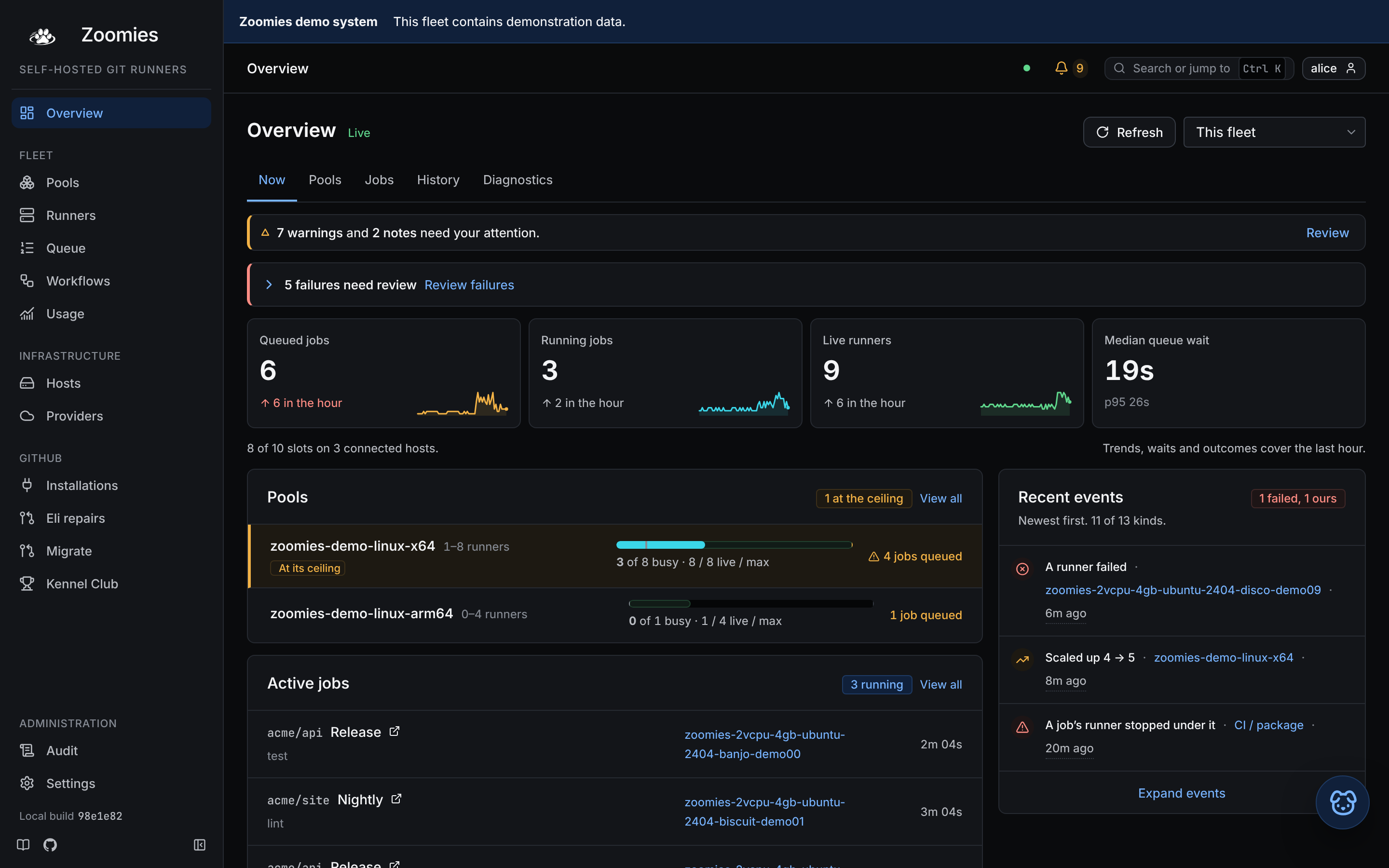
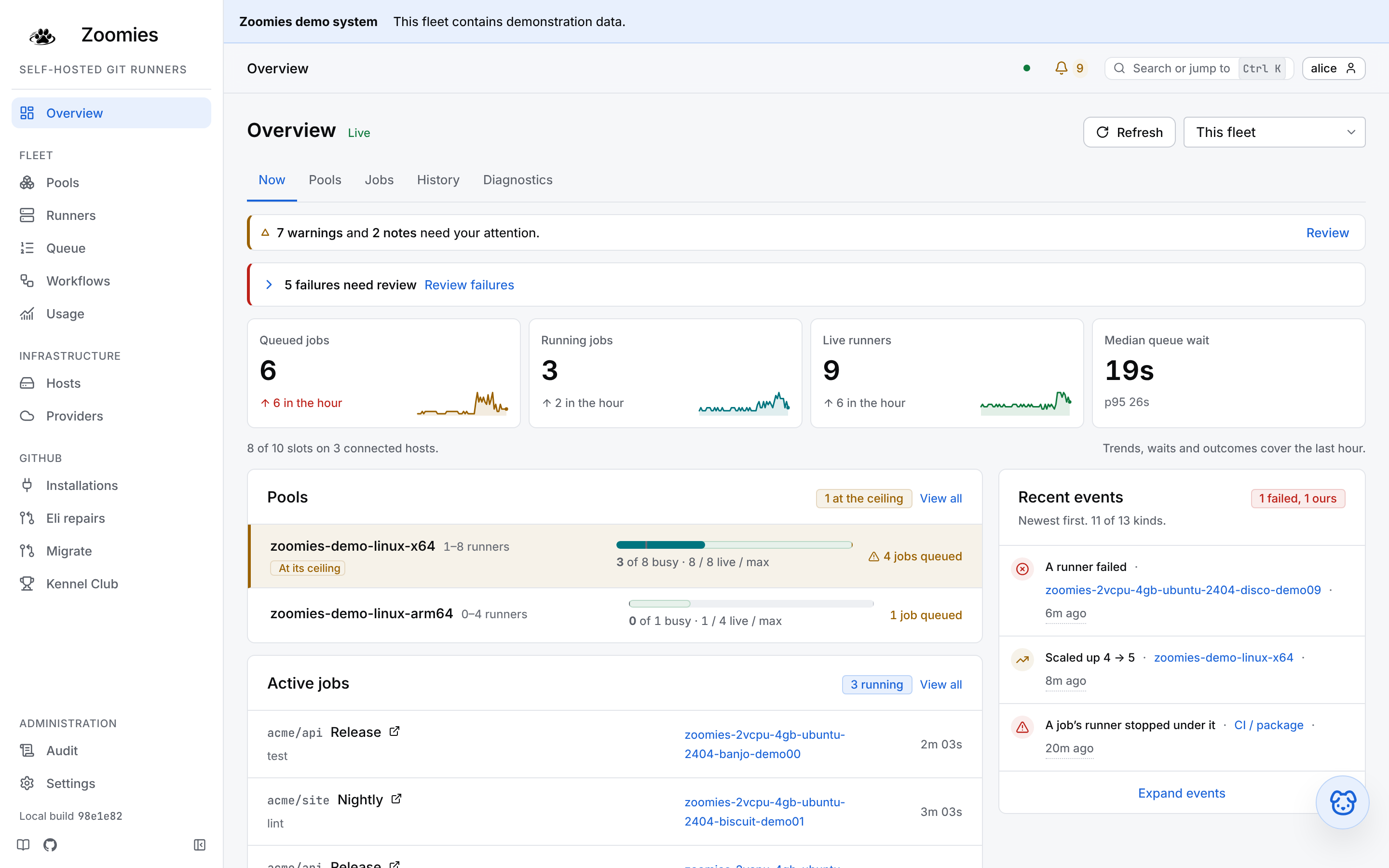
Watch jobs, capacity and scheduler decisions update in place, shown here in the Classic style. Explore the web UI.
Ask your fleet. Understand your builds.
Investigate a failed test, find why a job is waiting, or work out whether a build needs more memory or a smaller runner. Zoomies gives assistants access to the job evidence and fleet measurements behind those questions.
Eli, right where you work
Press Ask Eli on a job, host, pool or problem. With fleet access enabled for your chosen model, Eli can read job history, failure explanations, available runner logs and measured sizing advice, then explain what to try next. Its answer shows what it looked at.
“Why did this job fail, and what should I try next?”
Use a local or hosted model you choose. Explore the built-in fixture provider in the local demo, without an account or API key.
Your assistant, connected over MCP
Bring the same live diagnostics into Claude or another Model Context Protocol client. Compare queue waits, runner sizes and usage; with separately granted AI Context access, read the verified workflow source behind a job.
“Compare this workflow's runner sizes and show the evidence for a better fit.”
Start with read access. Operator connections can also re-run jobs, drain runners and adjust capacity, within the role you grant.
From a failed check to a fix: opt-in Eli PR repairs can investigate failed jobs, publish changes to the existing PR branch and watch GitHub's checks. Choose when repairs run and which provider pays; Eli never merges the PR. Chat itself diagnoses and advises without changing the fleet or repository.
Try Eli in the local demo Troubleshoot jobs and improve builds
What you get
See why a job is waiting
Fourteen pages, one job each: live jobs, runner logs, host health, queue waits and scheduler reasons. Tour the UI or diagnose a queued job.
A fresh runner per job
Ephemeral container runners take one job, then their containers and workspaces are removed. GitHub App authentication supplies single-use registrations. Understand the boundaries.
Scale across your machines
Pools define labels, runner sizes and limits. Agents contribute capacity from eligible hosts and connect outbound to the controller. Hosts and pools.
Use spare resources
Optional elastic CPU lends spare CPU to busy runners. Elastic memory can raise a memory limit when there is headroom. Observe first, then tune from measurements.
Keep useful build caches
Optional host-local caches preserve selected downloads and build data outside the disposable workspace. Add a cache with a workflow recipe that also works on a cache miss.
Operate through open interfaces
Use the CLI, API, Prometheus metrics and backup tools alongside the UI. Keep the database and its matching encryption key recoverable.
How it works
Connect a GitHub App to your organisation or to a repository on your personal account. A pool advertises the runner label your workflow requests. Zoomies sees queued work through webhooks, with polling as a fallback, and provisions capacity on a host that can run it. GitHub assigns the job to the runner.
flowchart LR
    q["GitHub job queued<br/>webhook or fallback poll"]
    p["Controller matches a pool<br/>and chooses an eligible host"]
    r["Agent starts a fresh runner<br/>GitHub assigns the job"]
    e["Job finishes<br/>ephemeral runner is removed"]
    q --> p --> r --> e
The fundamentals explain labels and capacity. Architecture follows the complete lifecycle.
Your home lab belongs in the pack.
Built-in Tailcat connections bring private home and office hosts into the same fleet as your cloud machines, without a public host IP, router port forwarding, Tailscale account or separate tunnel installation. Choose Private connection · Tailcat in Hosts → Add a host, then run the command on that machine.
Connect a private host Plan a home-lab fleet
From a fresh host to a running fleet
The quick start takes you through five steps: install, choose native or container deployment, connect GitHub, create a pool and run a test workflow. Native setup completes in the terminal; container deployments finish account, App and pool setup in the browser. Use the label printed by your pool, then watch the job complete and its ephemeral runner be removed.
Keep the first setup small: one host, one pool and a workflow you trust. Caches, resource elasticity and automatic pools can follow once that works.
Run it from the browser. Reach it from anywhere.
| Your task | Documentation |
|---|---|
| Learn and install | Start here, fundamentals, quick start |
| Run the fleet day to day | Web UI, hosts and pools, troubleshooting |
| Deploy from files or a platform | Docker Compose, PaaS, marketplace deployment |
| Scale, tune and recover | Advanced operations, metrics, backup and restore |
| Script or integrate | CLI, API, configuration |
| Investigate jobs or use an assistant | Eli, MCP guide, AI Context, job troubleshooting |
Moving what you have now
From hosted runners: the migration wizard maps supported hosted labels to your pools, shows the diff and can open one pull request per repository. It needs optional repository write permissions. It never merges the pull requests; test one workflow before moving more.
From static self-hosted runners: a pool can advertise the labels your jobs already request, so workflows may need no edits. Check the installation, runner group, platform and toolchain before retiring the old runners. The migration wizard deliberately leaves existing self-hosted jobs alone.
What runs where
| Component | Platforms and boundaries |
|---|---|
| Controller and agents | Linux x86-64 and arm64. The agent also builds for Windows x86-64; macOS builds are useful for controller development. Qualification is described below. |
| Container runners | Ubuntu 24.04, Ubuntu 26.04, Ubuntu 22.04, Debian 12, Debian 13, Fedora 42 and Rocky Linux 9, each for x86-64 and arm64. See the image catalogue. There is no macOS runner image. |
| Backends | Docker, Podman (including rootless), or process. Windows uses process, which runs directly on the host with a fresh work directory and no container isolation. See worked shapes. |
What is qualified
The support matrix separates automated evidence, manual trials and builds. It is the place to check before choosing a platform for important workloads.
Controller, agent, join and real-workload paths are exercised on pull requests with the process backend and a fake GitHub, on amd64 and arm64. Docker is unit-tested against a fake Engine API; this repository also runs its own CI on Zoomies container runners, apart from the arm64 and Windows legs. That is useful operating evidence, with different coverage from a dedicated end-to-end test.
The Windows agent builds and is vetted and unit-tested on a hosted Windows runner. The maintainer reports a real Windows host join and job on 11 October 2026; the written qualification evidence is still pending. Treat that manual trial separately from a qualified support claim.
Why not something else
Zoomies suits teams that own runner hardware or VMs and want ephemeral runners, autoscaling and a web UI without operating Kubernetes. You still own host capacity, patching, network access and recovery.
| Your situation | Read before choosing |
|---|---|
| You already operate Kubernetes and want runners in that cluster | Compared with ARC |
| You want CI capacity without maintaining machines | Compared with runner services |
| You are choosing among VM-based controllers | Alternatives |
| You are unsure the savings justify the work | Should you self-host? and costs |
Zoomies charges no platform fee. Machines, storage, electricity and operator time still count; costs records the pricing assumptions and links to GitHub's current billing guidance.
A word about self-hosted runners
Start with workflows you trust. Ephemeral containers reduce leftover job state, but share the host kernel; they are not a VM per job. The process backend runs on the host itself. Optional Docker access and shared caches change the boundaries further. Read security before running untrusted pull requests or changing isolation settings.

Give your CI the Zoomies.
Explore the demo, run your first trusted job, then grow at your own pace. The documentation takes you from the basics to operating a fleet.