Hosts and pools
New to the terminology? The fundamentals explain hosts, pools, workflow labels and capacity with one complete test workflow.
| Your task | Jump to |
|---|---|
| Join a machine | Adding a host |
| Create a runner recipe | Adding a pool |
| Set runner size and concurrency | How big a runner is |
| Explain placement or a pool with no eligible host | How a runner is placed |
| Choose a platform or topology | Worked shapes |
Adding a home-lab or private host? Choose Private connection · Tailcat in Add a host for built-in encrypted connectivity without public host IPs or port forwarding. Private host setup and how it works.
The quick start leaves you with one host and one pool, which is a whole working fleet. This page is the next step: a second machine, a second pool, and the rules that decide which runner lands where.
Two things make up a fleet, and they are deliberately separate:
- A host is a machine an agent runs on. It contributes capacity, the backends it can actually service, and labels describing what it is.
- A pool is a named group of interchangeable runners: which labels a workflow must ask for, what image and backend to build them from, and how many may exist.
Neither owns the other. A pool can be placed on any host that suits it, and a host can carry runners from every pool at once. That is what lets you add a machine without touching a pool, and add a pool without touching a machine.
Adding a host
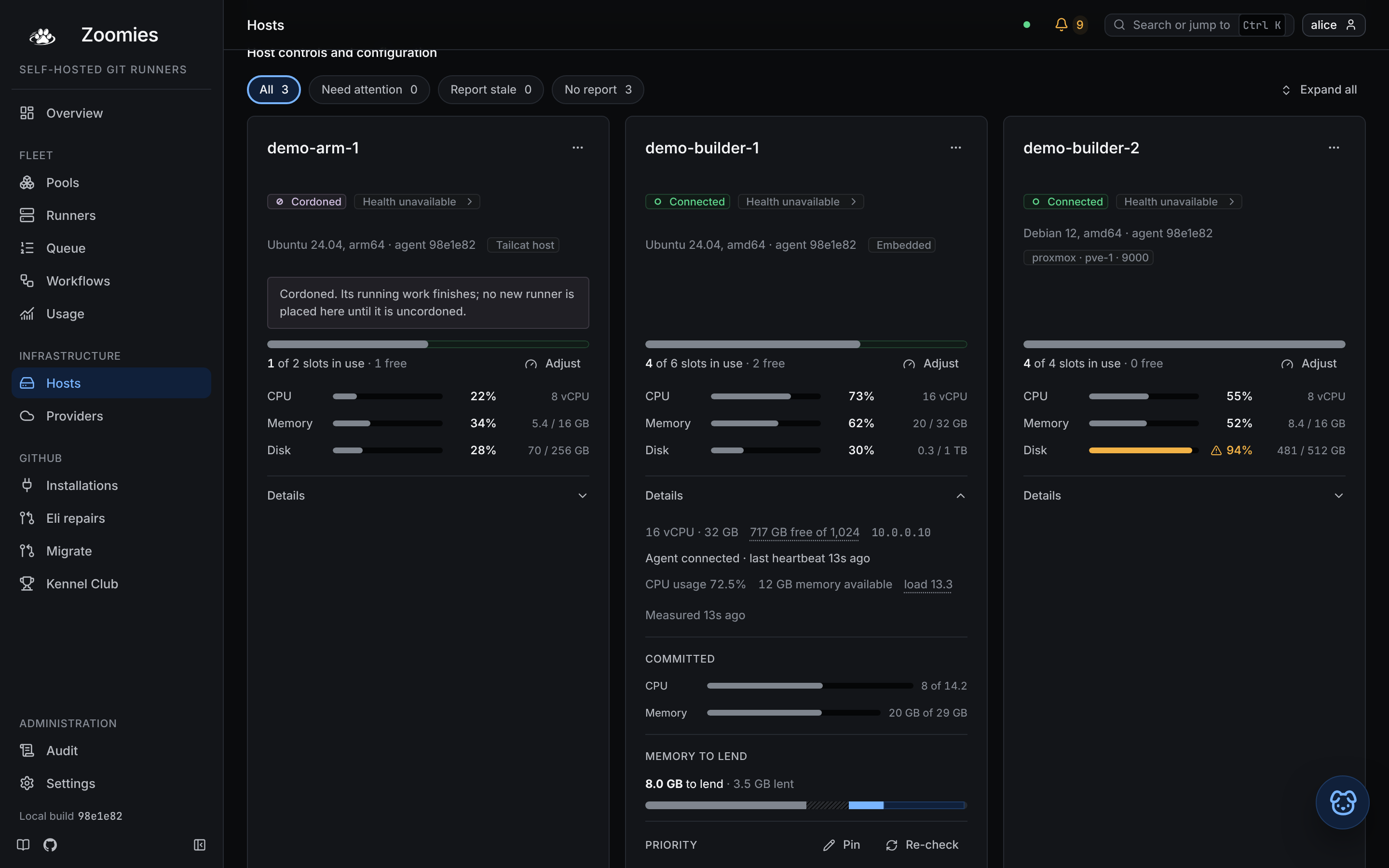
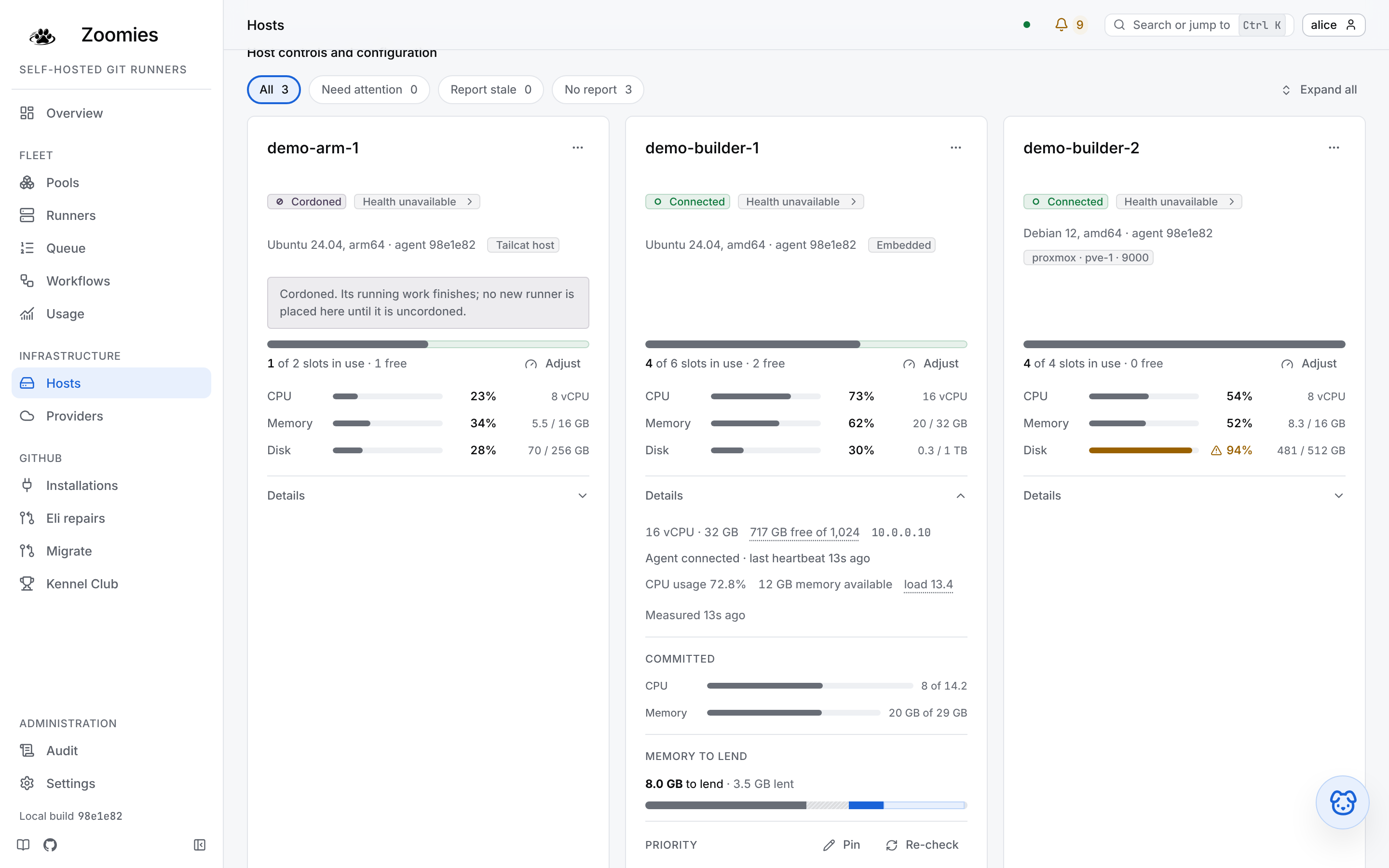
Hosts → Add a host in the UI does the whole thing on one page: it mints a join token and prints the command to paste on the new machine, already filled in with the address your browser reached the controller on and the labels your pools select hosts by. From a terminal, the same token comes from the CLI:
It prints the command to run on the new host, the token, and when it expires. The token is shown once, only its hash is stored, and it may be redeemed once.
On the new machine, either install and join in one line:
curl -fsSL https://zoomies.sh/install.sh | sh -s -- \
  --mode agent \
  --controller https://zoomies.example.com \
  --join-token zoojoin_...
or, if the binary is already there, join with the shorter form:
zoomies agent join https://zoomies.example.com --token zoojoin_... \
  --capacity 8 --labels gpu=true,zone=eu-west
join redeems the token, writes the credentials, and installs the service that
keeps the host enrolled; --no-service joins without one. On a systemd host
the service needs root, so run the shorter form with sudo, without it the
command stops before the token is redeemed, rather than spending a single-use
token and then failing at the unit file. A private controller
takes --ca-file, prefer it over --insecure, which trusts anything on the
path.
The agent connects outbound only, both to long-poll for tasks and to post results back, so a host behind NAT or a strict firewall needs no inbound rule. See Architecture for why the connection runs that way round.
An agent in a container
A host that would rather not have a binary installed on it can run
ghcr.io/eyupio/zoomies-agent instead. It is the same build as the controller
image, with the agent as its command rather than the controller, and it needs
the container runtime's socket bind-mounted so the runners it starts are
siblings on the host rather than containers inside it.
zoomies init does not set this up for you: a runner host it installs is a
native one, whatever --deployment says, because the join it performs writes
this host's credentials to the state directory and the binary reads them from
there at every start. A container joins itself instead, on its first start, so
the file is yours to write:
services:
  zoomies-agent:
    image: ghcr.io/eyupio/zoomies-agent:v1.2.3
    restart: unless-stopped
    environment:
      ZOOMIES_CONTROLLER_URL: https://zoomies.example.com
      # Single-use, and spent on the first start: it is exchanged for a lasting
      # credential written into the volume below, which every later start reads
      # instead. Mint one under Hosts -> Add a host.
      ZOOMIES_JOIN_TOKEN: zoojoin_...
      # Say who this host is. The name is otherwise derived from the machine and
      # the container's hostname, and that hostname is identical on every
      # machine running this file -- so two hosts of the same shape would
      # compute one name, and the second one's join would be refused.
      ZOOMIES_AGENT_NAME: ollama1
      ZOOMIES_STATE_DIR: /var/lib/zoomies
      ZOOMIES_WORK_DIR: /var/lib/zoomies/work
      ZOOMIES_DOCKER_HOST: unix:///var/run/docker.sock
    # The image runs as an unprivileged account that is not on this host, so it
    # is given the group that owns the socket rather than joined to one. Use
    # your own: `stat -c %g /var/run/docker.sock`.
    group_add:
      - "998"
    volumes:
      - zoomies-agent-data:/var/lib/zoomies
      # Zoomies' own access to the runtime, which is what lets the runners it
      # starts be siblings of this container rather than containers inside it.
      # It is not handed to the jobs themselves.
      - /var/run/docker.sock:/var/run/docker.sock

volumes:
  zoomies-agent-data:
The volume is the part worth keeping. It holds the credential the join token was exchanged for, and losing it means minting another token and joining again.
Give it the same tag as the controller where you can: a fleet on v1.2.3
wants ghcr.io/eyupio/zoomies-agent:v1.2.3, one tracking main wants :dev on
both. Which image tag to run has the full
table.
That is a preference rather than a requirement, and Version skew is where the rules live: an agent may lag its controller by releases while the protocol version matches, which is the normal state during a rolling upgrade. The direction to avoid is a newer agent against an older controller, upgrade the controller first.
A host whose owner installed the update helper can be brought to its
controller's release from the web UI instead, when updates.mode is manual
or auto, and never past it: see
Updating from the web UI.
What an older agent costs is description rather than placement. A host on a
build from before agents measured themselves reports no CPUs, memory or disk at
all, so a pool's resource limits have nothing to fit against and the Hosts page
shows it as a different build. Only a protocol mismatch stops work reaching
a host, and then it is excluded from placement exactly as a cordon excludes it
and says incompatible on its card.
The Disk bar on a host's card is the filesystem holding the work directory, the one the host health disk.space check reads. The card follows each heartbeat and the check runs about once a minute, and the bar turns amber by the check's rule (under 10% or under 10 GiB free). Under Details, the figure in gigabytes links to that check.
A host in WSL2
A Windows desktop can be a host through a WSL2 distro, with the Docker or
Podman backend inside it. It stays enrolled only while the agent runs, and a
distro does not start with systemd by default, so agent join finds no service
manager, tells you to start the agent yourself, and that process ends when its
terminal closes.
Turning systemd on is optional, and it is what keeps the agent running. Add this
to /etc/wsl.conf in the distro:
Then run wsl --shutdown from Windows, reopen the distro and join again with
sudo zoomies agent join ... --token zoojoin_..., using a new token. The join
installs the zoomies-agent service as on any systemd host, so the agent starts
whenever the distro does. Joining again replaces the host's credentials and
leaves the earlier record on the controller as an offline host until you remove
it.
zoomies upgrade notices the same situation: on a WSL distro without systemd
it finds no service to restart, says so, and offers to write systemd=true
into /etc/wsl.conf (it keeps the old file as wsl.conf.zoomies-bak, and
--yes accepts the offer in advance; --check changes nothing). It cannot
restart the distro for you, so it ends by telling you to run wsl --shutdown.
WSL stops a distro when the last Windows session attached to it closes,
whatever is running inside, so an agent that is a systemd service still goes
away when the terminal that first started the distro is closed, and nothing
starts it again after a reboot. The agent looks after this itself when it finds
it is in WSL2 (WSL_DISTRO_NAME, or microsoft-standard-WSL2 in
/proc/version), and logs that it did:
- A session held open. The agent starts
wsl.exe -d <distro> --exec sleep
  infinity
through Windows interop and keeps it for as long as it lives. The process is left running when the agent stops, so restarting or updating the agent never lets the distro go down under a job, and the next agent adopts it. - systemd linger for the account the agent runs as.
- Start at boot.
boot.commandin/etc/wsl.confrunszoomies agent --wsl-ensurewhen the distro starts (a command you already had there is kept, and ours is chained after it), and two Windows scheduled tasks start the distro if it is not running:Zoomies\WslOnStartat startup andZoomies\WslEvery5Minutes. Both run a small script under%LOCALAPPDATA%\Zoomiesthat checkswsl -l --runningfirst.
zoomies init, zoomies upgrade and zoomies agent join notice a WSL2 distro
and offer all of this, listing what is missing and asking before anything is
written (--yes answers for you, zoomies upgrade --check only describes it,
and with no terminal and no --yes it is left undone and says so). They say
nothing once everything is in place.
Run sudo zoomies agent --wsl-ensure yourself to see what is in place and what
is not. It is safe to repeat, changes nothing that is already right, restarts no
service and ends no process, so it cannot interrupt a job. Whatever it cannot do
is printed as a warning and the exit status stays 0. It never asks for a
password: writing /etc/wsl.conf needs root, and an ONSTART task needs an
elevated Windows session, so without those it says so and carries on with the
rest (the five-minute task runs as you, and only while you are signed in).
zoomies agent join runs the same step as root.
When a host goes away, the controller fails its runners after five minutes and removes their GitHub registrations. A registration GitHub still reports as busy is not forced: its removal is deferred until GitHub reports it idle or absent.
What a host brings with it
| What | Where it comes from | Why it matters |
|---|---|---|
| Capacity | agent.capacity, --capacity, or half the CPU count |
A hard ceiling the scheduler respects, per host, and, with default limits on, what one slot's share of the machine is divided by. |
| Backends | Probed by the agent at startup, and again as sockets appear | A pool is only placed on a host that offers its backend. |
| Labels | agent.labels or --labels |
What a pool's host_selector matches against. |
| OS, arch, version | The agent | Shown in Hosts. A pool's host_selector can match os and arch directly, so keeping work on arm64 needs no labelling at all. |
| Health | A heartbeat every agent.heartbeat_interval |
A host silent for 90 seconds, three times the default interval, is unhealthy, and takes no new runners until it checks in again. After five minutes of silence it is presumed gone: the runners still recorded on it are failed so the pool can replace them, and a job one of them was running is marked as lost by the fleet. |
A host that offers no backend is connected and useless: nothing will
ever be scheduled on it. zoomies hosts list says so rather than printing a
dash, and repeats the agent's own explanation for each backend it could not
use, usually a Docker socket that is not readable by the account the agent runs
as. Configuration covers that diagnosis.
The controller itself counts as a host. On a single-VM install the controller runs an agent inside its own process, which is why the fleet works before you have added anything.
Updating a host's agent
A remote host's card has an Update button for an administrator, and so does the host's own page. It is offered when all of these are true:
- The update helper is installed on that host (
sudo zoomies updates helper
  install
there), so its agent reports that it can update itself. - The host is behind the controller's release, and the controller was built from a release.
updates.modeismanualorauto. Withoffthe button cannot be pressed, the card says that updating is off and which setting turns it on, and every request is refused and says so.
Pressing it asks you to confirm, naming the host and the release it will be taken to. The controller then asks the agent on its next poll (it never dials a host), and the helper on the host runs the same upgrade the card's command runs. The agent restarts, and the jobs that are running keep running: their runners stay in place and the new agent takes them over. The restart does not wait for them to finish.
The card says Updating until the host reports the controller's release, and
says Updated only then, never because the request was accepted. It is read
from the controller on every load, so an update in flight is still shown after a
reload. An update that fails, or that nothing answers within 90 minutes, says so
on the card, shows the helper's sentence to the platform role (every other
role reads a fixed sentence), and can be tried again; it raises
host.update_failed in the problems list, which opens the host.
When the button is not offered, the card says why in a sentence: the agent does not offer to update itself, or the build cannot be ordered against a release. Where the update helper can never be installed on the host (it is not Linux, systemd does not run it, or its agent runs in a container under a rootless runtime), the card says Update by command and which of those it is, draws no button and suggests no install: the command beneath it is the way. A host that matches the controller has no row at all. The agent inside the controller is updated with the controller, from Settings → Updates. On the card of a remote host whose release differs from the controller's (or whose agent speaks a protocol the controller cannot work with), the copyable command is at the foot, beneath the row, in a folded Update this agent section, for an operator to run on the host whatever the button does. The row is for administrators, so an operator who is not one sees the section alone, and the host's own page has the row and not the command. Where no command can work (an agent newer than the controller, a machine Zoomies rents, or a controller built from no release) the section is called Agent version guidance and holds only the sentence that says what to do.
Priority among hosts
When the fleet has a runner to start and several hosts that could take it,
placement prefers the bigger, faster machine. Every host is scored out of 100
from what its agent reports: more CPUs score higher, a faster CPU clock (the
figure cpufreq carries), more and faster memory (the rate the machine's DMI
table gives), and more disk that does not spin (ssd rather than hdd). An
axis a host cannot measure is left out rather than scored last, so an agent too
old to report a clock does not lose to one that can; a host that reports no size
at all scores 0 and is placed by headroom exactly as it always was.
The score is the number on the host's card (Priority, under Details), and the reason
beneath it says what it was computed from. A pool that keeps warm runners also
stands them up through this ranking, so the fleet's fastest machine fills before
a slower one is touched. Among hosts that score the same, scheduler.host_order
still decides: headroom spreads work, largest_standard goes where the big
runners are, best_fit packs.
An operator can pin a host to their own number on the same scale (0 keeps it for
last, 100 asks for it first) from the Priority control under the card's Details or a PATCH
to /api/v1/hosts/{id}; the pin outranks the specs and survives a re-join,
like the labels. Clearing it hands the ranking back to the machine.
After an upgrade the host re-measures itself: the agent runs its detection on every heartbeat, so the new figures (and the new score) arrive on their own, and the card's Re-check button forces the frame and the scheduling pass to settle now.
Living with more than one host
zoomies hosts list                  # state, OS health, free capacity, backends, platform
zoomies hosts cordon host_k3f9qz2m  # keep its runners, accept no new ones
zoomies hosts uncordon host_k3f9qz2m
zoomies hosts delete host_k3f9qz2m  # refused while runners are still on it
Cordon before maintenance. A cordoned host keeps everything it is already
running (no job is ever interrupted by a cordon) and accepts nothing new. Once
nothing on it is running a job (a runner kept warm for a pool never finishes by
itself, so look at which are busy), reboot the machine, upgrade Docker, do
whatever you came to do, then uncordon it. The scheduler says cordoned in its
reasons while that is true, so the pause is visible rather than mysterious. An
operator can also do it from the host's own page, whose Next step panel
offers Cordon this host and Uncordon this host and says when the host is
idle and cordoned. The panel is there when the host has an OS finding or a
pending reboot, or is already cordoned (see host health); on a
clean host, cordon it from its card's menu or with zoomies hosts cordon.
Delete only a host that is gone for good. delete is refused while live
runners remain; --force deletes anyway and leaves their GitHub registrations
orphaned, which is the right trade only when the machine itself has gone away.
Capacity and labels are edited in the UI under Hosts, or with a PATCH to
/api/v1/hosts/{id}, see the API surface.
Relabelling a host changes which pools can select it on the very next scheduler
pass; the runners already on it stay where they are.
Adding a pool
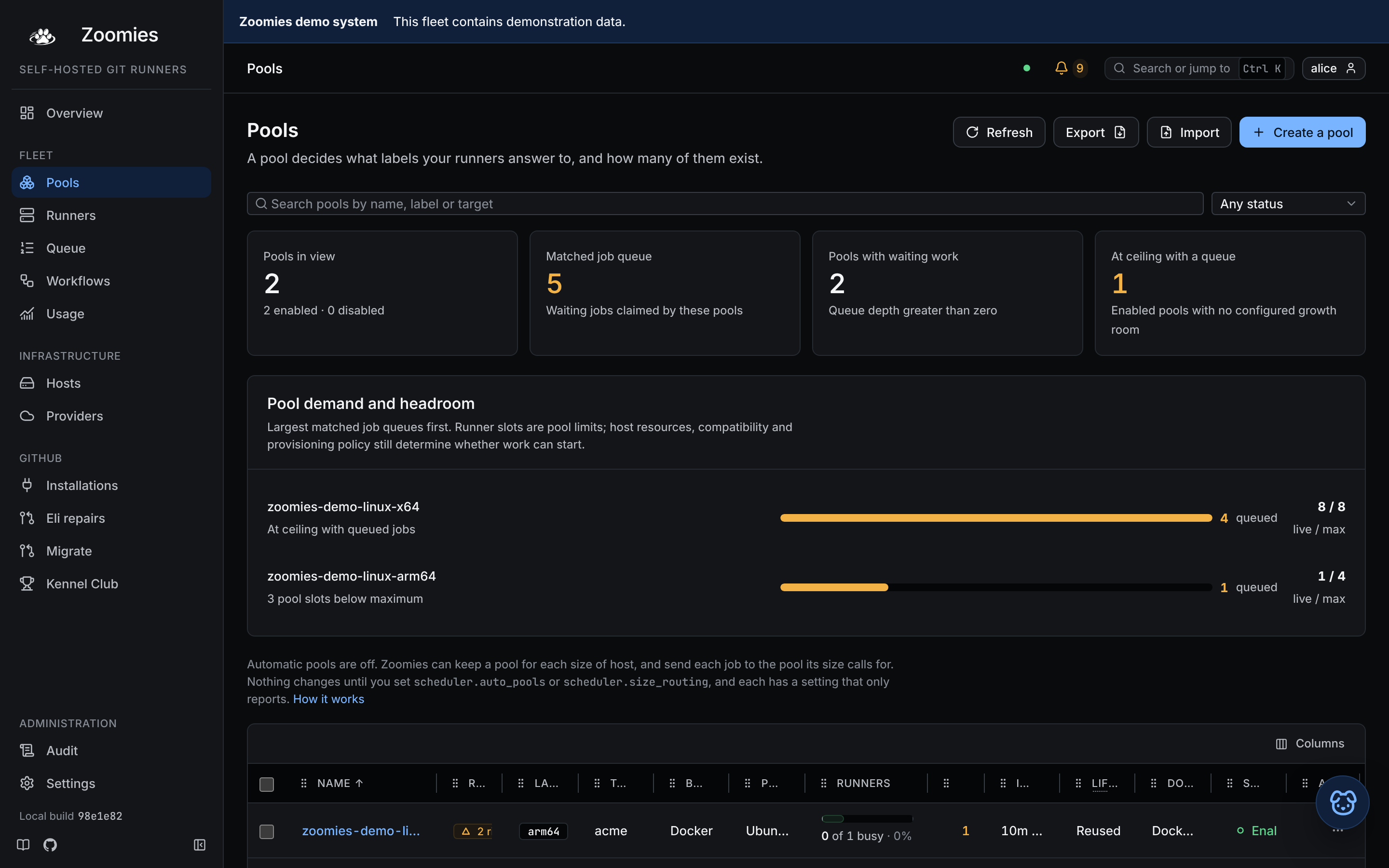
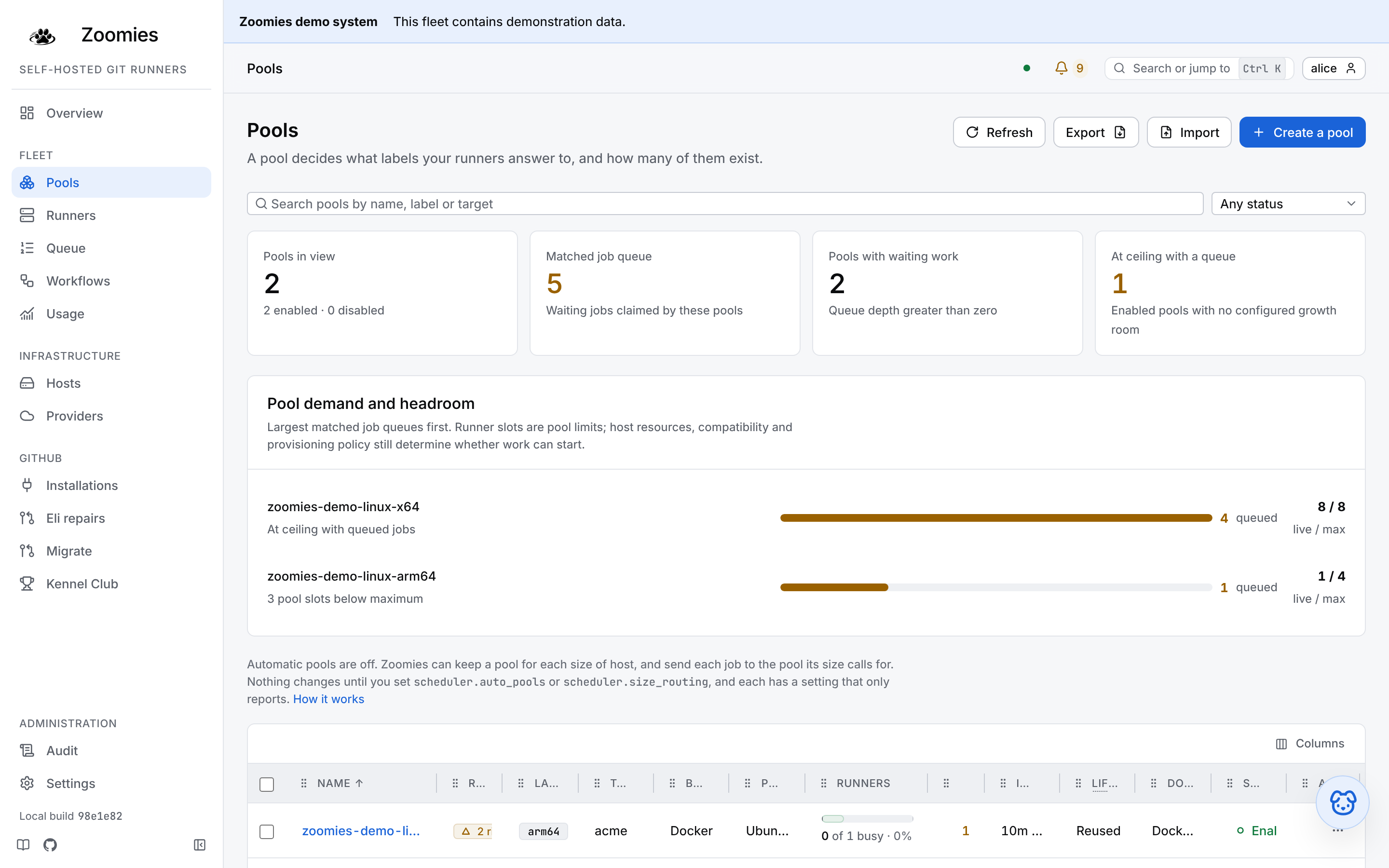
One pool is enough until the fleet has to answer two different questions. Add a second when a job needs something the first cannot give it:
- A different machine. GPU boxes, arm64 builders, a host in another region.
Architecture and operating system need nothing set up,
arch=arm64oros=linuxmatches what the agent already reports. Anything else is a label on the hosts and the same key in the pool'shost_selector. - A different runtime. A pool whose jobs build images needs a
docker_mode, which most pools should not have; asking for one switches the stock runner image to its Docker variant. - A different ceiling. A noisy repository is easier to bound with its own
pool and its own
max_runnersthan with a shared one. - A different priority. When the fleet is full, higher-priority pools receive create slots first. Priority orders the work rather than stopping some of it: once a lower-priority pool's oldest queued job has waited a full scheduler interval, it gets one create in each pass before the higher tier takes the rest, and the higher pool's scaling reason says it was deferred for fairness across priorities.
A fleet of mixed machines can also leave pool-making to the controller: with
scheduler.auto_pools on it keeps one pool for each
architecture and size class among the hosts it has, sized by those hosts, and
never touches a pool you made. See
Size classes and automatic pools.
One page, six sections
Creating a pool and editing one are the same page. It is made of six sections,
each one a decision (Name and labels, Hosts, Runner, Size,
Scaling and Speed-ups) and each is a row that says its current answer
without being opened: One share of each host · elastic CPU observing, 0 to 10
runners · idle 5m. Opening a row shows the controls that change the answer, and
any section is one tap from any other, so there is no order to follow and
nothing to press Next through. A link to one opens it: /pools/new#size.
A new pool opens on the first, which is all most pools need. Name it, label it, say whether its jobs build container images, and create it. Every other setting follows this fleet: each runner is given one slot's share of whichever host it lands on, any host that can run it may, the backend is Docker on the published image for the host's platform, and every timing follows the fleet's own, and keeps following it when you change one. Nothing to revisit when the fleet grows.
The Docker question is there because it is the one thing a fleet cannot work out
for itself: nothing in a name, a label or a host says whether the jobs that will
land here run docker build. Answering yes sets docker_mode: dind, which
gives each runner a private daemon in a privileged container beside it, the
page says so, and the runner image follows automatically, so there is nothing
to pin. Answering no is the default and costs nothing. The host Docker socket,
which hands a job root on the host, is chosen in the Runner section, where
it is confirmed deliberately.
The other five sections are the same pool with the opinions put back: which hosts, a backend and platform chosen by hand, a fixed size on every host, the count and the runner timings this pool disagrees with the fleet about, and scratch space kept in memory and a cache. Each already holds the answer a new pool would have chosen, so you only change what you mean to, and what is rarely changed (the minimum size, the priority and the timings, an image of your own) is behind a row of its own inside the section.
An existing pool opens on none of its sections, so that an operator who came to change one setting reads six lines rather than scrolling a form. A section you have changed is marked Edited, a section with something wrong in it says how many things, and Save changes waits until there is something to save. On a wide screen a rail beside the page lists the sections and jumps to one.
A bar at the bottom says what the controller makes of the pool so far (Room for 10 runners on 2 hosts, or No connected host can run this pool yet) and Create pool is never disabled for a mistake: pressing it while something is wrong opens the first section with a problem and puts the cursor in it.
The CLI takes the same fields, and omitting them is how you ask for the automatic answer:
zoomies pools create \
  --name zoomies-gpu \
  --labels zoomies-gpu \
  --installation ins_k3f9qz2m \
  --host-selector gpu=true \
  --max 4 \
  --dry-run
--dry-run validates exactly as the editor's check against the controller does
(field errors and the dangerous-setting warnings the pool would produce) without
creating anything. Drop the flag to create it for real. Every field is in
Pool settings; the labels to choose are in
The labels to give a pool.
A pool whose image is large is worth prewarming after you create it or point it at a new image, so the first job of the day does not pay for the pull:
That pulls the pool's image on every host the pool could be placed on, and reports what each one did.
Disable rather than delete a pool you may want back: a disabled pool drains
to zero and creates nothing, while its settings and history survive. Deleting
drains its runners first unless you pass --force.
How big a runner is, and how many there are
A pool sizes its runners in one of three ways, and there is no fourth: “no limit at all” is not reachable, because a runner with no cgroup limit takes every core on the machine it lands on while the fleet charges it one slot's share; the host reads as half committed, its daemon stops answering, and the creates queued behind it time out on a machine every page calls busy.
One share of each host is what a pool with no cpus and no memory_mb
means, and it is what a new pool does. The scheduler charges each runner one
slot's share of the machine it is placed on (the machine less its reserve,
divided by the host's capacity) and gives it exactly that share as a real
cgroup limit. The books and the cgroups therefore say the same thing, and they
say it per host: the same pool is 3.8 cores on a 16-core box with four slots
and 7.6 on a 32-core one, so an unequal fleet is sized correctly everywhere
without anybody typing a number. Resize a host, or change its capacity, and the
share moves with it.
That share is handed out by scheduler.default_runner_limits, which is on by
default. With it off, a pool that names no size is charged the share and given
nothing, which is the one shape where “automatic” and “unlimited” are the same
thing, so the controller says so (pool.size_unlimited).
The size each host sets is the third answer, for a fleet whose machines
differ and where the operator, not a slot count, knows how big a runner should
be on each of them. The pool carries size_from_profile instead of a size, and
each runner is given the standard size of the runner
profile of the host it lands
on, or the fleet's default, runners.default_cpus and
runners.default_memory_mb, where a host names none. It is the same pool on
every host and a different runner on each, and it is the one answer where a
host's own figures decide what a runner is.
A fixed size is the two figures on the pool, applied on every host. It is
for a pool whose jobs need a particular amount of machine wherever they run,
and it is the right answer less often than it looks: a figure chosen for the
first host fits four runners on the 64-core one that joins later, and the
controller names that when it happens (pool.size_strands_hosts). The editor's
sliders open on runners.default_cpus and runners.default_memory_mb (two
cores and four gigabytes out of the box) so a fleet of small boxes or of
compilers says so once rather than on every pool.
A pool's minimum (the least a runner will take when no host has room for
its standard) works the other way. Left empty, it follows the fleet's
runners.minimum_cpus and runners.minimum_memory_mb live, so changing those
moves every pool that set none of its own on the next pass; the pool's page
marks such a minimum (fleet default). A figure typed on the pool wins on its
field. There is no per-pool "none" while the fleet sets a minimum: a pool that
must not be reduced gives its own figure instead. See
runners.minimum_cpus.
Disk and the process limit are independent of the choice. Neither has a share to be given (free disk is a measurement rather than a budget) so a pool may cap its cache's disk and still leave its size to the host.
In the editor the size is a section of its own, after the hosts and before the count, because that is the order the decision is made in: these are the machines, this is what one runner costs on them, and therefore this is how many there can be. Beneath the choice the controller counts what the hosts this pool reaches can actually hold, host by host:
- A host that promises more slots than its machine can back at this size is
named, and its capacity can be set to what fits in one click
(
pool.host_overcommitted). The slots above what fits are counted as free capacity everywhere they appear, and every create for one of them is refused for want of cores or memory. - A maximum above what the fleet can place is named too
(
pool.max_above_room), with the room offered as the maximum. It is not wrong (the maximum is a backstop rather than a target) but the runners above the room are runners the scheduler will never create, and the jobs that ask for them wait with nothing else saying why. - While a new pool's maximum has not been typed over, it follows that room, so choosing bigger runners or fewer hosts lowers the cap in front of you. The cap is still stored as a figure: one that silently grew with the fleet would be a cap nobody chose, and its whole job is to stop one misconfigured workflow filling every machine you have, and every machine the provider loop would rent behind them.
The cache size limit is a slider on the same step and is checked the same way,
against the free disk on the smallest host the pool reaches
(pool.cache_above_disk). The limit is kept by evicting whole entries between
one runner and the next, so a limit above the free space is not a limit at all:
the disk fills first, and a host at or below its disk reserve takes no runner
of any pool.
Runner profiles: how big a runner is on one host
A fleet of identical machines needs nothing beyond the share above. A fleet with a twelve-core machine beside two four-core ones does: the size that suits the large host is too much for the small ones, and the share is only as good as the capacity somebody typed for each. A runner profile is what an operator says about one host instead (how big a runner is there, and the least it may be) and the scheduler places by it.
A profile has two tiers and a policy, every field is optional, and a field left out follows the fleet's own setting. A host that has never been given one behaves exactly as it did before profiles existed: nothing changes on any host until somebody writes one.
| Field | What it says | Left out, it follows |
|---|---|---|
minimum.cpus, minimum.memory_mb |
The least a runner is given on this host. | runners.minimum_cpus and runners.minimum_memory_mb |
standard.cpus, standard.memory_mb |
The size of one runner here, for a pool that takes its size from the host. It is also what decides how many runners the host takes. | runners.default_cpus and runners.default_memory_mb |
standard.burst_max_cpus |
The most CPU one runner here may use, its own share and any CPU lent to it together. | no ceiling of the host's |
standard.burst_max_memory_mb |
The most memory one runner here may hold, its own share and any memory lent to it together. | no ceiling of the host's |
tmpfs.disabled, tmpfs.max_mb |
Whether pools may keep a runner's folders in memory on this host, and the most any one folder may be. | each pool's own setting |
A profile is set from the host's menu on Hosts (Set runner sizes), with
zoomies hosts edit, or with runner_profile on PATCH /api/v1/hosts/{id},
which replaces the whole profile, {} clears it. The dialog shows what each
empty field follows, says how many runners the figures give the host before
anything is saved, and refuses a figure the machine could never hold.
Slots follow the standard. A host with a standard size takes as many runners
of it as its allocatable machine holds (the machine less its reserve, divided
by the standard on each of CPU and memory, the smaller count winning) and never
more than its capacity. Capacity becomes the operator's ceiling on that count
rather than the count itself: a host that holds three runners and has a capacity
of eight takes three, and one that holds eight with a capacity of two takes two.
The host's card says which of the two it is, under the slot bar (slots_limited_by on the API is
cpu, memory or capacity). A capacity of zero still takes nothing, because
that is how a host is paused and a size must never un-pause one, and a host that
has not reported its machine is counted by its capacity alone until it does.
Pools sized by a share divide the machine by these slots too, so a share on the
host above is 3.8 cores, not the 1.4 its capacity of eight would have given.
A floor and a ceiling meet the pool's. What a runner is given on a host is worked out from both sides, and neither side's explicit figure is changed by the other:
- The floor is the larger of the pool's minimum (its own, or the fleet's where it follows it) and the host's.
- The ceiling is the smaller of the pool's
cpu_burst.max_cpusand the host'sburst_max_cpus. An unset side does not count, so a pool with a ceiling and a host with none keeps the pool's. Whoever owns the machine has the last word on how much of it one job may take, so the host's can lower the pool's and never raise it. The memory ceiling is the same rule: the smaller of the pool'smemory_burst.max_memory_mband the host'sburst_max_memory_mb. - A pool that states a size,
cpusandmemory_mb, is never given more than it states. A host whose minimum is above that size is not used for the pool at all, and says so, rather than building a bigger runner than the pool asked for. - A pool that takes its size from the host is never given less than its own floor. A host whose standard is below that floor is not used for the pool.
- A pool sized by a share is in neither case: its runner is the share, and a floor above the share raises it, as a minimum always has.
A host left out is named with the limit that did it, in the same words on the
pool's page, in the pool editor's count and in the refusal of a host edit that
would cause it: its standard runner is 1.5 CPU, below this pool's minimum of
3 CPU -- give the host a standard runner of at least that, or lower the
minimum. A host edit that would leave a pool with nowhere to run is refused
like any other (neither half is edited alone),
and a pool that no host's profile lets run is raised as
pool.no_eligible_host, because the pool looks healthy and starts nothing.
A throttle does not go below the minimum. When host pressure steps a host's runners down, a host with a minimum stops the CPU part of the step where the smallest limited runner on it reaches that minimum, and the slot part of the step goes on. A throttle exists to stop a host being overwhelmed and a minimum to stop a runner being too small to be of use; a runner throttled below the size its host says is the least it may have is the second failure bought with the first. The larger runners on the host are throttled a little less than the ladder alone would have done, which is the safe direction.
Which host a runner prefers is scheduler.host_order. headroom, the
default, picks the host with the most CPU and memory left afterwards, which
spreads work and is what the fleet has always done. largest_standard picks the
host where this pool's runner is biggest, which suits a fleet sized by profile:
a job that can use three cores goes to the host that gives it three before the
one that gives it one and a half. best_fit picks the one with the least left,
filling one host before starting the next. The setting only ever chooses among
hosts that already fit, so it moves where runners go and never whether they
start.
A mixed fleet
One 12-CPU, 32 GB machine and two 4-CPU, 16 GB ones. After the reserve the large host has 11.4 CPUs and about 30 GB to place runners on, and each small one 3.5 CPUs and about 15 GB. The operator gives each a profile:
zoomies hosts edit hst_big    --standard-cpus 3   --standard-memory-mb 8192 --min-cpus 2
zoomies hosts edit hst_small1 --standard-cpus 1.5 --standard-memory-mb 4096
zoomies hosts edit hst_small2 --standard-cpus 1.5 --standard-memory-mb 4096
The large host holds three runners of 3 CPU and 8 GB (11.4 CPUs is three threes, and 30 GB is three eights) and its cores run out first. Each small host holds two runners of 1.5 CPU and 4 GB: 3.5 CPUs is two of them with half a core over. That is seven slots between the three machines, where a capacity of eight on each would have promised twenty-four. Three pools then use them:
| Pool | How its runner is sized | big |
each small |
Room |
|---|---|---|---|---|
zoomies-ci |
the host's standard, no minimum | 3 CPU · 8 GB, three runners | 1.5 CPU · 4 GB, two runners | 7 |
zoomies-build, minimum 3 CPU |
the host's standard | 3 CPU · 8 GB, three runners | kept off: its standard of 1.5 CPU is below the pool's minimum of 3 CPU | 3 |
zoomies-lint, states 1 CPU and 2 GB |
stated by the pool | kept off: the host's minimum of 2 CPU is above the 1 CPU it states | 1 CPU · 2 GB, two runners | 4 |
zoomies-ci is the same pool on all three machines and a different runner on
each. zoomies-build needs a runner of at least 3 CPU, so only the large host
can run it, and the small ones are named as excluded rather than left to look
like a quiet fleet. zoomies-lint states a small size and the large host's
minimum would have made it bigger, so the large host is kept for work that needs
it and the lint jobs go to the small ones, which is what the host's minimum is
for. Creating the first pool and the third is:
zoomies pools create --name zoomies-ci --labels zoomies-ci \
  --installation ins_k3f9qz2m --size-from-host --max 7
zoomies pools create --name zoomies-lint --labels zoomies-lint \
  --installation ins_k3f9qz2m --cpus 1 --memory-mb 2048 --max 4
Seeing it
Every figure says whose it is (the pool's, the host's or the fleet's) so an operator told a runner is 3 CPU knows which setting to change to move it:
- A host's card lists its runner sizes, under Details, with where each came from, and says what its slots are limited by when a standard made them so.
- A pool's page has a Size on each host panel, for operators, and only where a size is somebody's choice per host: a pool that takes its size from its hosts, or a fleet where some host has a profile. The pool editor's size section shows the same count while a pool is being made: what a runner is on each host, the floor and ceiling the host puts on it, and each host that is kept off with the reason.
- A job records the CPU and memory of the runner that took it, and where that
size came from (
granted_cpus,granted_memory_mbandgranted_sourceon the API), when it took it. Moving a profile later does not rewrite what an earlier job ran on, which is what makes "it ran out of memory" answerable against what the runner was given.zoomies jobs stats --group-by sizecompares jobs by it. zoomies hosts listandzoomies hosts editsay what a host's profile is and what slots it gives, andzoomies pools getsays where a pool's size comes from.
A host's profile is applied by the controller when it creates a runner and is sent to the agent as the size the runner was given, so no agent needs upgrading, and a runner already running keeps the size it was created with: a profile changed today moves the runners created after it.
Runner settings a pool can override
Every timing that shapes a runner's life is a fleet-wide setting, and a pool follows the fleet on all of them until it says otherwise. A pool that overrides one keeps following the fleet on the rest, and a setting left alone keeps following it after you change the fleet's own figure, which a value copied onto the pool at creation would not.
| Setting | Overrides | Zero means |
|---|---|---|
provision_timeout |
scheduler.provision_timeout |
Never give up on a runner that is still starting |
drain_timeout |
scheduler.drain_timeout |
Leave a drain unbounded |
max_runner_lifetime |
scheduler.max_runner_lifetime |
Let a runner live until something else removes it |
scale_up_delay |
scheduler.scale_up_delay |
Scale the moment a job is queued |
docker_wait |
runners.docker_wait |
Leave the runner image's own wait in place |
Zero is an answer in each of them rather than an absence, which is why the API
distinguishes an absent field from an explicit null: absent leaves what the
pool had, null hands the setting back to the fleet, and a duration sets it.
The pool that needs these is usually the one whose images are large. A pool pulling twelve gigabytes of Windows and a pool booting Alpine do not agree about how long registering should take, and a fleet that has to pick one picks the slower, which leaves the fast pool holding a dead runner's slot for ten minutes.
Clearing an override is the empty string, which is how the CLI says null:
max_creates_per_tick is deliberately not overridable. It is a fleet-wide
budget shared between pools, so a pool that could raise its own share of it
would be taking the protection from the others.
One relationship is worth knowing before you set a provision timeout. A runner's
start is bounded three times over, and the provision timeout is the only one
that gives up: the agent allows itself fifteen minutes for the create, and a
pool that provides Docker then waits for that daemon before it registers. A
provision timeout inside those two fails runners that are still coming up, and
the replacement pulls the same image over the link that was slow to begin with.
The fleet's own defaults are held in the right order by a test and by
the validator; a pool that overrides either half is held by
pool.provision_timeout_short, which the editor also says while the number is
being chosen.
Keeping the work folder in memory
A runner's work folder (the checkout, build output, the runner's own temporary
files) normally lives on its container's writable layer, which is on the host's
Docker data root. On a host with slow disks and memory to spare that layer is
where every checkout, install and build waits. A pool can keep the folder in
memory instead: a tmpfs mounted over _work, gone when the runner is. How much
that is worth depends on how much of a job is spent writing files, and on how
slow the disk is; on a saturated disk the difference in raw write speed is
orders of magnitude, and the difference in a real build is whatever share of it
was waiting. Measure one workflow before and after rather than trusting a
benchmark.
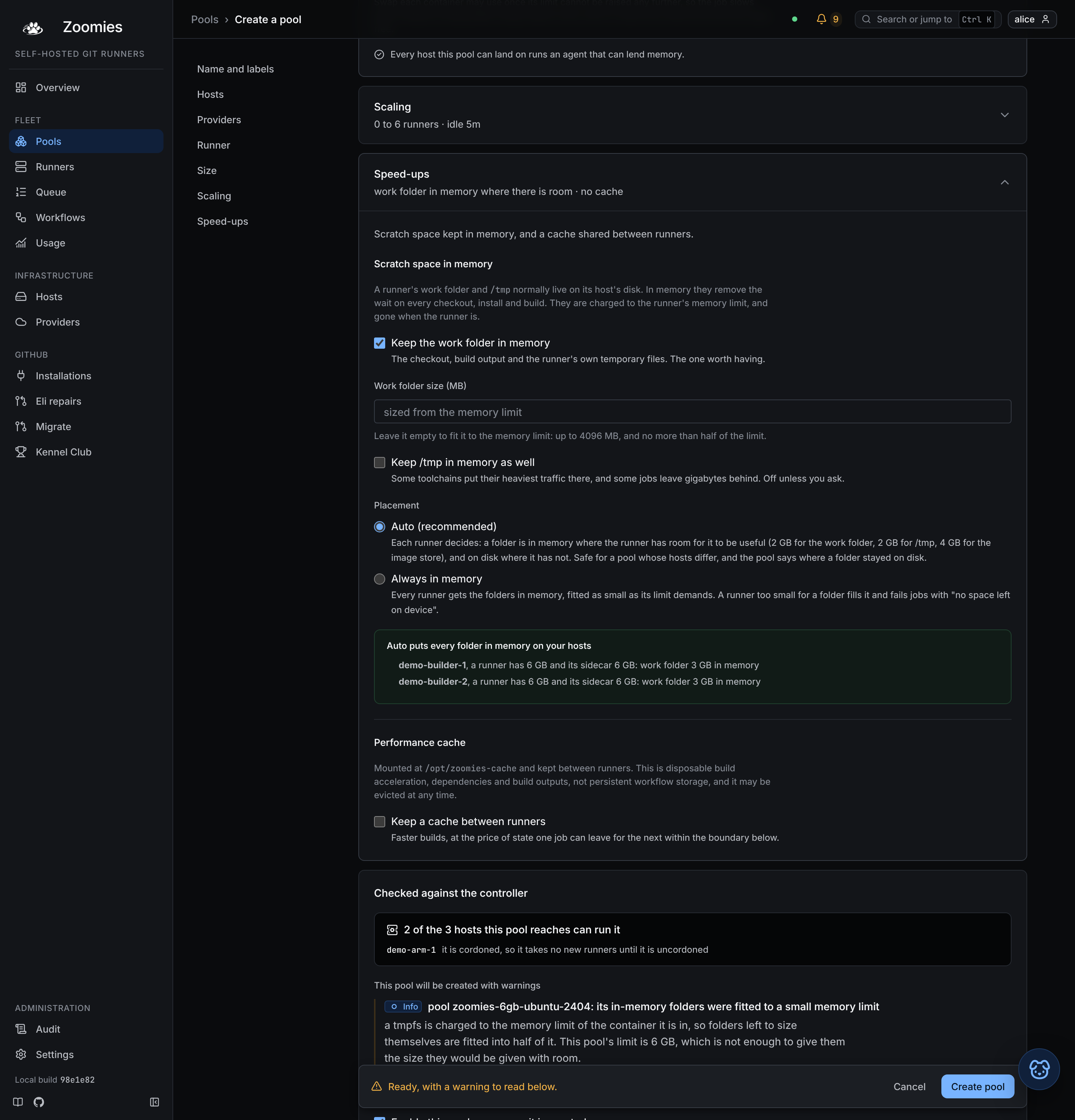
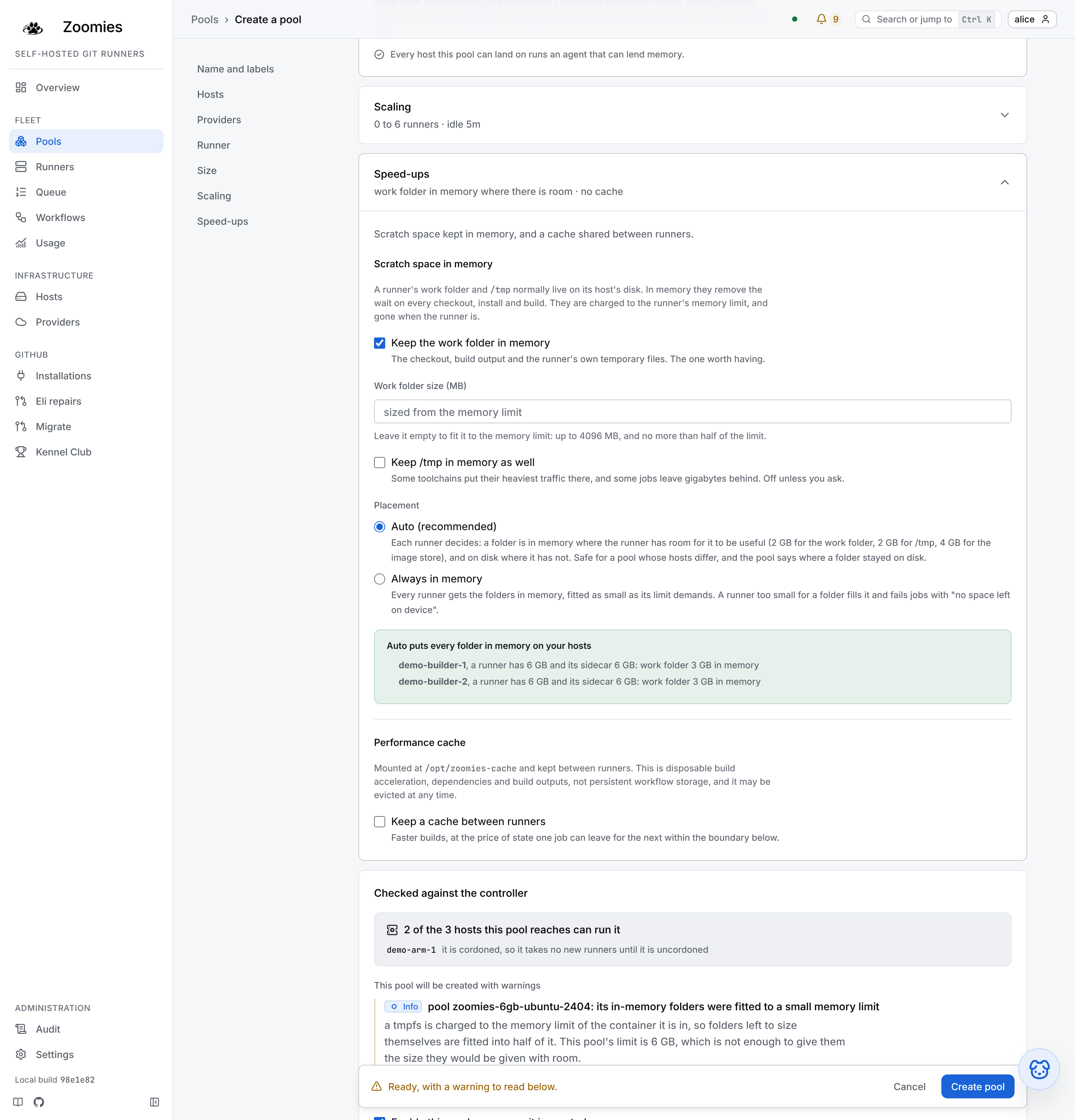
It is off for every pool until somebody turns it on, because of what it costs. A tmpfs is charged to the runner's own memory limit, so the room a folder may fill comes out of the limit the pool was sized with for the job; it is not added to it. A pool that turns the setting on without raising its limit leaves the job less memory than it had, which shows up later as a kill in a build that always passed.
tmpfs:
  work:
    enabled: true
    auto: true        # each runner decides; see "Auto" below
    size_mb: 0        # 0 sizes it from the memory limit
  tmp:
    enabled: false    # /tmp, as well; its own choice
    size_mb: 0
  daemon:
    enabled: false    # the Docker-in-Docker sidecar's image store; docker_mode: dind only
    size_mb: 0
| Setting | What it does |
|---|---|
work |
The runner's _work folder. The one worth having, and the one the pool editor offers first. |
tmp |
/tmp. Off unless asked for: some toolchains put their heaviest traffic there, and some jobs leave gigabytes behind. |
daemon |
The Docker-in-Docker sidecar's image store, /var/lib/docker in the daemon's container: where every image a job pulls and every layer it builds is written. Needs docker_mode: dind. Its own choice, because it is the one folder that can fail a job that used to pass; an image bigger than the store does not pull. |
auto |
Let each runner decide whether the folder is in memory: yes where it has room for it to be useful, on disk where it has not. The recommended setting, and what the pool editor starts a pool with. Without it an enabled folder is always in memory. |
size_mb |
The folder's ceiling, at least 64. 0 fits it to the memory limit: 4096 MB for the work folder, 4096 MB for /tmp and 8192 MB for the image store, shrunk so the work folder and /tmp together take no more than half of the runner's limit, and the image store no more than half of the daemon's. |
Auto. A pool is one setting for every host it lands on, and the hosts
differ: the same pool has 31 GB machines with five slots and 128 GB machines
with plenty to spare. With auto on, each runner decides at creation, from the
memory limit it is really given and the host it is on: a folder is in memory
only if it would come out at least as large as its floor (2 GB for the work
folder, 2 GB for /tmp, 4 GB for the image store, or the size you typed if that
is smaller) and on disk otherwise. When two folders compete for the room, the
one furthest below its floor goes to disk first, which leaves the other more, and
/tmp goes first when they are level, because the work folder is the one worth
having. The floors are not a measurement of your jobs: they are the least a
folder is worth having, because below them a checkout, a build or an image pull
fills it and fails with no space left on device, which names neither the mount
nor the setting, while saving little disk traffic. A folder that is not auto is
never put on disk; it is always in memory, as small as the limit demands.
/tmp is sized like the work folder, and its floor is set by a compiler. Go
builds every package of a cold build into a work directory under /tmp and
keeps it there, with the linker's output on top, until the command exits: a
cold cross-compile of Zoomies itself leaves close to 1 GB there, and in a 1 GB
/tmp its darwin link failed on the fleet's biggest runners with no space
left on device while the small ones, whose /tmp had stayed on disk, passed.
A job should not need a GOTMPDIR step to run on a runner with more memory,
so an in-memory /tmp is never smaller than 2 GB.
When a folder fills anyway, the fleet says so. A job that writes past a
folder's ceiling fails a step with no space left on device, which GitHub
records as an ordinary failure; the runner's own output never carries a step's
words, and a compiler deletes its work directory as the link fails, so by the
time anybody looks the folder is empty again. The agent therefore measures each
in-memory folder at every resource sample, by running df in the runner's
container through the container engine's API, and the fullest each got is kept
on the job (scratch_peaks on its record). A failed job whose folder was at
least 90% full at a sample is explained as scratch-full by zoomies why, the
job's drawer and get_job, with the folder, its ceiling and how full it got as
evidence, and jobs.scratch_full names the pool in the problems list, because
the folder's size is the pool's setting. The fill itself falls between samples,
which is why the explanation is sure to medium rather than high.
Measuring asks nothing of the host beyond the container socket the agent already
has, so it does not depend on the agent's privileges or on whether the agent
itself runs in a container. It costs one short command per runner per sample, always
df -P -k with the runner's in-memory folders as its arguments and no shell,
run as the container's own user; a runner whose pool keeps nothing in memory is
never asked. Anything that audits docker exec will see it, and what df
prints is read as untrusted, bounded in size and time, and used only to explain
that runner's own job. A folder the agent cannot measure is reported unmeasured
and never as empty, and a host where none can be measured says so in
host.scratch_unmeasured, with the reason: the engine refuses to run a command
in a container (a socket proxy or authorisation plugin in front of it, which
needs to allow exec), the runner image has no df, or df printed something
unreadable. Without that entry, a host that cannot measure would look exactly
like a host whose folders never fill.
The pool editor shows the result while you are choosing: under the folders in the Speed section, for every host the pool can run on, what a runner there has and what each folder is given, in memory or on disk. Where something is on disk it says what would change that, the standard runner memory to set on a host (or, for a pool sized by a slot's share, the capacity to lower it to) and the slots the host is left with, and a daemon share where one helps without losing a runner, so the trade is on the page where it is made, with its cost. A runner profile is where a host's standard size is set, so that is the lever for a pool that takes its size from its hosts.
Auto never silently changes what a pool is. Where it kept a folder on disk,
pool.tmpfs_auto_on_disk names the hosts and what their runners have, as
information, and says what would put the folder in memory there: bigger runners
on that host, or smaller folders.
A runner's row records its folders when it is created, from the controller's placement rule; the agent on the host mounts them from its own copy of that rule. While the two run the same build the row is what the runner was given. While they run different builds, as they do between a release reaching the controller and every host following it, the row is the controller's estimate, and the runner's folders say so, naming both builds: an agent that has not yet taken a release that changed the sizes still mounts what its own build says.
The memory limit. Zoomies never raises the pool's setting for you, because
it is also what the scheduler charges the host for and changing it changes how
many runners fit. It proposes instead. (A running container's limit is a
different thing, and elastic memory can raise it while a
job runs.) The pool editor offers the limit that leaves the job the
room it has now (the current one plus what the folders may fill, and never less
than twice what they may fill, because folders are fitted into half a limit and a
proposal that left them more would be tight again when it was taken) as soon as
the folders take more than half of it, and pool.tmpfs_memory_tight says the same
in the problems list and in the dry run. Sizes you type that add up to the whole
limit or more are refused; a pool with no limit of its own is sized from its
host's share, and folders left to size themselves are fitted into half of
whatever that turns out to be.
Two containers, two limits. A Docker-in-Docker runner is a pair, and a tmpfs
is charged to the container it is in: the work folder and /tmp to the runner,
the image store to the daemon. What each container's limit is depends on how the
pool is sized.
- A typed size is given to both containers in full (a pool that asked for 8 GB and got it only in the container that is not building would have asked for nothing) and the host is charged for both. The proposal covers whichever container needs more, not the sum, because each is charged for its own folders.
- A size left to the host is one slot's share, and the pair splits it evenly, because a slot is one runner: a host set to eight slots may carry eight runners, not four because half of them brought a daemon. The host is charged once. The split is an accounting rule, not a measurement of where a build's memory goes; the memory a Docker-in-Docker job reports is the two containers added together. Where your jobs do their work decides how the slot should be divided, so it is yours to set, see the next paragraph. It divides only a share the host chose; a typed size goes to both containers in full whatever it says.
- One field typed, the other left to the host is each of the two at once: the typed field goes to both containers in full and is charged twice, and the field the host decided is one slot's share that the pair divides. That share is held to the same floor as a pool left entirely to the host (about 2 CPU and 4 GB for the two containers between them, more with a larger minimum) and a host whose slots divide to less is refused, with the capacity that would fit named. Before, a pool that typed only one field was never checked on the other, and its typed figure was divided in two as well, so a job given 4 CPU ran on 2+2.
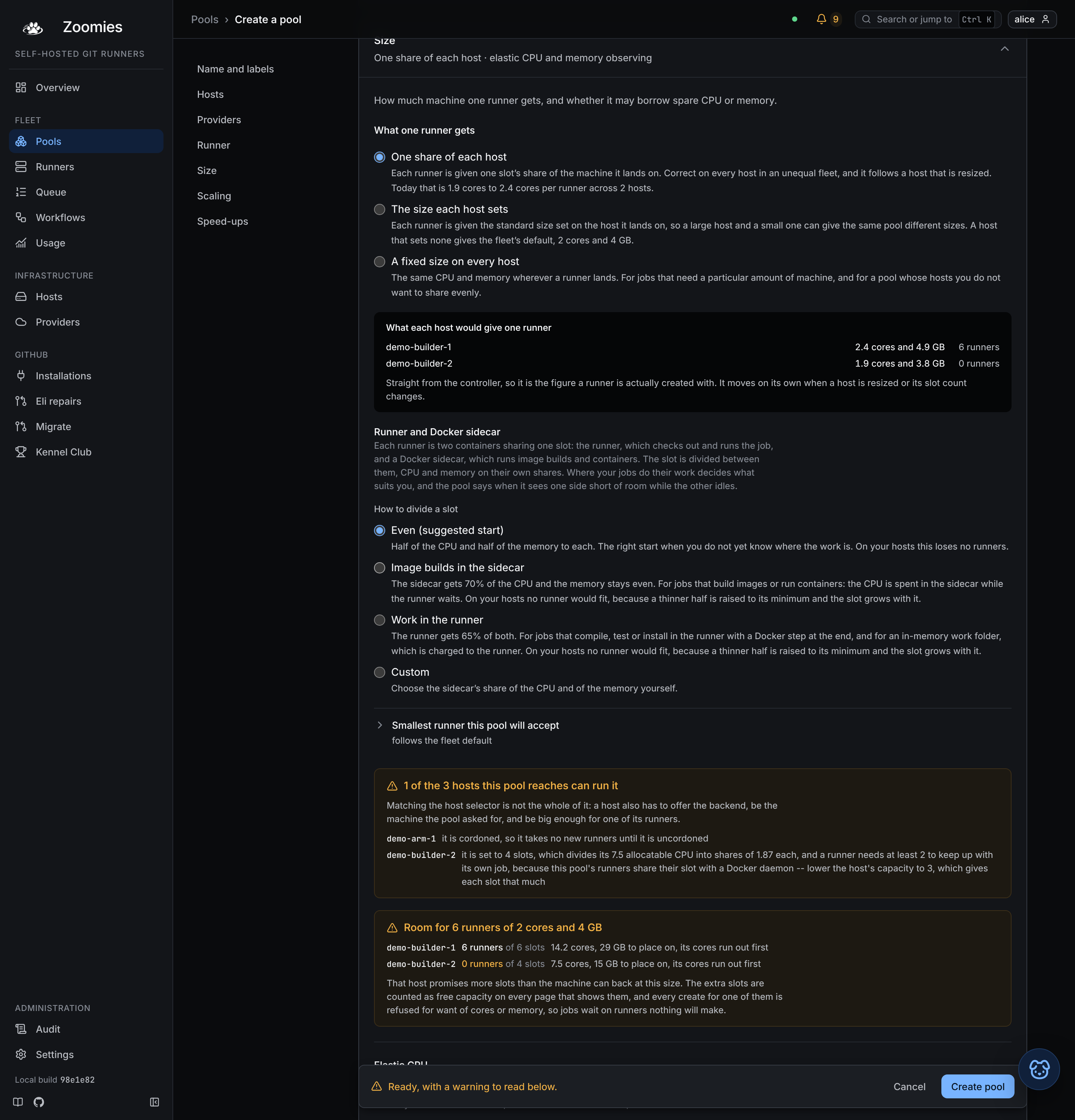
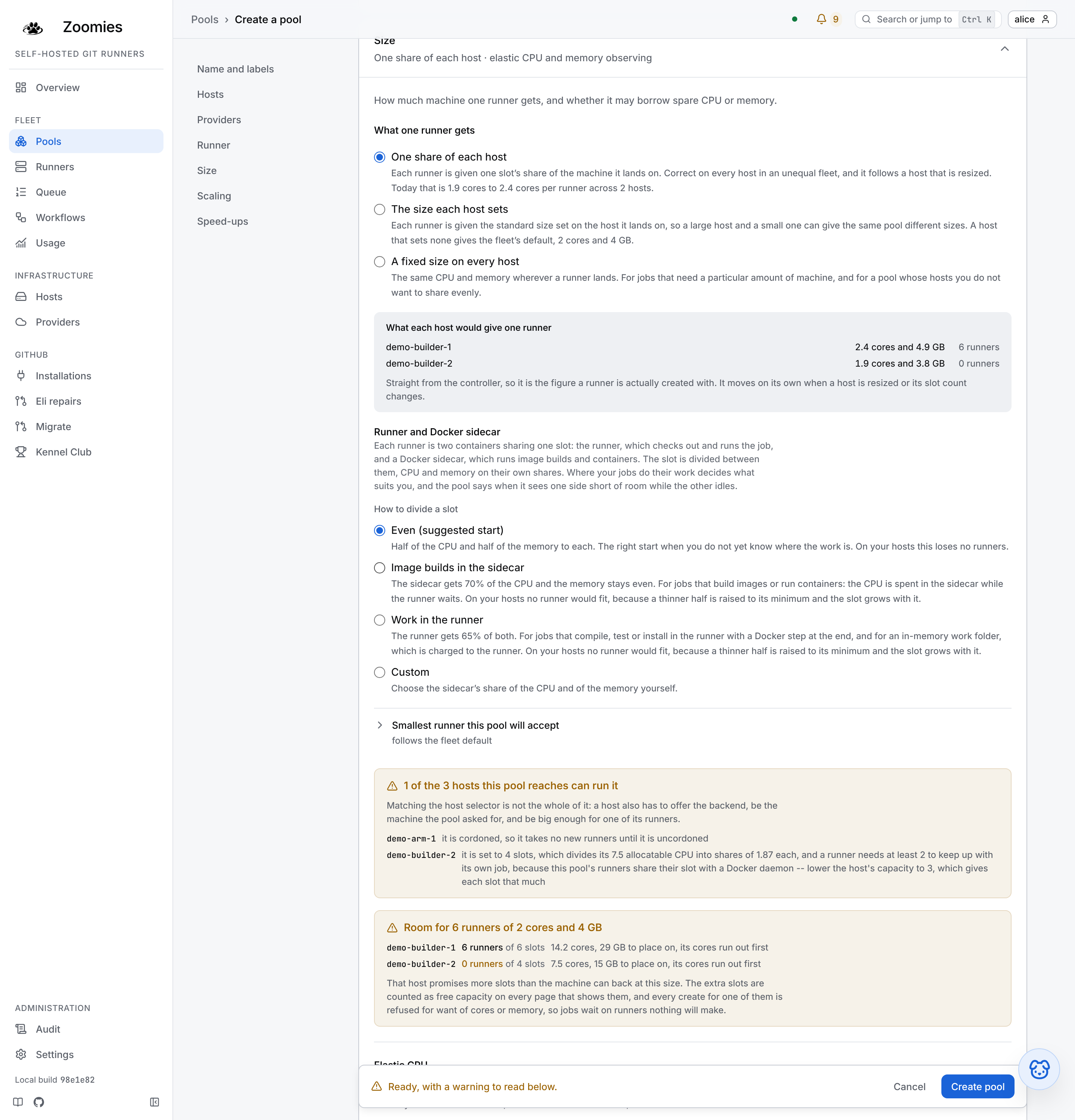
Dividing a slot: CPU and memory apart. The Size section of the pool editor has a Runner and Docker sidecar choice for a Docker-in-Docker pool sized by its hosts. CPU and memory are two shares, not one, because the two are not used alike: an image build is CPU in the sidecar, so that is the share worth raising, while the runner's memory holds the checkout, the toolchain and any in-memory work folder (all charged to the runner), so memory is often better left even or lowered. One number could not say "more CPU to the sidecar, and keep the memory".
| Preset | Sidecar's CPU | Sidecar's memory | For |
|---|---|---|---|
| Even | 50% | 50% | The right start when you do not yet know where the work is. |
| Image builds in the sidecar | 70% | 50% | Jobs that build images or run containers, where the CPU is spent in the sidecar while the runner waits. |
| Work in the runner | 35% | 35% | Jobs that compile, test or install in the runner with a Docker step at the end, and an in-memory work folder, which is charged to the runner. |
| Custom | 10–90% | 10–90% | Any two figures. |
Nobody knows where their jobs work when a pool is made, so each preset is priced on the hosts the pool will land on, and a new pool starts on one that costs nothing. That cost matters: a skewed split raises the thinner half to its minimum and the slot grows with it, so the same preset keeps every runner on a fleet of large slots and loses most of them on a fleet of small ones. The editor says which, in runners, beside each choice, and starts on Image builds in the sidecar only where it loses none, on Even otherwise.
The same two figures are resources.daemon_cpu_share_percent and
resources.daemon_memory_share_percent in the API and --daemon-cpu-share and
--daemon-memory-share on zoomies pools; the older --daemon-share sets both and
each specific one overrides it for its own resource. A pool saved with one figure
keeps meaning it.
You don't have to guess the figures. The agent reports what each container of a pair
used, and when one has been squeezed against its own limit while the other idled
(across enough jobs on several runners) pool.daemon_share_suggested names the pool
and a share to try, for CPU and for memory on their own: more CPU to a sidecar that
is building, less memory to one that is not, in one notice with a flag for each. A share
is never proposed if it would cost the pool runners on its hosts, since a thinner half is
held to the pool's smallest runner: the notice offers the nearest share they can carry, or
says what the figure would cost and leaves the share alone. An
operator can make the change from a button on the notice, which sets those shares and leaves
the rest of the pool as it was; nothing changes until it is clicked. It applies only to pools
sized by their hosts, by a share of the host or by its
runner profile, and clears itself once you
change the share.
When to turn it on. Zoomies tells you. pool.tmpfs_suggested is raised for
a pool when, on one host, all three are true: the pool ran jobs there in the
last six hours, the host has been waiting on its disk for at least ten minutes,
and it has free memory beyond its own reserve for a work folder. It stays for as
long as that holds, rather than appearing once, and clears itself when the
setting is on, the disk calms or the memory is spent. It is information and
never a warning: nothing is failing, only slower than it needs to be. To see
what a host is doing, iostat -x 5 shows %util and await for its disk, and
a before-and-after run of one real workflow tells you more than any figure.
What it does not cover.
- Docker-in-docker, unless you ask. The work folder in memory does not speed
docker buildordocker pullinside a job: those write to the sidecar's image store, which is thedaemonfolder above and is off until you turn it on. When it is on it replaces/var/lib/dockerin the sidecar with a tmpfs, so size it for the largest image your jobs pull, with the layers it unpacks. It covers the default sidecar image, which keeps images in/var/lib/docker; a newer sidecar that stores them under/var/lib/containerdis not covered. Test it on one pool, with a job that pulls your biggest image, before relying on it. - Jobs that mount the work folder into another container. A step that runs
docker run -v $PWD:...against the host's Docker names a path that daemon resolves on the host, where the tmpfs is not. - The shared cache. A tmpfs belongs to one container, so a cache in one would start cold for every runner, which is no cache at all. To keep the cache in memory, see Keeping the cache in memory.
- The process backend. It has no container to mount on, and the setting is
refused there. Point
agent.work_dirat a tmpfs on the host instead. - Tool downloads. A pool with no tool cache has
setup-python,setup-nodeand the rest unpack into_work/_tool, which is in memory and counts against the folder's size.
A host has the last word. The setting is the pool's, and a pool is one setting for every host it lands on, but a fleet has machines with memory to spare and machines without, and only the host's owner knows which is which. So a host's runner profile can say:
tmpfs.work_mb,tmp_mbanddaemon_mb: the size each folder is asked for on this machine when a pool leaves it to size itself, in place of the built-in 4096, 1024 and 8192 MB. The folder-sized counterpart of a host's standard runner size: a machine with 256 GB can offer a work folder far larger than the default, and one with 16 GB less. They are what is asked for, so the fit to the runner's limit, the auto floors andmax_mball still apply; a size a pool typed is the pool's and is not replaced. At least 64 MB each.tmpfs.disabled: fall back to disk on this machine, whatever a pool asks for. Its runners use disk, as they did before the setting existed. This is a tactical fix and not a policy: it is for a machine that cannot spare the memory today, and the pool is told for as long as it is on (pool.tmpfs_host_off), so it is not forgotten. The lasting answers are the per-host sizes above and a pool's Auto placement, which keep memory where it is useful without anybody switching a machine off.tmpfs.max_mb: the most any one folder may be on this machine. It is applied after a pool's size is fitted to the runner's limit, so it lowers a size however the size was arrived at, typed or fitted, and it never raises one. It cannot be combined withdisabled, because a host that keeps the folders off has nothing to cap or size, and it is at least 64 MB.
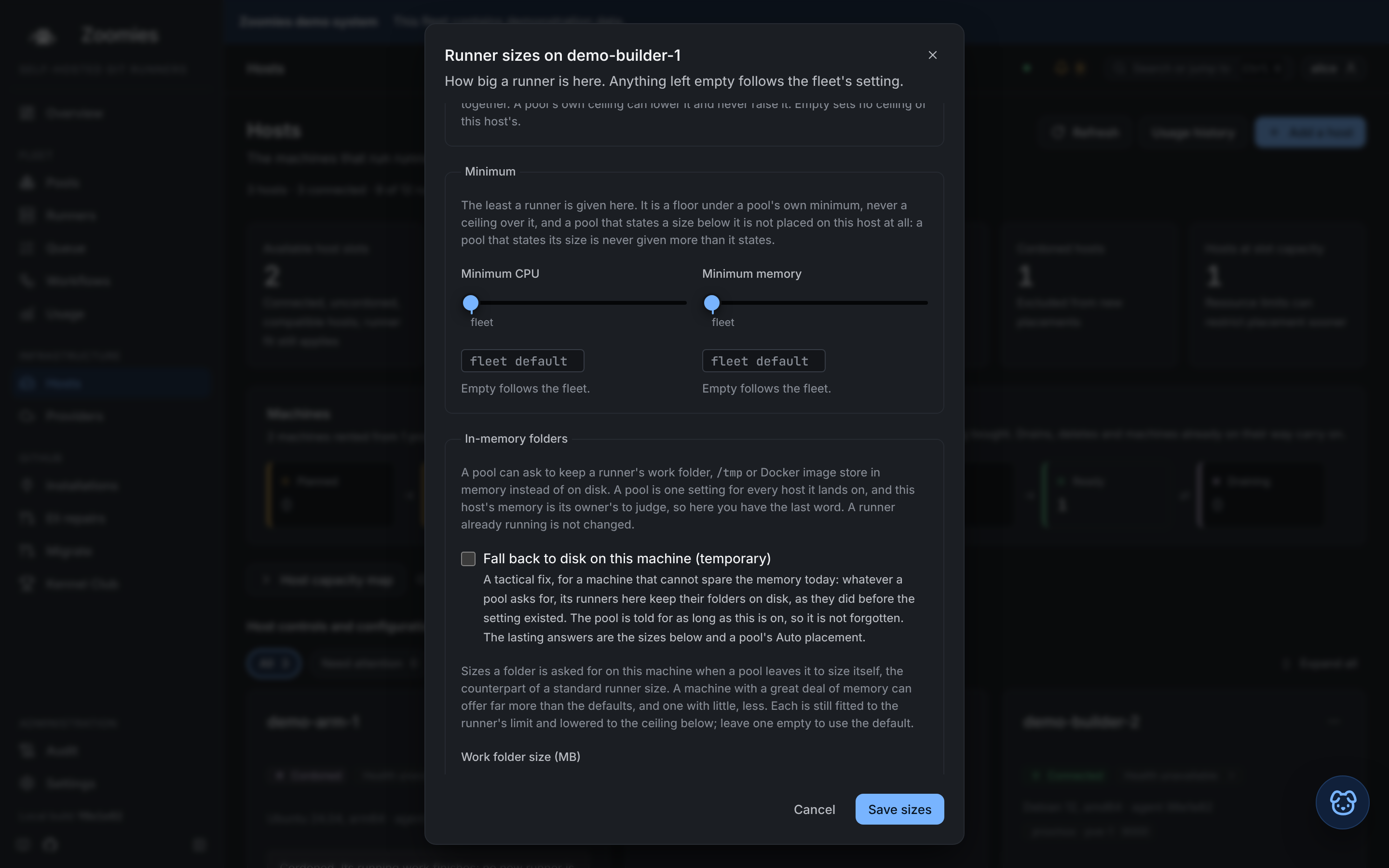
Set them in the host's runner sizes (Set runner sizes in its menu, or Edit
on the Runner sizes block under the card's Details, which a host has once
it has a profile), with
zoomies hosts edit <host> --tmpfs-work-mb 16384 (also --tmpfs-tmp-mb,
--tmpfs-docker-mb and --tmpfs-max-mb), --tmpfs-off for the tactical
fallback, or with
runner_profile.tmpfs on PATCH /api/v1/hosts/{id}. A host that says nothing
changes nothing. The host is read when a runner is created, not when the pass
begins, so an edit made while GitHub is being asked for the runner's registration
applies to that runner too; a runner already running keeps its folders as they
were. The suggestion to turn the setting on skips a host that has it off, and
judges one with a ceiling against the most a folder could take there. A pool that
asks for folders in memory and is placed on a host that keeps them off is told so
as information (pool.tmpfs_host_off), because that runner runs on disk and
nothing on the pool would otherwise say which one.
An agent too old to mount the folders starts the runner on disk, as with the
setting off. pool.tmpfs_unsupported names those hosts where the pool is
saved, with the same fix as elastic CPU's: upgrade the agent.
A shared in-memory area, for an emergency. Where a folder will not fit in a
runner and on-disk is too slow, the tempting answer is one large area in memory
that all of a host's runners share, in place of a tmpfs of each runner's own.
Zoomies does not build one, because it would not do what it appears to. Shared
memory is charged to the memory cgroup of the process that touches each page, so
a directory on a host's /dev/shm that a runner writes to is counted against
that runner's limit exactly as its own tmpfs is: it lifts the size ceiling and
nothing else, and a runner that fills it past its limit is killed all the same.
It also outlives the runner unless something removes it, and a size ceiling
shared by every runner on the host is a limit that one job can spend for the rest.
What is possible today, for one host and on purpose, is the existing
agent.work_dir setting: point it at a directory on a tmpfs the operator
mounts with a size of their choosing, and every runner's work folder is a
subdirectory there, removed with the runner. That is host-wide, hand-sized and
subject to the memory-cgroup rule above, which is why it is an operator's
decision on a machine they have looked at and not something Zoomies offers as a
fallback.
Sizing a machine from the other side
The same figures size a machine from the other side. The recommended capacity on a host's Adjust dialog is the machine, less its reserve, divided by what a runner in this fleet asks for (the largest ask across the enabled pools, or the fleet's default where no pool has said) so the two screens describe one fleet rather than two.
Leaving out the default labels
Every self-hosted runner advertises self-hosted, its operating system and its
architecture as well as the labels its pool gives it, and Zoomies matches jobs
the same way GitHub does: a job asking for [self-hosted, linux, x64] is not
asking for any pool in particular. no_default_labels registers a pool's
runners with its own labels only, as the runner's config.sh
--no-default-labels does, useful when a workflow written as runs-on:
self-hosted must never land on this pool.
The scheduler follows the runners: once a pool leaves the default labels out, a
job whose runs-on names self-hosted, linux, x64 or the like matches the
pool only if the pool lists that label itself. A job naming only the pool's own
labels matches as before.
Only a pool with ephemeral off can do this. An ephemeral runner registers with
a just-in-time configuration, and GitHub adds self-hosted, the operating
system and the architecture to every one of those itself (the request has no
way to ask otherwise) so the API refuses the combination rather than keep a
pool whose runners advertise labels the scheduler thinks they do not. Existing
pools keep the default labels; the setting is off until you turn it on.
A pool belongs to one installation
--installation is not bookkeeping. A pool's runners are registered into that
installation's GitHub target with that installation's credentials, so the
target decides which jobs can ever reach them, and Zoomies will not put a job
from one installation on a pool belonging to another, whatever the labels say.
Two installations whose pools advertise the same labels are two separate
fleets that happen to use the same words.
A job Zoomies cannot place for this reason says so rather than sitting there: the Jobs page and the problems drawer name the pool whose labels matched and the installation it belongs to, and a repository no installation here covers is reported as that rather than as a labelling mistake. Neither has a fix in the workflow file; both are fixed by installing the App on the right target or by adding a pool there.
Within one organisation installation, that is as far as the boundary goes. GitHub decides which of its runners gets a queued job, and it offers a job to any runner in scope whose labels match, so a runner this fleet created for one repository's job may be handed another repository's job from the same organisation instead. Zoomies has no say in it. Where two repositories must not share runners, give each one a repository-target installation, or separate them by labels and accept that the separation is a convention kept in workflow files rather than something the platform enforces. The same caveat governs a repository-scoped cache: see Adding a pool and the pool's own warnings.
A runner group narrows this further, and only on an organisation. During a
successful organisation connection probe, Zoomies creates an organisation-wide
zoomies group, enables it for public repositories, and moves pools that still
use GitHub's implicit Default group into it. Idle runners registered in Default
are recycled so their replacements join the managed group; busy runners finish
first. New organisation pools use zoomies unless an operator explicitly
chooses another group or Default.
Explicit group choices remain administrator policy and Zoomies never rewrites
them. If an incompatible group named zoomies already exists, connection
verification stops with an actionable error instead of silently widening it.
If any explicitly selected group cannot be resolved, runners fall back to
Default and the pool carries a pool.runner_group_unresolved warning.
Repositories have no runner groups, so repository-target pools continue to use
their repository's Default scope.
How a runner is placed
Every scheduler pass takes a snapshot (pools, runners, queued jobs, hosts) and decides where new runners go. A host is eligible for a pool when all six of these hold:
flowchart TD
    p["a pool wants<br/>one more runner"] --> h{"for each host"}
    h --> f{"free capacity<br/>left?"}
    f -->|no| no["not eligible"]
    f -->|yes| hl{"heartbeat<br/>recent?"}
    hl -->|no| no
    hl -->|yes| c{"uncordoned?"}
    c -->|no| no
    c -->|yes| b{"offers the pool's<br/>backend?"}
    b -->|no| no
    b -->|yes| s{"matches the<br/>host selector?"}
    s -->|no| no
    s -->|yes| r{"CPU, memory and disk<br/>left for one runner?"}
    r -->|no| no
    r -->|yes| ok["eligible"]
    ok --> pick["the eligible host with<br/>the most room wins"]
Among eligible hosts Zoomies prefers the most CPU and memory headroom after placing the requested runner. It averages the remaining fractions, so a larger machine can carry more work while a smaller, quiet machine can still beat a busy one. Reservations made earlier in the same pass count immediately, across every pool sharing the host. Equal scores prefer more free slots, then host ID, so the same snapshot always produces the same plan.
Current usage and automatic holds
Linux agents sample whole-host CPU occupancy, MemAvailable and the one-minute
load average on their normal heartbeats, including work outside Zoomies. CPU
uses counter differences, so the first sample reports memory and load only; I/O
wait counts as occupied. The same counters give I/O wait on its own (the share of
time the machine sat idle with something waiting on disk) because a build
stalled on a saturated disk reads as a machine hard at work, and that is the one
figure that tells the two apart. It is judged the way CPU is: it starts a clock
at 20% and holds it until it falls below 10%, and a host that has been there for
ten minutes is called disk-bound, which is what
keeping the work folder in memory is
suggested on. Available memory includes reclaimable cache. The load
average is there because CPU occupancy pins at 100% and then stops saying
anything: load keeps counting what is queued behind the cores, so it is what
says a host has been pushed past them rather than merely to them. Sampling
reads procfs and makes no extra Docker requests.
The Hosts page shows actual usage separately from Committed resources, both under a card's Details; the closed card says so when committed resources are why a free slot goes unused. Committed CPU is a reservation, not a measurement of CPU saturation. A fresh reading tightens memory admission and influences host ranking; it never raises the configured capacity or overrides the pool's limits and host reserves. Measured memory already contains running workloads, so their reservations are not subtracted from that measurement again. Runners still provisioning or registering, starts newer than the measurement, and all placements in the current pass are charged before another placement is allowed. The independent reservation budget remains enforced as well.
One exception, for a pool that sets no memory_mb and so takes one slot's
share of its host. On a host running nothing of Zoomies', that share is
checked against the reservation budget alone, not against measured free
memory. The share is carved from the host's allocatable memory, the machine
less its reserve, while measured free memory is the machine less what its
operating system actually uses, and on a host whose system uses more than the
reserve allows for, the share never fits: a host of one slot, whose share is
the whole of its allocatable memory, would refuse its only slot while idle and
report itself short of memory. With nothing of ours on the host there is
nothing for the measurement to protect, and the hold in the table below still
stops every start once free memory falls to the reserve. From the first runner
on, the measured check applies as usual, and a pool that states its
memory_mb is checked against measured free memory even on an idle host,
because that figure is what its jobs need.
| Observation | New runner placement |
|---|---|
| CPU below 85% | Balance across eligible hosts using CPU and memory headroom. |
| CPU at least 85% | Start at most one runner at a time on that host. Other compatible hosts remain available. |
| CPU at least 95% for 30 seconds across fresh samples | Hold new starts until CPU falls below 85%. |
| Available memory at or below the host reserve | Hold new starts until memory becomes available. A pool whose next runner would not fit waits too. |
| Usage missing, older than 90 seconds, or inconsistent with the reported host size | Use configured capacity and reservations; show usage as unavailable. |
| Overwhelmed on a fresh sample: CPU at or above 95% for 30 seconds while a runner with no CPU limit is on the host, the one-minute load average at least twice the host's CPUs, or available memory at or below the reserve | Throttle, step 1 of 3. The host is stepped down to three quarters of its slots, and every runner on it that has a CPU limit is left 75% of it. The host card says so, host.throttled is raised, and the step is audited as host.throttle. |
| Still overwhelmed two minutes after the last step | Step 2: half the slots, and running jobs at half their CPU allocation. |
| Still overwhelmed two minutes after that | Step 3: a quarter of the slots. Running jobs stay at half; the top rung takes slots and nothing else. |
| Calm: CPU below 85%, load average under one per CPU, memory above the reserve, for five minutes without a break | One step back down, audited as host.throttle_lift. The streak starts again, and the throttle is gone once the last step is taken. |
| Neither, 90% CPU, say | The rung is kept and the calm streak is broken. Not overwhelmed, and not a host to give slots back to either. |
| Usage stale for ten minutes while throttled | The throttle is lifted anyway. A host nobody can measure is placed by its configured capacity, exactly as the holds fall back. |
The holds affect new runners only. Existing runners stay in place and running jobs finish normally; an idle runner already registered with GitHub may still receive a job. A host shared by several pools has one admission budget. An operator's cordon and capacity remain authoritative during recovery.
The throttle is what outlasts a sample. A hold releases the moment a reading
says the pressure is gone, so a host that is overwhelmed on and off for an hour
spends that hour bouncing in and out of the holds, taking a fresh runner each
time it is let back in. The throttle is a ladder instead: each rung takes a
quarter of the host's slots, it climbs while the pressure keeps coming back,
and it comes down one rung at a time after a stretch of calm long enough to
mean something. The slots it takes come off the host's effective capacity
(the configured capacity stepped down by the rung) and that is the figure
free is measured against, on the Hosts page, in zoomies hosts list and in
the scheduler alike, while the throttle stands. The configured capacity is the
operator's, and the throttle never writes it.
It touches running jobs in exactly one way. On the next heartbeat the agent
lowers the CPU quota of every runner on the host that has one (the runner and,
for a dind pool, its sidecar) to the rung's share of what it was created
with, and never below half. Half speed doubles a job's time, which the
timeout-minutes most workflows set survives; a quarter turns "slow" into
"timed out", and a throttle that made jobs fail would be doing the thing it
exists to prevent. That is why the third rung takes slots and nothing else. A
runner with no CPU limit has nothing to lower and is left alone, and a memory
limit is never lowered on a live container, because that can kill it: memory
pressure is relieved by the smaller effective capacity only. The throttle_reason
on the host says all of this in one sentence, what was taken, which
measurement did it, what the running jobs are getting, and how it ends.
Not every host can be throttled, because not every host is measured.
Throttling needs a Linux agent on the machine it measures (the same hosts the
sampling above covers) so a remote Docker endpoint, which is never sampled, is
never throttled. Lowering a quota needs a Docker or Podman daemon beside that
agent: a host that offers only the process backend has no container to
update, so its throttle is slots only, and its reason says so.
How a throttle ends. Five minutes of calm (every fresh sample under 85%
CPU, under one runnable task per core and above the memory reserve) lifts one
rung, and the streak starts again for the next; a sample that is neither calm
nor overwhelmed breaks the streak without moving the rung. Recovery is longer
than a step up on purpose: a host that recovered in a minute and was pushed
straight back over would otherwise oscillate with the ladder rather than settle
on it. If the samples stop (an agent downgraded to a build that does not send
them, or a host that went away) the rung is kept for ten minutes and then
lifted, so a host that comes back is not still throttled for pressure nobody
can see. An operator can end one sooner, three ways: a PATCH /hosts/{id} that
changes the capacity or a reserve clears it, since it was decided against
figures that have just changed; a re-join clears it, since the row is made
afresh; and Lift the throttle on the host card
(POST /api/v1/hosts/{id}/throttle/clear, operator role, audited as
host.throttle_clear) clears it by hand once the cause is fixed. Nothing pins
one: a clear that was premature is answered by the next heartbeat putting the
host back on the first rung. A cordon keeps the throttle, and switching
scheduler.host_throttling off lifts every standing one.
At small capacities the ladder has less to take. The effective capacity never falls below one (a host taken to nothing would look exactly like a cordon, and an operator reading "0 slots" would go looking for who cordoned it) so a host of capacity 4 steps through 3, 2 and 1; one of capacity 2 drops to 1 on the first rung and stays there; and one of capacity 1 keeps its slot on every rung, where the throttle is the CPU quota and nothing else.
Whole-host sampling currently covers local Linux hosts whose procfs CPU and memory totals match the reported machine. Remote Docker endpoints, other operating systems and differing cgroup views retain reservation-based placement. Samples are best-effort observations, not predictions of a job's peak memory demand. Continue setting appropriate pool limits and host reserves. The host usage metrics expose fresh measurements and admission holds for monitoring; diagnostic bundles include the same host view.
Two ceilings apply at once, and both are hard: a pool never exceeds its
max_runners, and a host never exceeds its capacity. A pool's max_runners
is therefore only as real as the capacity available on the hosts it can select;
setting it to 20 across two hosts of capacity 4 buys nothing.
Keeping a host at its recommended size
Adjust on a host's card recommends how many runners the machine can hold and what
it should keep for itself, and Set to recommendations puts those numbers there.
By default the controller keeps every host there, so a machine nobody sized stops
being a problem. That is the fleet setting
scheduler.host_auto_adjust, on unless
turned off, and it includes hosts a provider rents. In Adjust, Keep at
recommendations and Never adjust decide for one host: Never adjust keeps a
host's typed figures whatever the fleet says.
The recommendation is the smallest of three counts of runners:
| Limit | What it counts |
|---|---|
| CPU | the cores left after the reserve, over what one runner asks for |
| Memory | the memory left after the reserve, over what one runner asks for |
| Disk | the work filesystem less its reserve, at 10 GiB of working room per runner |
A runner asks for the largest size an enabled pool sets, or the fleet's default size where none does. The reserve is a core on anything up to sixteen, a tenth of the memory (1 to 8 GB) and a tenth of the disk (2 to 64 GB). The page names the limit that set the count, so a machine with many cores and a small disk says that the disk did.
The controller re-works these as the host reports and the pools change, no more than
once every five minutes for a host, and leaves a host alone when it is paused
(capacity 0), cordoned, silent or has not reported its size. Running jobs are never
stopped; a lower capacity only stops new runners starting until the host is under it.
Each move is in the audit log as host.auto_adjust with the reason, and Adjust
shows when it last happened.
What a runner reserves
A slot is a count, and a count does not know that eight runners of a pool that asks for 4 GB each do not fit on a 16 GB machine. So each runner is also charged against what its host reported, and a host that cannot cover the charge takes no more work however many slots it has left.
What one runner is charged is the pool's own resources. A field the pool
leaves unset is charged one slot's worth of the host instead; a host with
30 GB allocatable and a capacity of 6 charges 5 GB. That is not a fallback for
old rows: it is what one share of each host
means, it is the shape a new pool has, and the same share is handed to the
runner as a real cgroup limit, so the books and the cgroups agree.
A pool with docker_mode: dind runs two containers per runner, and what it is
charged follows what the two are given. A size you typed says what the job
may have, and the build runs in the daemon, so the daemon is given the same and
the host is charged twice: two of what the pool asked for. A size that came
from the host's slot is one slot, and the pair splits it between them, so
the host is charged one, and eight slots are eight runners whether or not their
jobs build images.
Both halves of that have to stay true together, and each has been wrong once.
Charging a defaulted pair one share while giving each container a whole one is
the arithmetic behind a host reading "CPU committed 50%" with every core on it
inside a runner's quota and docker refusing creates. Charging two while
giving the pair one is the mirror of it, and reads as a fleet that will not use
the machines it has: eight slots holding four runners, a page promising room
the scheduler refuses, and an overcommit warning whose fix, fewer slots, cost
room every time it was taken, down to one slot holding nothing at all.
A slot too small to give both halves what a runner needs is refused rather than divided, and the host says so with its slot count and the figure it divides into: dividing anyway would hand the daemon whatever was left over, and a leftover of nothing is no limit at all. Stability over performance sets that floor above the bare minimum a plain runner needs to avoid being killed: each half of a defaulted pair has to clear a full core and 2 GB on its own, the same figure a plain runner's slot is judged comfortable against, or the pool does not run on that host at all. A host that used to squeeze several thin dind pairs onto a small machine now runs fewer of them, each with room for its daemon to answer a create, which is the trade this exists to make.
A minimum on the pool (its own, or the fleet's where it set none) replaces
that figure on its field. The
comfortable size is a judgement made for a pool nobody sized; min_memory_mb
or min_cpus is the operator saying what each container may have at least, so
a slot is held to twice the minimum instead (the runner and its daemon each
get their share of it) and a host whose share clears that runs the pool at
its share. The pool editor counts such a host as running the pool and lists it
as information, saying the runners there get less than on a larger machine;
it is not a warning, because the minimum doing its job is the pool working as
configured. The
reservation is worked out from the runner rows on every pass; nothing stores
it, so a restart recovers it and a runner that fails stops being charged for
as soon as its row says so.
Held back before any of that: reserve_cpus, reserve_memory_mb and
reserve_disk_mb on the host, which are the operator's the way capacity is;
an agent reports what it measured and never writes these. Set them with
PATCH /hosts/{id} or on the host's card; a reserve on a figure the host has
never reported, or one that would leave nothing to place on, is refused rather
than clamped, because an operator who typed megabytes for gigabytes should be
told and not quietly obeyed. All three have a floor, which is what holds when
the operator has set nothing or set less: 512 MB of memory, or a twentieth
of the machine on a large one, up to 8 GB; 2 GB of disk; and half a
CPU, or a twentieth of the machine on a large one. The first two exist
because a machine with nothing left over does not run jobs slowly, it has one
of them killed or fails a checkout before its first step. Memory scales with
the machine for the reason CPU does, and the cap is where holding more back
stops buying anything: a 64 GB host booked down to its last half gigabyte has
no page cache left, and the daemon minding its containers is the first thing
to suffer for it, while a twentieth of 256 GB is more than that daemon will
ever want.
The CPU floor is there for the daemon rather than for the jobs. A CPU quota is
a share of the one resource that is never exhausted, only contended, and a
contended machine does still finish the job, but the runners' quotas are not
the only thing on the machine. dockerd, containerd and the agent have to answer
in the gaps the quotas leave, and a host whose quotas add up to every core
leaves none: the daemon stops answering, creates time out, and the fleet reads
a busy host as a broken one. Half a core, or a twentieth of a sixty-four core
box with sixty-four containers to mind, is what those three need to keep
answering while every runner is flat out. An operator's own reserve_cpus is
whole cores and replaces the floor where it is larger.
The host the controller runs on (the one whose agent is embedded) holds back one more core and one more gigabyte on top of both floors. The floors are sized for dockerd, containerd and the agent; on that host the controller is on the machine too, with the scheduler, the database every heartbeat and webhook writes through, the API and the event stream, and it answers in the same gaps. Without its own room, a busy fleet starves the process that schedules it at exactly the moment it is busiest. The allowance is added to the floor rather than folded into it, so a small machine keeps its daemon's share too, and an operator's own reserve still replaces the total where it is larger.
The memory reserve is the one that is more than a charge: it is also the line pressure is judged against. A host whose available memory falls to its reserve takes no new runners and starts climbing the throttle ladder, and it recovers only once memory is above the reserve again, so raising the reserve raises the point at which the host counts as overwhelmed. Held at 8 GB of 32 GB, a host is under pressure from three quarters full. That is worth knowing before raising one to protect a machine: the reserve is arithmetic rather than a fence (the room is kept free by placing less there, and nothing stops a job that runs away from taking it) so a large reserve buys an earlier throttle rather than a guarantee. The host's Adjust dialog says what the figure set there means for this machine.
Neither half is edited alone
A host's settings and a pool's requirements are two halves of one sentence, written on two pages by people who cannot see the other half. Hold back most of a machine's memory and the pool that used to run there fits nowhere; ask a pool for two more cores than the fleet has and the same thing happens from the other side. Neither shows up as a fault: the hosts stay healthy, the scheduler keeps deciding correctly, and the only symptom is a job that queues for an hour.
So both edits are checked against the other half before they are saved. A
change that would leave a pool with no host in the fleet that could ever run
it is refused with a 409 naming the pool, the machine it no longer fits and
by how much, PATCH /hosts/{id} for the host's side, PATCH /pools/{id} for
the pool's, and the same sentence in the Adjust dialog and the pool editor. The
check is deliberately narrow. It asks only whether a pool that has somewhere to
run would stop having one: a pool with another host to go to is not stranded, a
pool that already fitted nowhere is not made worse, and a disabled pool has
nothing waiting on it.
Shrinking a host before deleting the pool that used it, and sizing a pool for
machines that have not joined yet, are both real things to want, so the refusal
is a question rather than a wall, ?confirm=true, or Save anyway in the
dialog, goes through. What it stops is the silent version, where the figure is
accepted and the consequence arrives an hour later as a job that never started.
A pool's resources are enforced as cgroup limits on the docker and podman
backends, including the docker-in-docker sidecar. The process backend applies
none of them, and a pool that sets limits on it raises
pool.resources_unenforced: the scheduler still holds the room, so the fleet
does not oversubscribe, but the room is bookkeeping and a job that runs away
takes the machine with it.
Default allocations
A charge is bookkeeping, and for a long time nothing turned the charge for an
unset field into a limit: the books balanced while eight runners of a pool with
no limits each took every core on the machine, which is how a host's Docker
daemon stops answering. With scheduler.default_runner_limits on, the default,
a runner whose pool leaves cpus or memory_mb unset is created with one
slot's share of the host's allocatable on that field as a real cgroup limit:
exactly what it was charged, and nothing the pool did not already pay for. The
share is the allocatable figure divided by the host's slots; its capacity, or
fewer where a runner profile
gives it a standard size. An 8-CPU, 16 GB host
with capacity 4 keeps half a core and 512 MB for itself and gives each runner
1.87 CPUs and 3968 MB; the CPU share is floored to the hundredth the pool form
takes limits in, rather than rounded, because three runners rounded up from
0.667 to 0.67 would together be promised a hundredth of a core the host does
not have, and the daemon refuses a quota above the machine. The memory default
is a hard limit, exactly like an explicit memory_mb. A pool's own limits win
on every field it set; the default fills only what it left empty, so a pool
that sets memory and leaves CPU alone has said something about memory and
nothing about CPU, and is treated that way.
Elastic CPU zoomies
The share is a guarantee, not a ceiling. An automatically-sized Docker or Podman pool can let a busy runner be lent the CPU its host is not using (after every live runner's guarantee and one queued start have been charged, and never on a host under pressure) and give it back the moment the demand ends. Memory has a valve of its own, which only raises a limit. New pools measure both by default and move nothing until you say so; the runner page says Squirrel spotted, maximum zoomies when it is happening.
In the UI the setting is in the Size section of the pool editor, one tap from any other section, so the pool elastic CPU is for, the plain automatic one, is never the pool that cannot reach it. It has a page of its own: Elastic CPU zoomies.
A default is given only where it would bind. The host's own probe says what
its daemon can enforce (a CPU quota, a memory limit, both or neither, read
from the daemon's /info) and a field the daemon cannot apply gets no
default, because a daemon that cannot apply a CPU quota refuses the container
rather than ignoring the request, and a default sent there would fail every
create on the host. A probe from an agent too old to say is read as "nothing",
which is what every host did before; host.limits_unverified names such a host
and host.limits_unenforceable names one whose daemon has said it cannot. A
host that has not reported its size gets no default either, since a share of a
machine nobody has measured cannot be computed, and host.resources_unknown
becomes a warning while defaults are on. The process backend never gets one:
it applies no limit at all, and a defaulted figure on one of its runners would
be a number on the Runners page saying the opposite of the truth.
A dind pool's sidecar is given what the runner was, and what that is depends
on where it came from. A limit an operator typed is given to both containers
in full (the build runs in the daemon, so it needs the same figure the runner
was promised) and the charge covers both to match. A defaulted figure is one
slot's share, and the pair splits it between them rather than each keeping a
whole one, because a slot is one runner however many containers it takes to
run it; the charge is one share to match. A slot too small to give both halves
a full core and 2 GB each is refused rather than divided, because handing the
daemon whatever is left over is no limit at all, and a daemon on less than
that is the usual shape of a host that stops answering creates.
What a runner was given, and why, is on its page and in
GET /api/v1/runners/{id}: allocated_cpus, allocated_memory_mb and
allocation_source, which is pool when the pool set the limit and host
when the runner was given the host's default share. They are recorded at
create rather than recomputed, because the question they answer is historical:
a pool edited since, or a host whose capacity moved, would give a different
answer today. The container carries the same three as labels
(io.zoomies.cpus, io.zoomies.memory-mb, io.zoomies.limits-from), which
is how an agent that restarts knows what each workload it adopts was given.
The source is what an out-of-memory kill turns on. A runner killed for
exceeding a limit the pool set is told to raise the pool's memory_mb. One
killed on a host default is told the limit was the host's default share of its
memory, and offered the two ways out: set memory_mb on the pool, so its
runners carry a limit of their own, or lower the host's capacity, so each
runner's share is larger. A default share is the machine divided by its slots,
so a job that needs more than its share is either a pool that should say what
it needs or a host with too many slots, and host.overprovisioned warns about
the second before any job finds out: a measured host with more slots than it
has allocatable CPUs, or more than it has 2 GB of allocatable memory for, is
named with the share each runner is getting and the largest capacity that
fits.
scheduler.default_runner_limits: false restores unlimited containers for
pools that set no limits, and is warned about as
scheduler.default_runner_limits_off for as long as it stands.
Free disk is a gate rather than a budget. A host at or below its disk reserve
takes no new runner at all, whatever the pool asks for; nothing is evicted to
make room, because a runner's caches outlive it on purpose. Two things follow:
disk is the one shortage that no job finishing will clear, and a pool that sets
resources.disk_gb is charged it against what is free right now.
A host whose agent never reported its size is placed by slots alone, exactly as before, which is what stops an upgrade emptying a fleet, and it is worth knowing that this cuts both ways: an unmeasured host accepts a pool its measured neighbour refuses, because a figure nobody reported constrains nothing. Upgrade the agent and the machine starts answering for its own size.
The number to check a limit against is not the one on the pool. A runner is
charged what its pool asks for, a field left unset is charged one slot's worth
of the host instead, and a docker-in-docker pool is charged twice over for
a figure it typed, because the backend gives the build's sidecar the same
limits as the runner. A field left to the host is one slot's share that the pair
splits between them, and is charged once:
so a pool asking for 8 CPU needs a 16-CPU host, and a 12-CPU machine that
matches its selector in every other way will never take one. The pool editor
says so as the limits are typed: it names each host its selector reaches that
could not run the pool, and what that host has against what a runner costs. Note also what a
reservation is not: it is a promise the fleet accounts for, and what actually
binds a runner is the cgroup limit the container backends apply from the same
resources, or from the host's default share where
the pool set none. The process backend applies none, so on a process pool the
reservation is bookkeeping and nothing enforces it.
Sizing from job history
A pool's size is the same for every job it runs, and jobs are not the same
size. A pool whose minimum is 1 CPU and 1 GB can land a race-enabled test
suite on a 4-CPU, 3 GB host, where the kernel kills go vet an hour and a
half in. So the fleet remembers what each job used.
While a job runs, the agent's usage samples (the same ones elastic CPU is
decided on) raise the job's peak CPU and peak memory, and a runner
the kernel killed for memory (the container's OOMKilled, or exit 137 from
the runner or one of its steps, unless the daemon says the container was not
killed for memory -- a docker stop, an operator, or a maintenance restart's
--kill-running, which end in 137 too) marks the job OOM-killed, a fault of the
fleet's rather than the workflow's. In a Docker-in-Docker pool the builds run
in the sidecar, under a limit of its own, so a kill there leaves a runner that
finishes its job cleanly; the sidecar's own OOMKilled is read once the runner
has stopped, and the job's explanation says it was the sidecar that was short of
room. Both show on the job's page, in
GET /api/v1/jobs/{id}, in job_stats and in the MCP tools.
A job's requirement is the ninetieth percentile of the peaks of its last
twenty measured runs, keyed by repository, workflow, job name and pool, with
a fifth more memory. A run that was OOM-killed counts as having needed half
as much memory again as its peak, because its peak is the limit it hit. CPU
gets no margin: a build uses every core it is given, and a margin would ratchet
the requirement up run after run. The requirement is never below the pool's
minimum, and the history is the job rows themselves, so it rolls forward and is
pruned with retention.jobs.
scheduler.history_sizing decides what the requirement does:
| Mode | What happens |
|---|---|
off |
Nothing. Placement is the pool's size and the host's room. |
shadow (default) |
The requirement is worked out, and where a runner went to a host short of it, a waiting job's explanation (GET /api/v1/jobs/{id}/explanation, and get_job) says so, and so does the controller's debug log. Placement is unchanged. |
on |
A runner created for the pool's queue goes only to a host whose unpromised and measured-free CPU and memory hold the largest requirement among the jobs waiting, and a field the pool leaves to the host is sized up to it (allocation source history). A field the pool states is never raised: the requirement then only chooses the host. |
The constraint is GitHub's: GitHub, not Zoomies, hands a queued job to an idle runner, so the fleet cannot put a particular job on a particular runner. It places and sizes each runner for the largest requirement among the jobs waiting on that pool, because any of them may be the one it is given. A light job may therefore run on a runner sized for a heavy one beside it, and a runner that was already idle before the heavy job queued may take it anyway. Pools with distinct labels for heavy jobs are still the way to guarantee a size.
A host short of the requirement gets no runner for it, and the reason says why:
That is a wait, like at capacity: a larger host that finishes its work takes
the runner. A job whose requirement no host that can run the pool could ever
hold is left out of the requirement rather than holding every other job back,
and raises pool.history_unfit: it needs a larger host, and waiting will not
help.
When nothing can be placed
The scheduler says why, in one sentence, and the same reason appears in Scaling events, the problems drawer and the CLI:
Read the counts, because they name the fix:
| What it says | What to do |
|---|---|
at capacity |
Nothing is wrong. Wait for a job to finish, raise a host's capacity, or add a host. A host that could never run the pool (another backend, platform or selector, or too small) is not counted when judging whether the fleet is full. Nor is one the pool's size excludes through its runner profile, or one already at its disk reserve, because a finishing job gives neither back. |
cordoned |
Uncordon the host, if the maintenance is over. |
unhealthy |
The agent is not heartbeating. Check that it is running on that machine and can reach this controller. |
without the docker backend |
Fix the socket on that host, or point the pool at a backend your hosts already offer. When every other host is out for that reason, the sentence carries the agent's own words about the socket, and names the backends it could move to. |
not matching the pool's host selector |
Relax the selector, or label a host to match. |
too small for this pool's limits |
The machine could not hold one runner of this pool even when empty. Lower the pool's CPU or memory limits, or add a bigger host. Waiting will not help. |
short of memory, short of CPU |
The host is the right size and has already promised what it has to the runners on it. Wait, lower the pool's limits, or add a host. When runners of yours hold it, that counts as full rather than as a fault, because a finishing job returns what they hold; memory taken by work outside the fleet does not. |
low on disk |
The work directory's filesystem is at or below the host's disk reserve. Free space on it, lower the pool's disk_gb, or add a host; no job finishing will return this, because a runner leaves its caches behind on purpose. |
throttled after sustained pressure |
The host is on a rung of the throttle ladder and every slot the rung left it is in use. Wait for it to lift, lower the host's capacity or the pools' limits so its runners fit the machine, or add a host; running jobs continue. A host that keeps being throttled has too many slots for its machine, or pools whose limits let a job take more than a slot's worth of it. |
The distinction the reasons keep is between a fleet that is merely full, which clears itself, and one that is misconfigured, which never will. Troubleshooting walks the same tree from a queued job's point of view.
When runners keep failing to start
A runner that dies before it ever registers -- the image will not pull, the host cannot reach GitHub, the runner version does not exist -- is not replaced in the same pass that notices. The pool waits ten seconds after the first such failure, and doubles the wait with each one after it, up to five minutes:
cannot scale linux-x64 0 -> 1: the last 3 runners failed to start, most recently
30s ago (No such image: sha256:9f2c…); trying again in 10s
Without the wait a pool with a bad image creates, fails and removes a runner every second, and pays GitHub two API calls a time for the privilege. The failed runners stay on the Runners page for ten minutes with their reasons, which is where the sentence above points; the problems drawer lists the pool under runners are failing to start for as long as it is waiting. Nothing needs resetting once the cause is fixed: the next attempt succeeds, no new failure lands on the page, and the wait runs out on its own.
A runner that ran jobs and then failed does not count. That says something about the job, not about whether the next runner will start.
Worked shapes
A GPU box beside the general fleet. Label the machine on the way in, then require the label:
zoomies agent join https://zoomies.example.com --token zoojoin_... --labels gpu=true
zoomies pools create --name zoomies-gpu --labels zoomies-gpu \
  --installation ins_k3f9qz2m --host-selector gpu=true --max 2
Workflows reach it with runs-on: zoomies-gpu. Nothing else lands there,
because every other pool's selector is empty and matches any host, including
this one, which is usually not what you want, so give the general pools a
selector too (class=general) once a specialised host exists.
An arm64 builder. Same shape with arch=arm64, and a pool whose image is an
arm64 runner image, but no --labels on the agent this time, because the
architecture is something the agent already reports:
zoomies agent join https://zoomies.example.com --token zoojoin_...
zoomies pools create --name zoomies-arm --labels zoomies-arm \
  --installation ins_k3f9qz2m --host-selector arch=arm64 --max 4
os works the same way, --host-selector os=linux keeps a pool off the macOS
box somebody runs a controller on. Both are matched against what the agent
reports, and a label of the same name on a host still wins, which is the escape
hatch if you want a machine to answer for an architecture it does not have.
A Windows host. The agent runs on Windows with the process backend:
actions/runner's own win-x64 build, started as a process on the machine, no
container. In Hosts → Add a host, choose Windows, copy the command and
paste it into PowerShell opened as administrator. Direct and private
(Tailcat) connections both work:
& ([scriptblock]::Create((irm https://zoomies.sh/install.ps1))) -Mode agent -Controller 'https://zoomies.example.com' -JoinToken 'zoojoin_...'
The script needs Windows PowerShell 5.1 or PowerShell 7 and later on x86-64 (there
is no ARM64 Windows build), and refuses to start in a window that is not
elevated, because it installs a service and it does not elevate itself while
the command holds a token. It asks once, downloads
zoomies_windows_amd64.exe for the controller's own channel, checks it against
the release's checksums.txt, installs it to %ProgramFiles%\Zoomies, puts that
folder on the machine PATH, runs zoomies agent join on the process
backend, and confirms the service is running and starts automatically.
-Version takes latest, a release such as v1.4.0, or dev; -Yes skips the
question for a script.
Run the same command again on an enrolled machine and it upgrades: it stops
the service, replaces the binary and starts it again, and keeps the host's
credentials, so the host does not become a second one. -Force enrols again
with a new token (the old host stays on the controller as an offline host until
you delete it). -Uninstall removes the service, the install folder and the
PATH entry, and says what it leaves behind: the host's credentials, configuration
and log under %ProgramData%\zoomies, which it tells you how to delete.
join writes its configuration and credentials under %ProgramData%\zoomies,
restricts that folder to SYSTEM and Administrators, registers zoomies-agent
with the service manager so the host comes back after a reboot, and starts it;
the service appends its log to %ProgramData%\zoomies\zoomies-agent.log, since
a service has no journal. sc.exe query zoomies-agent is systemctl status
zoomies-agent. The host reports os=windows, so a pool selects it with
--host-selector os=windows and needs no image: there is no Windows runner
image, and the pool's runner_version picks the actions/runner release the
agent downloads and verifies. Without the selector a pool's runners wait for a
host that matches, and a Windows host offers only the process backend.
The binary is not code-signed yet, so Microsoft Defender SmartScreen or another
endpoint policy can warn about or block a copy downloaded in a browser. The
installer fetches it from PowerShell instead and checks its checksum, but this has not
yet been tried on a managed machine with a strict policy. If you would rather do it by hand,
download
zoomies_windows_amd64.exe from the release and, from an elevated prompt:
What a Windows pool does not have is a container, and so it does not have the
ephemeral guarantee the rest of this page assumes: a job gets a fresh work
directory and a single-use registration on a machine whose state persists,
exactly what the process backend means on Linux, and
security says what that costs. Draining a
Windows runner is a kill rather than an interrupt, because a service has no
console to raise one on; the runner's registration is single-use either way.
A Windows host has joined a controller and run a job, tried by hand on 11 October 2026. The support matrix still waits on the written-up evidence before it calls the row qualified.
Separating a noisy repository. Give it a pool with its own labels and its own
max_runners. Note the limit of repository_scale_up_limit on a shared pool: it
limits creation attributed to one repository, but GitHub may still hand a
queued job to any compatible idle runner. Strict isolation means a pool of its
own, with runs-on labels no other repository uses.
Draining a machine for good. Cordon it, wait for Hosts to show no runners on it, then delete it and remove the agent's service. The controller never dials an agent, so nothing has to be told to stop first.