Zoomies UI guidelines
The Zoomies web UI is meant to be left open on a second monitor all day. That is the bar every decision below is measured against: it should be calm when nothing is happening, unmistakable when something is wrong, and never need the operator to click refresh.
This document is the contract. If you are adding a component, take the tokens from here rather than inventing values.
1. Design tokens
Visual style and colour mode
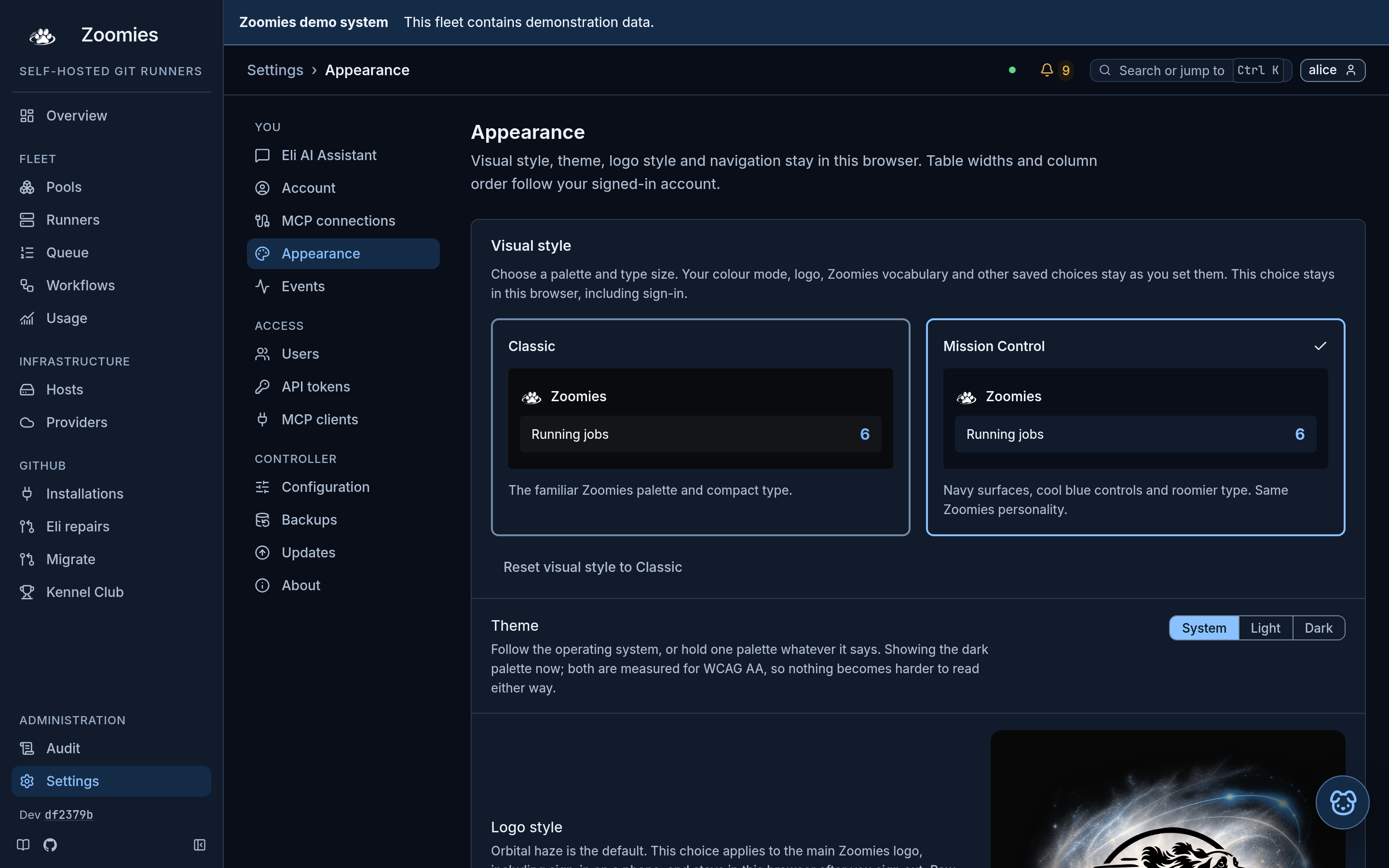
Settings, Appearance offers Classic and Mission Control (the default). Classic retains the compact neutral palette. Mission Control uses navy surfaces in dark mode, cool light surfaces in light mode, and slightly larger type. Runner Blue remains the interactive accent; cyan still means running work. Both styles follow the independent System, Light or Dark colour-mode choice. The phone's More menu offers the same two style choices.
Visual style stays in this browser under zoomies.ui-style and is applied before
first paint, including sign-in and the first-account form. Missing or unknown
values get Mission Control; only a stored classic opts a browser out, so
choosing Mission Control again simply clears the key.
A browser that stored Light, Dark or Mission Control under an earlier release
keeps that choice. System and Classic were stored as the absence of a key, so a
browser that had chosen either, or never chose, now opens in Mission Control and
the dark theme like a new one; choosing them again in Settings, Appearance is
remembered from then on.
The separate public /status document retains Classic. It is dark unless its
reader stored Light or System, and the dark is written on its <html> element,
because its policy allows no inline script of its own to apply it.
Selecting a style updates root tokens without replacing the route or its state. It preserves the original Zoomies artwork and logo treatment, Eli, dog/paw animations, Off/Cute/Standard vocabulary, reduced motion, navigation and saved phone-table layouts. Log viewers refresh their canvas palette and type without clearing output. No fleet setting or API call is needed to change style.
Both styles use the Calm operations Overview: first-run guidance, attention summaries and four compact live metrics, then pools and active jobs beside a three-entry recent-events preview. One scope selector controls the page. Sticky jump links assist navigation; phones put supplementary destinations under More. History, host capacity and startup/registration timings are expandable sections with live summaries and browser-local expansion preferences. History remains this fleet's activity, with its own labelled range, even when other runners are included in job counts. A fragment link opens its destination before scrolling. The full events feed expands in place, retaining the controller's reason strings. On a Mission Control phone, Jobs puts search, status and records before supplementary analytics; Filters and Fleet context expand without clearing the URL filters.
A grid with no saved phone-layout choice starts as Cards in Mission Control and Rows in Classic. A saved per-grid view wins over a saved global view, and both win over the style default. Existing saved Rows values are preserved, including values older versions may have written automatically. Changing a logo or vocabulary does not record an unchosen global table default. Saved column order and widths take precedence over the new Jobs default order.
The Eli repairs pages use the same grammar: a sticky On this page navigation with counts, native disclosures whose closed summaries stay useful, and the supporting detail (History, Automatic repairs, the attempt's case and technical details) closed until somebody asks for it. A section that holds live work opens by itself; a quiet History does too, because then it is the content. A browser's explicit open or closed choice is remembered, and the phone keeps the last two destinations behind More.
Mission Control colour values live in the --z-mission-* tokens. Preview cards
use those same tokens, so their light/dark previews agree with the selected
style. Normal and secondary text, accent text and filled-button text meet
4.5:1 across its surfaces; meaningful control edges meet 3:1. The contrast tests
cover both palettes, including hovered surfaces and accent-subtle backgrounds.
The style is checked in the states a healthy fleet never shows, not only the populated happy path. Each is a capture from the real binary with the seeded fleet's responses stubbed just enough to reach it, in Mission Control with Classic beside it:
- First run keeps the setup checklist first.
- Loading puts skeletons where the figures have not arrived.
- A failed fetch says the fleet could not be read and offers a retry, rather than showing a stale figure as though it were current.
- An empty pool list and a filter that matches nothing are separate states, each with its own next step.
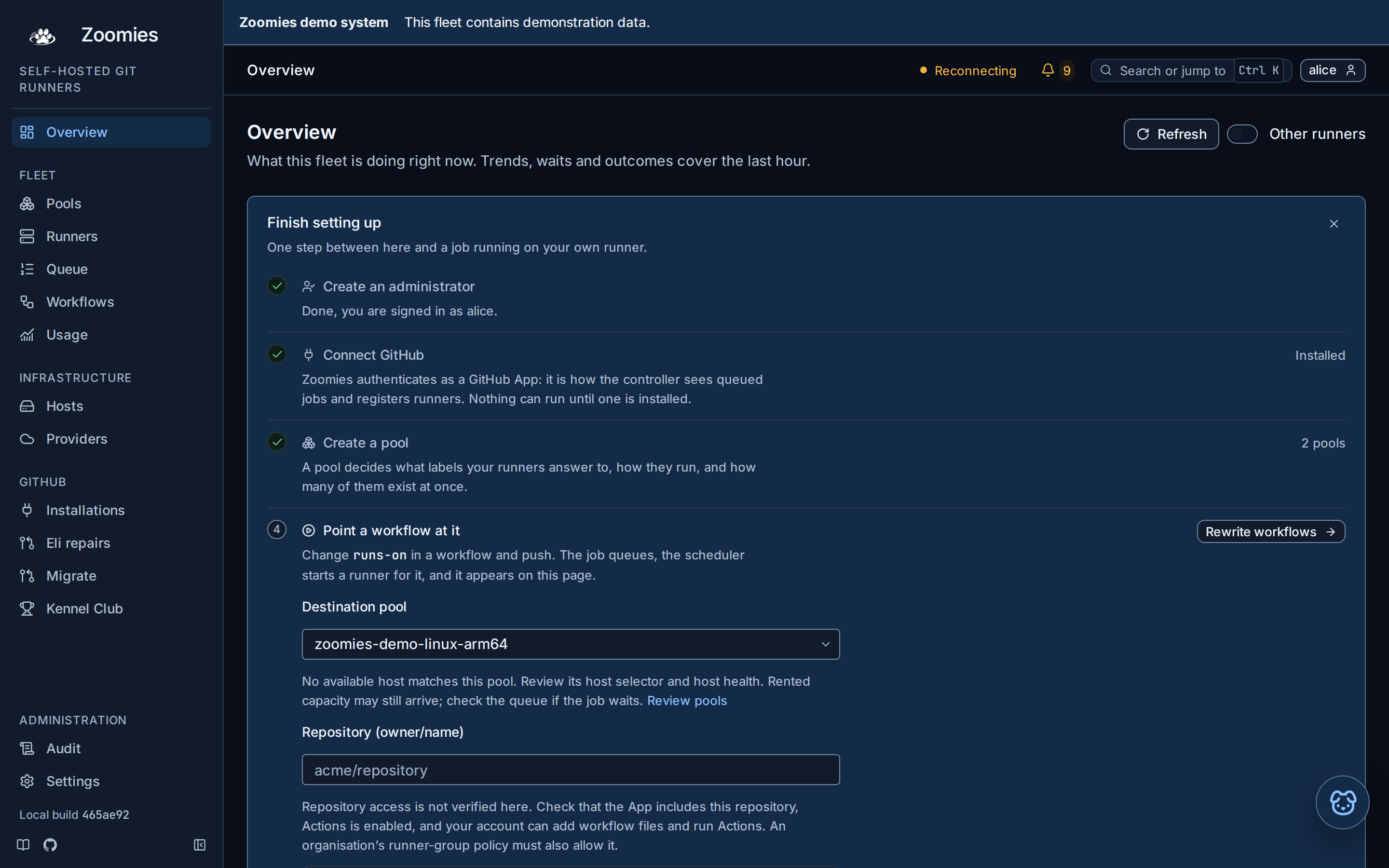
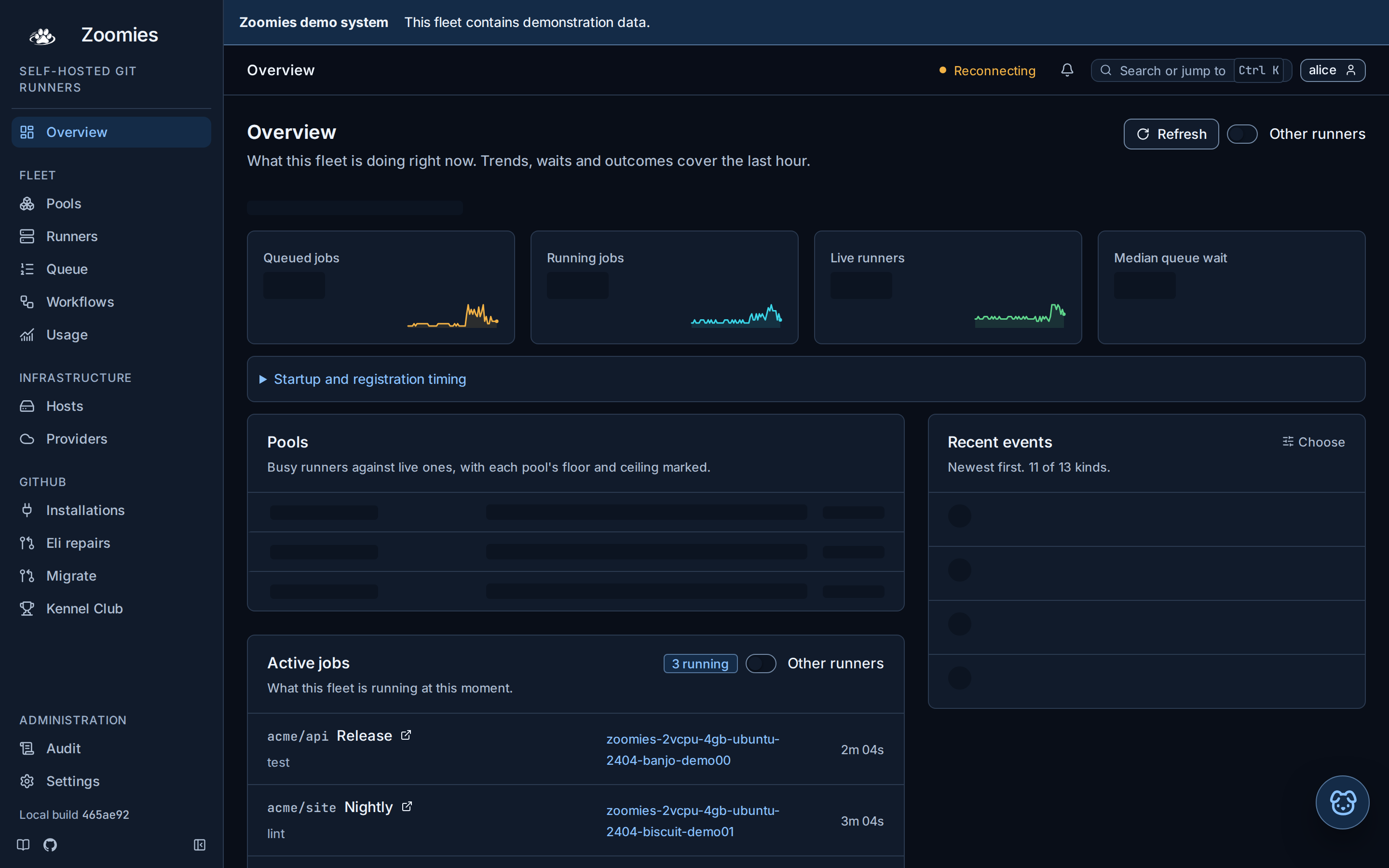
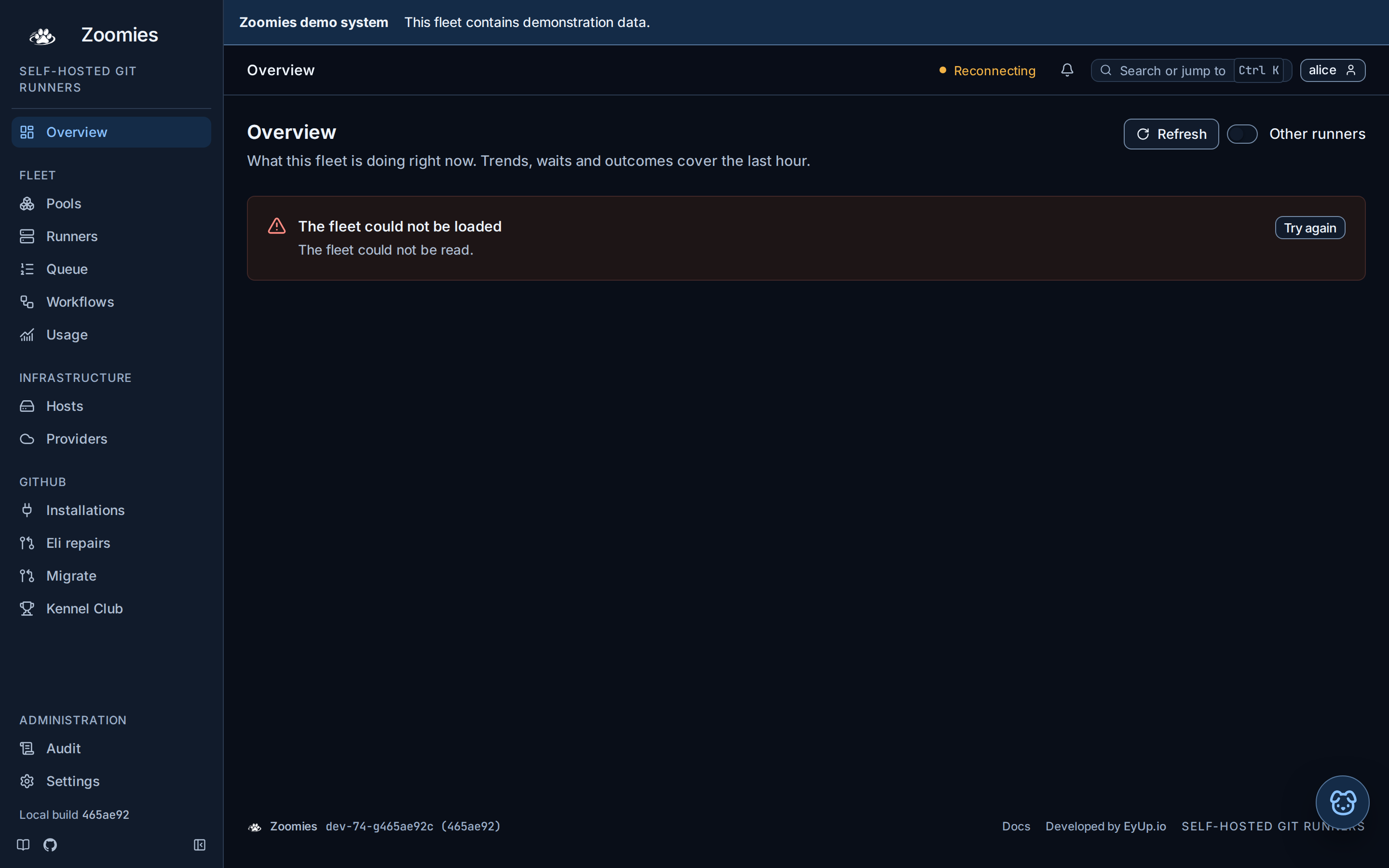
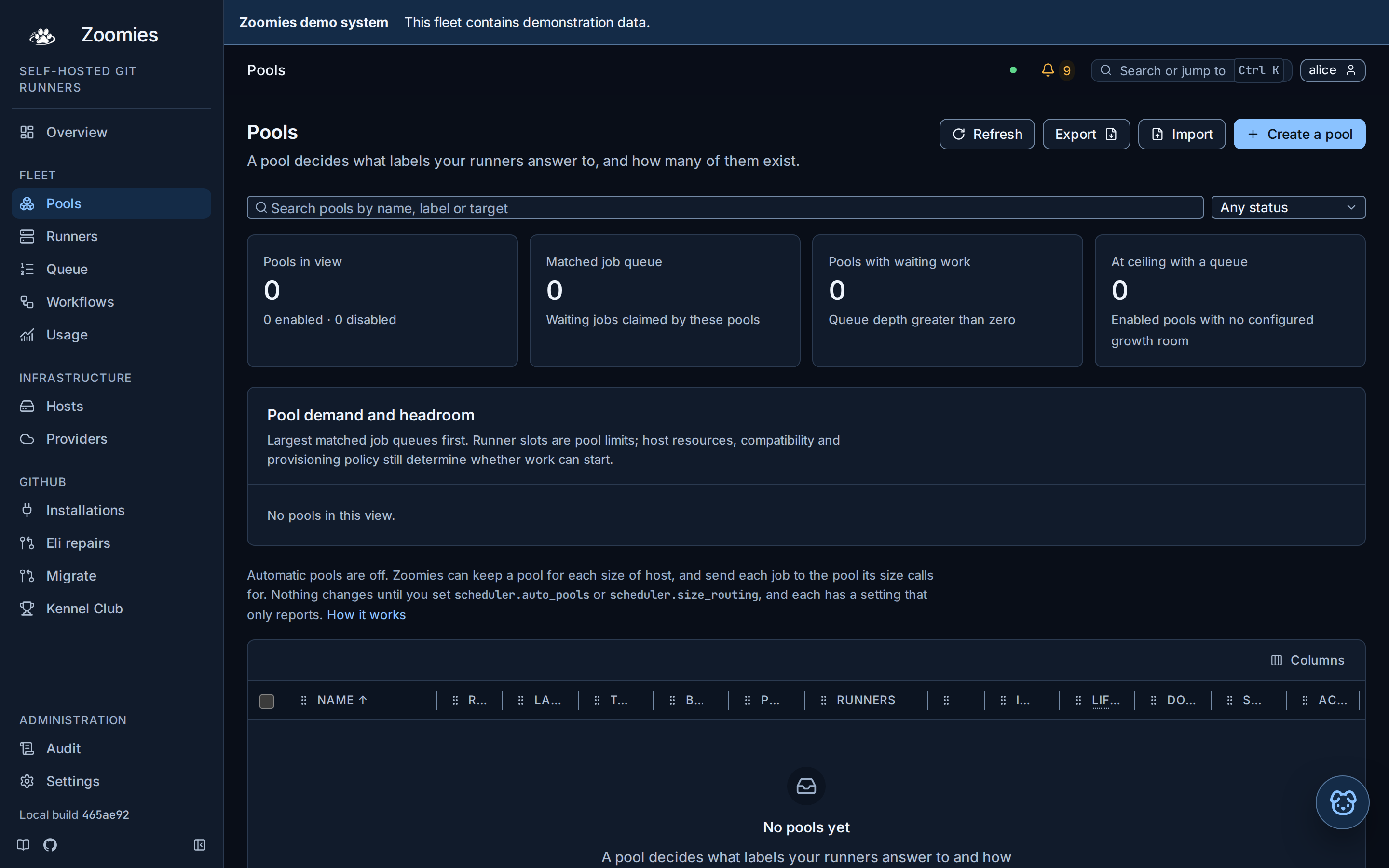
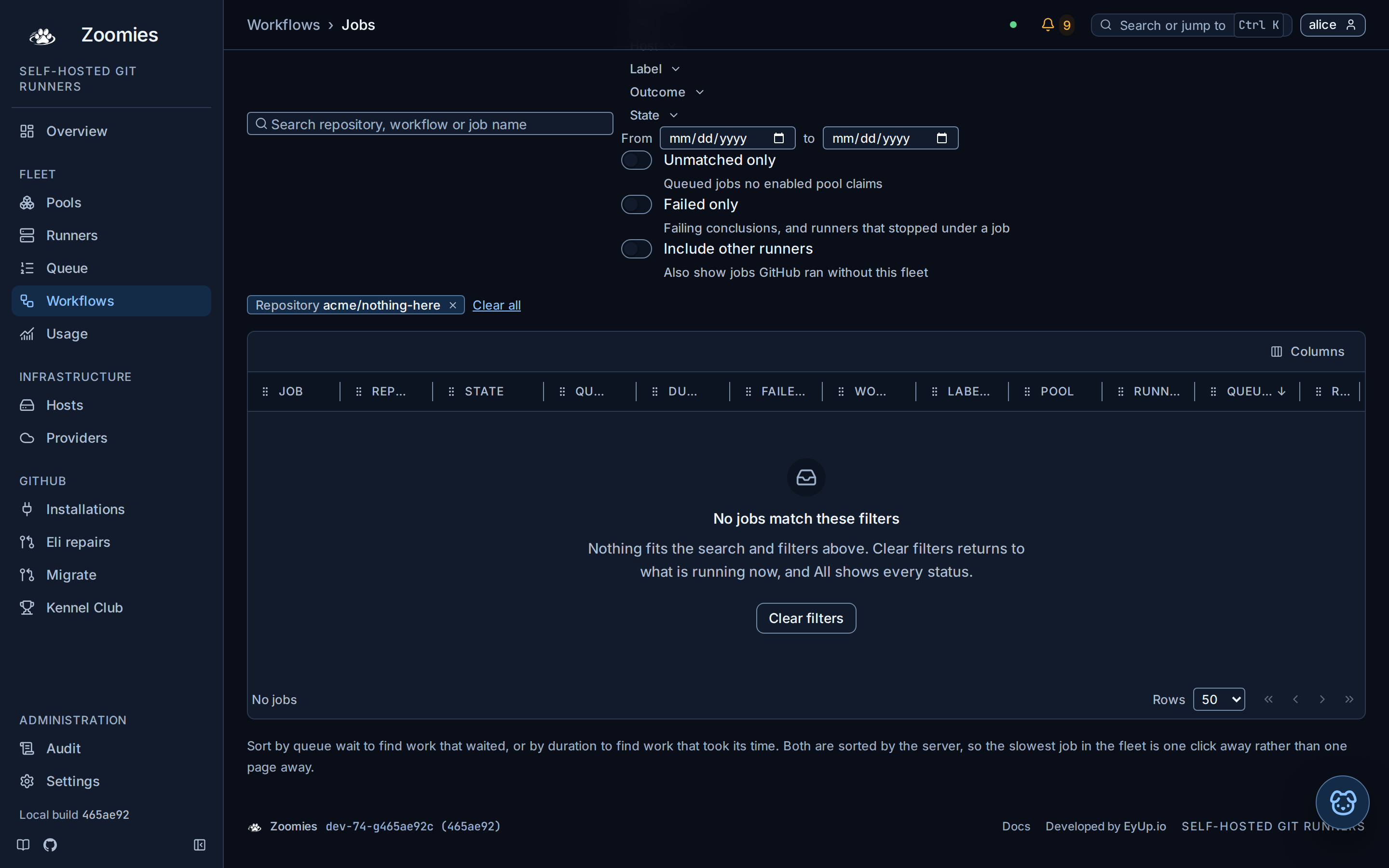
A headless browser cannot raise a soft keyboard, so the assistant sheet's keyboard behaviour is covered by the browser suite rather than photographed.
Primitives are reviewed in the development-only component gallery
(web/gallery.html, served by make gallery), which renders the real
components in every state above, in four style and mode combinations. That is
not a product page: it is never built into the binary and never linked from
the navigation. Its captures live under design/theme-review/gallery and are
refreshed with make screenshots-gallery; web/tests/gallery.spec.ts checks
all four combinations, the refusal reasons, focus rings, live status contrast
and the phone width.
Logo backdrops are chosen in Settings, Appearance and saved in this browser.
Orbital haze is the default for new, missing or unrecognised preferences.
Starlight, Pearl veil, White square and White circle are the other choices. Every
main logo uses the same choice, including the unauthenticated login screen.
The original black artwork remains unchanged in both themes. The --z-logo-*
tokens select the full atmospheric backdrop assets and define inset spacing.
Decoration is static and never carries status meaning. The main logo uses the
same detailed artwork on desktop and portrait phones. Paw icons remain unchanged:
black in light mode, white in dark mode, with no decorative backdrop.
Backdrops are lossless WebP files; the original black logo remains a separate SVG.
Runner, workflow and queue status share ZoomiesStatusIcon. Settings →
Appearance → Zoomies vocabulary offers three choices:
| Choice | Status words | Illustration |
|---|---|---|
| Off (default) | Plain state names | Standard Lucide status icon |
| Cute | Zoomies dog-park vocabulary | Original animated avatar |
| Standard | Zoomies dog-park vocabulary | The dog icon and paw prints, with a gesture and a persistent cue glyph per state |
The choice stays in this browser. A browser that has never chosen (a new
install, or one whose saved preferences were cleared) starts on Off. Existing
users keep Cute when their old vocabulary switch was on, and Off when it was
off. The validated prefs.statusStyle is the saved choice; prefs.quirkyStatus
is its derived boolean for state maps, filters and activity text. Those maps
still accept a quirky argument so they remain importable as plain TypeScript.
Off draws each state with a Lucide icon from the state map in
web/src/lib/status.ts. Runner, workflow and queue icons sit in a compact
24px tile, with an 18px glyph, a slightly firmer stroke and the state's subtle
background and border. This keeps their weight and alignment consistent while
labels and tooltips carry the meaning. A state still in progress moves a
little, chosen by glyph so the same glyph moves the same way on a runner, a
job or a machine: being set up turns, work executing sends one pulse along its
trace from left to right, being accepted breathes, and finishing turns its
hourglass over now and then. The three CPU states each move the way the CPU
went: extra CPU gives its trend line two quick hops, maximum CPU shakes its
bolt harder as it fills with charge and then flashes, and CPU being held back
tugs its line down and drags it slowly back up. Everything waiting or finished
holds still, so a page of idle runners is a calm one and a failure never draws
the eye by moving, and reduced motion stops all of it. A glyph the motion map
does not know holds still too, unless the state's tone is the busy one, in
which case it falls back to the quiet breathe: a new in-progress glyph nobody
mapped yet must not look finished. An icon names a state, never an action: the
Queue's Run now, Pause, Resume and Delete carry Zap, Pause, Play and the bin,
Re-run a turning arrow, and the Runners page's Drain the slashed circle, so a
status drawn with one of them beside those buttons reads as something to press.
One glyph also means one thing wherever it appears:
| Icon | Means | Used for |
|---|---|---|
LoaderCircle |
being set up | provisioning runner; machine creating, starting, bootstrapping |
Handshake |
being accepted | registering runner; enrolling machine |
CircleDot |
ready, waiting for work | idle runner; ready machine |
Activity |
work executing | busy runner; running job or step; machine with runners |
Hourglass |
finishing, then leaving | draining runner |
CircleX |
failed | failed runner; failed job |
CircleMinus |
gone | removed runner; job removed from the queue |
Clock |
queued | queued or waiting job; a Ready queue row |
ChevronsUp |
prioritised | a job somebody pressed Run now on |
OctagonPause |
held by an operator | a paused job |
CircleSlash |
stopped taking work | cancelling job or run; cordoned host; disabled pool |
TimerOff |
ran out of time | timed-out job |
IterationCcw |
another attempt asked for | a re-run requested on a job's timeline |
Zap, TrendingUp, TrendingDown |
CPU lent at maximum, lent, taken back | elastic CPU on a busy or idle runner |
Standard is the Lucide dog face, two PawPrint marks under it and the state's
cue glyph in the corner, in one SVG per runner, moved by CSS alone: each
state's gesture is a set of keyframes for those marks, so there is no drawing
to keep beyond the face's own eye and mouth variants. Busy runners trot while
the paw prints step underneath them, extra zoomies dash from side to side with
speed lines and dust, and maximum zoomies dash faster with dashed streaks and a
charge flash, both leaving trail prints. Idle dogs sit, blink and tap a paw,
provisioning dogs dip down to sniff the paw prints as a scent rises,
registering dogs wave a paw print under a ripple ring, throttled dogs strain
against a taut leash, and draining dogs sink and settle as their paws fade.
Failed dogs hold their heads low with downcast eyes and one slow sigh, removed
dogs fade as dashed ghosts, and unknown dogs rock with glancing eyes; these
three move slowly and sadly rather than freezing, so a stalled runner never
reads as a broken image. The glyph in the corner is the cue, and it is the icon
Off draws for the same state (Activity, CircleDot, Hourglass, CircleX
and so on, with TrendingUp and Zap for the two boost levels), so one glyph
keeps one meaning across the styles; throttled, which Off has no glyph for,
wears a Turtle rather than a pause, since pause is a button on the Queue.
Labels, colours and tooltips keep their existing status meaning. Below 28px the
accents and mouths step aside and pose, eyes and the state's colour carry the
state.
Each runner ID seeds its timing so rows and workflow packs do not move together. Reduced motion disables every animation while retaining the expression and cue. The existing reserved avatar size and workflow pack widths are preserved. Cute keeps its palette and gains a pose per state: posture, ears, eyes, mouth and brows are chosen per state, the collar tag and props borrow the status tone, and below 32px the props and fine detail step aside so posture, ears and tone carry the state. Off keeps plain status icons.
All tokens live in exactly one place: web/src/lib/styles/tokens.css, declared
as CSS custom properties on :root and overridden under [data-theme="dark"].
Tailwind v4 consumes them through @theme so utility classes and hand-written
CSS resolve to the same values: colours, sizes, radii, shadows, weights,
tracking and the easing curve are mapped by name, and the whole spacing scale
is derived from the same 4px step by arithmetic rather than by a mapping that
could drift.
Never write a raw colour, and never write a raw value that already has a
token. Colour is absolute: a hex or rgb() in a component is a bug, because a
colour written by hand is a colour that only works in one theme. Everything
else is a rule about repetition; a value that appears twice is a decision being
made twice, and it belongs here where it can be made once. A hairline border,
the tracking on an uppercase label, the width of a dialog and the height of a
switch thumb were all raw in several dozen files before they were tokens.
Three things are still raw, and each is raw for a reason worth knowing:
- Media query widths.
@media (max-width: var(--z-bp-md))is not valid CSS (a media query is evaluated before custom properties exist) so the two thresholds are written out.--z-bp-mdand--z-bp-lgare declared anyway, so the number has one home and JavaScript can read it rather than repeat it. - A one-off content measure. The width a filter row stops growing at, the column count a card grid wraps at: these are that component's own layout, answer to nothing else, and naming them would only add a lookup. The moment a second component wants the same measure it becomes a token.
- One hex, in the log viewer. xterm.js takes its theme as JavaScript values
and insists on
#rrggbb, so the bridge inLogViewer.svelteresolves every token through a probe element and converts the result. The single literal there is the fallback for a colour that failed to parse, which is a last-resort value rather than a design decision.
1.1 Colour
The palette is the brand palette: a cool near-black spine with Runner Blue as the interactive accent. See brand.md for the identity itself and the two decisions -- darkening Runner Blue for text, and spending Fast Cyan on the busy state -- that turn it into a usable UI palette.
Every pairing below has been measured; the numbers are real, not aspirational.
Brand constants
Fixed by the identity, available as --z-brand-* and unchanged between themes.
| Token | Value |
|---|---|
--z-brand-black |
#080808 |
--z-brand-white |
#FFFFFF |
--z-brand-cool-grey |
#B9BCC2 |
--z-brand-mid-grey |
#666A73 |
--z-brand-runner-blue |
#2F80ED |
--z-brand-fast-cyan |
#22D3EE |
--z-brand-paw-black |
#000000 |
Two of these are the record rather than a value a rule reads. Mid Grey is the
brand's light-theme secondary text, but --z-text-muted darkens it to #5B6069
for the same reason the accent is darkened below: at 13px on white the brand
value is 5.4:1, and text an operator reads all day should be past 7:1. Paw Black
is the favicon artwork, which is a PNG rather than a colour any rule sets.
Neutrals
| Token | Light | Dark | Use |
|---|---|---|---|
--z-bg |
#F6F7F9 |
#0A0B0D |
Page background |
--z-surface |
#FFFFFF |
#131519 |
Cards, panels, table body |
--z-surface-raised |
#FFFFFF |
#1B1E23 |
Popovers, dialogs, dropdowns |
--z-surface-sunken |
#EEF0F3 |
#050607 |
Wells, code blocks, table headers |
--z-border |
#E2E5EA |
#262A31 |
Default hairlines |
--z-border-strong |
#C7CBD3 |
#363B44 |
Inputs, focused containers |
--z-text |
#0B0C0E |
#F4F5F7 |
Primary text |
--z-text-muted |
#5B6069 |
#B9BCC2 |
Secondary text, labels |
--z-text-subtle |
#666B74 |
#868B94 |
Timestamps, placeholders |
Primary text is 18:1 in both themes. Muted is 5.9:1 light and 10.3:1 dark, on the
page ground. Subtle -- the weakest text in the product -- is 5.0:1 light and
5.75:1 dark on the page ground, and clears AA on every surface it sits on: the
lowest is a sunken well at 4.7:1 in the light theme and a raised surface at
4.9:1 in the dark. It is measured on all of them, not only on white, because a
breadcrumb sits straight on the page ground; web/unit/text-contrast.test.ts
holds it there.
Brand accent
| Token | Light | Dark | Use |
|---|---|---|---|
--z-accent |
#1A63D8 |
#78B4FF |
Primary buttons, links, active nav, focus |
--z-accent-hover |
#154FB0 |
#9BC9FF |
Hover |
--z-accent-subtle |
#E8F0FD |
#10203A |
Selected rows, badge backgrounds |
--z-accent-contrast |
#FFFFFF |
#08131F |
Text on an accent fill |
5.13:1 and 9.16:1 against their backgrounds; the text on an accent fill is
5.5:1 light and 8.7:1 dark. Full-strength Runner Blue (--z-brand-runner-blue) is
available for illustrative fills, where the bar is 3:1.
Status
Runner and job states get their own hue. The mapping is fixed -- do not use these colours for anything else, because operators learn them.
| State | Token | Light | Dark |
|---|---|---|---|
| idle / healthy / success | --z-idle |
#0F7A3D |
#5FD68C |
| busy / running | --z-busy |
#00757F |
#3BD6E8 |
| provisioning / registering / pending / throttled / warning | --z-pending |
#9A6100 |
#F2B246 |
| draining / cordoned / paused / waiting on a step an operator asked for | --z-draining |
#4D3F5C |
#D0BEE0 |
| failed / error / destructive | --z-danger |
#BD2018 |
#FF8D84 |
| removed / neutral | --z-neutral |
#686D76 |
#7F858E |
Two meanings that are not states of the fleet are written into the table
rather than left to be inferred, because each had quietly grown a colour of its
own. Warning is --z-pending: a finding or setting the operator should look
at, drawn the way a state that will resolve itself is. Waiting on a step an
operator asked for -- a setting saved but not applied until Zoomies restarts, a
restore staged for the next start -- is --z-draining, because it is held on
purpose and will not move until somebody acts, like a cordon.
Information is not a status. A note, an explanation or an info severity
carries --z-accent, never one of the six: cyan says a runner is executing a
job right now, and plum says something was held back, so neither can also mean
"for your information". A box that only explains itself takes --z-accent-subtle
and --z-accent-border.
The fleet status page at /status has three states of its own, and they sit on
this mapping rather than beside it: blocked is --z-danger with the
triangle, degraded is --z-pending with the dashed ring, and healthy
is --z-idle with the hollow dot. A reader with no account sees the same
colour and shape for "something is stopping jobs" that an operator sees for a
failed runner, and the state is always written out as a word beside them.
On a host, the heartbeat reads Connected or Unreachable, and "healthy" is kept for the host's OS report, so the two pills on one card never use a word for two different things. The mapping above does not move: only the label did.
Busy is the Fast Cyan family: the brand asks for the accent to be used sparingly, and this runner is executing a job right now is the single most valuable "look here" signal on the page.
The six are separated in lightness and chroma, not only in hue, because a legend is the one place they are read side by side. An earlier palette set all six within a few points of L* 45 and let hue do the whole job, which worked for green against red and failed everywhere else: draining and neutral were two greys at the same lightness, six points of CIEDE2000 apart, where a pair has to be around twenty before a legend dot tells them apart at a glance, and busy, accent and the greys sat inside twenty points of each other. Two of them are now pulled off that plane. Draining carries a plum cast and the far end of the lightness range (dark on light, light on dark: it is a state an operator asked for, and should be findable), and neutral is the only flat grey left, sitting quietly at its contrast floor.
Measured across all six plus --z-accent, the closest pair is now 19.3
(CIEDE2000, light) and 21.7 (dark), against 6.1 and 10.2 before; no pair that
can appear in one legend is under 19, and most are past 25. When a chart puts
two of them within about twenty points (the executing and allocated lines in
the usage chart, queued against cancelled work) the nearer of the two is drawn
dashed, so the legend swatch carries a stroke style and not only a colour.
Each status foreground clears 4.9:1 on its own theme's surface and 4.5:1 on its
own -subtle ground, which is what a badge is.
Each has a -subtle companion for badge and chart-fill backgrounds, and
--z-danger has a -contrast for text on a destructive fill. Every status is
also carried by a shape: a filled dot for busy, a hollow dot for idle, a
dashed ring for provisioning and for a throttled host, a slash for draining, a
triangle for failed. A throttled host is pending rather than draining on
purpose: the fleet stepped it down and the fleet will step it back up, so it is
a state that resolves itself, like provisioning, and not one an operator asked
for, like a cordon.
Colour alone never encodes state -- that is both an accessibility requirement
and a practical one for an operator glancing at a sparkline from across the
room.
Charts
--z-chart-1 … --z-chart-6 are a categorical ramp derived from the status
hues, ordered for maximum adjacent separation. Sparklines use --z-busy for
running work and --z-pending for queue depth, because those are the two
quantities an operator is actually watching.
The mark
--z-mark-chip is the Zoomies Black ground the monochrome mark sits on. The
mark is white line art drawn for a dark surface, so the UI puts it on a small
black chip rather than inverting it -- one asset, correct in both themes,
legible at 24px. See brand.md, which lists every place the signed-in
product carries the mark, the name or the descriptor.
The panel
A panel is a ground that is Zoomies Black in both themes (the sign-in page's
logo stage, the Appearance preview's), so what is drawn on it cannot follow
the theme: the light theme's muted grey is 3.2:1 on black. These are declared
once, never overridden per theme, and read on a panel alone. Measured on
#080808:
| Token | Value | Use | Contrast |
|---|---|---|---|
--z-panel-bg |
--z-brand-black |
The panel | - |
--z-panel-text |
--z-brand-white |
The tagline, fact titles, the credit's name | 20.0:1 |
--z-panel-text-muted |
--z-brand-cool-grey |
The lede and the links | 10.5:1 |
--z-panel-text-subtle |
#868B94 |
The facts' detail, "Developed by" | 5.9:1 |
--z-panel-border |
#262A31 |
The fact icons' edge | decorative |
--z-panel-raised |
#121418 |
The fact icons' ground | decorative |
--z-panel-ring |
rgb(255 255 255 / .07) |
The motion-path rings | decorative |
The subtle and border values are the dark theme's --z-text-subtle and
--z-border, repeated because the light theme has no name for them. The one
arc of --z-brand-runner-blue in the rings is 5.2:1, an illustrative stroke
rather than anything to read. The focus ring stays --z-accent, which is 3.6:1
on the panel in the light theme and 9.3:1 in the dark, both past the 3:1 a
control's indicator needs.
1.2 Type
Two faces, both self-hosted as woff2 so an air-gapped install has no network dependency and no third-party font request:
- Inter Variable: UI.
--z-font-sans. Geist andsystem-uiare the brand's sanctioned alternatives and sit in the fallback stack. - JetBrains Mono: logs, IDs, labels, durations, anything monospaced.
--z-font-mono.
The wordmark in the logo artwork is custom-rendered and is not Inter. Do not try to set it in type.
Both declare a full system fallback stack so the first paint is never blank.
| Token | Size / line-height | Weight | Use |
|---|---|---|---|
--z-text-2xs |
11px / 16px | --z-weight-medium |
Table micro-labels, badge text |
--z-text-xs |
12px / 18px | --z-weight-normal |
Metadata, timestamps |
--z-text-sm |
13px / 20px | --z-weight-normal |
Default table and body text |
--z-text-base |
14px / 22px | --z-weight-normal |
Form controls, prose |
--z-text-lg |
16px / 24px | --z-weight-semibold |
Card titles |
--z-text-xl |
20px / 28px | --z-weight-semibold |
Page titles |
--z-text-2xl |
28px / 34px | --z-weight-bold |
Overview metrics; at --z-weight-semibold, the sign-in page's heading and tagline |
--z-text-3xl |
36px / 42px | --z-weight-bold |
Hero numbers |
Four weights exist and the table names them rather than numbers, because the
numbers are Inter Variable's axis positions and are not round: --z-weight-normal
450, --z-weight-medium 500, --z-weight-semibold 550, --z-weight-bold 640.
Tracking is set for uppercase and for display sizes, and left alone in between:
--z-tracking-wide (0.04em) for the uppercase micro-labels above table headers
and drawer sections, --z-tracking-wider (0.08em) for the widely spaced brand
lockups in the footer, nav and About panel, and --z-tracking-tight (-0.01em)
for headings at --z-text-2xl and above, which set too loose at their default.
A quiet link's hover underline sits --z-underline-offset (0.15em) below the
text, clear of the descenders.
The sign-in page is the one place a title is set at --z-text-2xl. Everywhere
else a page title is a label over the content that follows; there, the form is
the whole page and the title and the brand panel's tagline are its display
text.
The base size is 13px, not 16px. This is a dense operational tool; 13px Inter at 450 weight on the warm background stays comfortably legible while fitting a useful number of runners on screen. Prose in docs and empty states steps up to 14px.
Numerals in tables use font-variant-numeric: tabular-nums so columns align.
IDs use --z-font-mono at --z-text-xs.
A value that is not there is written --, everywhere. Every formatter in
lib/format.ts answers with it for a null, and a page with no formatter to call
(a tile whose figure is not yet known, a cell with nothing behind it) writes the
NO_VALUE constant from the same file rather than its own dash. An em dash or an
en dash in that place is how a table cell and the tile above it came to disagree
about what empty looks like. Ranges (1–10 of 24) and sentences keep their dashes.
Form controls are the one exception, and only on a phone. Below 768px,
Input, Textarea and Select step up to --z-text-lg (16px). Mobile Safari
zooms the whole viewport whenever a focused control is under 16px, and the
viewport meta deliberately sets no maximum-scale, so without this every field
tap on the first-run screens jumped a 360px page to roughly 410px of effective
width and ran the card off both edges, once per field. Control height comes
from the space scale, so nothing reflows; only the glyphs grow.
A validation error takes the hint's place; it never appears beside it.
Field renders one message row, because an error rendered in addition to the
hint adds a line and moves everything below it, including the submit button,
out from under a pointer already on its way down, so the click lands on whatever
takes its place and the operator experiences a button that does nothing. A field
on a form worth clicking therefore carries a hint, so the row is occupied before
an error needs it. Anything a field must say alongside an error goes in
notice, which is rendered independently, is aria-live="polite", and is what
the caps-lock warning uses.
1.3 Spacing
A 4px base with a restricted scale. Only these values exist:
--z-space-1 4 · -2 8 · -3 12 · -4 16 · -5 20 · -6 24 · -8 32 ·
-10 40 · -12 48 · -16 64
Page gutters are --z-space-6, card padding --z-space-5, table cell padding
--z-space-3 vertical / --z-space-4 horizontal, form field gap
--z-space-4.
1.4 Radii, borders and geometry
--z-radius-sm 4 (badges, inputs) · --z-radius-md 8 (buttons, cards) ·
--z-radius-lg 12 (dialogs, panels) · --z-radius-full 9999 (dots, pills).
Borders come in three weights and the choice between them is meaning, not
taste. --z-border-width (1px) is the hairline that separates things belonging
to the same list. --z-border-width-thick (2px) marks the one that is selected,
focused or wrong. --z-border-width-rail (3px) is the flag down the left edge
of a problem, a disabled pool or a failed step, thicker because it is a signal
rather than a boundary.
Below the 4px spacing grid there are three optical nudges, --z-nudge-1 to
--z-nudge-3. They exist because a checkbox aligned to the grid sits visibly
low against a 13px line. Anything that can sit on the spacing scale does.
The drawn controls have their own sizes, for the same reason: --z-control-box
(15px, the checkbox and radio box), --z-control-thumb (14px, the switch), and
--z-control-icon (14px, the icon inside a button). Field and button heights
are on the spacing scale and stay there: sm is --z-space-6, md is
--z-space-8, and lg (which only the sign-in form uses, because it is the one
form that is the whole page) is --z-space-10. The one exception is --z-control-touch
(44px) is the height a control read by a finger takes under
@media (pointer: coarse) (the segmented choices, the chips and legend
switches every trend carries, a slider's thumb, a column heading's reposition
grip and resize edge, and the sign-in form's lg fields and button) because a 24px row
a mouse is fine with is two rows under one fingertip. It applies only where the pointer is coarse,
so the desktop keeps its density.
Dialogs and drawers are cut to their content's comfortable measure rather than
to the viewport, so each has three widths and they are the three shapes we
actually put in one; a confirmation, a form, a table:
--z-width-dialog-sm|md|lg (400/560/820) and --z-width-drawer-sm|md|lg
(360/520/760).
1.5 Elevation
Shadows are cool-tinted, to match the near-black spine, and very restrained; in dark mode elevation is carried mostly by surface colour, not shadow.
| Token | Light | Dark |
|---|---|---|
--z-shadow-sm |
0 1px 2px rgb(8 12 20 / .06) |
0 1px 2px rgb(0 0 0 / .5) |
--z-shadow-md |
0 4px 12px -2px rgb(8 12 20 / .10) |
0 4px 12px -2px rgb(0 0 0 / .6) |
--z-shadow-lg |
0 16px 40px -8px rgb(8 12 20 / .16) |
0 16px 40px -8px rgb(0 0 0 / .7) |
Every modal sits on the same veil, --z-scrim with --z-scrim-blur; the page's
own ground at 72% and a 3px blur, so it dims in both themes without a hard-coded
black. Dialog, Drawer, the command palette and the phone's navigation sheet all
take it from the token, so a dialog opened over a drawer dims the page by one
amount.
1.6 Focus
One look, two mechanisms. app.css draws the global ring with outline, from
--z-focus-width, --z-focus-colour and --z-focus-offset; that is what
almost everything gets, on :focus-visible only, so a mouse click draws no ring
and a keyboard tab does. --z-focus-ring is the same ring as a box-shadow,
for the controls whose outline a scrolling or clipping parent would cut off. A
consumer on a raised surface overrides --z-focus-gap so the ring's inner gap
matches what it is drawn on. A parent that clips for a different reason makes
room instead: a grid cell truncates its content, and pushes that clip out by an
offset and a width so the ring of whatever is focused inside it still has
somewhere to be drawn.
The ring is never removed. Removing it and replacing it with a colour change does not count: a border that goes from grey to blue is invisible to anyone who cannot see the difference, and is exactly the change a focused and invalid field cannot make.
1.7 Motion
| Token | Value | Use |
|---|---|---|
--z-motion-fast |
120ms | Hover, focus, colour change |
--z-motion-base |
200ms | Panels, dropdowns, row insert |
--z-motion-slow |
320ms | Dialogs, drawer, route transition |
--z-ease |
cubic-bezier(.2,.8,.2,1) |
Everything |
State changes animate the colour and the dot, never layout; a table that
reflows while you are reading it is worse than one that does not animate at all.
Everything inside @media (prefers-reduced-motion: reduce) collapses to 1ms.
1.8 Theme
Three states: light, dark, system. dark is the default. system sets no
attribute, so prefers-color-scheme decides. Every choice persists to
localStorage under zoomies.theme, and all but system write data-theme on
<html>; a browser with nothing stored gets dark.
The choice is applied by a tiny inline script before first paint so there is no
flash.
1.9 Scrollbars
The scrollbar is the one control the browser draws for us, and the one that is easiest to leave too faint to find. It is styled so that it belongs to the theme and, more to the point, so that an operator can see it and take hold of it.
| Token | Light | Dark | Use |
|---|---|---|---|
--z-scrollbar-size |
14px |
14px |
The column, which is the whole hit target |
--z-scrollbar-inset |
3px |
3px |
Gap between thumb and column edge, each side |
--z-scrollbar-thumb |
--z-text-subtle |
--z-text-subtle |
Resting |
--z-scrollbar-thumb-hover |
--z-text-muted |
--z-text-muted |
Under the pointer |
--z-scrollbar-thumb-active |
--z-text |
--z-text |
While it is held |
--z-scrollbar-track |
rgb(8 12 20 / .06) |
rgb(255 255 255 / .07) |
Behind the thumb |
The thumb borrows the weakest text colour, so its ratios are the ones already measured above: against every surface it can sit on it is never below 4.1:1 in light or 4.8:1 in dark, past the 3:1 a control needs. The track is a tint rather than a colour so that it reads on a white card and on a sunken well alike. The visible thumb is the column less the inset on each side -- 8px -- and the whole 14px column responds to the pointer.
Two rules keep it working, and both are written into app.css beside the
rules themselves:
- Pointer only. The styling sits inside
@media (pointer: fine). On a touchscreen a finger scrolls the content, never the bar, and the browser's overlay scrollbar -- which takes no space and fades when idle -- is the right control there. Styling it would pin a permanent column down the edge of a phone. - One mechanism per browser. Chromium and WebKit draw from the
::-webkit-scrollbarpseudo-elements, which are the only way to get a thumb that is inset and rounded. The standardscrollbar-widthandscrollbar-colorproperties are set only where those pseudo-elements are unknown (@supports not selector(::-webkit-scrollbar), which today means Firefox), because a browser that knows both ignores the pseudo-elements the moment the standard properties are set and draws its own thin bar instead. Settingscrollbar-width: thin"as well" is exactly how the thumb became a sliver nobody could find.
The log viewer's terminal draws its own scrollbar rather than the browser's, so it is handed the same three thumb tokens through its theme.
2. Information architecture
Persistent left navigation, collapsible to icons only (persisted). Order is fixed, because muscle memory is the point:
- Overview: fleet health at a glance
- Pools: what runners to make
- Runners: what runners exist right now
- Queue: what is waiting for a runner, and why
- Workflows: what has run, one row per workflow run, each opening to the
jobs inside it. The job-level list is one step down, at
/jobs: it is not in the navigation, but every link that names a job (the problems drawer's, the Overview's) lands there, and the two pages share their filters. - Usage: runner-hours and job activity by pool, repository or workflow
- Hosts: where runners can go
- Providers: the infrastructure that machines are rented from
- Installations: GitHub App connections
- Eli repairs: review failed PR offers, follow what is running and what
happened, and set up the accounts and repositories behind them. It is one
entry for four pages under
/repairs: the hub, a failure at/repairs/new, one repair at/repairs/<id>and setup at/repairs/setup. The entry is lit on all four. - Migrate repositories: move repositories off GitHub's runners onto this fleet. The navigation shortens it to Migrate, because a nav label has to fit beside an icon in a 232px column; every other place that names the page (its heading, the palette, the shortcut sheet, the browser title) uses the full name.
- Kennel Club: which repositories could hurt the fleet or stop its CI
(Kennel Club). It is a section of pages, like Settings:
Standards (the Overview and the list of Repositories, and each
repository's own page) and, under For assistants, AI Context,
preparing repositories for AI coding assistants, where explicit source access
is separate from fleet permissions. AI Context has no section of its own, and
/ai-contextstill reaches it. - Audit: who did what
- Settings: a section of pages rather than one page: your account and
appearance; users and API tokens; the configuration, backups, updates and about.
Each has an address of its own (
/settings/users), the section's own rail lists them beside the page, and/settingsalone goes to the first of them, except on a phone, where it is the list.
The sidebar reads the same order under four headings (Fleet, Infrastructure,
GitHub and Administration, with the Overview standing alone at the top and
Administration pinned to the foot) so an entry is found by its neighbourhood
rather than read for from the top. Collapsed, the headings become hairlines
and nothing moves. The headings change nothing about the order or the g
chords, which is what lets them be added without anyone relearning anything.
Every page is shown, in both themes, in The UI.
The navigation is headed by the mark, the wordmark and the descriptor, and every page ends in a hairline footer carrying the mark, the name, the running version, a link to the docs and the credit Developed by EyUp.io, so a signed-in screenshot says which product and which build it came from, and who makes it, without anyone having to open Settings. On a phone the navigation moves to the bottom edge and loses its masthead, so the mark appears in the top bar instead, and again at the head of the sheet the More button opens, which is the one place on a phone with room to say the name.
The account menu in the top bar is about the person rather than the fleet: who is signed in and as what, the theme as a choice with the one in force marked, their own settings pages, the keyboard shortcuts, the documentation and the way out. On a phone the same things live at the top of the More sheet.
A link that leaves the product opens in a new tab; a link within it does
not. An operator watching a fleet should not lose the page they were on to go
and read what a runner group is. Both footer links leave, so both take a new
tab, as does every link to GitHub or to the documentation from a dialog,
Button has a newTab prop for the ones that are buttons. Each of them adds
"(opens in a new tab)" to its accessible name, because a tab appearing under
somebody who cannot see it happen is disorienting rather than helpful.
A command palette on Cmd/Ctrl+K jumps to any page, any pool, any runner by
ID or name, and runs quick actions (drain a runner, cordon a host, create a
pool). It is the fastest path to everything and is discoverable from a hint in
the top bar.
Overview
The one page that has to earn the second monitor.
- The activity matrix, first: today by the hour, and up to a year of the
fleet's days as one band of squares, a column per week and a row per
weekday, coloured by what finished,
greener as more jobs finish, red the moment any fail, darker red the
larger the share. Colour never carries it alone: a failing square has a hole
in it, a square with work waiting and nothing finished is hollow, and every
square's accessible name is the whole sentence its tooltip shows. The grid
is one tab stop walked with the arrow keys; selecting a square opens the
day's hours and its links beneath the grid rather than in an overlay. Quick
ranges cut the window (a day and a week are drawn by the hour, a month and a
quarter as the calendar with each day cut into four- or eight-hour squares
side by side, and the year by the day) and the choice, the day it starts on
aside, is a per-operator preference. Slicing the days is what gives the
shorter calendars about as many columns as the year, so every range fills
the band the same way. Every range is drawn whole, never cut to the width or
scrolled: its square shrinks until the window fits, so the newest week is
always on screen and a year is twelve months on a phone, and the month
names shorten to initials where the columns are too close for them. It is
compact on purpose: every line it spends is a line the
numbers under it lose. The band spends its width as well as its height: a
grid with at least as many columns as rows grows its square until it fills
the room beside the figures, one too narrow for that keeps its size and
hands the width over, and the figures (what the squares on screen come to,
so the window reads without hovering every square) take whatever is left.
On a phone the band cannot hold both, so the one that would use the width
gets it: a week of hours or a month of sliced days grows across the whole
band with the figures under it, a few weeks of whole days keeps them beside
it instead of leaving that width white. Which of the two it is comes out of
the measurement, not a second breakpoint.
The key runs under both, where it explains the squares rather than floating
at the right with the white space in front of it. The component lives in
lib/insights/because the Usage page draws its range with the same one. - Four metric tiles: queued jobs, running jobs, live runners, median queue wait. Each carries a sparkline of the last hour.
- Per-pool utilisation bars: busy / live, with the pool's min and max marked so an operator can see a pool pinned at its ceiling.
- Recent events, a reverse-chronological list of what has happened to the
fleet, whatever kind of thing it was: the scheduler's decisions in its own
words ("scaled
linux-x642 → 4: 3 jobs queued > 30s"), how each job ended, a runner that failed and a runner that came up ready, a runner lent spare CPU or slowed by the host it is on ("Squirrel spotted, maximum zoomies", in the same words the runner's own page uses), a host that went quiet, was throttled or is holding new runners off under pressure, a machine a provider is renting, a pool somebody changed, the GitHub connection, problems as they are raised, and the audit trail. What goes right is a category as much as what goes wrong: a panel that only ever reported failures would teach an operator that silence is the good state, which is the same thing as teaching them not to read it. Every line is the same four things (a mark in one of the six status tones, what happened, what it happened to, and when) with the controller's own sentence under it where there is one, printed verbatim. A job's line names the step it stopped at, how long it took and where it came from, and a job whose runner stopped under it says so: that failure is the fleet's, not the workflow's, and this page is where the two are told apart. The hour's failures and how many of them were the fleet's own are a badge in the panel's header, because nothing else answers that, GitHub records both as failure.
Which kinds it carries is the operator's choice, one switch per category on Settings → Events, grouped under four headings and kept in the browser like the theme. Two rules make that safe: the panel says how many kinds are switched off rather than quietly omitting them, and a category never reports a frame that carries no news, so nothing floods the panel with heartbeats. A category with no history to load (a host, a machine, a pool) says so on the settings page, because one that is on and empty otherwise looks exactly like one that is broken.
On a desktop the pools and the running jobs share the left-hand column and this feed takes the right, cut to their height and scrolling inside itself. It is the one panel whose length says nothing about the fleet, so it never decides the height of the page: a fleet with one pool does not get a screen of blank space under it because the scheduler has been busy. * Active jobs, under the pools: what is running this moment, newest first. How the last jobs ended was a second panel across the bottom of the page and is now part of the feed: two reverse-chronological lists on one page, each with its own idea of what belonged on it, was one list too many. * Problems summary: one line saying how many things need a person, worst severity first, with a Review button that opens the problems drawer. When everything is fine it is a single quiet line, not an empty box and not a green celebration. It is a line rather than a list on purpose: the panels above are what the page is for, and a configuration warning somebody chose deliberately must not push the pools and the running jobs below the fold every day. * Recent failures: unresolved failures nobody has acknowledged, newest first, with the count in the panel's header and each row naming the repository, the workflow, the job and the step or fault it stopped at. A row opens the job's own drawer, and its Mark as known button takes the failure off the list, with the toast carrying the undo and the drawer able to put it back. It is a panel rather than a line like the problems summary, because each entry is a separate job with a separate thing to do about it and each leaves when somebody acknowledges it or a newer run replaces it. Background GitHub checks also remove fixed, superseded and closed PR failures; cancelled or skipped results are not proof of a fix. An unavailable GitHub read never resolves a failure. Opening a stale repair link explains what changed and offers the appropriate next step instead of sending the reader into setup. It shows a short glance of the newest few with the whole count in the header, not the whole list, so it too leaves the pools and the running jobs above the fold of a laptop screen. When nothing is owed it drops to one quiet line with a link to the Failed view: an empty card would spend the same height saying nothing.
The problems drawer
Reachable from the count in the top bar on every page, from the Overview's Review, and from the command palette. It holds the list itself (unhealthy hosts, failed registrations, webhook delivery failures, unmatched queued jobs, jobs whose runner stopped under them in the last hour, and every dangerous configuration setting the validator flagged) worst first, each entry saying what is true, why it matters and what to change, with a link to the pool, host, runner or installation it is about.
Every entry can be dismissed or snoozed for 15 minutes, an hour, four
hours or a day, for that one problem, or for every problem of its kind. A
decision is the operator's own, kept on their account in the database
(problem_dismissals, via GET/PATCH /api/v1/auth/problem-dismissals) so it
holds on another browser, another device and a second tab, and is never fleet
state: GET /api/v1/problems, zoomies status and any alerting rule still see
everything. An identity with no account behind it, such as an auth-disabled
instance, keeps them in localStorage instead. Three rules stop a dismissal
from hiding a real fault:
- a plain dismissal is forgotten the moment the controller stops reporting that problem, so the same fault happening again is news again;
- a snooze is not: it ends when its own clock does, so a problem that clears for one pass and comes back inside the window stays put away; and
- it only covers the severity it was made at, so a warning that becomes an error comes back.
Dismissed entries stay listed at the bottom of the drawer, dated, and can be restored one at a time or all at once.
3. Component inventory
The components below live in web/src/lib/components/ and take their values
from tokens. Everything else lives in a folder named for the thing it serves --
lib/pools/, lib/jobs/, lib/shell/ -- so a file's path says who owns it,
and a component earns its way into components/ when a second feature needs it
rather than on the day it is written. Svelte 5 runes ($state, $derived,
$props, $effect) throughout; no stores except for genuinely global state.
Primitives
| Component | Notes |
|---|---|
Button |
variants: primary, secondary, ghost, danger; sizes sm, md, and lg for the sign-in form alone; loading swaps the label for a spinner without changing width. help is a sentence in the shared tooltip; reason, with disabled, says why it cannot be used and keeps it reachable (see Help) |
IconButton |
square, always has an aria-label, which is also the heading of its tooltip. help, keys and reason add a sentence, the keys that do the same and why it is unavailable |
Input, Textarea, Select, Switch, Checkbox, RadioGroup |
all support error and hint; the error is announced with aria-describedby. Input has the same three sizes as Button |
Field |
label + control + hint + error; the only way form controls are laid out |
Badge |
status pill: colour and shape from the state map |
StatusDot |
the shape half of the state encoding, reusable inline |
Tooltip |
the one hover and focus help, on one bubble (TooltipBubble) and one set of timing rules (lib/tooltip.ts); never the only place information lives. Plain help is a title heading, a text sentence, a reason and the keys that do the same thing; text is also what assistive technology gets, linked to the control with aria-describedby. An optional content snippet draws a richer card for sighted readers, with text as its one-sentence copy. What it wraps has to be something a keyboard reaches, or focus opens nothing; a card that carries figures also opens on a tap, which has no hover. See Help |
Segmented |
one choice among a few as one control, aria-pressed on the one in force: the activity matrix's ranges, the fleet trend's windows, the usage chart's two measures |
Dialog |
focus trap, restores focus on close unless something else has taken focus meanwhile, Esc closes, backdrop click closes only non-destructive dialogs, and never one that is showing a secret exactly once. A dialog with text fields is a <form> whose footer button is type="submit" form="…", so Enter submits it |
Drawer |
right-hand detail panel; same focus rules. On a phone it runs the full height but not the full width: a strip of the page stays visible down its left, under the scrim, so it reads as a panel over the page rather than a new page, and a tap on the strip closes it |
NavMenu |
the phone's menu: a sheet that rises from the bottom edge, where the thumb that pressed More is, carrying every section named and in order, plus the account, the theme and sign out; same focus rules, closes when a section is chosen |
DropdownMenu |
roving tabindex, type-ahead; the list opens in the browser's top layer, placed against its trigger and flipped above where there is no room below, so a menu on a grid's last row is not cut off by the frame that scrolls. It closes when its trigger scrolls out of that frame. A header snippet names who the menu is about, and items sharing a choice are one segmented row of radio items with the one in force checked |
Tabs |
aria-selected and arrow-key navigation; aria-controls only when the component renders the panel, because a caller that draws what the tabs switch between elsewhere leaves it none to point at, and an aria-controls naming an id that is not on the page is an error |
Toast |
bottom-right, aria-live="polite" (assertive for errors), auto-dismiss except on error |
Skeleton |
the only loading affordance for content. Spinners are for in-flight actions only |
EmptyState |
icon + one sentence of what this is + the action that fills it; a visual snippet replaces the icon disc where artwork is wanted, as the not-found page does with the mark |
CopyButton |
wraps any ID; announces "copied" to screen readers |
RelativeTime |
"4m ago", the exact local time and the ISO timestamp in the tooltip, updates itself |
Duration |
humanised, tabular numerals |
Sparkline |
inline SVG, no chart library, role="img" with a text summary |
Slider |
the browser's own range control between notches, with the recommended notch ringed and words at the ones worth naming; a second row when two would collide. aria-valuetext says the value in the same words the readout shows |
QuantityField |
every size and CPU figure; a runner's limits, a host's reserve, a machine's shape, and every numeric or duration setting on the Configuration page. A Slider for choosing beside a field that reads what people write (4gb, 4096mb, 4g, 4 GiB, 1.5, 1500m) and, on Enter or blur, writes it back in the largest unit that says it exactly: 4096mb becomes “4 GB”, 1536 becomes “1.5 GB”, and 3000 MB stays as it is rather than turning into a rounded, different limit. A gigabyte is 1024 MB, as it is everywhere else on the page. A length of time reads Go's spelling and the one people say (168h, 7d, 2 weeks, 1h30m, 90 seconds) is shown as “7d” or “1h 30m”, and is sent to the controller in Go's spelling, which has no day. What cannot be read is said beside the field and changes nothing. Never a bare type="number" box with the unit in its label |
UtilisationBar |
busy/live with min and max ticks |
ConfirmDialog |
destructive confirmation that names the thing ("Delete pool linux-x64? 3 runners will be drained.") and requires typing the name for anything irreversible; Enter in that field confirms only once the name matches |
Composites
| Component | Notes |
|---|---|
DataGrid |
TanStack Table core + our own markup. Server-side pagination, sorting and filtering; column show/hide, width and order persisted per grid; a column's help makes its heading a dotted-underline button that opens a sentence; sticky header; row selection with a bulk action bar; full keyboard navigation (↑ ↓ rows, Enter opens, Space selects, Shift+↑/↓ range). Defaults fit the frame; an explicitly widened layout scrolls inside its own frame, see Tables use the space they need |
RowActions |
a row's actions as buttons rather than a menu, as an ARIA toolbar: one tab stop per row, ← → along it, and every button's name carries what it acts on |
FilterBar |
chips for active filters, each individually removable, plus a clear-all |
PageHeader |
title, subtitle, breadcrumb, primary action, and the refresh button where the page passes onrefresh |
RefreshButton |
the one refresh: registers the page's handler so the button, R and the palette all run it; turning icon while it works |
MetricTile |
number, label, delta, sparkline |
LogViewer |
lib/logs/. xterm.js with search, follow/pause, wrap toggle, download, and a line counter |
MemoryBadgePill, MemoryBadgeCard |
lib/runners/. A small pill and the card it opens, for what the memory valve has done for a runner and which of its folders are kept in memory. The model is memory-badges.ts, free of components so a unit test reads it: a badge names a tone (accent for something to notice, pending for something to look at, neutral for a fact, danger for a refusal) and an icon by meaning, and the components resolve both from tokens. A pill is as wide as its words -- a short column wraps its pills, it never squeezes one to a glyph -- a dashed one is something that has not happened, and a dot on one means the runner wants more and cannot have it. The card is a Tooltip content with the wide size, and the same markup is drawn open in the runner page's panel, so what an operator reads in the tooltip is what the page says. A pill is for reading, never for navigating: its click stops at it |
HostMemoryPool |
lib/hosts/. The memory a host may lend, as a figure and a bar drawn against the whole machine, so segments compare between hosts of different sizes; the ledger it was worked out from, line by line, is the card behind it. The figure and bar are one button, so the ledger opens on focus and a tap as well as on hover |
HostCard |
lib/hosts/. One host, closed unless asked. It opens on what the Hosts page exists to answer: the host's state, what kind of host it is, why it is not taking work if it is not, the slot bar and three utilisation bars, then a Details disclosure that opens the rest beneath it. The rule it keeps is that a fold may hide detail and never a reason: every sentence that explains why a host takes no work, and the Backends block for a host with nothing to run a job in, stay on the closed card. The page that holds the cards owns which are open, because a filter that takes a card off the screen must not close it; the choice is remembered per browser, written when it is made and never on sight. The open part is not mounted while closed. A card is a subgrid of the page's grid and its sections are rows of it, so the cards in a row are one height and the same section sits at the same height in each (a notice on one card leaves the space for it on the others, and opening one makes the whole row as tall as that card needs), with the page's row gap at zero so that it does not also open up the rows inside every card |
HostVitals |
lib/hosts/. CPU, memory and disk as a share of the whole machine: three rows of one grid, so the bars align across a card and, by the columns' least widths, across a row of cards, each with the figures it is a share of. The arithmetic is the capacity map's (hostSeries.ts) and the lines are the product's own, one for each: amber from the scheduler's 85% for CPU, counted without the CPU it has lent to runners; at or below the host reserve for memory, where the scheduler holds new starts; and by the doctor's low-disk rule for the disk, with a warning triangle and a sentence in the row's label so colour is never the only cue. A figure that is not measured is the absent-value mark, and a host that has stopped sending heartbeats shows none as current |
MemoryBar |
lib/runners/. A runner's memory as one bar: guaranteed, lent, swap (hatched, so it cannot be mistaken for the solid fill where colour is lost) and a tick at the ceiling. aria-hidden: the figures beside it carry the meaning |
RunnerTimeline |
lib/runners/. One row per state with how long the runner stayed there, reconstructed from the four timestamps a runner row carries -- and it says so, rather than letting an operator read it as an audit trail |
Wizard |
a flow of steps that is genuinely a sequence; the AI Context setup, the provider form, the migration; on a phone its footer stays pinned above the bottom bar. The provider form also sets jumpable, so each stage in the list but the current one is a button that goes straight to it; the current stage is plain text with aria-current on its list item, because a button that did nothing would be a dead tab stop. A pool is not one: see the pool editor |
The log viewer
Runner details open on Build log, the workflow's console output after the GitHub runner has masked secrets. Runner diagnostics keeps startup and worker messages separate. Switching tabs reuses the stream and preserves both buffers. The step summary reflects GitHub's latest report; it does not claim to update after every step. Save log exports the build output received in this view, and the GitHub link opens the complete archived job log.
Live build capture requires the updated stock runner entrypoint. It extracts
the runner's masked JobServerQueue console trace before GitHub truncates long
lines; other verbose traces are discarded before entering the relay. Older,
native and custom runners without this capture show an explicit waiting message
and the GitHub link. This live feed is best effort, not an archive: relay limits
still apply, and output is unavailable after the container is removed.
100k lines without jank is a hard requirement. xterm.js with the canvas/WebGL addon handles the rendering; the constraints on our side are:
- a bounded scrollback (
scrollback: 100000): beyond that the oldest lines go; - writes are batched on
requestAnimationFrame, never once per SSE frame; fitis debounced and only runs on real size changes;- search uses the search addon, not a DOM scan;
- "follow" is a mode, not a scroll position: leaving the bottom turns it off, and a floating "jump to latest" button turns it back on.
4. Interaction patterns
Real time
A single SSE connection to /api/v1/events feeds a client-side cache; each
page subscribes to the event kinds it cares about. On reconnect the client
sends Last-Event-ID and the server replays what it buffered, then the page
does one reconciling fetch; frames that land while that fetch is in flight are
held and applied on top of its result, because they are newer than it. The
connection state is visible in the top bar: a quiet dot when live, an explicit
"reconnecting…" when not, never a silent stall.
A grid that fetches its rows from the server refetches on the cache's shape (a runner appearing, changing state, pool, host or job) not on every frame, so a heartbeat that only moves a runner's CPU and memory costs no round trip; and it refreshes at most about once a second however fast the shape moves, so a fleet in trouble is still readable while it is in trouble.
The one page that asks rather than listens is Add a host: while it waits for the new machine it fetches its own join token every few seconds, because credentials are deliberately not on the stream. Even there the stream is the fast path (a host's first frame is the cue to ask at once) and the page says in words that it is waiting and how.
Refresh
Refreshing is never how the screen keeps up, the stream is, but it is how an operator settles the question of whether it has. Some things genuinely do not arrive over the stream: join tokens, users, API tokens, and the configuration.
So the control is one control, in one place, everywhere it means anything:
PageHeaderrenders it, first in the actions row, ahead of the page's own actions. It is asecondarybutton, never the primary one; the primary action changes the fleet, not the view of it.- A page declares what refreshing means for it by passing
onrefresh, andRefreshButtonregisters that withlib/state/refresh.svelte.ts, which is also what theRshortcut and the palette entry run. The button and the key cannot drift apart, because there is only one handler. - A page with nothing to fetch (a wizard mid-flight, the not-found page) passes nothing and shows no button. A control that succeeds at nothing is worse than no control.
- One at a time: a second press joins the refresh in flight rather than starting another, so a page that fans out to five requests cannot be made to send fifteen.
- The icon turns while the fetch runs and for a beat after it, because a refresh
answered out of a warm cache in twenty milliseconds otherwise looks like
nothing happened. The label does not move;
aria-busyand one polite announcement say the same thing without the animation.
Optimistic updates
User actions apply locally first and roll back on failure with a toast that says
what failed and why. Draining a runner flips its badge immediately; if the API
returns 409 the badge flips back and the toast explains. Background outcomes
(the runner actually reaching removed) arrive over SSE and need no toast.
The same holds for an answer a person is waiting on after they asked for it: a refresh, or a check they asked a host to run, shows its result by the page changing (a fresher time, a finding that cleared) and is announced once in a polite live region for people who cannot see the change. A toast is for the failure of the request itself, which the person's own press caused, never for what arrived afterwards.
The controller's own words are what a failure says; a 403 names the role
required, and paraphrasing it would lose that. They are shown as they are, but
run through sentence() in lib/errors.ts first, in the failure toast and the
error panel: the server writes for a log line (lowercase, no full stop), and
under a sentence-case title that reads as raw output. That changes only the
first letter and the last mark, and leaves alone a message that opens with an
identifier such as a setting key. An error a form or dialog shows inline is not
yet passed through it.
Forms
Validation rules come from the same source as the API's, generated into
web/src/lib/api/schema.d.ts from the OpenAPI document. Errors appear inline on
blur and again on submit; the first invalid field receives focus. Defaults are
filled in from the host's detected capabilities, so a first pool is a name and
a press of Create pool.
A form that is a document of settings rather than a procedure is one page of sections, not a wizard. A wizard asks the questions in an order; a pool's settings have no order the operator has to follow, only a short list that most pools need and a long one that few do, and a step list that cannot be pressed is a form's table of contents that does not work. The pool editor below is the pattern.
The pool editor
Creating a pool and editing one are the same page, made of sections that are each a decision (who the pool is for, which hosts, what a runner is, how big, how many, what makes it faster) rather than a screen of the code that handles it.
- Every section is a row that says its answer. A heading holding a
disclosure button, with the current answer in a line beneath it (
One share
  of each host · elastic CPU observing
), so the whole pool reads down the page without opening anything. The whole row is the target, and the summary is the button's description rather than its name. A closed section is not mounted: the draft is one object, so nothing typed is lost by closing it. - A new pool opens on one section and leaves the rest at their defaults,
under Fine-tune (optional). An existing pool opens on none, because an
operator who came to change one setting is better served by six lines they
can read than by a form to scroll. A link to a section opens it:
#size. - The rows are the navigation. From
--z-bp-lgup a rail beside the page lists the same sections, marks the ones that are edited or have something to fix, and jumps, opening, scrolling to and focusing the section, and writing#sizeinto the address as a replacement rather than an entry. Below it there is no rail: a second copy of the list above the form is one more thing to scroll past on a phone. - One sticky bar, and the button is never disabled for validation. It says what the controller makes of the pool so far, and on a phone says nothing unless there is something to act on. Pressing Create pool while something is wrong opens the first section with a problem and puts the cursor in it; a disabled button cannot explain itself. It is disabled only for an edit that has changed nothing.
- The exception is behind a row of its own. A section is the answer to one question, and the controls that refine it are in a native disclosure with a line saying whether any are in use. One or two to a section, and open already when one is, never a setting in use hidden behind a closed row.
- The form vocabulary is shared.
.group,.hint,.echo,.pair,.proposaland.calloutare laid out once, by the section that holds them, so six bodies do not carry six copies of the same eight rules; a.pairstacks at--z-bp-md, and anything that can be one long word (an image reference, a path, a selector) wraps rather than widening the page. The phone suite checks every section, and the states that widen one, at 360px.
Destructive actions
Named, counted, and consequential. "Delete" says what will be destroyed and how many things it affects. Anything that removes runners from GitHub says so explicitly. Irreversible actions require typing the resource name.
Empty states
Never a blank table. Each says what the thing is and what to do next, with the action inline:
- Pools: "No pools yet. A pool decides what labels your runners answer to and how many of them exist." + Create a pool
- Runners: "No runners right now. That is normal when nothing is queued, runners are created on demand."
- Jobs: "Nothing is running right now. No runner here is working on a job at this moment, which on a quiet fleet is the ordinary state." + Show every status; the page opens on what is running, so that is the empty grid an operator meets first
An empty grid that is empty because of a filter says so instead, naming the filter rather than the noun: "No pools match those filters", "No runners match these filters". The two are different facts and an operator acts on them differently, one is a fleet with nothing in it, the other is a search with nothing in it. The Jobs page carries this furthest, because an empty grid there means seven different things, and the page says which: with a search or a facet in force it is "no jobs match these filters" (the Workflows page says "no runs") offering Clear filters, and that outranks every status sentence below, because none of them is true of a search that matched nothing (the dates are not a facet here; an empty window keeps its own advice to widen it); under the unmatched filter it is "no unmatched jobs", which is good news and says so; under the failed one it is "no failed jobs"; under the attention view it is "no failure is waiting on you", which is the all-clear of the triage list and names what takes one off it (a re-run that passes, or somebody marking it known); in the status views the page opens on, it is "nothing is running right now" or "nothing is queued", each offering Show every status rather than a narrower filter, because the way out of a status view is the same page without it; with other runners included it is "no jobs recorded yet", which points at webhook delivery; and without them it is "no jobs have run on this fleet", which offers to widen the view.
A page past the end is not an empty grid. When the page an operator is on
answers no rows beside a total that says there are some (the last page emptied
by a live refresh, or a pasted ?offset= from before the fleet shrank) the grid
steps back to the last page that has rows. The empty state is for a list whose
total is zero.
Keyboard
Everything reachable, in a sensible order, with a visible focus ring
(2px --z-accent, 2px offset, never removed). Cmd/Ctrl+K palette,
g then o/p/r/q/w/j/u/h/v/i/m/k/a/s to jump between sections (j is the Jobs
list, one step down from Workflows), / focuses the current page's search, R refreshes it, ? opens the shortcut sheet, Esc closes the
topmost layer, and a tooltip is the first thing it closes. While a dialog, drawer, menu or the palette is open, Esc is
the only one of these the shell answers; the rest belong to the overlay, so a
g r typed into a confirmation cannot navigate away from the thing being
confirmed. Tab stays inside the innermost open overlay, and everything outside
it is inert.
Help
Every help that appears on hover or focus is a Tooltip. The browser's own
title is not used for it: it waits a second, cannot be styled, never shows for
the keyboard, and is read out inconsistently. title stays where it carries
meaning in its own right, on an <abbr> (the expansion of an abbreviation), an
<iframe> and an SVG <title>, and nowhere else.
There are three kinds of content, and one bubble under all of them:
| Kind | What it is | Used by |
|---|---|---|
| Plain help | an optional heading, one sentence, an optional reason and the keys that do the same thing | the sidebar, icon buttons, row actions and menu items, Badge, RelativeTime, truncated values, grid headings |
| Rich card | a content snippet with a layout of its own; text stays its one-sentence copy |
the runner state card, the memory badges, the host memory ledger, the lifecycle flow, pool risks, field help, setting sources, backup badges |
| Data card | a rich card that is not interactive and opens with no wait | the activity matrix |
The heading is shown only for a control that does not show its own name: an icon
button's label, a collapsed sidebar entry's page. When there is a heading the
sentence is muted. A reason says why a control cannot be used now and what to
do about it, under a rule and an "i" icon, or a padlock when it is a permission
(lock). The keys are <kbd> caps.
The surface is --z-surface-raised with --z-border, --z-radius-md and
--z-shadow-md, in --z-text-xs. It is in the browser's top layer, so a table's
scrolling frame cannot clip it, and it is let go of when its trigger scrolls out
of the frame it lives in. It is at most 280px wide (360px for a wide card, 300px
for the matrix's). The caret is an 8px rotated square that points at the
trigger's centre even when the bubble has been held inside the window, and is
kept 14px from the bubble's ends. An invisible halo around the bubble bridges the
gap to the trigger, so the pointer can travel onto it. It prefers the side it is
given (top unless told otherwise), flips to the other when there is not room
for it plus an 8px gap and an 8px margin and the other side has more, and is held
8px inside the window. On a phone-width window a right preference becomes
bottom. A sidebar entry anchors to the rail's edge (edge), not its own, so
the bubble clears the rail. It fades in and slides 4px from the trigger's side
over --z-motion-fast, which collapses to 1ms under reduced motion.
The timing is one controller, lib/tooltip.ts, shared by every bubble, so only
one is ever open:
| Rule | Value |
|---|---|
| The first bubble waits | 250ms (OPEN_DELAY), counted from the pointer's first move over the trigger and not from the browser reporting that it entered (see below) |
| After one has shown, and while one is open, a neighbour opens at once | for 300ms (WARM), which is what makes a sweep down the sidebar feel instant |
| Leaving closes after a grace, and entering the bubble cancels it | 100ms (GRACE) |
Keyboard focus (:focus-visible) |
opens at once; blur closes |
Esc |
closes the bubble first, in the capture phase, without moving focus and without closing the menu underneath; it is stopped only when a bubble was open |
| A press on the trigger or the bubble | hides it |
| A touch | does not open on hover; the sentence is still the description |
wait="none" |
opens at once, for things people scrub across |
Rich cards take the shared 250ms wait. They used to open the instant the pointer
touched them; RICH_CARD_WAIT in lib/tooltip.ts is the one place to give that
back.
The wait starts on a move because a page that changes under a resting pointer (the
phone's sheet rising where "More" was pressed, a list re-rendering) makes the
browser report the pointer entering whatever is now beneath it, with no move
behind it. Help that opened on that would arrive over the thing the person had
just opened, and take the first Esc that belonged to it. whenPointerMoves in
lib/tooltip-intent.ts is the one place that rule lives; Tooltip and
attachTip both use it.
What a screen reader gets does not depend on the bubble. The sentence (and the
reason) is the control's aria-describedby, unless it would only repeat the
control's accessible name, and a value that is already on the page in full
(a truncated name) is not described a second time. A control that is unavailable
for a reason is marked aria-disabled, not disabled: a disabled button cannot
be hovered or focused, and the reason is the point. Button, IconButton,
Checkbox, RowActions and DropdownMenu items all do this when given a
reason.
Responsive
Two thresholds, --z-bp-md (768px) and --z-bp-lg (1180px), and so three
ranges:
< 768px(phone. The navigation becomes a bar along the bottom edge carrying the four sections a fleet is watched with) Overview, Pools, Runners, Workflows; each under its own word, plus a More button opening a sheet from the bottom edge that lists all fourteen, with the account, the theme and sign out above them. An icon-only target for every section across a 412px screen is about 32px apart and told apart only by a glyph, which is not a navigation an operator can use one-handed at 3am. The sheet is a modal overlay like any other: Escape closes it, the page behind it is inert, and choosing a section closes it. Settings has no room for its rail here, so/settingsis the list of its pages and each page carries a way back to it; between 768 and 1180px the rail is a strip of the same pages above the one being read. Collapsing is a desktop idea and the phone must never inherit it; a bar along the bottom has nothing to collapse, and.nav.collapsedoutranking the phone's own rules is what once made that bar 56px wide with every entry piled into the corner. Metric tiles stack, every table's rows become cards (read down, one heading per line, nothing dropped and nothing truncated) text controls step up to--z-control-font-touchso iOS does not zoom, and every control stays usable: the Playwright suite's mobile project runs the whole suite at this width, drains and the pool editor included.768–1180px: tablet. The nav starts collapsed to icons unless the operator has chosen otherwise. That default is bounded at both ends, inprefs.svelte.tsand in the inline script inindex.htmlthat applies it before first paint: a phone is not a narrow desktop and has no sidebar to collapse.> 1180px: full.
One page also answers to the window's height. On a desktop the sign-in page's brand panel drops its three facts when the window is under 720px tall (a laptop with its browser chrome is often less) rather than grow a scrollbar on the one page that should fit without one. It is the only height query in the product, and it hides nothing a person needs to sign in.
On a phone that page's brand column becomes a band drawn to the very top of the
screen, so it pads by --z-safe-top, the status bar's height, which is zero
anywhere but an installed web app.
An overlay that covers the screen (the drawer, the dialogs, the command
palette, the side menu, the bar along the bottom and the toasts) takes its
width from --z-window-width, never from a bare 100% or inset. A phone
answers a page that overflows sideways by laying the whole thing out in a wider
block and showing it smaller, and everything position: fixed is laid out
against that block rather than against the screen. One row a few pixels past
the edge is therefore not one row: it put the problems drawer at its desktop
760px, anchored to the right-hand end of a block twice the width of the phone,
and left an operator looking at a sliver of a panel whose close button was off
the side of the screen. min(100vw, 100%) is the window on a phone, and on a
desktop it is the side of the two that does not add a scrollbar.
The mobile project emulates a 412px Pixel 7, which is the forgiving end of the range most phones are in, so two of its tests set 360px instead and walk every section at it. That is where a settings row (15rem of key, the value beside it) ran Change over the edge, and with it the document and every overlay laid out against it.
A third threshold is not a judgement call to be made per component. Four
components had one each (560, 640 and 720) and every one of them was a "stack
this on a phone" rule written to a width somebody eyeballed. They are all 768px
now. A media query cannot say "above 1180" without naming the next pixel, so the
one min-width: 1181px in FleetMetrics.svelte is the same threshold from the
other side and carries a comment saying so.
Tables use the space they need
Tables begin at content-relevant widths rather than stretching a short state,
date or action column merely to fill the frame. When those useful widths fit,
unused room remains at the end of the table instead of being hidden inside its
columns. When the defaults need more room they still divide the frame, and the
narrow-desktop priorities keep the page readable without a page-level
scrollbar. web/tests/tables.spec.ts checks the page itself at 1440, 1180,
1179, 768, 412 and 360 pixels.
Five things make it fit, in this order:
- Defaults fit before they scroll. The table is
table-layout: fixed, andDataGridworks out each column's width from the frame it measures rather than from its content. A declaredwidthis the useful measure when all the useful measures fit, and a share of the frame when they do not. A cell too small for its content truncates and keeps the whole value in a tooltip, which opens only on a cell that is actually cut off. - A deliberate layout stays deliberate. Every heading has a drag handle and a resize edge. The handle also moves with left/right arrow keys and the edge resizes in eight-pixel keyboard steps; double-clicking an edge restores that column and the chooser can restore the whole layout. A layout wider than the frame scrolls inside the grid, because shrinking other columns behind the operator's back would make the resize handle lie. Widths and order are saved under stable column ids to the signed-in account, with local storage as the immediate and offline fallback. New columns append to a saved order.
- Both gestures answer a finger. They are pointer gestures rather than
HTML5 drag-and-drop, which a browser raises from a finger only after a long
press on Android and never on iOS, so the order was once a preference a
phone could read and not write, on the Rows layout that exists to give a
phone columns to arrange. Under
@media (pointer: coarse)the heading takes--z-control-touch, and both controls grow into it. The resize edge's line is drawn at rest on every pointer, so the handle is findable before anything is hovered; it turns accent under the pointer or the keyboard.web/src/lib/actions/columnGesture.tsis the one implementation, shared with the tables that are not grids, andweb/tests/column-layout.spec.tsholds it true under both a cursor and a touchscreen. - A narrow desktop shows fewer columns. Twelve columns in the 660 pixels a
768px window leaves is 55 pixels each, which fits and says nothing. Between
--z-bp-mdand--z-bp-lg, columns markedpriority: 'wide'wait for a window with the room to show them properly. Which ones those are is each page's judgement: the columns that answer the page's own question stay. - In Classic a phone keeps the table, and the frame takes the scroll. A grid
is the same shape at every width unless it is told otherwise: below
--z-bp-mdthe columns take the widths they declare rather than dividing a frame they cannot meaningfully divide, and the grid's own frame scrolls sideways to reach the ones past the edge. Like a deliberately widened desktop layout, the scroll belongs to the table's frame rather than the page, so it buys a page an operator already knows without moving the application itself. - A phone reads down in Mission Control, and in Classic when the operator says
so. Ten columns in 412 pixels each say very little, so each grid carries a
Cards/Rows toggle above its rows and Settings → Appearance holds the default
every grid that has not chosen follows (Cards in Mission Control, Rows in
Classic, until it is set). In the card layout every row becomes a card and
every cell carries its own heading, taken from its
data-label; the shape the usage report and the Hosts page already had. Nothing is dropped and nothing is truncated; awidecolumn is back, because a card has a line for it. Two things a heading row does that a card cannot are kept as a strip above the cards: the sort, and the tick that takes every row on the page. The rest of the heading row stays in the document, out of the layout, so a screen reader still has a column header to associate each cell with.
The same card layout is written out by hand in the tables that are not grids;
the usage report, the accounts and API-token lists, the outstanding join tokens
and the three check tables on a host's page.
The tableLayout action gives those record tables the same measured defaults,
handles and account preference keys without taking ownership of their rows. A
compact matrix whose column order carries meaning (the chronological capacity
card, for example) stays a matrix and does not offer a misleading reorder
control. A new table of any size belongs in one of those two places.
All of them, the grid included, spell their ARIA roles out rather than leaving
them to the element. A browser drops a row's implicit role the moment display
stops being table-row, so a card layout that says nothing is a run of loose
text to a screen reader; the values are all there and nothing says which record
any of them belongs to.
5. Performance budget
| Budget | Limit |
|---|---|
| App shell (JS + CSS, gzipped) | < 200 KB |
| Route chunk | < 80 KB gzipped, with named exceptions |
Status page (/status, all of it, gzipped) |
< 30 KB |
| First contentful paint on a warm cache | < 400 ms |
| Interaction to next paint | < 200 ms |
How it is kept:
- route-level code splitting; xterm.js and TanStack Table load only on the routes that use them;
- no chart library: sparklines and bars are hand-written SVG;
- Lucide icons imported individually so tree-shaking works;
- fonts declared by hand as four Latin faces with
font-display: swap, rather than @fontsource's own stylesheets, which pull in Cyrillic, Greek and Vietnamese in both woff and woff2; - the SSE cache is a plain
Map, not a reactive deep-proxy over thousands of rows.
npm run build prints every chunk's gzipped size and fails if the shell or
any route is over its budget, so this stays true.
The shell is the entry chunk, what it imports statically, and the CSS those bring with them, not every stylesheet in the build, which is what it used to count and why the printed number overstated the first paint.
The status page is its own document, web/status.html, built by a second pass
(vite build --mode status, which npm run build runs after the app) and held
to its own budget. It is read by people with no account, often on a phone, and
it is a heading, four numbers and a list, so it loads the tokens, one component
and the Svelte runtime and nothing from the app. Building it as a second input
to the app's own pass made the two share chunks and moved a kilobyte into the
shell; built apart, the shell is unchanged by it.
One route is over the 80 KB line and is named in ROUTE_ALLOWANCES in
web/vite.config.ts with the size it is allowed: xterm, the terminal
emulator behind live runner and job output, which loads only on the two pages
that show it. A route that grows past the budget without an entry there fails
the build; adding one is a decision to make in a pull request, not a number to
nudge.
6. Accessibility checklist
Every PR that touches the UI should be able to answer yes to all of these:
- Operable with the keyboard alone, including grids and dialogs
- Focus visible everywhere, moved into a dialog, and given back when it closes unless something else has taken it meanwhile
- Custom widgets carry the right
role, and state viaaria-* - Colour is never the sole carrier of meaning
- Text meets WCAG AA in both themes (4.5:1 body, 3:1 large and UI)
- Live regions announce async outcomes once, not on every keystroke
- Reduced-motion honoured
- Hover help is a
Tooltip, never a nativetitle, and a control that is unavailable says why - Zoom to 200% without loss of function
7. Adding something new
- Look for an existing component first. The inventory above is deliberately small.
- If a token you need does not exist, add it to
tokens.cssin both themes, check the contrast, and record it here. - If it is a status, add it to the state map (colour and shape).
- Write the empty, loading and error states before the happy path. They are most of what an operator actually sees.
- Keep the space outside the block when a sentence continues across an
{#if},{#each}or{:else}. Svelte drops the whitespace at the start and at the end of a block's body, so a space written inside it is not there on the page: "in use{#if x}" followed by a line break and "· 1 via Tailcat" reads "in use· 1 via Tailcat". Put the space before the block, or build the optional part as one string.npm run lintfinds these (web/scripts/block-spacing.mjs).
Testing a fleet in trouble
The Playwright suite's shared fixture is a fleet with nothing wrong with it,
and deliberately so: the demo keeps its two starting runners young
(freshenDemoRunners) because an instance left open on somebody's desk must
not report a fault in a fleet that has no agent to have one. Those two also
need a queue behind them. The fixture is a snapshot and the reconcile loop
reads it as a fleet, so a pool holding more runners than its demand justifies
has the ones that have not finished starting drained on the very first pass,
which is why seedBacklog writes a queued job for every runner in the pool
that is neither busy nor draining, and the fixture survives the loop that
reads it. The cost is that
every page which explains a fault has nothing to render there (the problems
drawer, both stuck-runner shapes, a pool nothing can place, a job GitHub is
holding) so all of them went untested.
ZOOMIES_SEED_STUCK=true, on top of ZOOMIES_SEED_DEMO, is the opt-in that
breaks three things in that fleet: it ages the demo's two starting runners past
the point where runners.not_progressing says so, adds a pool whose host
selector nothing answers, and adds a job held for a deployment review. Its rows
carry demo identifiers, so every guard that keeps a fixture out of a real fleet
applies to them unchanged.
The diagnostics Playwright project runs tests/diagnostics.spec.ts against
its own controller on that fixture. Put a spec there when what it protects is a
diagnosis (the words an operator reads on their worst day) rather than a
grid.
ZOOMIES_SEED_UPDATES=<folder>, on top of ZOOMIES_SEED_DEMO, is the opt-in
for the Updates page. The binary the suite drives is a dev build, which no
release comparison accepts, so on every other fixture that page can only say the
build is left alone. This makes the controller report 1.3.0 and read a release
list holding v1.3.1 and v1.3.2, and its value is the folder the suite makes for
the controller to do its updating through. That folder also holds the marker an
installed update helper leaves, so the Update button is offered, and nothing
answers the request a press writes there: the spec plays the helper by writing
a result.json into it. The updates and updates-mobile
projects run tests/updates.spec.ts and tests/host-update.spec.ts against one
controller of their own, in manual mode, which is the mode whose sentences do not move with the clock;
states it cannot make, an auto soak or a list nobody has read, are served to the
page as the documents the controller would send. host-update.spec.ts joins
hosts of its own on 1.2.0, which are behind this controller's 1.3.0, and plays
each host's agent by posting its heartbeats.
8. Screenshots
The screenshots in docs/screenshots/, the ones The UI, the site's
home page and the repository README embed, are captured from the real binary,
never from a design file or a retouched page. make screenshots builds, boots
a controller with the demo fleet (ZOOMIES_SEED_DEMO) and authentication on,
signs in as a freshly bootstrapped administrator, and photographs every page in
both themes at 1440×900 on a 2× display, plus the sign-in page from a browser
that was never given the session, and the Overview on a phone. The
files are lossless WebP. The script is web/tests/support/screenshots.mjs,
and it needs Pillow (pip install pillow) to encode them.
Refresh them when a page changes in a way a reader would notice, and commit
the whole set: a gallery in which one page has the new navigation and the rest
the old one is worse than one that is uniformly a release behind. If a shot
needs the fixture to show something new, change the fixture in
internal/controller/seed.go rather than the image; that is the fleet the
Playwright suite asserts on, so the picture and the tests stay honest together.
The component gallery is a separate capture set: it is not a product page, so
it never goes in this folder or in the docs gallery. make screenshots-gallery
refreshes design/theme-review/gallery/; see the README beside those files.
Eli's contextual assistant
Every user can open Eli from the circular dog button on any page. Drag the
identity in the panel header to move it, or focus it and use arrow keys (Shift
for larger steps). The panel stays within the viewport when moved or resized;
left and right placement reset its position. Thinking is the avatar's own dog icon
and two paw prints on a short track, and nothing else moves: each of its six
routines (zoomies, fetch, sniffing, pouncing, a happy wiggle and chasing circles)
is a set of keyframes for those three marks, so the picture stays as light as a
status icon and a new routine needs no drawing. It cycles the routines with 24
playful quotes. Quotes change every 4.5 seconds, routines every 9 seconds, with a
varied starting point per answer.
Avatar hover greetings vary between a tilt, a boop and a wiggle. All animations
are disabled for reduced motion.
The panel offers Compact, Default
and Expanded sizes, left or right placement, manual corner resizing and a
full-screen view. Size and side are browser preferences. A phone shows the panel
as a sheet inset by --z-space-3 on every side, above the scrim every modal
shares, with the rest of the page inert; the sizes and sides do not apply there.
The sheet opens with focus on itself rather than on the message box, so the
keyboard waits for a tap, and it is sized from the visual viewport
(web/src/lib/assistant/sheet.ts), so when the keyboard does come up it
shortens the sheet from below instead of scrolling Eli's header off the top of
the screen.
Minimising or navigating preserves the conversation and draft; a reload,
sign-out or New conversation clears them. Chat uses the owner-scoped personal API and that user’s enabled default
provider. Installation provider management retains its administrator gate.
web/src/lib/assistant/AskEli.svelte is the shared contextual action. It wears
the avatar's own tint (--z-accent on --z-accent-subtle, ringed by
--z-accent-border), so the button on a page and the dog in the corner are
plainly the same way to reach Eli, and it wiggles once when a page first shows
it and again under the pointer so a person who has never noticed it does; a list
of them arrives on three staggered beats rather than in unison, and reduced
motion stops all of it. Supply an
EliContext with a kind, title, optional question and an explicit map of displayed
facts. Never pass a whole API object, credentials, environment variables or
unrequested logs. Clicking the action opens Eli and asks with that snapshot.
Questions clicked during an answer wait in order and can be discarded. When no
provider is available, they remain visible until the operator configures one and
reopens Eli. The model has no mutation tools. It reads the fleet only through a
provider whose fleet switch is on, and the snapshot prompt tells it to check the
live state with those tools when it has them, so the facts are a starting point
and not the model's only view.
Host and runner details and problem entries use the same action. Add another
entry point by supplying its own display facts to AskEli; it needs no chat
transport or page-specific event listener. assistant/prompts.ts holds the pure
prompt builder and splitFollowUps. The controller asks the model to end each
answer with a <follow-ups> block of questions specific to the conversation;
the page strips the block from the answer, shows the questions under
Continue the conversation once streaming finishes, and offers none when the
model gave none. They arrive in the same response, not an additional model
request.