Eli, the assistant
Eli is the assistant built into Zoomies. The name stands for Extremely Lively Intelligence, which is what a dog is for a few minutes after a bath, and what a fleet is meant to be. Eli is a chat in the corner of every page. You ask in plain words, and Eli answers about Zoomies, about GitHub Actions and, if you allow it, about your own fleet.
Eli talks to a model you choose and pay for: one on your own machine such as Ollama, or a hosted one such as Ollama Cloud, OpenCode Zen, OpenCode Go, Anthropic or OpenAI, or your own Claude, ChatGPT or GitHub Copilot plan. Chat sends nothing until somebody asks Eli something. Enabled automatic repair policies also send PR source and failed-job evidence when a job fails.
What you can do with Eli
Eli helps with the fleet and the workflows running on it. With fleet access enabled for your provider, start from Ask Eli on the relevant page:
| You want to… | Try asking |
|---|---|
| Explain a failed build | “Was this a workflow failure or a runner fault? Show the evidence and the next step.” |
| Unblock a queued job | “Why is this job waiting, and which pool or host constraint matters?” |
| Choose a runner size | “Does the measured CPU and memory use support a different size for this workflow?” |
| Investigate a slow build | “Separate queue wait, startup and execution time before suggesting an optimisation.” |
| Understand a fleet problem | “Explain this problem code, the affected resources and the proposed remedy.” |
The answer shows which tools Eli used. It can advise from job history, failure explanations and available runner logs, but chat does not apply changes or read repository source. Troubleshooting takes a diagnosis into a fix or measured optimisation.
For an existing PR with failed checks, PR repairs are a separate opt-in: Eli can read bounded source, publish a change to the PR branch and watch GitHub's checks. It never merges the PR. Prefer your own assistant? MCP exposes fleet diagnostics, permitted actions and separately authorised AI Context source reads to a connected client.
Try it without credentials: start the local demo, open Settings → Eli AI Assistant, edit the demo provider and enable Let Eli read this fleet through this provider. Then open Eli and ask about “the fleet”: the built-in fixture provider reads the demo data and presents a formatted fleet summary with a next step. With the switch off it echoes your question without reading the fleet. Use a model you configure for normal conversations and repairs on your own instance.
Setting it up
Under Settings, Eli AI Assistant, add a provider, choose its model from the list the provider gives, test it, and make it the default. Eli then appears in the corner of every page for signed-in users with a personal provider. Press E from anywhere that is not a box to type in, or press Ask Eli. Esc puts the panel away.
The Ask Eli button opens setup guidance until you have an enabled personal provider; your default answers, or, with none ticked, the first usable one you own. Installation providers remain separate and do not pay for personal chat.
A provider that speaks the OpenAI chat protocol (the OpenAI-compatible and OpenAI
kinds) can be told how hard its model should think: Reasoning effort on the
provider's form is sent as reasoning_effort on every request, the test included,
so a model that does not take it says so under Test. The provider reads the word:
DeepSeek takes none, low and high, OpenAI low, medium and high. Leave it
empty for the provider's own default. A thinking model at its default effort can
spend an answer's whole room on reasoning, which Eli then reports as having run out
of room, so low is the setting for chat.
Using your own subscription
An administrator can also add their own plan, used through the vendor's own program on the
controller's machine: Claude through Claude Code, ChatGPT through Codex, or
GitHub Copilot through its command line tool. Zoomies runs the program and asks
it the question. You sign in to it once, as the user the controller runs as
(claude auth login, codex login or copilot login); Zoomies never sees the login,
holds no key and has no address to call.
| Claude Code | Codex | GitHub Copilot | |
|---|---|---|---|
| Sends the question to | Anthropic | OpenAI | GitHub |
| Tools of its own | Every one off | Read-only sandbox | None pre-approved |
| Model | sonnet, opus, haiku, chosen from a list |
Left empty, Codex chooses, or named | Left empty, Copilot chooses, or named |
| Test spends | Nothing | Nothing | One request of the plan |
| Refuses an API key | Yes | Yes | Not detectable |
Things to know before you add one:
- It is yours alone. A plan is one person's, and the vendors' terms do not allow it to serve other people, so only the person who added the provider can use it, test it, change it or make it the default. Another administrator sees it on the list, marked with your name, and can remove it, but cannot use it. For them Eli answers through a provider they are allowed to use, if there is one.
- Read the vendor's terms yourself. Whether your plan allows this use is your decision, and Zoomies cannot check it for you.
- Eli cannot read the fleet through it. Eli's own fleet tools are never offered
to these programs, and the fleet switch is not shown for them. They are run from
an empty temporary directory with an environment that carries no
ZOOMIES_*setting and no key or token. What you type to Eli does leave this machine, for the vendor. - Codex and Copilot have tools of their own, and cannot be run without them. Claude Code is run with every one of its tools off, in its safe mode. Codex has no such mode: it is run in its read-only sandbox, so it can read files the controller's user can read, and it is asked in the prompt not to. Copilot is run with nobody to ask and none of its approval options passed, so a tool that needs permission does not run. For both, whatever their tools did is ignored: it is not shown and Eli does nothing on the strength of it, but ignoring what a tool did is not the same as the tool not having done it. Only the person who added the provider can ask it anything, and nothing about your fleet is put in the question, so what could lead one to read a file is the person's own words.
- Copilot's question is a command line argument. Anyone who can list processes on the controller's machine can read it while the answer is being made.
- They follow the programs' releases. The options Zoomies uses are the programs' own. If a release stops accepting one, Test says to update the program.
- A plan, not an API key. For Claude Code and Codex, Test refuses a program signed in with an API key and says so; use the Anthropic or OpenAI provider for that. Copilot cannot be told apart, but its token variables are never passed on.
- Not while Local models only is on. The question goes to the vendor.
- Host installs only. They need the program installed on the machine the controller runs on. The controller image is distroless and has none, so a compose or image deployment cannot use them.
- Two at a time. At most two of these programs run at once, so a busy conversation cannot start a crowd of them.
What Eli can see
By default, nothing about your fleet. Eli is told it cannot see it, and answers what it knows about Zoomies and GitHub Actions, and asks you to paste anything else. That is the right setting for a hosted model you have not decided to trust with job and repository names.
To let Eli look, turn on Let Eli read this fleet through this provider in that provider's settings. It is a switch per provider, off for every provider including those you already have, because what is read is sent to that provider. For a model on this machine or a private network it stays there; for a hosted one it leaves your network. Changing the switch is recorded in the audit log.
With it on, Eli can look at what an agent of yours could read through the
MCP server: the fleet at a glance, problems, jobs and their
history, runners, pools, hosts and their health, label advice, a runner's log while
the runner exists, Kennel Club findings, and the machines the
fleet rents from a provider: which providers exist, which pools each
will buy for and why one will not, and where each machine got to. That last part is
what lets Eli answer "why is this pool full and not renting?" from the fleet and not
from a guess. A setting only an administrator can read, such as provider.enabled,
is not something Eli can see, but list_providers carries renting, which says
whether renting is switched on and what to change, so Eli can still name it.
It can read the fleet's recent past as well: what changed lately, the scheduler's
decisions and the reason for each, the minute-by-minute samples of the fleet and
of each host, a runner's timeline and the workflow runs, and it can wait for the
next change. The audit log, the webhook deliveries and the support bundle are not
offered to it, whoever is asking: they are who did what by name, GitHub's whole
payloads and the whole instance at once, which is more than a question about the
fleet should send to a model. The same goes for their events: what changed lately,
as Eli reads it, never includes an audit row or a webhook delivery, and asking for
those kinds is refused. Eli's wait for the next change is held to 10 seconds, not
an agent's 25, so that a question which keeps waiting still ends inside the
answer's own time limit.
When it looks, the panel says what it looked at, under the answer, and a look
that failed says why beside its name (a code that is not in the catalog, a route
that refused), which is the part worth reading. A call Eli makes twice with the
same arguments is answered from the first without being run or shown again,
except a read of what changed lately or a wait for the next change, which is a
new question each time it is asked.
The questions an empty conversation offers come from the fleet when Eli can read it: the open one first, then, while a problem is open, what changed in the last ten minutes, then the worst open problem by name, the jobs waiting, the jobs that failed and the host that is unwell, filled out from a fixed few on a quiet fleet. Without fleet access they are about Zoomies in general, so the first press is never a refusal.
Every question also carries the situation: the time, your role (so "ask an administrator" is advice Eli knows whether you can act on), and the page you asked from. Through a provider that may read the fleet that is the page's path, and one line more: how many hosts, pools, runners and jobs there are, and how many problems of each severity with their codes. Through a provider that may not, it is only the section of the UI ("the hosts page"), and nothing of the fleet. How much Eli says, and for whom, is your choice, under How Eli answers in Settings, Eli AI Assistant, My providers. The default is short: the answer first, at most one short list, under about two hundred words, no headings and no recap of what it was told. Medium adds the reasons and the evidence; long is the full picture, including what Eli ruled out. The voice is plain (terms explained, no commands unless asked), balanced (plain words with the exact names of what to act on, the default) or technical (exact names and figures, common terms not explained). The choice is kept with your account, so it holds on the phone as at the desk, and Eli gives more when a question asks for it, whatever it says.
Eli does not get the tools that change the fleet, and it does not get the ones that read a repository's source. It reads as the person asking, through the same routes and the same permissions, so it can see nothing that person could not.
What is sent
When Eli looks at the fleet, what the tools return is sent to the provider with your question: runner, host, pool, job, workflow, repository and branch names, statuses, counts, a provider's address and the addresses of the machines it rented, and the end of a runner's log if Eli asks for it. A provider's credential is never part of it: the API reports only that one is configured. A tool's answer is cut at 16 KiB. The fleet's recent past is held to 12 KiB a block before that, on whole rows: events, samples, decisions and runs keep the first or newest rows that fit. Samples, decisions and runs say how many there were, and the cursor Eli is given names the last event it was shown, so reading on misses nothing. The switch is still the main control: turn it on for a provider only if that provider may be shown this.
What is hidden first
Before anything goes to a model, Zoomies looks in it for credentials and for email
addresses and replaces what it finds with [redacted credential] and
[redacted email]. It looks in what a tool returns, in what you type or paste, and
in the facts a page shares when you ask Eli about it, and it does so for every
provider, a model on your own machine included, so that the behaviour does not
depend on which one answers.
What it recognises:
- GitHub tokens (
ghp_,gho_,ghu_,ghs_,ghr_andgithub_pat_), OpenAI and Anthropic keys (sk-), AWS access key ids, Google API keys, Slack tokens, npm tokens and JSON Web Tokens; - private key blocks, a password in the address of a repository
(
https://user:password@host/...), and the value of an Authorization or Bearer header; - the value of a setting whose name says it is a secret (
password,secret,token,api_key,private_key,credential, in any case and with any prefix or suffix), such asDB_PASSWORD=...or"access_token": "...". A number, a flag, a value GitHub has already masked and a reference such as${{ secrets.NAME }}are left as they are; - email addresses, such as the author of a commit. Names, hostnames and IP addresses are not hidden, because working out why a runner failed often needs them.
The answer says how many were hidden ("1 credential and 1 email address were hidden
before this went to the model."), and the assistant.chat audit row records the
counts, never what was hidden. Only what is new in your latest question is counted:
the earlier turns of the conversation are sent again and are hidden again, but were
counted when you asked them.
This is a set of known shapes and not a guarantee. It cannot recognise a secret that has no shape, such as a password written in a sentence, a customer's name, or a secret that a log has split across two lines. Do not paste what you would not send to the provider, and keep the fleet switch off for a provider that must not see job and repository names.
Job and branch names, commit messages and log lines are written by whoever can open a pull request against your repositories. Eli is told that such text is data and never instructions, and every tool result is marked as the fleet's data. Eli has no chat tool that changes anything, and chat answers are drawn as text, so the most a hostile name can do is mislead an answer: check what you act on.
Limits
- One question may take at most six rounds of looking and twelve tool calls.
- Each round may write at most the provider's output limit, 8,192 tokens unless its form says otherwise (1,024 to 65,536), thinking included. A model that reaches it is stopped by its provider, and Eli says so under the answer, naming the provider and the limit, with a button that raises the limit on your own provider and asks again: a thinking model at high effort can spend the ceiling on reasoning and send no words at all. Lowering the provider's reasoning effort is the cheaper cure.
- A conversation is at most 40 messages and 32 KiB in all, and a message you write is at most 8 KiB. Eli's own answers have no limit of their own, only the 32 KiB, so a long answer never stops you asking the next question; a conversation that has grown past 32 KiB takes Start a new conversation. The box shows the size of what you are typing from 6 KiB, and a message over 8 KiB cannot be sent until you cut it. Keep the end (the usual choice for a log, whose failure is at the end) or Keep the start trims it at a line break and says how much it took off, and Undo puts it back. Nothing is cut until you choose. If the controller refuses a message anyway, or a conversation has outgrown what one request carries, your words come back in the box with the reason, and Start a new conversation takes them into a fresh thread.
- Signed-in conversations are saved to your account, with the retention and limits described under Past conversations. A demo with authentication off has no account and keeps no conversation history.
- Every signed-in user can ask through their own API provider; controller subscription tools require an administrator. Every chat is written to the audit log as
assistant.chatwith the provider, the model, whether the fleet could be read and the tools used, and never with what was said.
PR check delay
Read PR check delay from a job drawer before asking Eli to explain the
snapshot. Supply a PR number in the selected job's repository. The selected
job fixes the installation and head; a changed head needs a job from the
current revision. The card shows protection/observation coverage and unknown
phases explicitly. Ask Eli shares those labelled facts without requesting a
fresh diagnostic. A fresh get_pr_delay tool read requires fleet access and
uses the same shared admission allowance as the UI and CLI.
The scripted evaluation harness includes unknown queue/startup timing, a missing required check and a head change during collection, with instruction text planted in the target branch. These scenarios prove the tool/transport path and evidence fences; they do not measure an unscripted model's reasoning. Live model evaluation remains a separate recorded check.
Measuring Eli
A prompt change is measured before it is trusted. internal/api/eli_eval_test.go
holds recorded scenarios against the fake fleet: a job the kernel killed for
memory, a pool with jobs waiting and no host to run them, and a job whose name
carries an instruction planted where a pull request could put one. Each names
the question, the tools a good answer rests on, the tools it must not touch, how
many looks it should take, and the claims it must not repeat.
Every test run plays them with a scripted model, which proves the loop, the
tools and the fences do what the scenarios expect. To play them against a real
model, set ELI_EVAL_URL, ELI_EVAL_KEY and ELI_EVAL_MODEL to an
OpenAI-compatible provider and run make test-eli-eval: the report says, per
scenario, what the model looked at and what it answered, and the run fails only
on the hard rules, a forbidden tool or a followed instruction. Which tool a model
reaches for first is a score to read and compare between prompt changes, not a
verdict to break the build on.
If it is not there
- No answer. Add an enabled personal provider in Settings, Eli AI Assistant, and tick the one you want as your default when you have several.
- "Eli cannot see this fleet through ..." The provider's fleet switch is off.
- A provider error. The text says what the provider answered; Test on its card sends one short prompt and says which part failed. A model that does not support tools answers without them, and says it could not look.
- A private address is refused.
assistant.allow_private_providerlets a provider live on this machine or your network, andassistant.local_onlyrefuses any that does not.
The demo model that ships with the demo fleet can be asked about "the fleet" after you enable its fleet-read switch in Settings, Eli AI Assistant. It then reads the demo data and presents a readable summary, so the lookup loop can be seen with no account and no key. With the switch off it only echoes the question.
Personal conversations and PR repairs
Eli uses your configured model provider. In Settings, Eli AI Assistant, add a personal provider, test it and make it your default. Its key is encrypted at rest and never returned to the browser. Each account has its own providers and default. Administrators manage installation providers separately. Existing API providers remain installation-owned after an upgrade; existing subscription providers retain their owner.
Past conversations
Once Eli has answered, the conversation is kept under your account, so a
reload or another device finds it: the clock icon in the panel's header lists
your past conversations, newest first, to pick one up where it was left or to
delete it. What is kept is the transcript the page would send back, bounded the
same way as a chat and with credentials and email addresses hidden the same way,
so nothing is in the database that was not already in front of a model; the
looks, the provider and the follow-ups an answer came with are not kept, so a
resumed answer is the words alone. Nobody else can read yours. Each person keeps
at most fifty, and retention.assistant_conversations (thirty days by default)
removes those untouched for longer. A session with authentication off has no
account to keep them under, and keeps none.
A chat that fits your work
Open Ask Eli from any fleet page. Choose Compact, Default, Expanded or Full screen with one click, move the panel to either side, or drag its resize handle. The panel remembers its size preset and side in this browser. Minimise it while working and reopen the same conversation. Conversation text stays in memory and is cleared on sign-out; it is not saved to browser storage.
Ask Eli actions on host, runner, pool and problem views, on a job's Why panel in the
drawer, on a Kennel Club finding and on the Usage report send the displayed context
and a relevant question. Eli sees this snapshot, and can use read-only fleet tools when enabled for its provider. After an
answer, follow-on prompts use the conversation's topic and skip questions
already asked. Extend web/src/lib/assistant/prompts.ts with a narrative topic;
new page integrations pass an EliContext to AskEli.svelte.
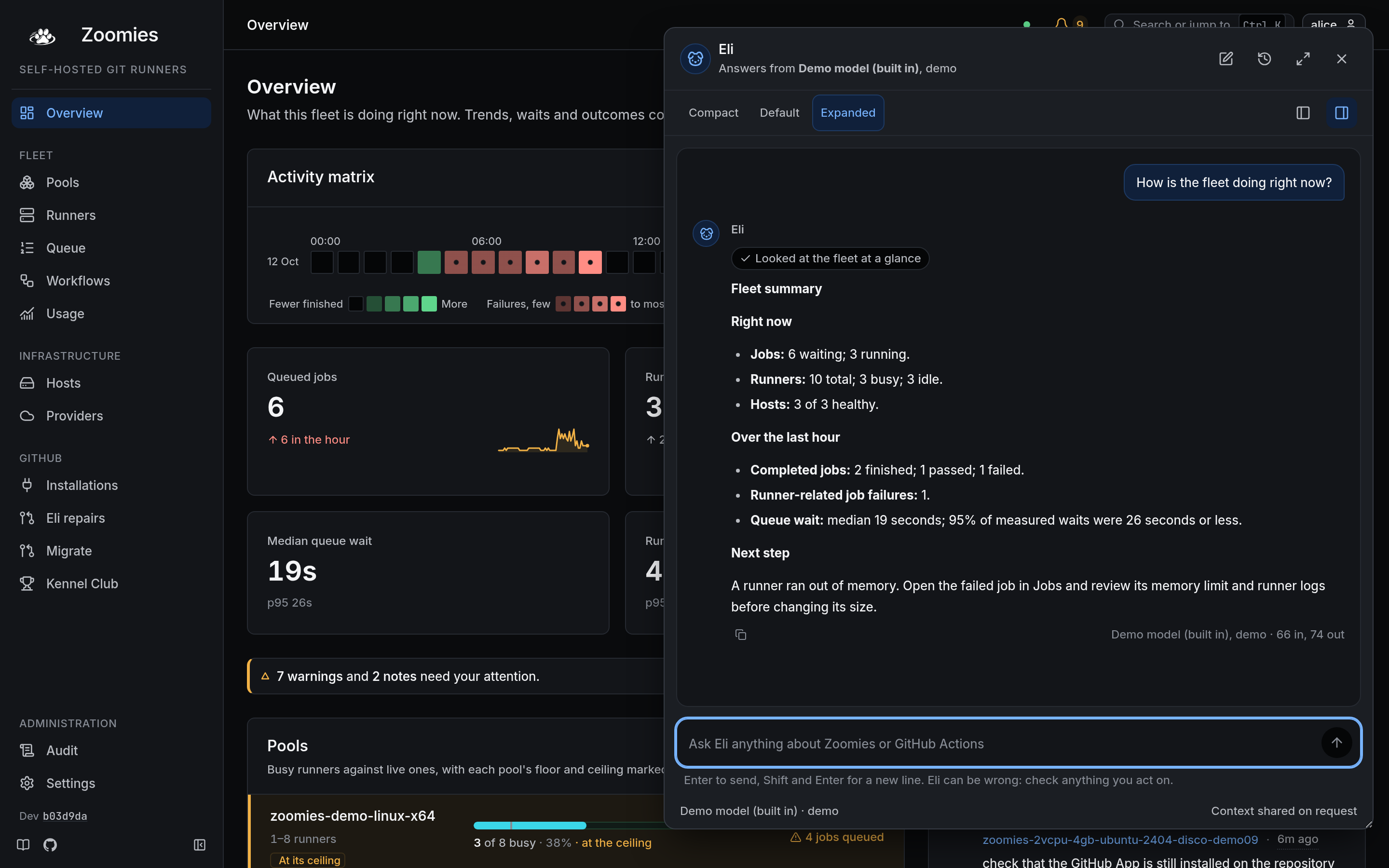
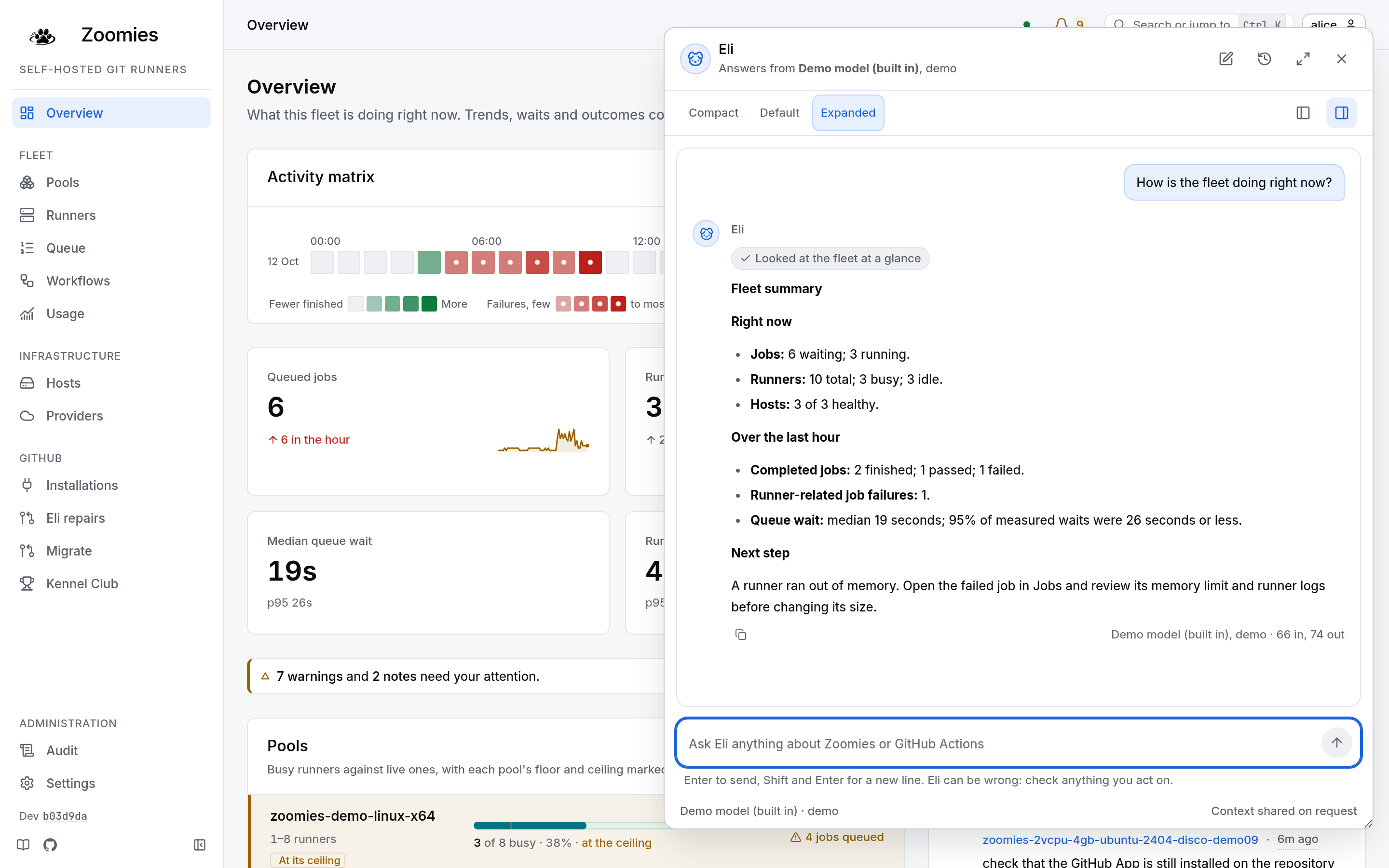
The UI tour shows the current panel beside the fleet. This capture uses the built-in demo model and a real fleet lookup. It presents the result with clear headings, labelled metrics and a next step, without credentials.
Hybrid provider ownership
| Request | Provider |
|---|---|
| Chat and contextual Ask Eli | Signed-in user's personal provider |
| PR repair requested in Zoomies or a GitHub comment | Requester's personal provider: their default, or the first usable one they own |
| Unattended repair of a failed PR job | Installation provider selected by the repository policy |
There is no fallback from a missing personal provider to an installation key when authentication is enabled. The authentication-disabled development demo uses its built-in installation provider because it has no personal accounts. Provider address restrictions and the Local models only setting apply to both scopes. Removing a user removes their personal providers. Deleting an installation provider leaves repository policies in place; automatic repairs stop until an administrator chooses another installation provider.
Set up PR repairs
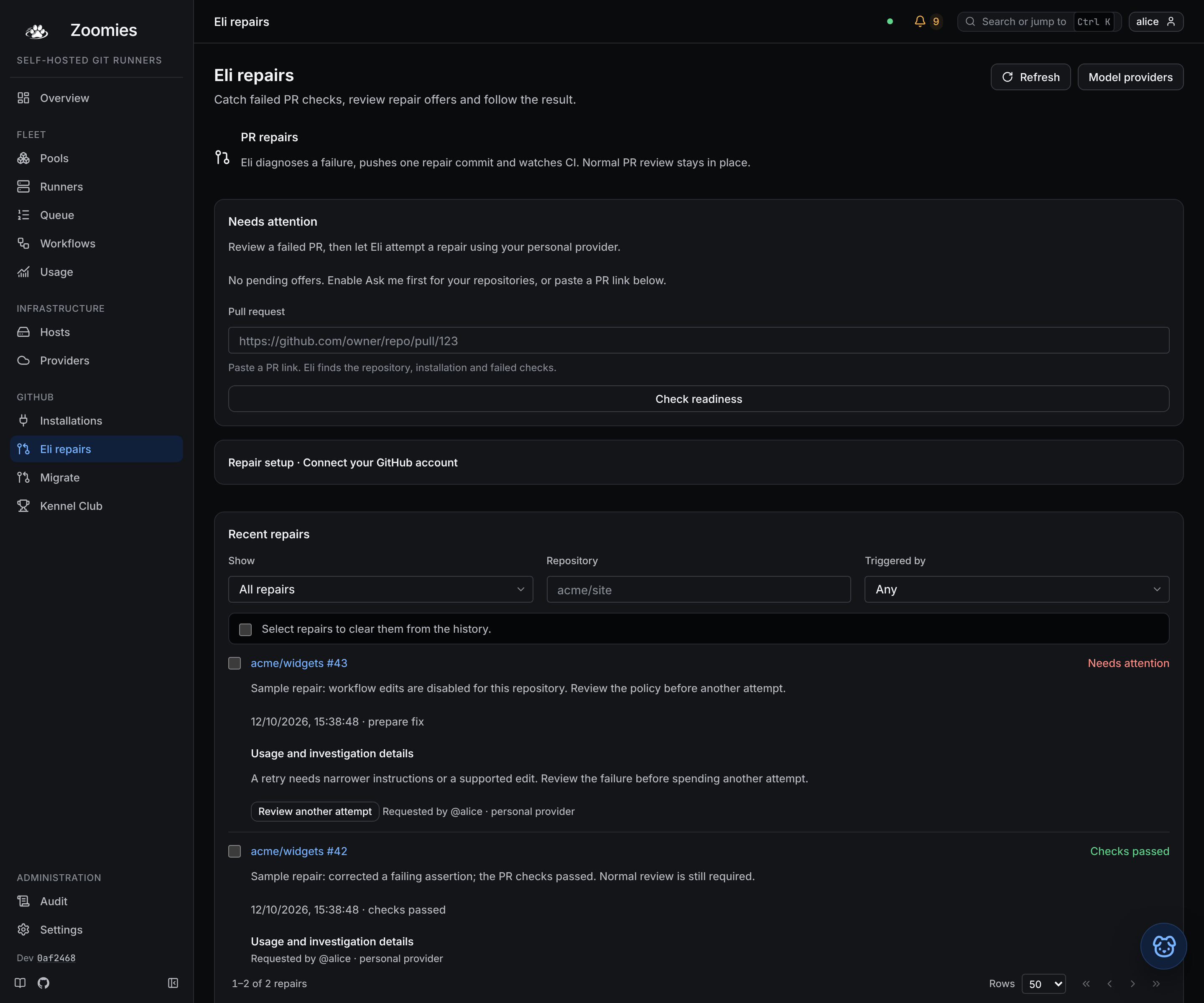
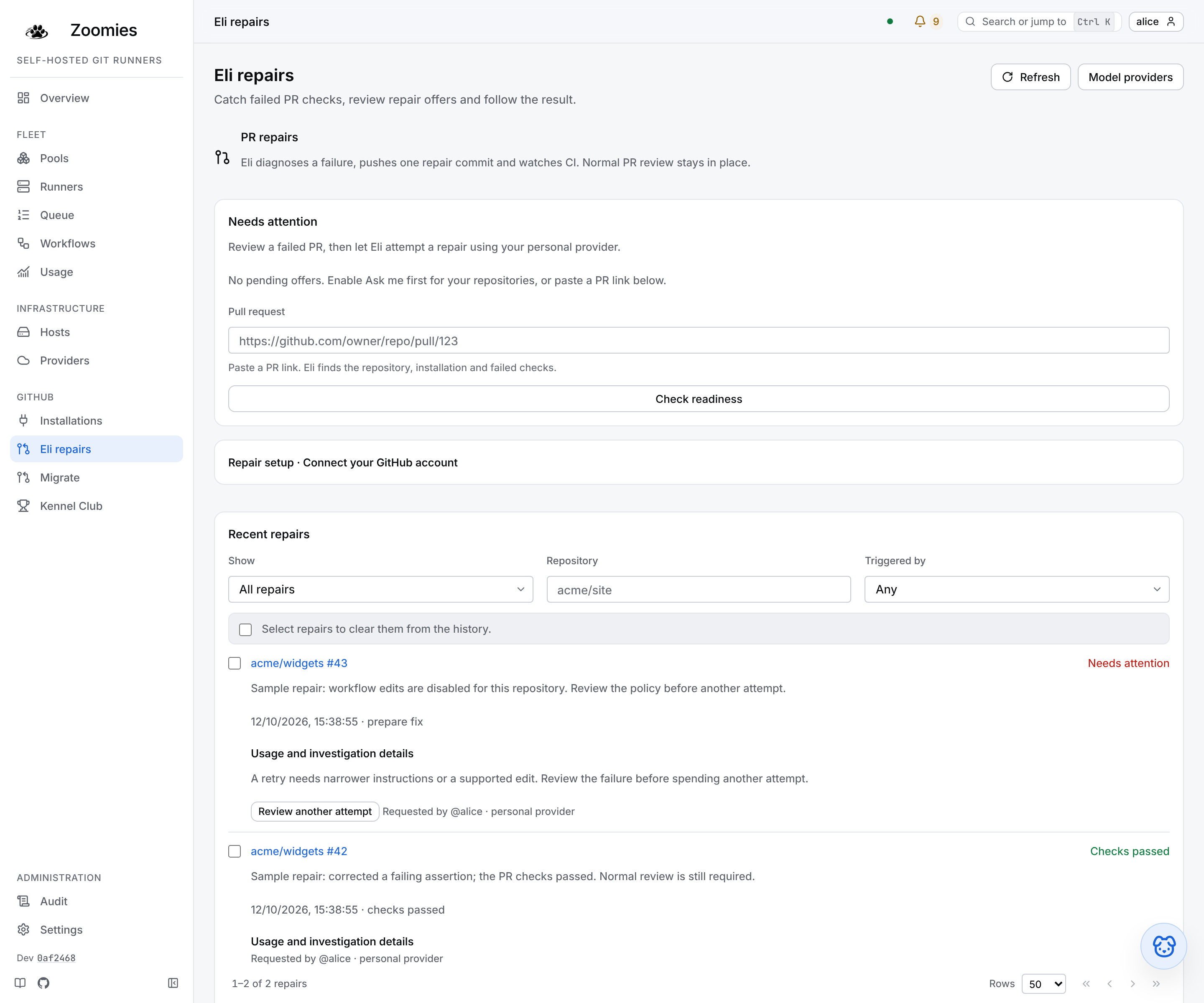
The repair UI tour shows readiness checks and repository setup. The history below uses labelled sample outcomes; no real PR was changed to produce these images. A stopped attempt explains what needs attention before you spend another attempt, while a passed repair still needs normal PR review.
- Open Eli repairs from the navigation, or Review a repair with Eli beside a failed job. Paste a PR link to check readiness without invoking a model.
- In Repository repair policies, choose a GitHub installation, search its repositories and select the ones to enable together. Owner and installation details come from discovery. Each selected repository reports its own save result.
- Choose Ask me first, Manual only or Automatic. New setup recommends Ask me first; existing policies retain their behaviour. The enable switch turns a policy off. Only Automatic requires an installation provider.
- Set the attempt budget, from 1 to 50 per rolling 24 hours. Explicit and automatic attempts share this repository budget. Each personal account also has a limit of 10 explicit attempts per rolling 24 hours.
- An administrator verifies account ownership, selects the Zoomies user and a discovered repository where their GitHub account has write permission, then links the account once. Each requester confirms Allow this GitHub account to request repairs using my provider and adds an enabled personal provider. Administrators cannot give that consent on their behalf. Changing the link clears consent; repository selection does not create another identity link.
- Return to the original PR and check readiness again. Review the payer, model, workflow permission and remaining allowance before choosing Repair with Eli.
Ask me first groups failed jobs into one persistent offer per PR head. The Overview shows available offers; Eli repairs lets you review or dismiss them. Offers do not invoke a model or spend attempts. Dismissal is personal and applies only to that commit. A bounded reconciliation every five minutes looks back at recent failed jobs, including failures that predate setup. Access and the pinned head are checked again before acceptance. Existing closed, superseded or now-green PR offers are retired during reconciliation. External notifications are not sent.
The GitHub App needs Contents: write, Pull requests: write,
Issues: write, Actions: read, Checks: read and Commit statuses: read
for the relevant repositories. Subscribe to Issue comment alongside
Workflow job. Existing installations may need to approve new App
permissions. Editing .github/workflows also requires the appropriate GitHub
App workflow permission, and a separate opt-in on the Zoomies policy.
On a pull request, a linked maintainer can comment:
Prefer the slash form. @eli and @zoomies still work, but an at sign notifies
whichever GitHub user happens to own that name, who is not part of your
repository, and a slash command notifies nobody.
Commands must begin a line outside a quote or code block. Only new comments by human users trigger a repair. Edited comments, ordinary issues and bots do not. Both triggers use the existing signed webhook endpoint.
A command from someone with write access that Eli cannot act on is answered, not
dropped: Eli puts a confused face on the comment and replies on the PR with the
reason. The reason is one of these: the GitHub account is not linked to a Zoomies
user, or its owner has not allowed it; the Zoomies account is disabled; or the
repository's attempt budget or the person's own limit is used up. A command from
anyone without write access is ignored without a word, so a stranger's comment
never makes the App post. The repository budget is shared with automatic repairs,
which on a repository whose CI fails often can use it up before anyone asks.
The App's own GitHub handle (for example @zoomies-eyupio2, the name GitHub
autocompletes) works too, once Zoomies has learned the App's slug. Recognition
uses the comment text and does not require GitHub mention notification routing.
What a repair does
The durable queue deduplicates webhook retries and charges attempts at admission. The worker reads the PR's pinned commit, changed text files, repository inventory and bounded failed-job evidence. It asks the selected model for a strict JSON plan, with at most six model turns and eight changed files. Text blobs up to 512 KiB stay on the controller; the model receives windows of at most 32 KiB, prioritising files and line locations named by failure evidence. Unique source supplied is capped at 128 KiB and the full transcript is checked against a 192 KiB byte allowance before every model call. These are conservative application bounds, not a measurement of the model's token capacity. Repeated and overlapping reads return only new source. The PR's bounded diff is included.
For large files, Eli returns exact before/after edits instead of rewriting the whole file. The controller requires unique, non-overlapping preimages in source already supplied to the model and preserves every untouched byte. Complete replacement of a partially read file is refused. Targeted edit text is capped at 64 KiB; there are at most 32 targeted edits. Unsupported blobs are named and skipped. A bounded log tail and unannotated test-error context help retain the failure evidence. Very large inventories, PRs or logs can still exceed limits.
Repair history records the stage, model, source bytes and per-call input/output usage when the provider reports it, including usage received before a failure. Missing usage is shown as unknown. Request bytes and elapsed time are recorded separately from token counts. Output truncation and provider rate limits receive specific advice. Failed attempts offer readiness review and copyable investigation details; deterministic source limits should be addressed before retrying. Recognisable provider/GitHub tokens and private-key headers are redacted before model use. These filters cannot identify every possible secret, so use a provider permitted to process your repository and job logs.
Eli does not execute repository code or run local tests. It cannot edit symlinks, submodules, credential paths or binary files. Workflow files are protected unless explicitly enabled. Fork PRs, closed PRs and default-branch PRs are refused. An infrastructure failure may produce a diagnosis rather than a code change.
Before publication, Eli rechecks repository policy, provider availability and requester access. The commit has the original PR head as its parent, preserves file modes and uses a non-force branch update. A concurrent push stops publication. Eli never merges the PR or bypasses branch protection.
When a repair starts, Eli reacts to the comment that asked with 👀, then posts progress as a single comment that it edits in place, with a heading for each stage (sniffing around, fetched a fix, checks passed, got stuck), and watches check runs and commit statuses on its commit. It reports checks passed, checks failed, a newer PR head, or unverified after an hour without complete results. Reported checks are not a guarantee that every branch-protection requirement is satisfied. Automatic repair will not start another attempt on an Eli commit. A maintainer can request another attempt.
Queued work survives restart. A repair interrupted during publication has an uncertain outcome, so it is marked interrupted and never replayed automatically. Inspect the PR before asking again. Eli repairs and Settings, Eli AI Assistant show repair history; ordinary users see their own requests and administrators see the whole history.
The history is paged and filtered by the controller, so a repair from last month
is as easy to reach as one from this morning. Filter it by state (all, needs
attention, in progress or checks passed), by repository name, and by whether Eli
was triggered automatically or by a request; any change of filter starts again
from the first page and drops whatever was chosen. Choose repairs one at a time,
or with the box above the list for every repair shown. Once every repair on the
page is chosen and more match, Select all takes everything the filters match,
up to 500 at a time, and says so when there are more than that. Clear from
history asks first, saying how many repairs it will clear, and then hides them
from this list and does nothing else. A cleared repair is kept: it still counts
towards each repository's and each person's daily limit, it still stops Eli
repairing its own commit, and it still stops Eli answering the same webhook
delivery twice. It cannot be restored from the page, but asking again for it,
from the page or by accepting an offer, brings it back into the history; a
repair that a webhook delivers again does not come back, because nobody asked.
A repair that is queued, running or waiting on checks cannot be cleared until it
finishes. Ordinary users clear only their own requests, and each clear that
hides a repair is written to the audit log as assistant.repair_clear.
Model-generated fixes still need review. The limits constrain cost and the editing surface; they do not prove a patch correct. Provider errors, quota exhaustion or unsupported model output stop a repair without trying another user's credentials.
A repair offers the model no tools; every step is a JSON object. Some models
take the names of those replies (read, windows, edits, files,
cannot_fix) for functions and call them. A call named after a reply says what
that reply would have, so Eli reads it as the reply and the repair goes on; the
same checks apply to it as to JSON the model typed. Any other tool call is
answered, as the result of that call, with the fact that it has no tools and which
JSON replies it may send, and the model is asked once more. Most models comply.
One that calls a tool again stops the repair, and Eli's comment names the tool it
asked for and the names of its arguments, so you can tell a model that ignores its instructions, which a
different model or provider fixes, from a prompt that was wrong. Every model turn
appears in the repair history.