Upgrading
Update your controller and agent hosts from the controller's web UI, or use the supported local CLI method. Start with Manual if you want to review each update before it runs; Auto can update the controller and roll out its release to hosts after a waiting period.
| You want to update | Where to start | Permission |
|---|---|---|
| The controller | Settings → Updates | platform role |
| One agent host | Hosts → Update on its card | Administrator |
| All eligible hosts behind the controller | Hosts → Update N hosts | Administrator |
| A machine locally, including older installations | CLI or installer on that machine | Its service owner, with elevation where needed |
Managed updates need the update helper on each machine being updated. A card or page that cannot offer an update explains why and provides the supported local instructions. Windows hosts use the agent installer or a binary replacement.
Before updating a controller, keep a current backup. Controller first, then its hosts: managed host updates target the release the controller is running. Running jobs continue in their existing runners; the services restart, so the UI briefly reconnects and reporting can be delayed. Work in flight covers the backend details.
Updating from the web UI
Set up managed updates
- Open Settings → Updates as a user with the
platformrole. - Under Update mode, choose Manual. This enables requested updates without enabling automatic restarts. The soak and check interval are on the same page; Configuration also exposes these settings. If the environment pins a value, the page names the override that must be removed to edit it.
- If the page says the helper is missing, copy its install command and run it on the controller's host. On each supported Linux/systemd agent host you want to update from the UI, its owner also installs the helper once:
Copy the command supplied by the page or host card for a custom configuration directory. Helper setup explains supported deployments, its permissions and older installations.
Update the controller from Settings
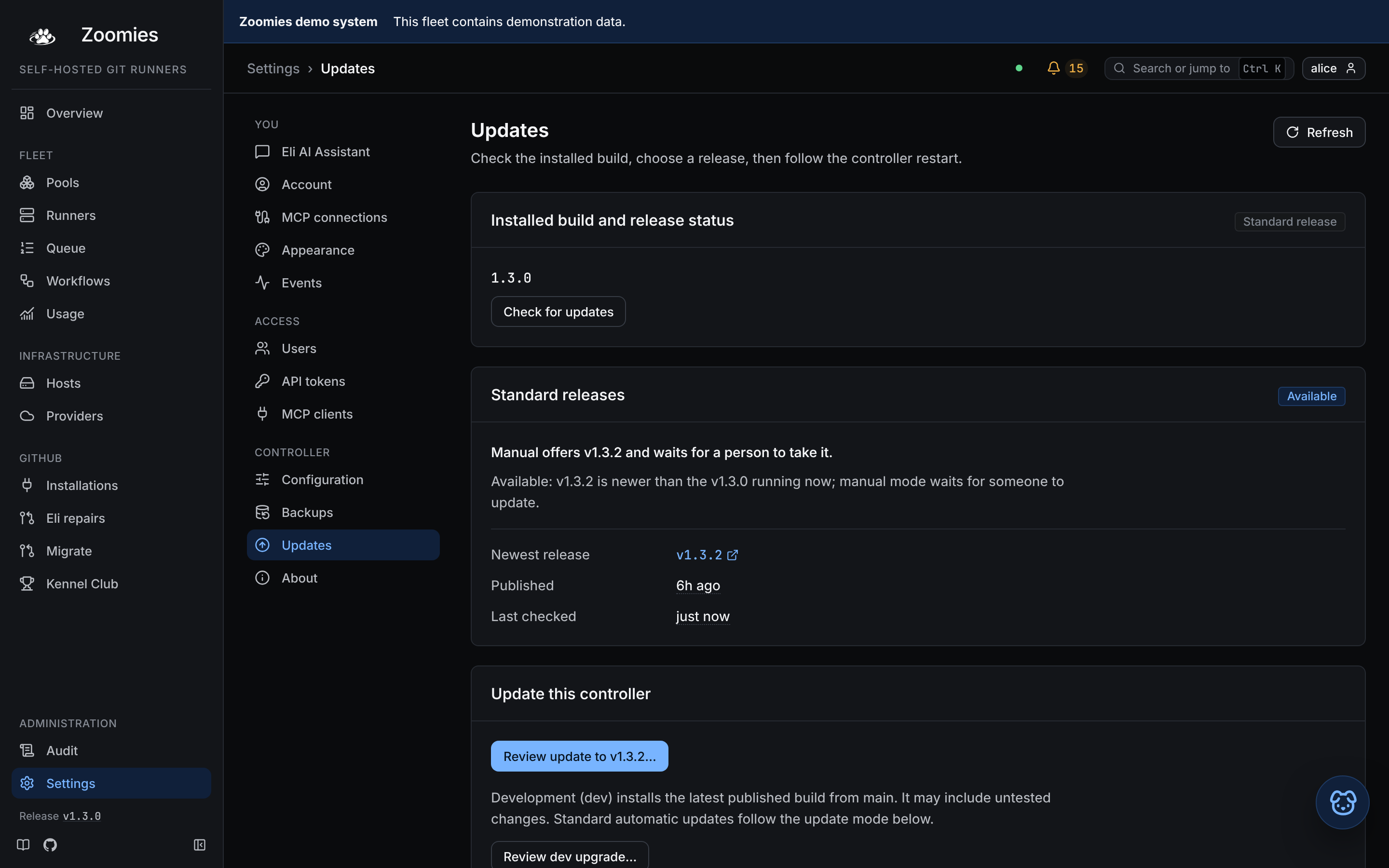
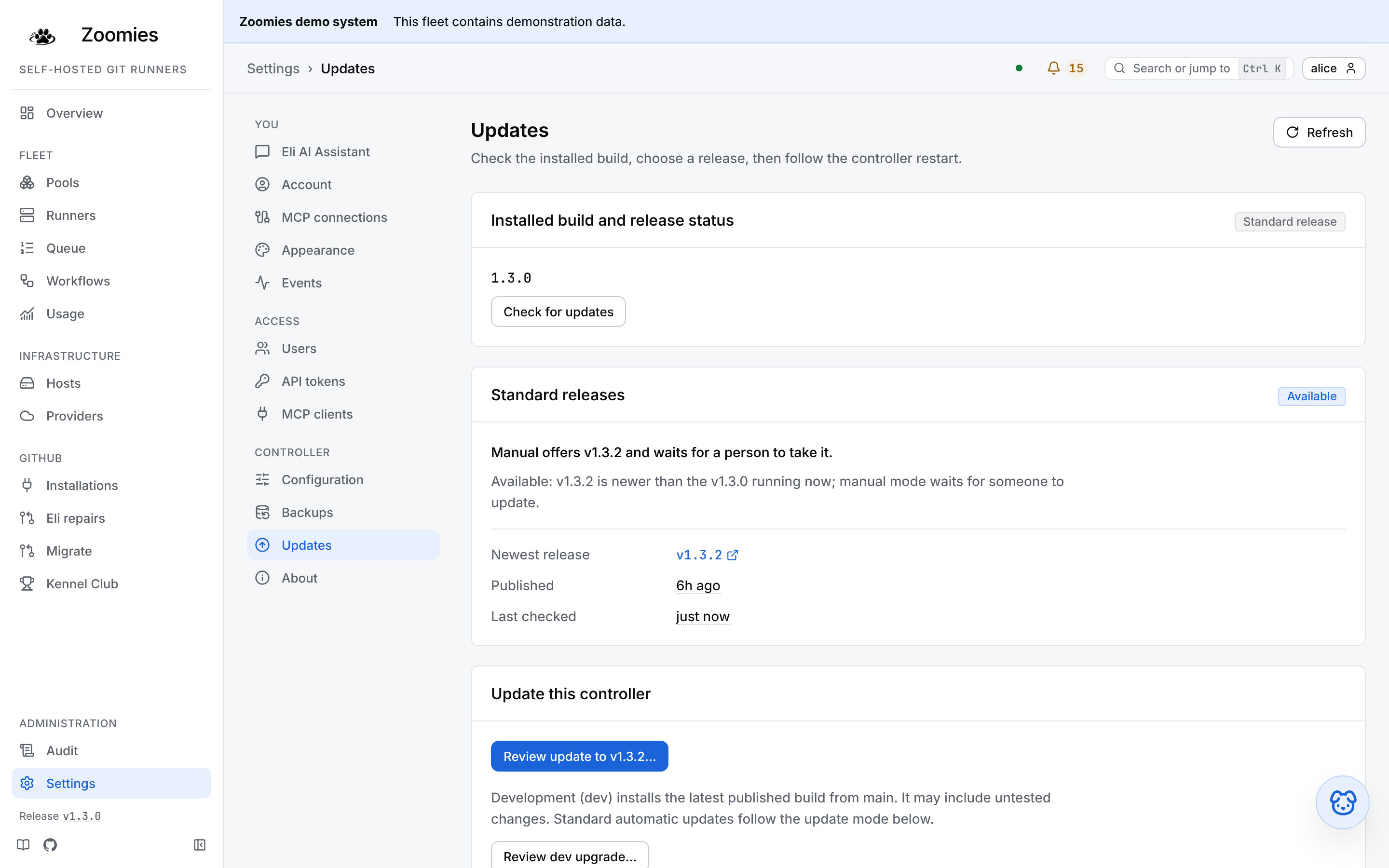
- In Settings → Updates, check the installed build and choose Check for updates to ask for the latest release information. Review the offered standard release and its release notes.
- Choose Review update to vX.Y.Z…, where the button names the available release, and confirm that version.
- Leave the page open while the controller restarts. It follows the attempt and confirms success once the controller returns on the target release. A controller's embedded agent updates with it.
The installed build is labelled Standard, Development or Custom. A development
build shows its installed commit and the latest checked commit on main, with
the check time. Matching main does not prove that a dev image has finished
publishing. Review dev upgrade… opens the confirmation for the latest
published dev build; when the commits match, the button says Reinstall latest
dev…. Standard automatic updates continue to follow the configured update mode.
Update hosts from the controller
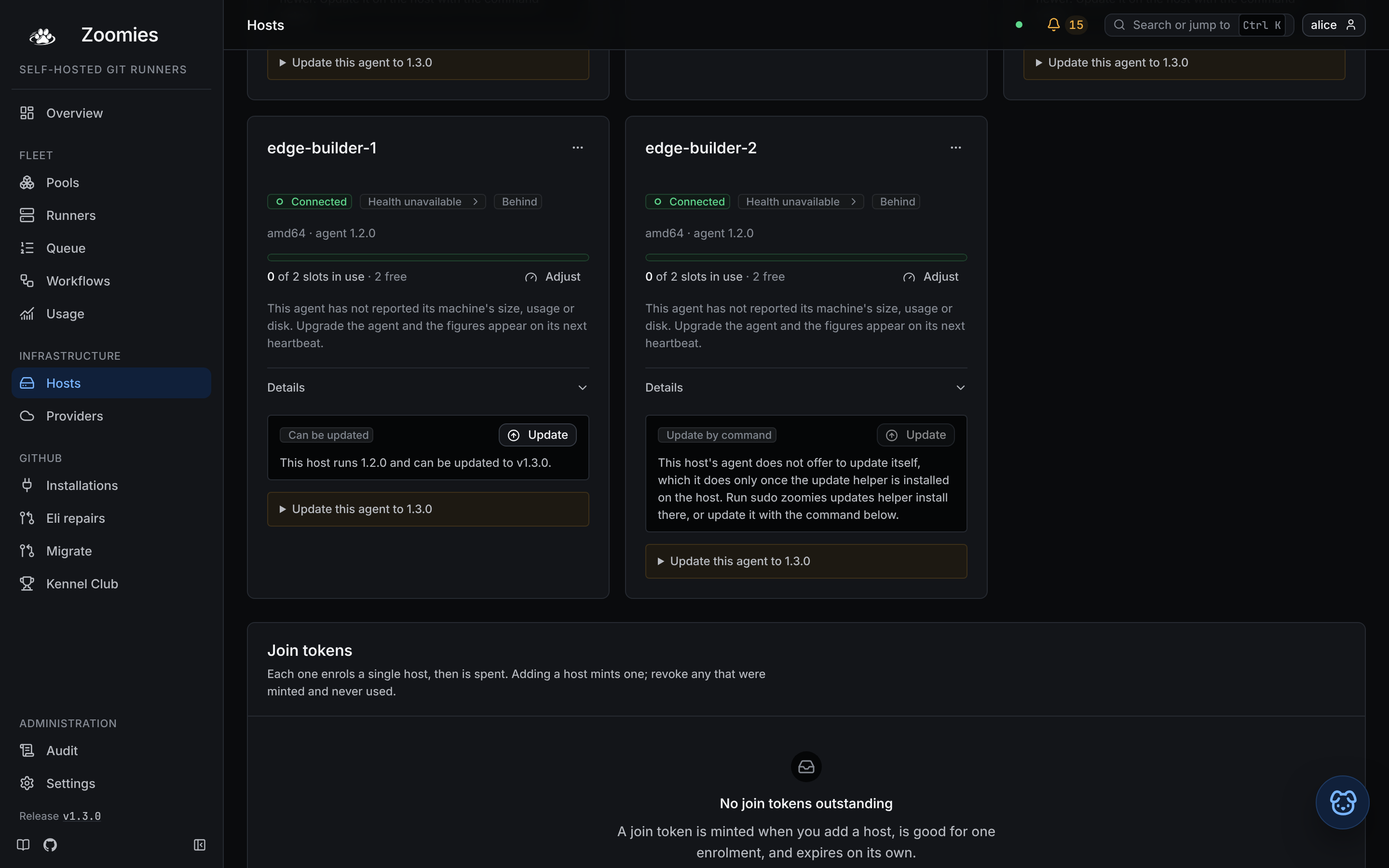
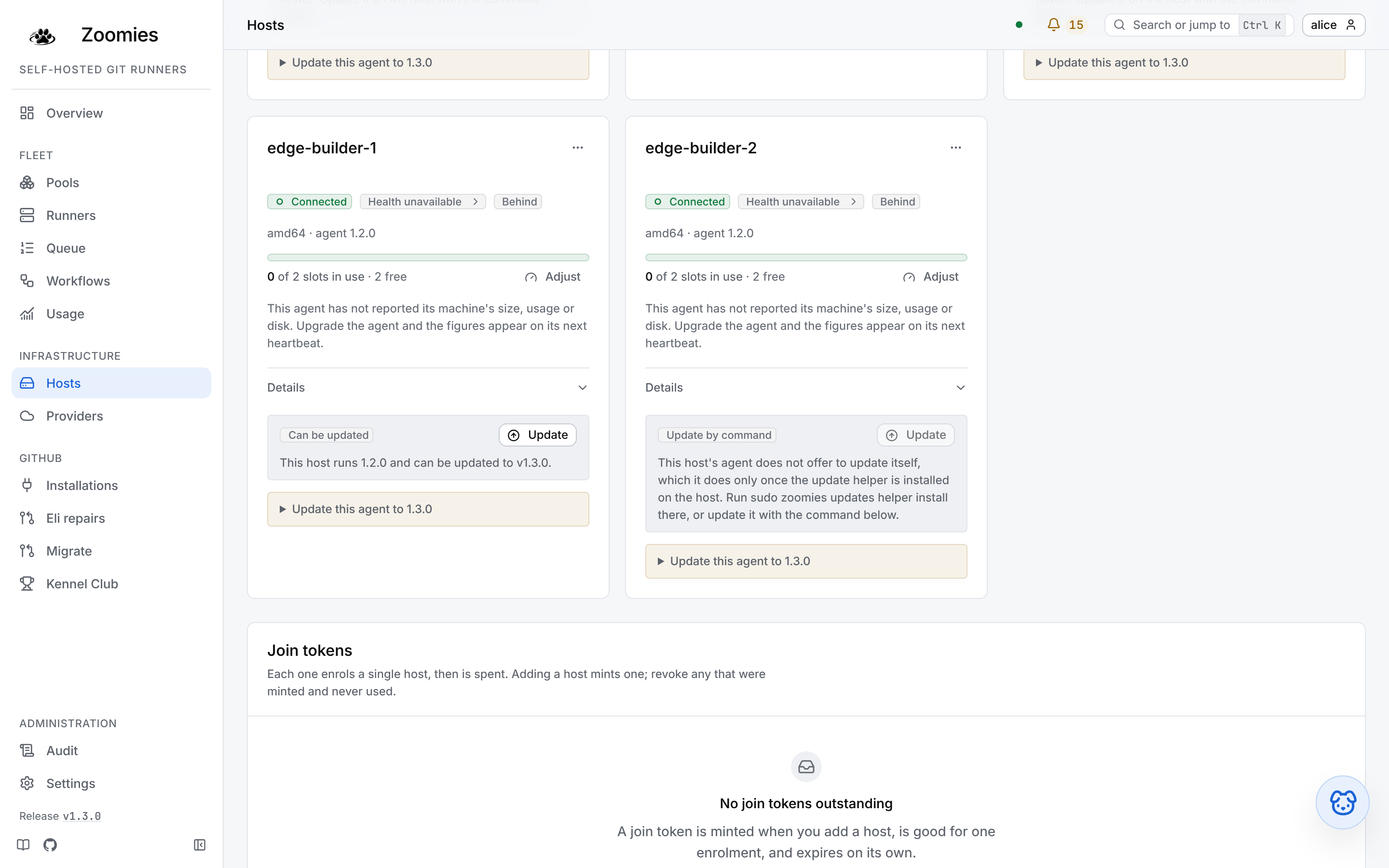
- Open Hosts as an administrator. A host behind the controller shows its current version, the target release and whether its helper can update it.
- Choose Update on one host's card, or Update N hosts in the page header to start a rollout of eligible hosts behind the controller.
- Confirm the update. A rollout handles one host at a time and confirms each host's target version from its heartbeat before moving on.
- Follow the rollout on Hosts. If a host fails or times out, inspect its reason, then use Resume the rollout or Cancel the rollout. Cancelling prevents new requests; an update already handed to a helper finishes.
No routine drain is needed for an update. A host without a usable helper shows Update by command with its local instructions. Where no supported command can be offered, Update by hand links to the manual steps. Windows agents use the PowerShell installer from their card. Use those instructions rather than a newer release chosen independently of the controller. Host update details cover ordering, retries and version confirmation.
A machine Zoomies rents is not updated here, and its card says so rather than offering a command nobody can run. Its agent is the one the provider's template carried when the machine was cloned, so the way to a newer one is that template: the provider's page has Prepare the template again, and the entry the provider raises in the problems list names the machines it affects. Proxmox VE describes what that command does and what happens to the machines already running.
Choose manual or automatic updates
| Mode | What it does |
|---|---|
off (the default) |
Web UI update requests are disabled. Host cards keep their local upgrade instructions; choosing this mode installs no helper. |
manual |
Request a controller update on Settings → Updates, one host with Update on its card, or a fleet rollout with Update N hosts. Only hosts whose helper can update them are eligible. Updates start when you request them. |
auto |
The controller takes the newest release once it has been public for updates.soak, then takes every host behind it to the release it runs, one at a time. The buttons stay, and mean "now, without the wait". |
Only the platform role changes the mode, soak and check interval, on
Settings → Updates or Configuration. Everyone can read the update status;
an administrator updates hosts and manages rollouts. Choosing Auto asks for
confirmation because it permits controller restarts without another click.
The default soak is 24 hours. Auto and the soak
explain what happens when another release arrives during that wait.
Prefer the terminal for managed updates? zoomies updates
requests the same controller and host updates. It is distinct from
zoomies upgrade, which upgrades the machine where you run it:
zoomies updates status
zoomies updates apply          # Request a controller update; platform role.
zoomies updates apply --hosts  # Request a host rollout; administrator.
These commands use your CLI connection to the
controller and need the same enabled mode and helpers as the UI. apply
returns when the request is accepted; follow it with updates status to check
the result. At a terminal it asks for confirmation; unattended requests need
--yes.
Upgrading from the CLI
The existing local CLI method remains supported. Run this on the machine you want to upgrade; it does not update the rest of the fleet:
Use sudo zoomies upgrade --check to inspect the deployment without changing
it. sudo zoomies upgrade --dry-run goes further: it downloads and verifies
the release it would install, prints the deployment review the real run shows
(the shared folder, mounts, files and settings it would offer), then prints
what the binary half would do (replace the binary and keep the running one as
zoomies.previous). It changes nothing, and it stages its download away from
the installed binary, so it needs no write access to /usr/local/bin.
Use --check when you only want to know whether this deployment is sound;
use --dry-run when you want to see the upgrade itself before agreeing to it.
--version vX.Y.Z targets a specific release, and --no-download applies the
executable already installed. Before it changes anything, an upgrade takes and
verifies a copy of the controller's database through the same backup package
the schedule uses, and prints the copy's name and the command that restores it;
--no-backup goes without it for an operator who keeps their own copies or
whose database is elsewhere. A remote agent's card provides the command
pinned to its controller's release.
It checks the existing deployment, downloads and verifies the new binary,
refreshes cached stock runner images, updates the controller or agent service,
and checks the result. Native hosts with both controller and agent services
upgrade both when they share the installed binary. An active native host-health
reporter using that binary is restarted too. Use --mode controller or
--mode agent to select one service explicitly.
For Compose and single-container deployments, the service image is pulled and compared with the image the running container uses. If they are identical, the container is kept running without a restart. An image pulled earlier still replaces a container using an older build. A stopped container is started even when its image has not changed.
Installer and upgrade animations
At a colour-capable terminal, a block-letter Zoomies banner lights up from
blue to cyan, catches a bright sweep, then holds briefly before the stages
begin. The intro lasts about three seconds and plays once, including when the command
continues in a downloaded binary. Use --no-animation or set
ZOOMIES_NO_ANIMATION=1 to skip it. NO_COLOR, TERM=dumb, --check,
--non-interactive and redirected output also skip the animation. Small terminals
skip it too. True-colour terminals use the brand colours; other terminals use
256- or 16-colour equivalents.
The same banner welcomes initial controller and remote-host installs through
zoomies init, including install.sh --mode agent, and agent template setup
with zoomies agent install. It runs once when the binary takes over setup,
with the caption “Ready. Set. Install.”. install.sh --no-animation carries
through to setup, including when setup runs via sudo. Answer-file installs stay
unanimated.
The terminal shows four short stages: Binary, Deployment, Verify
and Host health, followed by the upgrade result. Host health is read-only
and never opens a tuning menu. Run zoomies doctor afterwards to review
warnings, or sudo zoomies tune to review individual fixes. Upgrade approval,
including --yes, does not approve OS tuning.
zoomies update and zoomies deployment update remain compatibility aliases
for the same complete flow. They now include the binary update. Use
--no-download when you deliberately want to apply the installed binary.
A failed download stops the upgrade and gives a retry command; it does not
silently continue with an older executable.
The one-line installer remains available for older installations:
The first controller start applies schema migrations. Upgrade does not run setup again or require a new join token. The web UI uses the same upgrade engine through the helper installed on each machine; a local CLI upgrade needs no helper. Managed updates cover controller updates, individual hosts and fleet rollouts.
For a remote agent, copy the upgrade command from its card on Hosts.
That command targets the controller's published version instead of blindly
installing the newest release. A newer agent tells you to upgrade the
controller first. A local or unpublished controller build has no matching
published command. The dev channel moves, so it can contain a build newer
than the controller by the time you run the command.
The upgrade keeps configuration, credentials, host identity, data volumes,
ports and runtime options. It refreshes locally cached stock runner images
under their existing tags, including Docker-enabled and full variants; running runners
keep their current images. It does not retag a pool's pinned or custom image.
A custom service image needs an explicit --image <reference>.
Container upgrades allow up to twenty minutes for the old service to stop. This is a ceiling, not an added delay: the agent finishes admitted runner creation and cleanup, reports the result, then exits. Running CI jobs keep running in their existing containers; the upgrade does not wait for them to finish. A cold image pull can therefore make a restart take longer than an idle upgrade. Remote agents keep sending heartbeats during this wait.
The upgrade command supplies this timeout even for older Compose files;
newly generated Compose files also set stop_grace_period: 20m for manual
restarts, and a single-container (docker) deployment is created with
--stop-timeout 1200 so a plain docker stop or docker restart waits as
long. A single-container deployment created by an older binary keeps Docker's
ten-second default until it is recreated with zoomies init; until then, stop it
with docker stop --time 1200 zoomies. Existing native systemd units are preserved during upgrades. If
yours has a shorter TimeoutStopSec, use systemctl edit zoomies (or
zoomies-agent on an agent host) and set [Service] / TimeoutStopSec=1200s
before upgrading. New systemd installations use that budget by default.
When first upgrading from an older binary, its shorter internal shutdown limit still applies to that one stop. To avoid interrupting a creation on that transition, cordon the controller's host in Hosts, wait for its provisioning runners to finish starting, then upgrade and uncordon it. Existing running jobs can continue throughout.
For a custom installation, pass --config-dir <directory> and, where needed,
--installed-binary <path> (--prefix <binary-directory> for install.sh). Upgrade uses deployment.json for container
installs and the existing systemd or launchd service for native ones. It
refuses an unrecognised deployment instead of guessing at a replacement.
After the restart the upgrade waits for the controller to answer before it
reports success. A controller serves nothing until its migrations finish, and
on a large database that can take minutes, so the upgrade says it is waiting
and repeats the controller's latest log line every thirty seconds. A container
is asked through its own health check, run in it straight away; a native
service through /healthz on the listener its settings name. The wait lasts up
to thirty minutes. If the controller stops during it, or is still starting at
the end, the upgrade exits with an error that says which and points at its
logs. A native controller that does not answer is then rolled back by
itself, unless the upgrade migrated the database; rolling
back has the rule. A container deployment's service is its
image, which the upgrade does not keep the one before, so it is not rolled back
by itself. An agent serves nothing to ask, so an agent's upgrade does not wait.
A failed image pull stops before a restart. If a replacement container cannot
start, the upgrade attempts to restore the previous container or Compose image.
That restores the process, not a migrated database; the rollback rules
below still apply. An interrupted upgrade can leave upgrade.lock in its
configuration directory: remove it only after checking no upgrade is running.
What a release adds to the host
A release sometimes needs more of the host than the one you installed: a folder, a mount, a file the installer wrote and somebody has since removed, and a Compose file written by an older release, or by hand, can lack a mount this one would write. Before it pulls or restarts anything, an upgrade works out what this deployment should have, compares it with what it has, lists what is missing, and adds it only with your approval.
What the deployment should have depends on what it runs, and that is read from its settings, in its database (the same place the Settings page writes) layered exactly as the controller layers them at start. The upgrade opens the database read-only beside the running controller, as a backup does; for a container deployment it asks the container where its data volume is. So a controller whose embedded agent you turned off on the Settings page is not offered a runner host's folder and mounts, and one you turned on is. When the database cannot be read (Docker Desktop keeps volumes inside its own VM), the upgrade says so and offers what a host that runs runners needs.
| Missing | Offered to | What the upgrade offers |
|---|---|---|
| The shared folder, or a folder in it | hosts that run runners: an agent, or a controller with its embedded agent on | Create it, owned by the account Zoomies runs as, uid 65532 in the container images, the state directory's owner for a native install. A shared folder owned by someone else is given back to that account. |
| The shared folder's mount | the same, in a container | /var/lib/zoomies/shared:/var/lib/zoomies/shared |
| A pool's cache folder | the same, in a container, for each pool whose cache has a size limit and lives in a host folder outside the shared folder | The folder at its own path. The host's daemon mounts it into runners on its own, so the cache works without it, but the agent keeps the limit by measuring the folder, and without the mount it finds nothing to measure and never evicts. A folder the container already sees, through a folder above it bound at its own path, is left alone. |
| The runtime's socket, and the group that owns it | the same, on the Docker or Podman backend | The socket at its own path, and its owning group as group_add so the image's account can use it |
| The TLS certificate and key | a controller serving TLS from files | Both, read-only, at their own paths |
docker-compose.yml itself |
every Compose deployment | Write it again from deployment.json and the deployment's settings. |
Everything missing from a Compose file is added in one edit: the file is
copied to docker-compose.yml.bak.<time> first, and edited rather than written
again, so your own services, labels and comments stay; blank lines between them
do not survive the edit. On a docker deployment the replacement container is
created with the missing binds and group as well as everything the old one had.
A running host checks the part that matters most for itself: a containerised
agent that runs runners without the shared folder mounted from the host keeps
no tool cache rather than hand runners a folder the host's daemon cannot see,
and says so as
host.shared_folder_unmounted. One whose container was
never given the runtime's socket says that, and names the line to add, rather
than telling you to install Docker.
How the approval is given depends on how the upgrade runs:
- At a terminal, it asks
Add them now? [Y/n].install.sh --upgradeasks on the terminal even when the script itself arrived through a pipe. - With
--yes(zoomies upgrade --yes, orinstall.sh --upgrade --yes), it adds them without asking. - Unattended (
--non-interactive, or no terminal at all) it adds nothing, finishes the upgrade as before, and ends by listing what is missing and the command that adds it:zoomies upgrade --yes. The shared folder is only needed by pools that keep a tool cache, so a fleet without one loses nothing by waiting.
A missing docker-compose.yml is the exception: there is nothing to bring
the new image up with, so an unattended upgrade stops before it changes
anything and says so. --check lists what the real run will offer and adds
none of it.
zoomies upgrade --check checks the existing deployment without modifying it,
and zoomies upgrade --dry-run downloads the release it would take and previews
the whole run without changing anything.
zoomies update is a compatibility alias and accepts the same flags. Both commands
fetch the newest release (or the rolling dev build, for a host running one),
verify its checksum, replace the installed binary and carry on in the new one,
so a host upgraded this way gets the new release's checks and prompts too. They
never downgrade, and a download that cannot be verified is not installed.
--version v1.4.0 pins a tag and --no-download applies the binary already
on disk.
The parts of that worth knowing before you do it are what happens to work in flight, how far the pieces may drift apart, and the one direction you cannot go back in.
How managed updates work
With the mode off, controller and host update requests are refused with
update.mode_off. A controller fenced for recovery or without its lease
starts no update. Local zoomies upgrade remains available independently of
the controller's managed update mode.
A release is offered only once it is complete: a tag of the form vX.Y.Z,
neither a prerelease nor a draft, with checksums.txt and the binary for the
machine's system attached. GitHub makes a release public before all its files
are uploaded, so the newest release is not always one that can be installed. A
controller built from main, or from a checkout of your own, is offered the
newest release as a replacement, by the button and never by auto: it is
usually ahead of that release, so the update may take it back, and the
confirmation says so.
Adding the update helper
On a systemd host that has no update helper yet, an upgrade asks a question of its own once the deployment's additions above have been reviewed:
The update helper is what lets
the web UI update the host. The update helper runs zoomies upgrade as root for a validated request, so that the web UI can update this host (and on the controller's host, zoomies updates apply can too). Only the host's owner installs it, and sudo zoomies updates helper remove takes it away.
It is a pair of systemd units, and a request names a release and nothing else. The account Zoomies runs as can trigger an upgrade by writing a request, which is why it is a question of its own and never part of the batch above.
--yesdoes not answer it.zoomies upgrade --yesstill adds the layout additions and moves the settings, and still leaves this question at its default.- At a terminal, Enter,
nand the end of the input all mean no. Onlyyoryesinstalls it. --update-helper(zoomies upgrade --update-helper, orinstall.sh --upgrade --update-helper) installs it without asking.- Unattended (
--non-interactive, or no terminal at all) it adds nothing and printsAdd later: sudo zoomies updates helper install, with--config-dirappended when the upgrade ran against a configuration directory other than the default. - Once the helper is installed the upgrade it runs for the web UI adds nothing and prints nothing about the helper.
The question comes after the deployment's additions are reviewed and before
anything is pulled or restarted. It is not asked, and nothing about the helper
is said, on a host without systemd, on macOS (launchd), for a private
provider's own service, for a service that runs as root (which can upgrade
itself and needs no helper), or once the helper is installed. When a service
cannot be resolved for a reason you can put right (an unreadable unit, an
account that no longer exists, a unit that names another --config directory),
an upgrade at a terminal says so in one line.
A container that does not yet mount the shared folder gets the mount from the
restart in the same upgrade, and the helper cannot be installed before then.
So in that run the question is not asked: the upgrade says that the helper
needs the shared folder mounted, which the restart adds, and to run
sudo zoomies updates helper install afterwards.
If the install is refused (the binary sits under a folder a group can write, a
path is under /home, Docker remaps user namespaces) the upgrade does not
fail: it prints the helper's own sentence, says the helper was not added, and
finishes. Put the refusal right and run sudo zoomies updates helper install.
--check asks nothing and adds nothing.
Where the helper can never be installed, the web UI does not suggest it. A
controller on macOS or Windows, on a Linux host that systemd does not run, in a
container that runs no runners (and so does not mount the shared folder), or in
a container under a rootless runtime shows its helper as unsupported on
Settings → Updates, with the reason and sudo zoomies upgrade to copy instead
of the install command, and raises no controller.update_helper_missing. On
Windows, which has no sudo and no service zoomies upgrade can update, there
is no command to copy, and the reason says how to replace the binary by hand. A host
behind the controller for one of the same reasons (its agent says which on its
heartbeat; an agent too old to say is known only by an operating system other
than Linux) shows Update by command on its card with the reason and no
button, and the upgrade command beneath it is the way. A Windows agent's card
provides the PowerShell installer pinned to the controller's published release.
Where a command cannot be offered, the card gives version guidance and links
to upgrading an agent host.
The same question is asked once more, in the same words, at the end of a fresh
zoomies init and of zoomies agent join, once the service is installed (for a
container deployment, once it is up and has its shared folder). It follows the
same rules:
- It defaults to no, and
--yesdoes not answer it.zoomies init --yesandzoomies agent join --yesleave it at its default; onagent join,--yesmeans only "replace the credentials this host already has". --update-helper(onzoomies initorzoomies agent join) adds the helper without asking. In an answer file the key isupdate_helper: true.- Unattended it adds nothing and prints
Add later: sudo zoomies updates helper install. - A controller-only container is not asked, since it has no shared folder for the helper to watch.
- If the install is refused, the install or join still finishes: it prints the helper's own sentence and the command to retry.
zoomies init on a host where Zoomies is already installed only upgrades it in
place and does not ask; zoomies upgrade is where the question is asked then.
What the helper does with a request
The service, which runs as an account without root, writes request.json into
the update folder: update under the state directory on a native install, or
under the shared folder in a container. The request names an attempt and a
release tag, and nothing else: no address, path, command or flag. Its arrival
starts zoomies-update.service as root, which treats everything in the folder
as hostile. It refuses a request that is not a plain file owned by the service's
account, a tag of any other shape, an attempt it has already seen, a third try
at one release, or a second request inside ten minutes, and it does not start
while upgrade.lock says an upgrade is already running. A release already
installed, or an older one, is answered as done and nothing runs. The dev
channel, which names whatever main built last, has no count of tries and is
held to the ten minutes alone, because two updates through it are two updates
and not two failures; a host that follows a controller built from main is
taken through it each time that controller moves.
Otherwise it runs the upgrade you would run, unattended, as
zoomies upgrade --version <tag> --non-interactive, and never with --yes.
That downloads the release's binary, checks it against the release's
checksums.txt and asks the downloaded binary to check this deployment before
anything is replaced, so a release that needs something the deployment lacks
stops with the binary and the service as they were. A required addition stops
it, with the command that adds it; an optional one is skipped and named. Then
the binary is replaced, the one it replaced is kept beside it as
zoomies.previous, and the service restarts. The helper writes result.json
saying how it went, which the controller reads, and
sudo zoomies updates helper status shows it with the end of the log.
Updating the controller
Update to the release, on Settings → Updates, or zoomies updates apply,
asks the helper beside the controller to take it to the newest release that can
be installed (with --version, to that one). The controller records the
attempt, writes the request, and restarts as the new release. The page follows
the restart and says the update worked only once the controller does: the new
process closes the attempt when it finds the helper's result, or finds itself
running the release. A
controller that runs its agent inside itself updates that agent with it.
If the new controller does not come back, nothing in the web UI can say so. On
the host, sudo zoomies updates helper status and the journal of
zoomies-update.service can, and rolling back says
what to do.
When the helper stops reading requests
systemd stops the helper's path unit when its service starts too often, and a
host whose zoomies-update.path is disabled or inactive (dead) reads no
request at all. Before this was handled, a stale request.json then made the
agent refuse every later update with "an update request is already waiting for
the helper", and the host stayed on its old build with only a bare "update
failed" on its card.
Now the agent looks first: how old request.json is, whether upgrade.lock
is there, and what systemctl says of the two units. If the helper is running
an update it touches nothing and the attempt says so. If the helper is stopped
it asks root, through the update folder, to repair it. The agent cannot do that
itself, and does not try. The repair clears the units' failed state, rewrites
and starts zoomies-update.path, and only then removes a request.json or
upgrade.lock that is older than 15 minutes with no helper and no upgrade
running. Each host is repaired at most three times a day and ten minutes apart.
When the repair works the update goes ahead and the repair is in the audit as
update.helper_repair. When it does not, or cannot run, the attempt fails with
a sentence that names the cause, the host card says Helper stopped, and the
problem host.update_helper_stuck carries the attempt, how long the request
waited and what systemd says of the units. The fix by hand is
sudo zoomies updates helper install, which does the same. A host whose helper
was installed before the repair existed has no repair units and needs that
command once.
Updating hosts, and rollouts
A host is updated by its own agent, never by the controller reaching into it:
the controller hands the agent an update_agent task on the agent's own
long-poll, the agent writes the request into its host's update folder, and the
helper there does the rest. The agent offers this only while the helper's
marker is in an update folder it can write to, so a host without the helper is
never asked, and its card says why and keeps the command. A host is always taken
to the release its controller runs, never to the newest release, so an agent
is never ahead of its controller (version skew). An update has
worked when the host's heartbeat reports that release, not when the task is
answered. The agent repeats the helper's answer on its heartbeats until the
controller has recorded it, so an answer that arrives while the controller is
fenced, or cannot write its database, is recorded on the first beat after. A
fenced controller times nothing out, and once the fence lifts a host's 90-minute
time-out waits one heartbeat interval (and a few seconds more), so an update that
passed its 90 minutes under the fence still ends with the helper's reason rather
than a time-out.
Update on a host's card updates that host. Update N hosts on the Hosts
page, or zoomies updates apply --hosts, starts a rollout of every host behind
the controller (--host names some): one host at a time, the one running the
fewest jobs first, then by name. No host is cordoned or drained for it. The first
update in a rollout that fails or times out halts it, and a halted rollout
starts nothing until an administrator resumes or cancels it, on the Hosts page or
with zoomies updates resume or zoomies updates cancel. Resuming moves on to
the next host while the one that failed waits out its retry. Cancelling starts
nothing more; an update a helper has already been handed finishes by itself and
is recorded. While any update is open, neither a rollout nor auto starts
another, so automatic updating never updates the controller under a host or a
host under the controller. A person pressing a button is not held back the same
way: only a second update of the same machine is refused.
What auto does, and the soak
In auto the controller updates itself first, once the newest complete release
has been public for updates.soak (24 hours by default), counted from when GitHub
published it. A newer release restarts the wait, so a release replaced within the
soak is never installed: v1.3.2 published four hours after v1.3.1 means
v1.3.1 is passed over and v1.3.2 is taken a day after its own publication.
The cost is that a project publishing faster than the soak would never be taken
by auto, and Settings → Updates says so. Then it starts a rollout of the hosts
behind the release it now runs. A controller that is already behind a release
older than the soak when you switch to auto, with its helper installed, is
updated on the next pass, and the hosts are rolled after it. The soak is auto's alone: a person pressing a
button has decided.
Auto acts only through helpers that are there. While a release is due and the
helper beside the controller is not installed, it waits, and updates no host
either, because no host may go ahead of its controller. Where that helper can
never be installed (see above), the controller is left to a person and hosts
follow the release it runs. A rollout cancelled by hand is not started again for
the same release, however short retention.update_attempts is: a rollout a
person cancelled is kept when older history is pruned, for as long as no later
rollout to that release has ended. Switching to manual cancels a rollout auto started, and
switching to off cancels any open rollout; an update a helper is already
running finishes either way, and is recorded.
What happens to running jobs
Nothing. An update restarts a service, and a restart does not touch a running job: the job runs in its runner, the new agent adopts every runner it finds, and the controller's restart only delays the reporting. A rollout therefore does not wait for a host to be idle, and the confirmation says so. A drill updates an agent while a job runs on its host and holds the job to finishing.
When an update fails
An attempt that has not finished in 90 minutes is recorded as timed out (the
engine's own worst case is fifty minutes, so a shorter limit would fail an
update that was still working). A failure or a time-out leaves the machine on the
release it had, raises controller.update_failed or host.update_failed (see
Problem codes), with the helper's own sentence for the
platform role on Settings → Updates or the host's card, and in a rollout halts it. After a failure Zoomies waits 30
minutes before it tries that machine again by itself, and after two failures of
one release it leaves that release on that machine to a person. Those failures
are kept while that release is still the one the machine would be taken to (for
the controller, also while it is the release it last tried, which covers the mode
off), so retention.update_attempts never counts them back down. The helper keeps its
own count as well, in /var/lib/zoomies-update, where the service cannot reset
it.
Rolling back by hand
A native controller that does not answer after an upgrade is rolled back by itself: if the upgrade ran no migration, the previous release is put back over the installed binary, the service restarts on it, and the upgrade reports that it failed and the previous release is running again. A migration is the one thing that stops this, because migrations are one-way (there is no downgrade): a release that migrated the database is left in place, and the upgrade names the pre-migration copy to restore. A container deployment's service is its image, which an upgrade does not keep the one before, so it is not rolled back by itself. What an update leaves makes the rest possible by hand:
- The binary it replaced, kept beside the installed one as
zoomies.previous(/usr/local/bin/zoomies.previouson a default install). Each update replaces it, andsudo zoomies updates helper removeleaves it; onlyzoomies uninstallremoves it. - The database as it was, which the new controller copied to
pre-migration/zoomies-<timestamp>/beside the database before it applied a migration, if the release had any.
On a native controller, stop the service, put zoomies.previous back in place of
zoomies, and start it. If the older binary refuses to start because the
database has migrations it does not have, stop it again and put the pre-migration
copy back with zoomies restore
first. That has two costs: the restore fences the fleet and ends every session,
and anything written since the update is lost, the update's own attempt rows
among it. A host's agent has nothing to migrate, so the binary is all it needs. Turn
the mode to off or manual before you start, or auto will take the release
again once it is due. A container deployment's service is its image, so there
roll back by running the previous release's vX.Y.Z image, under the same rule
about the database.
The first update is by hand
A machine that runs a release from before updating from the web UI cannot be
updated from it: its agent does not know the task, and its binary has no helper
to install. Upgrade each one by hand once, controller first, with
sudo zoomies upgrade. Answer yes when it asks to add the update helper (or pass
--update-helper), and from then on the web UI can update it. A service that
runs as root can upgrade itself and needs no helper, but the web UI cannot
update it either, and Settings → Updates may still offer
sudo zoomies updates helper install, which then refuses.
Settings that were in .env
A controller's settings live in its database, where the Settings page changes
them. A container deployment installed by an older release carries them in its
.env instead (the external URL, bind address, TLS, trusted proxies, the
embedded agent's backend, socket and capacity, log settings) and a ZOOMIES_*
variable wins over the database, so each one shows on the Settings page as
locked, and a change made there never takes effect.
An upgrade finds them (in the running container's own environment, which is
what the controller reads, whether it came from .env, from a literal in the
Compose file or from a docker run long ago) lists them with the setting
each one sets, and with the same approval as above moves them:
- It pulls the new image and stops the controller, which holds the database's lock.
- A one-off container of the new image, on the deployment's own volume, runs
zoomies config import-envand stores every value in the database in one write. The values reach it on standard input, never as arguments. A value the controller could not run with stores nothing at all. - Each line in
.envis commented out, with a line above it naming the setting it moved to; a credential's value is not kept in the comment. On a Compose deployment the variables leave the service'senvironment:too, and anywhere else the file used them (an older file mounted the certificate as${ZOOMIES_TLS_CERT_FILE}) gets the value written in. The Compose file is copied todocker-compose.yml.bak.<time>first. On adockerdeployment the replacement container is created without them. - The controller comes back up on the same values, from the database.
If the new image cannot store them, nothing is edited and the upgrade goes on
with the settings where they were. If the recreate fails, .env and the
Compose file are put back as they were before the move, because the image
being rolled back to may predate reading them from the database.
What stays in .env is what is needed before the database can be opened (the
encryption key, the database path, the state directory) and what Compose or
docker run reads itself: the image, the published address and port, the
docker group. An agent keeps its whole environment: it has no database.
docker compose pull && docker compose up -d upgrades the image and moves
nothing. For a Compose file you wrote yourself, such as the repository's
docker-compose.yml, stop the controller, run
docker compose run --rm --no-deps -T zoomies config import-env < .env, take
the lines it stored out of .env and the file's environment:, and bring it
up again.
Host usage during a rolling upgrade
Resource-aware allocation adds migration 0028_host_usage.sql and an optional
heartbeat field. Upgrade the controller first, then the agents, to make their
new measurements available for placement. Older agents can keep running: a
host with no fresh usage reading retains configured capacity and reservation
checks. Local Linux agents begin reporting memory on their first sample and
CPU after a second sample. Unsupported or remote runtime measurements are
shown as unavailable, never as zero usage.
The pressure rules affect new runner starts and do not clear operator cordons. No new configuration is required. This remains a schema migration, so the backup and rollback rules below apply.
Default allocations and throttling during a rolling upgrade
Migration 0029_host_throttle_and_runner_allocation.sql adds the throttle
column to hosts and the allocation columns to runners, and the release that
carries it changes what a runner is given. Both halves are on by upgrade:
scheduler.default_runner_limits and scheduler.host_throttling default to
true, and each is a warning when turned off. What that means for a fleet, in
the order it will be noticed:
- A pool that sets no
cpusormemory_mbno longer gets unlimited containers. Its runners are created with one slot's share of their host's allocatable CPU and memory as a real cgroup limit; the same share the scheduler was already charging them. A job that used to have the whole machine to itself on a quiet host now has its share of it, and a job that needed more memory than its share is killed for exceeding a limit nobody typed. The runner's message says the limit was the host's default share and names the two ways out: setmemory_mbon the pool, or lower the host's capacity so each runner's share is larger.host.overprovisionedsays before any job does when a host's capacity gives each runner less than a core or under 2 GB. Default allocations has the rules. - The host's CPU reserve now has a floor of half a core, or a twentieth of
the machine on a large one, held back for the daemon. A fleet whose explicit
pool CPU limits summed to exactly the host's CPUs (four pools of 2 CPU on
an 8-CPU box, say) takes one runner fewer per host than it did, because
the last one no longer fits; pools with no limits simply get a slightly
smaller share. A host's
allocatable_cpusin the API and its committed CPU bar on the card show the figure the floor leaves. An operator's ownreserve_cpusreplaces the floor where it is larger. - Runners created before the upgrade keep whatever limit their pool set,
none where it set none, but carry no recorded allocation and an empty
allocation_source: the allocation is written when a runner is made, and nothing is applied to a live container retroactively. Two things follow while such a runner is on a host. It is counted among the host'sunlimited_runnerswhatever its pool's limit, so a sustained CPU hold there can still throttle the host; and the throttle cannot slow it, because the agent lowers only a quota whose allocation was recorded with the container, so its job runs at full speed and only the host's smaller effective capacity applies. Both end when its pool's next runner replaces it, which for an ephemeral runner is after one job. - Upgrade the agents before expecting either half. The controller gives a
default only where the host's daemon has said it can apply the limit, and an
agent from before the probe has not said, so its hosts get no defaults and
host.limits_unverifiednames them until the agent is upgraded. Throttling needs the agent's measurements (including the load average, which older agents do not send) and needs the agent to understand the throttle directive in the heartbeat response; an older agent ignores it, its running jobs are never slowed, and only the smaller effective capacity applies. Everything else about an older agent holds as before: a host with no fresh usage is placed by its configured capacity, and a throttle whose host stops measuring is lifted after ten minutes rather than left standing.
To turn either half off: scheduler.default_runner_limits: false
(ZOOMIES_DEFAULT_RUNNER_LIMITS=false) restores unlimited containers for pools
that set no limits, and scheduler.host_throttling: false
(ZOOMIES_HOST_THROTTLING=false) stops the controller stepping hosts down and
lifts any throttle already standing. Each is warned about at startup and in the
problems drawer for as long as it stands, because both are the thing that keeps
a host's Docker daemon answering. The CPU floor has no switch; a fleet that
wants every core placed has a smaller reserve than the daemon needs.
A docker-in-docker slot is one runner again
A dind pool runs two containers per runner: the runner, and the daemon its
builds run inside. A pool that types its own CPU and memory has both given
those figures (the build would gain nothing from a limit on the container that
is not building) so the host is charged twice, as it has been since the
release that started charging for the pair at all.
What changes here is the pool that leaves its size to the host. Its runner and
its daemon now split one slot between them, and the host is charged one. So
a host set to eight slots carries eight runners of such a pool, the same as any
other, where the last release made it four, and an operator who followed the
pool.host_overcommitted advice to "adjust the host to the slots its machine
can back" was walked down to fewer slots each time they took it, arriving at
one slot, which held nothing: one slot is the whole machine's share, doubled is
the whole machine again, and a machine always measures a little less free than
it is allocatable.
For such a pool that means twice as many runners per host as the last
release, each with half the machine it had: the pair divides the slot rather
than taking two. Nothing changes for a pool that is not dind, nothing changes
for one that typed its own figures, and no job is failed by it. A slot too
small to give both halves what a runner needs (under half a core, or under a
gigabyte, after the reserve) is refused with a sentence naming the capacity
that divides it, rather than divided into a runner and a daemon with no limit.
host.overprovisioned now counts a slot as a pair only for pools that typed
their limits.
Size classes and automatic pools arrive off
Size routing and automatic pools are two switches,
scheduler.size_routing and scheduler.auto_pools, and both are off after an
upgrade. Nothing is classed, no pool is made, no pool is changed, and every column
the migrations add holds the value an existing row already had, so no host, pool or
job is different until somebody sets one. No agent needs upgrading and the protocol
version is unchanged: an agent that sends no CPU throttling counters only means its
jobs are classed on memory alone.
There is one change that is not behind a switch, and it is a repair. A host that
joins again (a rebuilt machine, an agent restarted with its old credentials) now
keeps the labels an operator added since it first joined, and the size class it
held. Before, the join built the row from the token and the agent alone and quietly
dropped every edit, which the comment on that code said it did not. The join
token's labels still win, then what the agent declares now, then what was stored: a
label the agent declares is the agent's, so an operator's edit of it is put back,
and one the agent's configuration dropped stays until zoomies hosts edit --untag
removes it.
Two things in the UI are not behind a switch, because they cost nothing while the
feature is off. A host's card (under Details) and its dialog call the labels on
it tags, and list beside them the ones the controller works out from the
machine, os and arch;
what a pool's host selector matches is unchanged. And the Overview's feed gains an
Automatic changes kind, on by default and empty until a switch is set, which
Settings → Events turns off.
Kennel Club arrives off
Kennel Club is one switch, kennel.enabled, and it is off
after an upgrade. Nothing is read from GitHub, nothing is evaluated, and no
problem is raised, so no repository is different until somebody sets it. AI
Context, which now sits under the same Kennel Club heading in the UI, carries on
exactly as it was, and its old /ai-context address still works.
The migrations add three tables and change nothing that exists: 0080 adds the
evaluation and the waiver, and 0082 adds the record of a repository Kennel Club
has been told not to look at. They apply with the rest, and the usual backup and
no-downgrade rules cover them. Turning it on the first time reads the repositories
this fleet serves, within a GitHub request budget of its own (kennel.api_budget_percent,
20 per cent of the limit an installation reports by default), and the first
evaluations arrive over the next few minutes, not at once.
The usage ledger
Migrations 0047_runner_sessions.sql and 0048_usage_daily.sql add two
tables and change none. The first records a session for every runner already
cleaned up when the upgrade runs, reading the runners table without rewriting
it, so the usage report's runner history begins at the oldest runner row the
database still had (about a week back with the default retention.runners)
rather than at the upgrade. Runners pruned by an earlier build are gone, and no
migration can bring their hours back; history_from.runners on /usage says
where the ledger begins.
From then on every runner gets one session when its cleanup is confirmed, or
when the prune takes a row whose cleanup never was, and the prune pass rolls
whole UTC days into usage_daily before anything they were computed from can
go. retention.runner_sessions keeps sessions for a year by default and never
deletes one the roll-up has not absorbed; the roll-up itself is not pruned. No
configuration is required. The new migrations mean the backup and rollback
rules below apply.
The per-installation report
Migration 0051_installation_report.sql adds the daily roll-up of the
per-installation report's counts and two
columns to runner_sessions: the runner's first create task and its job's
eligibility, the two ends of the scheduling interval. Sessions already recorded
get them where the runner and job rows are still there to copy from; the rest
give no scheduling or registration sample, which the report counts as missing
rather than zero. The first roll-up starts from the oldest job or runner row
the database still has, and counts_from on the report says so.
From then on the prune pass holds the jobs prune and the sessions prune behind
that roll-up, so a job row is never deleted before the day it belongs to has
been counted. A job still unfinished when retention.jobs would take it is
counted as it stood. No configuration is required.
What happens to work in flight
A restart does not touch a running job. The runner is a container on its host, the job is executing inside it, and neither is talking to the controller while that happens, GitHub is. That holds on a host with its own agent, and it now holds on a single-VM install too, where the agent runs inside the controller: an agent lists what is already on its host before it starts its loops and adopts every runner it finds, so a restart finds its own work rather than a set of containers nobody claims.
It is the controller that says what may be cleaned up. An agent reports the runners it adopted, and the controller answers with the ones it has no record of; a runner deleted while the agent was down, say. Only those are removed. The agent never decides on its own that something is litter, because it cannot tell "the controller deleted this" from "I have forgotten it", and only one of those should cost somebody a job.
What a restart interrupts is the reporting: webhook deliveries during the gap are missed, and the fallback poller catches up when the controller returns, which is one of the reasons to leave it on.
The task queue does not survive a restart either, and that is deliberate: every task is derived from state the database already holds, so persisting it would add a second source of truth that could disagree with the runners table. An agent that finishes work across the gap reports a result for a task the new controller never issued, and it is applied anyway; the agent did the work, and the row is the only place that fact can land. Each runner row also records when its task was last handed to its host, so a restart does not lose how long the host has actually had it.
One thing a late result cannot do is bring a runner back. If the host was quiet long enough to be given up on, the fleet has already told an operator, and the job's timeline, that the runner was gone; a success arriving afterwards does not make that untrue. Instead the runner keeps its terminal row and the workload is settled: while a job is still running on it the container is left alone to finish, and once nothing is, it is removed. The job's timeline gains a runner returned entry, so a job that completes normally after its runner was written off does not read as a contradiction.
Agents keep working while the controller is down. They long-poll, so a connection that fails is retried with backoff, and a host that cannot reach the controller does not stop the runner it already started.
Two consequences follow:
- Upgrade whenever you like. There is no drain-first ritual. A fleet with fifty jobs running is as safe to upgrade as an idle one.
- A host that stays silent past
store.HeartbeatTimeout, ninety seconds, is counted unhealthy. A controller that is down for longer than that will show every host as unhealthy for a moment when it comes back, until the next heartbeat arrives. That is the display catching up, not a fault.
Version skew
The controller and its agents are separate binaries on separate machines, and they do not have to match.
The policy, in three rules:
- The protocol version must match. It is checked when an agent joins (a mismatch is refused there, because an agent that cannot join has nothing running to strand) and on every heartbeat after that, because an agent that joined before a bump would otherwise keep polling and receiving tasks it could not understand.
- An agent may lag the controller by releases, as long as the protocol matches. This is the normal state during a rolling upgrade. The Hosts page shows what each host is running.
- A newer agent against an older controller is unsupported. It usually works, because the controller's API is additive, but it is not a direction anyone tests. Upgrade the controller first: it owns the schema and the API, and an agent has nothing to migrate.
What happens when the protocol stops matching
The host is excluded from placement, exactly as a cordon excludes it, and nothing else. Its runners keep working, its agent keeps draining and stopping them, and the fleet shrinks host by host as it goes.
It is deliberately not a refusal. Answering a heartbeat with an error would send every agent in the fleet into its re-join path at the same moment, which is the outage the upgrade was meant to avoid.
The host says incompatible on the Hosts page with both protocol versions, a
pool that can no longer place says "running an agent this controller cannot
talk to" with the fix, and the agent logs an error about itself on every
change. Upgrading that agent clears it on the next heartbeat, with no re-join.
An agent old enough not to report a protocol version at all is not judged. It is the one case the controller cannot decide, and guessing would empty a fleet the moment its controller learnt to ask.
A task kind an agent does not know
An agent handed a task kind it does not understand reports that task as failed,
with a message saying to upgrade it. The controller treats an unrecognised kind
as not lifecycle work, so the runner the task concerned is left alone; a
runner that is running a job is not made to fail by a message neither side can
name. Only create_runner, stop_runner and remove_runner are lifecycle,
and that list is an allowlist so a kind added in a later release is safe on an
older controller by default.
Two agents as one host
Copying a VM, or a state directory, to a second machine gives two agents one host identity. Both hold a valid token, both report real work, and each sees only half of that host's tasks, which looks like a fault almost anywhere else.
Zoomies notices. An agent takes a fresh session each time it starts and never
returns to an old one, so a session a host has already moved on from can only
be a second agent still running, and host.duplicate_agent says so. Neither
session is refused: both are executing real jobs, and picking one would end the
other's. Stop the agent on the machine that should not be there and re-join it
with its own join token; the problem clears itself an hour after the sessions
stop swapping.
The platform role, and what your administrators keep
This release adds a fourth role, platform, above admin, for whoever runs
the process rather than the fleet. Two things move behind it: lifting the
recovery fence, and taking, downloading and restoring backups. A backup is
the whole database (every account's password hash and every sealed
credential, under the key this host holds) so it belongs to whoever operates
the instance.
Nobody loses anything on the way through. Every account that held admin
comes up holding platform, and so does every API token minted at admin
that has not been revoked. That is the same authority as before and not one
action more: platform is admin plus the two things above. A nightly
zoomies backup running on an administrator's token keeps working.
What is carried across is what held admin before the role existed. If you
track main and have already started a build that added the role, an account
or token you have made at admin since then stays admin; you made it
knowing what admin no longer reaches, and an upgrade should not overrule
that. Upgrading from a release, the two steps run seconds apart on the same
start, so this excludes nothing you have.
You do not have to do anything. On an instance one team runs, the change is invisible: everyone who could take a backup yesterday can take one today, and the Backups page looks the same.
The role earns its keep on the other shape; an instance one team operates
while another uses the fleet. There you separate the two deliberately, by
giving the fleet's people admin and keeping platform for whoever runs the
process. An upgrade will not do that to you on its own.
The last enabled platform account cannot be demoted, disabled or deleted,
for the same reason the last administrator could not be: an instance nobody
can operate is one only a shell can rescue.
Schema migrations
Migrations are embedded in the binary, run on first start, and recorded in a ledger keyed by file name. Two rules the code enforces and a test holds:
- A shipped migration's file name never changes. Renaming one re-applies its DDL to every existing database.
- A new migration takes the next unused numeric prefix, alone.
They run in one transaction each, in lexical order, and a failure stops startup with the name of the file that failed. Nothing is applied twice.
Two migrations change rows rather than shape. 0010_docker_pools_get_a_client
moves a pool whose docker_mode is not none from the stock runner image
under a moving tag (latest, main, or none) to
ghcr.io/eyupio/zoomies-runner-docker under the same tag, because the stock
image has no client for the daemon that mode gives it; the API makes the same
change to every pool saved from then on. A pool pinned to a sha-<commit> tag is not
touched, and neither is a pool on a digest or on an image of its own. What the
migration left behind, the controller resolves as it makes a runner: every tag
the running build publishes (the channels and the operating-system aliases,
vX.Y.Z among them) is swapped there, and a pool on a reference that cannot be
swapped raises pool.docker_client_missing rather than failing its jobs one at
a time. Idle runners made from the old
image are drained and replaced on the first scheduler pass. See Jobs that
build container images.
0012_job_installation is the other. It records on every unfinished job which
GitHub App installation covers its repository, matching an installation on the
repository itself before one on the organisation that owns it, and it then
unclaims any waiting or queued job whose pool turns out to belong to a
different installation. Before it, a job carried no installation identity at
all and a pool was chosen for it on labels alone, so on a controller with more
than one installation a job could be, and deterministically was, matched to a
pool in the wrong GitHub target. Those matches are the ones it takes back: the
pool would never have run the job, and the next scheduler pass decides again.
A job in a repository no installation here covers keeps no installation and is
unclaimed for that reason, which the Jobs page and the problems drawer both
say. Jobs that have already finished are not touched, and neither is a job
already in progress: its runner exists, and where it ran is a fact worth more
than a tidy row. A controller with one installation sees no change, because
every pool on it belongs to that installation.
There is no downgrade
Migrations are one-way. There are no down migrations, and there is no command that removes one.
An older binary started against a newer database refuses to start, and says
which migrations it does not have. That check arrived after 0.2-beta, so
rolling back to 0.2-beta itself is the one case where nothing stops you:
that release will come up on a migrated database and look perfectly healthy.
Put the pre-upgrade copy back alongside the binary, which is what the rest of
this section is about. SQLite itself does not object (it has no
opinion about columns nobody reads) which is exactly why the check exists:
without it, the older binary comes up, looks healthy, reads columns whose
meaning it does not know and writes rows the newer one will not accept, and
does all of it silently. Rolling a release back is a thing people do under
pressure, and this is the moment to be told that the database went forward
with it.
So the rollback plan is a copy of the database from before the upgrade, and
the controller takes one for you. Whenever it starts and finds migrations
pending on an existing database, it copies the database to
pre-migration/zoomies-<timestamp>/ beside it before applying anything, and
keeps the last two. It is the same layout zoomies restore takes, so putting
one back is one command.
Take your own as well before an upgrade you are unsure about: the automatic one is beside the database, and a disk that fails takes both. Backup and restore is the subject.
Which image tag to run
Four images are published, and the tag says where the build came from rather than only how new it is.
| Tag | Means | Moves |
|---|---|---|
:latest |
the newest full release | when a release is published |
v1.2.3 |
that release, and only that | never |
:dev |
the newest commit on main |
on every merge |
:main |
the same as :dev |
on every merge |
:sha-abc1234 |
one commit | never |
ghcr.io/eyupio/zoomies                 the controller
ghcr.io/eyupio/zoomies-agent           an agent, for a host that runs one in a container
ghcr.io/eyupio/zoomies-runner          the runners a pool starts
ghcr.io/eyupio/zoomies-runner-docker   the same, with a Docker client
:latest on every image means the newest full release. It used
to mean the newest commit on main, which cost more than a name: both the merge
and the release wrote it, so whichever ran last won, and an operator who pulled
it could get an unreleased build stamped main-sha-abc1234. CI now keeps a
rolling dev prerelease asset beside the :dev images, so the Add Host command
can install the same channel as a controller tracking main. Run :dev when
you want main; it says so.
A prerelease (a tag with a hyphen in it, v0.1-alpha, v1.0-rc1) is
published under its own tag and does not move :latest. Name it to run it.
Runner images use the same split. Their default :dev follows main, while
:latest follows the newest full release. Per-platform development tags use
the explicit form ubuntu-2404-dev; release builds use
ubuntu-2404-v1.2.3. Pin either form on a pool when it must not cross channels.
What a release carries
Every published binary and the controller image carry a build-provenance
attestation: a signed statement that these bytes were built by this
repository's release workflow, from this commit. install.sh already checks
the checksum, which says the bytes match what the release names; provenance
says where they came from.
gh attestation verify zoomies_linux_amd64 --repo eyupio/zoomies
gh attestation verify oci://ghcr.io/eyupio/zoomies:v1.2.3 --repo eyupio/zoomies
The attestation is attached twice. zoomies-provenance.sigstore.json is the
Sigstore bundle gh attestation verify reads; the signed statement together
with the certificate and transparency-log entry that say who signed it.
zoomies-provenance.intoto.jsonl is the same signed statement on its own, in
the DSSE envelope that SLSA tooling and the OpenSSF Scorecard recognise as
provenance. Both describe every binary in the release; neither is needed to
install, and install.sh checks neither.
Signing releases
The checksums file travels with the binary, so on its own it says only that a
download was not corrupted on the way, not who made it. A detached
signature over checksums.txt, checked against a public key compiled into
the running binary, says the release is this project's. zoomies upgrade
refuses a release whose checksums.txt.ed25519 is missing or does not verify,
and zoomies release verify checks one by hand:
The key is minted once, by the owner:
- Mint a pair. The private half is a credential and is written to a file, never printed:
- Commit the public half, the line in
release.pub, in five places, so every binary and every script trust the same key:Defaultininternal/releasekey/default.go, andRELEASE_KEYininstall.sh,connect-proxmox.sh,deploy/instapods/fetch.shandinternal/proxmoxsetup/release_signature.sh. A test fails when any of them differs fromDefault. - Store the private half,
release.key, as the repository secretRELEASE_SIGNING_KEY, and delete it from the machine.
Settings, Updates says which keys the running build trusts, or that it holds
none and takes the checksums on trust, so an operator can tell at a glance
whether a download was held to a signature. install.sh checks the signature
too, as far as it can: with a key built in and openssl on the host, a
download whose signature does not match the key is refused, and without either
it installs on the checksum alone and says so. It is the one-line installer, so
that is best effort rather than a hard requirement; zoomies upgrade holds a
running fleet to the signature in full.
The Proxmox connector (connect-proxmox.sh, and the full command the provider
wizard shows for a host that cannot reach zoomies.sh) and the InstaPods build
script hold their downloads to the same key, and run what they download, the
first as root. They add one rule, about which releases must be signed. Only two
kinds of name are exempt: dev, which is whatever main built last, and a tag
the script can read as a version below 1.3.6 (three numbers, each of one to four
digits), such as v1.2.0 or v1.3.5. A release that old was published before
signing began (v1.3.6 itself was published with no files, so v1.3.6.1 is the
first with a signature), so there is nothing to check on it, and one that is
named outright is taken on its checksum with a warning. Every other name needs a
signature: v1.3.6 and everything above it, and any name the script cannot read as
three numbers of that size, because whoever publishes a release picks its name
and a name nobody can place must not be the way out of the check. That includes
the early tags that do not look like vN.N.N, v0.1-alpha and V1.1.0 among
them: they were never signed and the scripts cannot tell that they are old, so
pinning one is refused.
A release that needs a signature is refused when its signature is missing,
cannot be read, or cannot be checked because the host has no openssl of 3.0 or
later, because a script that only warned would run whatever was left after
somebody deleted the signature. A signature that is there and does not match
refuses in every case, whatever the release. install.sh keeps its best-effort
rule for now.
The InstaPods build script refuses one thing more. With no ZOOMIES_VERSION it
takes the release GitHub calls the latest, which is the newest by date, under a
name its publisher chose. If that name is one that needs no signature, the script
stops before it downloads anything and says to set ZOOMIES_VERSION to a tag you
trust. An old release that you name yourself keeps the warning and the install,
because naming it was your decision.
release.yml signs
checksums.txt after it builds, verifies the signature
against the committed key, and attaches checksums.txt.ed25519 to the release.
A release cut without the secret fails rather than publishing unsigned, and a
tag cut before the public key is committed fails too. A dev build, which is
whatever main built last, has no release to sign and is not held to a
signature.
To rotate, Default carries more than one key, one per line, for one release:
that transition release is signed with the old key (still the secret) and its
binary trusts both, so an instance running an older binary still accepts it and
one running the transition binary accepts the next release, signed with the new
key. zoomies release verify says which key a signature names. Ed25519 is the
standard library's; nothing new is depended on. install.sh, connect-proxmox.sh,
deploy/instapods/fetch.sh and internal/proxmoxsetup/release_signature.sh (the
copy the provider wizard's full command is built from) carry the same set in their
RELEASE_KEY, one key per line, and accept a signature from any key in it; a test
in internal/docs keeps each of them equal to Default, so a rotation edits all
five together.
To hold one download to a different key, for a mirror or a test that builds its
own, pass the base64 public key to zoomies upgrade --release-key, or set
ZOOMIES_RELEASE_KEY. The flag wins over the environment
variable, and the environment variable wins over the keys compiled into the
binary. With none of the three, nothing is held to a signature, and the download
says so once.
Every image says what it is without being started, in the standard OCI labels,
org.opencontainers.image.version, .revision and .created. That includes
the runner images, which until recently carried no version at all.
A tag with a hyphen in it (v0.1-alpha, v1.0-rc1) is published as a
prerelease. GitHub keeps prereleases out of /releases/latest, so while
every release so far is one, install.sh with no --version asks the API for
the newest release of any kind instead. Once there is a full release, that is
what "latest" means and prereleases stop being offered. Either way, name the
tag with --version v1.2.3 when it matters which one you get.
A published full release cannot be rebuilt: the release workflow refuses. A published prerelease can, because it is still explicitly not finished. A released tag is a promise about specific bytes, and replacing them behind people who have already downloaded them is not an upgrade anyone can reason about.
Upgrading an agent host
After updating the controller, use Hosts → Update for one eligible host or Update N hosts for a rollout. Each host targets the controller's release. The UI steps explain how to follow it.
For a local upgrade, copy the command from the host's card. On a supported native, Compose or Docker installation, the CLI equivalent is:
# Replace vX.Y.Z with the release shown for the controller.
sudo zoomies upgrade --mode agent --version vX.Y.Z
This keeps the existing credentials and host identity. An older installation can use the installer upgrade command; copy the version-pinned command on its card rather than installing a newer agent independently of its controller.
A routine update does not require draining the host. If you want a maintenance
window with no new placements, cordon it, wait for its current jobs to finish,
upgrade, then uncordon it. Use zoomies hosts list to watch its runners.
hosts drain is a separate retirement action with a stop grace period; it is
not required for the restart to adopt running runners.
On a Windows host, use the installer command from its card in an elevated PowerShell. The version below is a placeholder for the controller's release:
On a machine that is already enrolled the script stops the service, replaces
zoomies.exe, keeps the credentials and starts the service again, with no
token. A Windows host's card gives this command in place of sudo zoomies
upgrade, which knows no Windows service. Doing it by hand is the same:
stop the service with sc.exe stop zoomies-agent, replace zoomies.exe,
then start it with sc.exe start zoomies-agent. A Windows agent runs the
process backend, so the runner release it downloads is pinned by the pool's
runner_version and the digests in the
binary, and an agent behind the controller's release may not know a digest the
controller's default asks for. Keep the Windows agent on the controller's
release so it has the matching runner digests.
An agent that comes back on a release the controller does not recognise is excluded rather than refused: it keeps heartbeating, its running work finishes, and no new runner is placed on it. The Hosts page says so on the card. See What happens when the protocol stops matching.
Upgrading a container deployment
Use the web UI when this deployment has a supported helper, or
sudo zoomies upgrade locally. Both use the recorded deployment, keep its
runtime options and provide the shutdown budget.
The earlier Compose method remains available when you manage the service image
and Compose file yourself. Pin the intended service image first, then run:
The database lives in a named volume rather than in the container, so replacing
the container keeps it. docker compose down is safe; down -v deletes the
volume with the database in it, which is the one command on this page that
cannot be undone.
After an upgrade
Check Settings → Updates for the controller's running release and completed attempt. On Hosts, check that each updated host reports the controller's version and that the rollout has finished. A failed host halts a rollout; review its reason before resuming it.
From the CLI, zoomies updates status follows managed update attempts and
rollouts; zoomies status checks the fleet. zoomies version reports the local
executable, so it does not prove that a remote controller or agent has updated.
If a setting was removed or renamed in the release, the
validator says so by name at startup rather than ignoring it: an unknown key in
zoomies.yaml is refused, so a setting that silently does nothing is not a
state this can get into.
RC1 runner timing and restart reporting
An agent restarted over a process runner may not know its eventual exit code, because the process belonged to the old agent. That outcome is now explicit: the runner is removed with an unknown-exit message, while GitHub remains the source of the job result. An exit code the agent did record still distinguishes a clean exit from a failure.
The RC1 migrations retain older cleanup timestamps as estimates. Confirmed cleanup needs both host and GitHub observations, so an older row may show “Awaiting confirmation” alongside its earlier estimate. Upgrade the agents as well as the controller to receive autonomous host-cleanup confirmations.
Host health after an upgrade
Upgrades finish with a read-only host health summary and point to zoomies
doctor when warnings appear. They never apply OS tuning, including with --yes. Container
deployments are offered a native read-only health service through the existing
layout review; approval is required to add it. See Host health and tuning.